

In Visual Studio 2015, we can add multiple package sources to get data for Nuget Package Manager. Let me explain first why we need to add a package source for Nuget package manager.
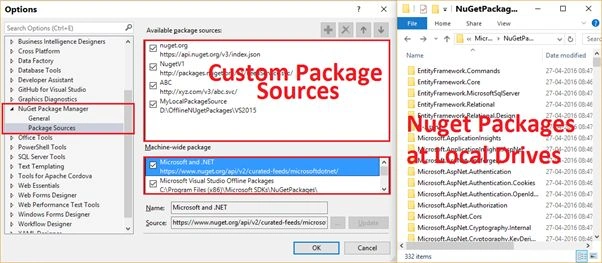
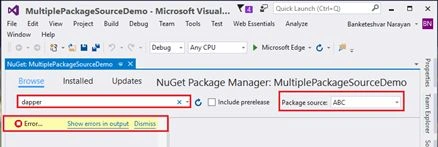
I downloaded an ISO file of Visual Studio 2015 with update 2 and installed it and created a project, then I was trying to download Dapper ORM from Nuget Package manager but I was unable to download it because in the package source dropdown list there was only one option and that was Microsoft & .NET which was getting data from the URL and I did not find the required package from this URL.
I downloaded an ISO file of Visual Studio 2015 with update 2 and installed it and created a project, then I was trying to download Dapper ORM from Nuget Package manager but I was unable to download it because in the package source dropdown list there was only one option and that was Microsoft & .NET which was getting data from the URL and I did not find the required package from this URL.
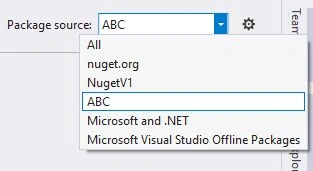
I am not sure why Visual Studio Update 2 ISO file does not include the name “nuget.org” with URL whereas I downloaded Visual Studio 2015 on another machine 6-7 months ago and upgraded it to update 1 and later on update 2 and in that machine I am able to search Nuget package because it contains 3 sources:
So if you are missing a package manger or you want to add some custom package manager you can do it easily. To add a new package manger do the following things:
- Open Nuget Package Manager Package Source Setting Window. There are different ways to open “Nuget Package Manager Package Source Setting”.
a. Way 1: Open Solution Explorer, Select & right click on your Project, then Choose “Mange NuGet Packages…” from context menu, It will open NuGet Package Manger window.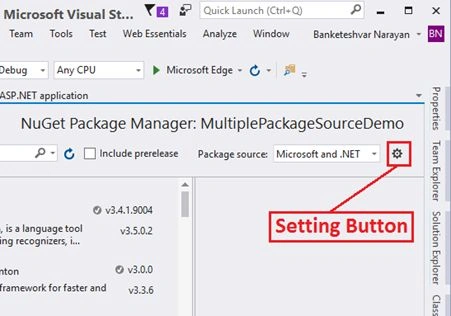
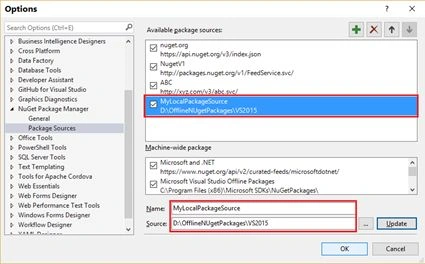
b. Way 2: Go to “Tools” menu => Options… => on Left Menu Tab select “Nuget Package Manager” => “Package Sources”,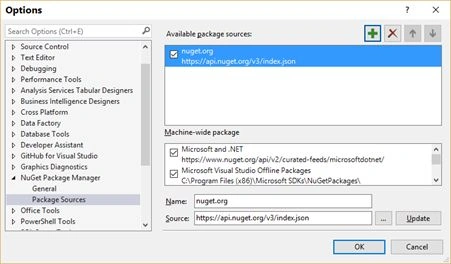
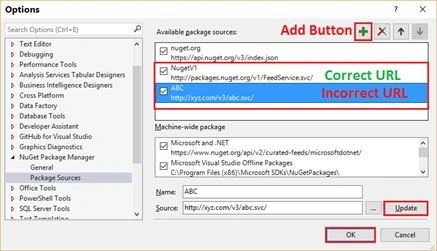
Currently I have added 3 Sources out of which 2 were under Machine-wide package section and 1 under Available package sources section. Now I am going to add some more package sources. We can add any URL as package source but if it is not valid then at the time of searching the package it will give error and will not be able to search the desired package.
VenkatPosted Aug 13, 2016, 10:42 AM
Nice one
Sonu ChaudharyPosted May 10, 2016, 7:35 AM
nice
Prasanna MuraliPosted May 10, 2016, 3:16 AM
Good and nice
Thiruppathi RPosted May 10, 2016, 1:21 AM
Nice Info..
Vignesh ManiPosted May 9, 2016, 6:13 PM
Good one
Bhuvanesh MohankumarPosted May 9, 2016, 1:21 PM
It's a good and Useful stuff.