
Introduction : AJAX (Asynchronous JavaScript and XML) is a new web development technique used for creating an interactive website. AJAX can help us develop web applications and retrieve a small amount of data from a web server. AJAX consists of different types of technology.
- JavaScript
- XML
- Asynchronous Call to the server
AdRotator Control : The AdRotator control in ASP.NET is extremely handy when it comes to randomly displaying advertisements on your site. However the ads are rotated only when the user refreshes the page. The AdRotaotr control is used to display a sequence of ad image. This control uses an xml file to store the ad information. The XML file must begin and end with an <Advertisements>tag. Inside the <Advertisements>tag which defines each ad.
AdRotator Control Properties :
- AlternetTextField
- ImageUrlField
- KeyWordFilter
- Runat
- Target
Step 1 : Open Visual Studio 2010.
- Go to File->New->WebSite
- Select ASP.NET WebSite
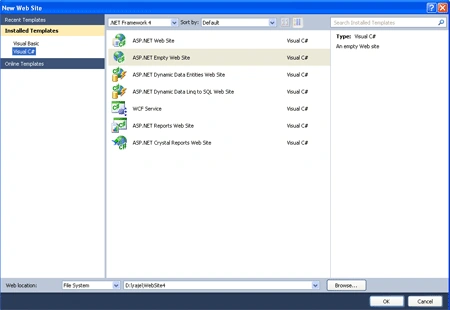
Step 2 : Go to Solution Explorer and right-click.
- Select Add->New Item
- Select WebForm
- Default.aspx page open
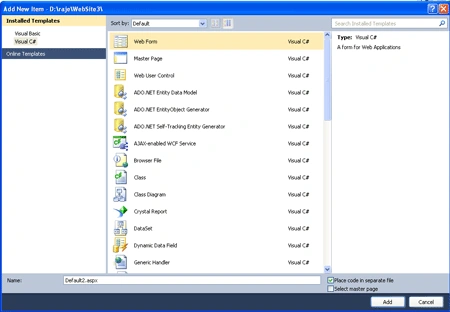
Step 3 : Now go to the Default.aspx page and drag a control from Toolbox.
- Drag ScriptManger, UpdatePanel,Timer Control
Add Image for the AdRotator Functionality :
Step 4 : Go to Solution Explorer and right-click
- Select Add Existing Item
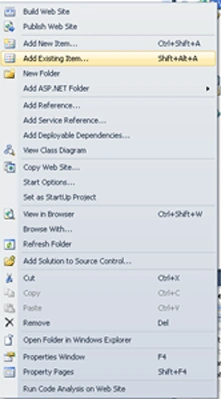
Step 5 : Now go to Default.aspx page and write the following code.
code :
<title>my
ajax application</title>
<style
type="text/css">
.style1
{
width: 100%;
}
</style>
</head>
<body>
<form
id="form1"
runat="server">
<div
style="background-color:
#FF99CC">
<asp:ScriptManager
ID="ScriptManager1"
runat="server"
/>
<asp:Timer
ID="Timer1" Interval="2000"
runat="server"
ontick="Timer1_Tick"
/>
<asp:UpdatePanel
ID="up1"
runat="server">
<Triggers>
<asp:AsyncPostBackTrigger
ControlID="Timer1"
EventName="Tick"
/>
</Triggers>
<ContentTemplate>
<table
class="style1">
<tr>
<td
height="40px"
style="background-color:
#FF9966" width="100%">
<asp:AdRotator
ID="AdRotator1"
runat="server"
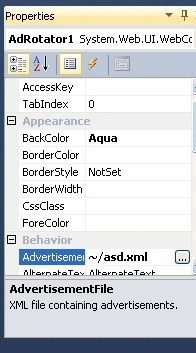
AdvertisementFile="~/asd.xml"
BackColor =
"Aqua" KeywordFilter
= "small"/>
</td>
</tr>
</table>
</ContentTemplate>
</asp:UpdatePanel>
</div>
</form>
</body>
</html>
Step 6 : The AdRotator control can retrieve
the list of advertisements from either a XML file or from the database.To keep
things simple,I will be use an XML file.So the next step is to create the
advertisement file.
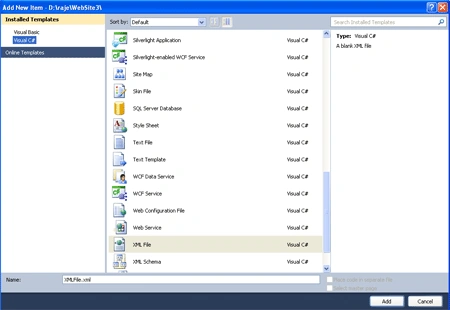
- Go to Solution Explorer and right-click
- Select Add->New Item
- Select XML File
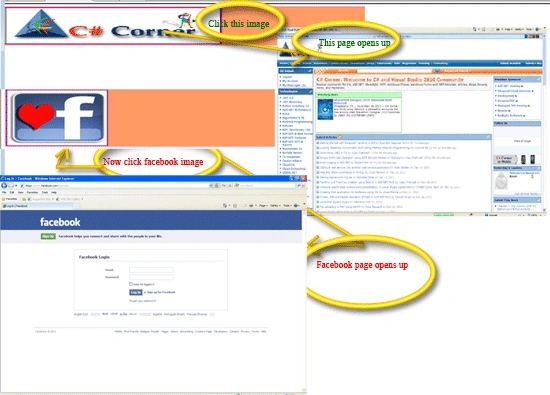
- Now add the following contents to the 'XML.xml' file


Manav PandyaPosted Sep 19, 2016, 5:51 AM
Nice share
ali bennouchenPosted Aug 5, 2012, 12:28 AM
<asp:Timer ID="Timer1" Interval="1000" runat="server" ontick="Timer1_Tick" /> <asp:UpdatePanel ID="up1" runat="server"> ... i put up1.update()in the Timer_Tick method but nothing is work i copy past your code (step 5 above). i used the same xml file without timer all its ok? ?? thanks