Ajax Control Toolkit AutoComplete Extender Control is attached to the Text Box to perform autocomplete operations. It will show words when entered; i.e, suggested keywords in the text box. As I have configured it for countries and entered the keyword pa, it will show a list that contains all the countries that contain "pa" in their names.
It generates the drop down list of the suggested words by keyword, after fetching from the Web Service.
You can learn more in my previous parts here,
The best thing about the autocomplete is that as you type the repetitive words in an autocomplete extender control, it does not make a new call but shows it from cache.
It uses the Web Services and the method name to fetch the required list to return.
Now we will check out the initial code with its output.
- <asp:TextBox ID="myTextBox" runat="server"></asp:TextBox>
-
- <div class="row">
-
- <div id="ajaxcontroltoolkitplaceholder">
-
- <ajaxToolkit:AutoCompleteExtender runat="server" ID="autoComplete1" TargetControlID="myTextBox" ServiceMethod="GetCountriesList" ServicePath="AutoComplete.asmx" MinimumPrefixLength="2" ShowOnlyCurrentWordInCompletionListItem="true">
-
- </ajaxToolkit:AutoCompleteExtender>
-
- </div>
-
- </div>
Output

So, let’s start to check its properties in detail.
- TargetControlID
This is the Text Box control in which an autocomplete extender works by typing the prefix keywords.
- <asp:TextBox ID="myTextBox" runat="server"></asp:TextBox>

- ServiceMethod
It is the Web Service method to be called. The same signature can be used, as shown below:
ServiceMethod="GetCountriesList"
- [System.Web.Services.WebMethod]
-
- [System.Web.Script.Services.ScriptMethod]
-
- public string[] GetCountriesList(string prefixText, int count)
-
- {... }
- ServicePath
This is the path where the service resides in the Application or http path. If the path of the service is not defined, then the page method should be called.
ServicePath="AutoComplete.asmx"
If your Service is in some directory structure, then mention the full path of the Service it points to.
- ContextKey
If you wish to use another parameter, Web Method can achieve it with the help of the context key. It should have the same signature with an additional parameter, named contextKey of type string.
ServiceMethod="GetCountriesList"
- [System.Web.Services.WebMethod]
-
- [System.Web.Script.Services.ScriptMethod]
-
- public string[] GetCountriesList(string prefixText, int count,string contextKey)
-
- {... }
- UseContextKey
This indicates whether or not the ContextKey property should be used. This will be automatically enabled, if the ContextKey property is ever set (on either the client or the server). If the context key is used, it should have the same signature as above in the context key.
UseContextKey="true"
- MinimumPrefixLength
It is the minimum number of characters, before you get the response from your Web Service.
MinimumPrefixLength="2"
- CompletionInterval
It shows the time in milliseconds; i.e, when the timer will kick in to get the suggestions, using the Web Service.
CompletionInterval="5000"
I have set five seconds, when the user enters the prefix it will fetch result after five seconds.
- EnableCaching
It will enable the client side caching for the control.
EnableCaching="true"
The first time, it will fetch the result against the prefix, but when you type the same prefix again, no call is sent to the Service, but it will fetch it from cache.
- CompletionSetCount
It is the number of suggestions you get in response to your prefix.
As I have seven countries starting from Sa,
- countriesList.Add("Saudia Arabia");
-
- countriesList.Add("Saint Kitts and Nevis");
-
- countriesList.Add("Saint Lucia");
-
- countriesList.Add("Saint Vincent and the Grenadines");
-
- countriesList.Add("Samoa ");
-
- countriesList.Add("San Marino");
-
- countriesList.Add("Sao Tome and Principe");
Output
- CompletionListCssClass
Css class is used to style the end result from the Service.
CompletionListCssClass="CompletionList"
- CompletionListItemCssClass
Css Class will be used to style an item in the AutoComplete list.
CompletionListItemCssClass="CompletionListItem"
- CompletionListHighlightedItemCssClass
Css Class will be used to style a highlighted item in the AutoComplete list.
CompletionListHighlightedItemCssClass="CompletionListHighlightedItem"
The style will look as shown below:
- <style type="text/css">
- .CompletionList
- {
- border: solid 1px Red;
- margin: 0px;
- padding: 3px;
- height: 120px;
- overflow: auto;
- background-color: #FFFFFF;
- }
-
- .CompletionListItem
- {
- color: blue;
- }
-
- .CompletionListHighlightedItem
- {
- background-color: white;
- }
- </style>
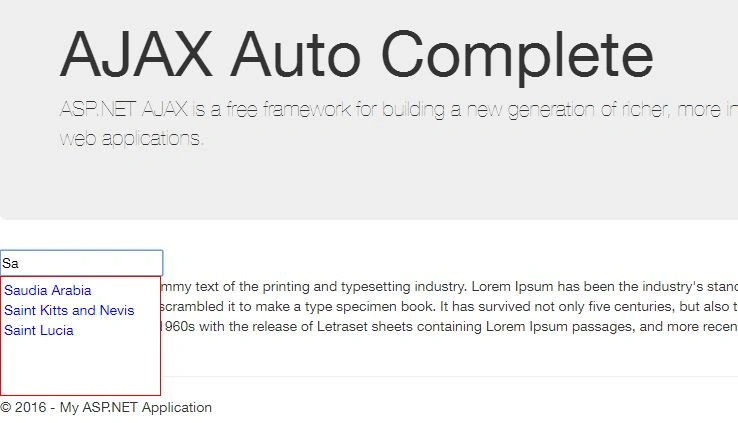
- DelimiterCharacters
With this setting, you can select multiple items, separated by the delimiter character; I have put a comma, another option is semicolon or any other character, with which you like to delimit.
DelimiterCharacters=", "

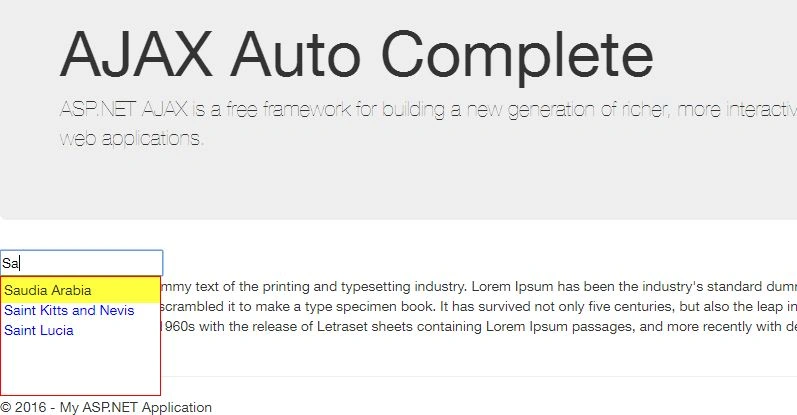
- FirstRowSelected
As the name suggests, it enables the first row of the selected list.
FirstRowSelected="true"
- ShowOnlyCurrentWordInCompletionListItem
If the condition is true and DelimiterCharacters are specified, then the AutoComplete will list the items, according to the display suggestions for the current word to be completed and will not display the rest of the tokens.
ShowOnlyCurrentWordInCompletionListItem="true"
Complete Code of Ajax AutoComplete is shown below.
- <ajaxToolkit:AutoCompleteExtender
-
- runat="server"
-
- ID="autoComplete1"
-
- TargetControlID="myTextBox"
-
- ServiceMethod="GetCountriesList"
-
- ServicePath="AutoComplete.asmx"
-
- UseContextKey="true"
-
- MinimumPrefixLength="2"
-
- CompletionInterval="1000"
-
- EnableCaching="true"
-
- CompletionSetCount="3"
-
- CompletionListCssClass="CompletionList"
-
- CompletionListItemCssClass="CompletionListItem"
-
- CompletionListHighlightedItemCssClass="CompletionListHighlightedItem"
-
- FirstRowSelected="true"
-
- DelimiterCharacters=", "
-
- ShowOnlyCurrentWordInCompletionListItem="true">
-
- </ajaxToolkit:AutoCompleteExtender>


Iqrar AliPosted Dec 9, 2016, 9:44 AM
Very knowledgeable piece of data.
Santhakumar MunuswamyPosted Jun 25, 2016, 2:15 AM
Thank you for nice article
Vignesh ManiPosted Jun 20, 2016, 6:44 AM
Thanks for sharing
Vinay SinghPosted Jun 20, 2016, 5:08 AM
Nice one
RakeshPosted Jun 17, 2016, 3:43 PM
Good one