It is ASP.NET Extender that can be attached with the ASP.NET DropDownList Controls. All the drop-down lists in the queue depend on the results of each other. As soon as it changes, the final required result is populated in the last drop-down list. The cascading drop-down list makes a call to web service, to retrieve the values of the next drop-down list in the set.
You can learn more from my previous articles here.
All the logic of getting data depends on the web service. All the changes in one drop-down list fill the data for the next list in the cascading scenario.
To get started, we can use the default options of the cascading drop-down lists and fill them with the use of web service.
Here is the process. We need to first create two drop-down lists and then bind the cascading extender with them. So, let’s start.
Note - For this demo, I am going to use the teams with their employee names.
Step 1 - Create ASP.NET drop-down list for teams and employees.
- Teams: < asp: DropDownList ID = "DropDownList1"
- runat = "server" > < /asp:DropDownList> < br / > Employees < asp: DropDownList ID = "DropDownList2"
- AutoPostBack = "false"
- runat = "server" > < /asp:DropDownList>
Step 2 - Add AJAX Control Toolkit Cascading Extender by either dragging or dropping or by writing your own via selecting through rich intelliSense.
As we have two drop-down lists, we need to create two extenders as well. One of them will be the parent while the other will be its child. The selection from parent will fill the data in the child drop-down list. This approach continues till you add the required number of drop-down lists. Whatever the number of drop-down lists is, one of them will act as Master while the others will be Slave.
Here is the extender control code.
- <div id="ajaxcontroltoolkitplaceholder">
- <ajaxToolkit:CascadingDropDown ID="CDD1" runat="server" TargetControlID=" " Category=" " PromptText="Please select a Team" LoadingText="[Loading Teams...]" ServicePath="WebService.asm" ServiceMethod=" " />
- <ajaxToolkit:CascadingDropDown ID="CascadingDropDown2" runat="server" TargetControlID=" " ParentControlID=" " Category=" " PromptText="Please select a Employee" LoadingText="[Loading employees...]" ServicePath="" ServiceMethod=" " /> </div>
Step 3 - Create Service for Operations.
Now, the next thing is to create the web service to fill the drop-down list, using web methods and also, the dependency of parent and child lists.
I am writing full web service code here. Later on, I will explain it in detail.
- using AjaxControlToolkit;
- using System;
- using System.Collections.Generic;
- using System.Linq;
- using System.Web.Script.Services;
- using System.Web.Services;
-
-
-
- [WebService(Namespace = "http://tempuri.org/")]
- [WebServiceBinding(ConformsTo = WsiProfiles.BasicProfile1_1)]
-
- [ScriptService]
- public class WebService: System.Web.Services.WebService {
- List < Employee > employees = new List < Employee > ();
- List < Team > teams = new List < Team > ();
- public WebService() {
-
-
- }
- [WebMethod]
- public CascadingDropDownNameValue[] GetTeamList(string knownCategoryValues, string category) {
- teams.Add(new Team {
- TeamId = 1, TeamName = "Software Optimization"
- });
- teams.Add(new Team {
- TeamId = 2, TeamName = "Software Development"
- });
- teams.Add(new Team {
- TeamId = 3, TeamName = "Software Quality Assurance"
- });
- List < CascadingDropDownNameValue > l = new List < CascadingDropDownNameValue > ();
- var x = from c in teams select c;
- foreach(Team teamsvar in x) {
- l.Add(new CascadingDropDownNameValue(teamsvar.TeamName, Convert.ToString(teamsvar.TeamId)));
- }
- return l.ToArray();
- }
- [WebMethod]
- public CascadingDropDownNameValue[] GetEmployeeList(string knownCategoryValues, string category) {
- employees.Add(new Employee {
- EmpId = 1, TeamId = 1, EmpName = "Muhammad Aqib"
- });
- employees.Add(new Employee {
- EmpId = 2, TeamId = 1, EmpName = "Ehsan Kamal"
- });
- employees.Add(new Employee {
- EmpId = 3, TeamId = 1, EmpName = "Ghulam Subhani"
- });
- employees.Add(new Employee {
- EmpId = 4, TeamId = 2, EmpName = "Aamir Sultan"
- });
- employees.Add(new Employee {
- EmpId = 5, TeamId = 2, EmpName = "Mehmood ul Hassan"
- });
- employees.Add(new Employee {
- EmpId = 6, TeamId = 2, EmpName = "Waqar Mirza"
- });
- employees.Add(new Employee {
- EmpId = 7, TeamId = 3, EmpName = "Umer Saleem"
- });
- employees.Add(new Employee {
- EmpId = 8, TeamId = 3, EmpName = "Hussnain Khursheed"
- });
- employees.Add(new Employee {
- EmpId = 9, TeamId = 3, EmpName = "Muhammad Nauman"
- });
- int TeamId;
- System.Collections.Specialized.StringDictionary kv = CascadingDropDown.ParseKnownCategoryValuesString(knownCategoryValues);
- if (!kv.ContainsKey("Team") || !int.TryParse(kv["Team"], out TeamId)) {
- throw new ArgumentException("Couldn’t find Team");
- };
- List < CascadingDropDownNameValue > l = new List < CascadingDropDownNameValue > ();
- var x = from c in employees where c.TeamId == TeamId select c;
- foreach(Employee employeevar in x) {
- l.Add(new CascadingDropDownNameValue(employeevar.EmpName, Convert.ToString(employeevar.EmpId)));
- }
- return l.ToArray();
- }
- }
- public class Employee {
- public int EmpId {
- get;
- set;
- }
- public int TeamId {
- get;
- set;
- }
- public string EmpName {
- get;
- set;
- }
- }
- public class Team {
- public int TeamId {
- get;
- set;
- }
- public string TeamName {
- get;
- set;
- }
- }
Step 4 - Bind Webmethods, TargetControlID, and ParentControlID to the DropDownLists.
As the cascading extender is shown above, we can finally bind the WebMethods and TargetControlID.
- <div id="ajaxcontroltoolkitplaceholder">
- <ajaxToolkit:CascadingDropDown ID="CDD1" runat="server" TargetControlID="DropDownList1" Category="Team" PromptText="Please select a Team" LoadingText="[Loading Teams...]" ServicePath="WebService.asmx" ServiceMethod="GetTeamList" />
- <ajaxToolkit:CascadingDropDown ID="CascadingDropDown2" runat="server" TargetControlID="DropDownList2" ParentControlID="DropDownList1" Category="Employee" PromptText="Please select a Employee" LoadingText="[Loading employees...]" ServicePath="WebService.asmx" ServiceMethod="GetEmployeeList" /> </div>
This is the final Extender Control after filling the WebMethods, Service name, TargetControlID, and ParentControlID.
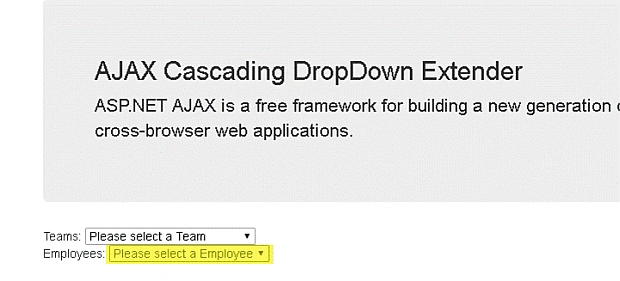
Here is the final output of the code, written above.
![[System.Web.Services.WebMethod] [System.Web.Script.Services.ScriptMethod] public CascadingDropDownNameValue[] GetDropDownContents(string knownCategoryValues, string category, string contextKey) {.... }](https://cdn.c-sharpcorner.com/article/ajax-control-toolkit-tutorial-cascading-extender-part-thirteen/output_cqu3ez.webp) Cascading DropDown Properties
Cascading DropDown Properties
- TargetControlID
It is the ID of the ASP.NET DropDownList to which extender control binds.
TargetControlID="DropDownList1"
- Category
It is the name of the category this DropDownList represents. It is some class model or certain column name to which the values get and populate in drop-down list.
Category="Team"
- PromptText
It is the Optional text to display before the user has selected a value from the DropDownList.
PromptText="Please select a Team"
- PromptValue
It is the optional value set when PromptText is displayed.
- EmptyText
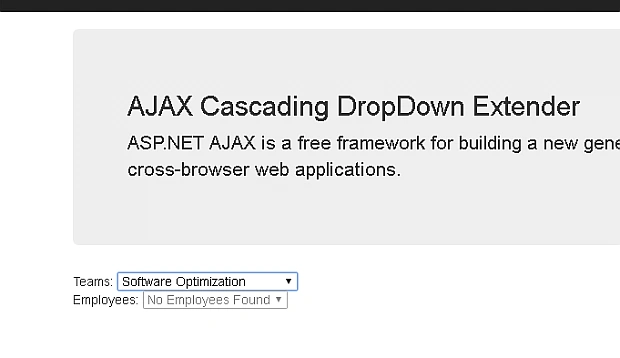
It is the optional text to display when the DropDownList has no data to display. In case of "no records found", this text should display.
EmptyText="No Employees Found"
- EmptyValue
It is the optional value set when EmptyText is displayed.
- LoadingText
It is the optional text to display while the data for the DropDownList is being loaded.
LoadingText="[Loading employees...]"
- ServicePath
Path to a web service that returns the data used to populate the DropDownList. This property should be left null if ServiceMethod refers to a page method. The web service should be decorated with the System.Web.Script.Services.ScriptService attribute.
ServicePath="WebService.asmx"
- ServiceMethod
Web service method that returns the data used to populate the DropDownList. The signature of this method must match the following.
- [System.Web.Services.WebMethod]
- [System.Web.Script.Services.ScriptMethod]
- public CascadingDropDownNameValue[] GetDropDownContents(string knownCategoryValues, string category) {...
- }
ServiceMethod="GetEmployeeList"
- ContextKey
User/page specific context provided to an optional overload of the web method described by ServiceMethod/ServicePath. If the context key is used, it should have the same signature with an additional parameter named contextKey of type string:
- [System.Web.Services.WebMethod]
- [System.Web.Script.Services.ScriptMethod]
- public CascadingDropDownNameValue[] GetDropDownContents(string knownCategoryValues, string category, string contextKey) {....
- }
- UseContextKey
Whether or not the ContextKey property should be used. This will be automatically enabled if the ContextKey property is ever set (on either the client or the server). If the context key is used, it should have the same signature with an additional parameter named contextKey of type string (as described above).
- ParentControlID
It is the optional ID of the parent DropDownList that controls the contents of this DropDownList if there are more than one cascading.
ParentControlID="DropDownList1"
- SelectedValue
It is the optional value to select by default. This needs to exactly match the string representation of a value in the DropDownList.
- UseHttpGet
It is the optional value which determines whether to use HttpGet or HttpPost method for the postback to the server.
UseHttpGet="false"
- EnableAtLoading
It is the optional value which determines whether or not the DropDownList Control is disabled while waiting to get the data from the service.
EnableAtLoading="true"
If it is true, then the child DropDownList is not disabled whether the data is loaded or not. If it is set to false (the default value), it is disabled.


Iqrar AliPosted Dec 9, 2016, 9:39 AM
Very knowledgeable piece of data.