
In this article I am going to discuss the Accordion control of the Ajax toolkit.
Below I have explained the steps to do the demo
- First we need to download the ajax tool kit; for this go to: http://www.asp.net/ajaxlibrary/download.ashx
- We can add that downloaded dll in our project by right clicking the add reference tab on solution explorer
- To get all the ajax tool kit controls in tool box right click on the general select add tab name that tab as ajax control (it is your choice)
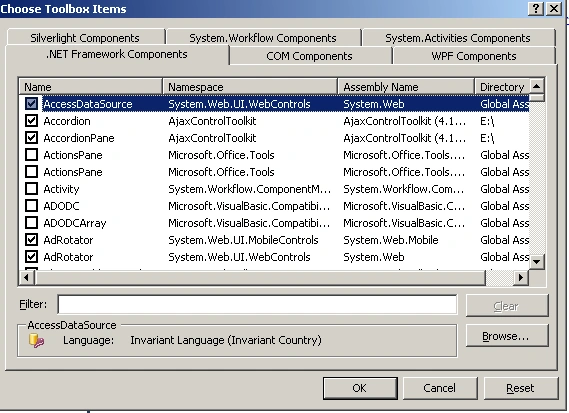
- Then right click on the newly created tab and select the choose Items then it will show one dialog box like as follows click on browse button and select the ajax dll then ok
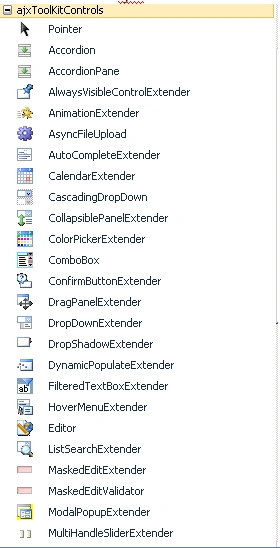
- All controls of the Ajax will come in that tab like this (it adds nearly 30 items)
Accordion:
The Accordion is a web control that allows you to provide multiple panes
and display them one at a time. It is like having several CollapsiblePanels where only one can
be expanded at a time. The Accordion is implemented as a web control that contains AccordionPane
web controls. Each AccordionPane control has a template for its Header and its Content. We keep
track of the selected pane so it stays visible across postbacks.
To see the accordion demo follow the steps:
- Add the script manager control on the top of the page because it is a must for all ajax sites.
- Drag and drop the accordion from the tool box this is available on newly added tab
- In the Accordion we have 2 templates
- Content template
- Header template
The header template is used to write the heading for panes
- In the Accordion panes is collection in this we can add any number of Accodion panes each pane having the head and content tag as said previously
- Like this we can take any number of Accordion panes
- Finally we apply the css for header and content for look and feel
- For apply the css Accordion having the 2 properties contentcssClass (the css for content), headercssClass (css for Header) once we give the values that css will apply for the content, head
- The key property here is selectedIndex it is by default 0; it is the currently selected section
<asp:Accordion ID="Accordion1" runat="server" HeaderCssClass="accordianHead" AutoSize="None" SelectedIndex="0" FadeTransitions="true">
<Panes>
<asp:AccordionPane ID="About" runat="server">
<Header><a>Aout</a></Header>
<Content>
<pre>
First pane The Accordion is a web control that allows you to provide multiple panes and display them one at a time. It is like having several CollapsiblePanels where only one can be expanded at a time. The Accordion is implemented as a web control that contains AccordionPane web controls. Each AccordionPane control has a template for its Header and its Content. We keep track of the selected pane so it stays visible across postbacks.
</pre>
</Content>
</asp:AccordionPane>
<asp:AccordionPane ID="Code" runat="server">
<Header><a>Code</a></Header>
<Content>
<pre>
Second pane The Accordion is a web control that allows you to provide multiple panes and display them one at a time. It is like having several CollapsiblePanels where only one can be expanded at a time. The Accordion is implemented as a web control that contains AccordionPane web controls. Each AccordionPane control has a template for its Header and its Content. We keep track of the selected pane so it stays visible across postbacks.
</pre>
</Content>
</asp:AccordionPane>
<asp:AccordionPane ID="Resources" runat="server" >
<Header><a>Resources</a></Header>
<Content>
<pre> <ul><li><a href="http://www.asp.net/ajax/videos/how-do-i-use-the-aspnet-ajax-accordion-control"> A Small Vedio</a></li>
<li><a href="http://dotnetslackers.com/Community/blogs/kaushalparik/archive/2009/05/08/open-ajax-accordion-panes-on-mouseover.aspx">onHover Show Pane </a></li>
</ul></pre></Content>
</asp:AccordionPane>
</Panes>
</asp:Accordion>
Note: I am not providing the css for you
Output:
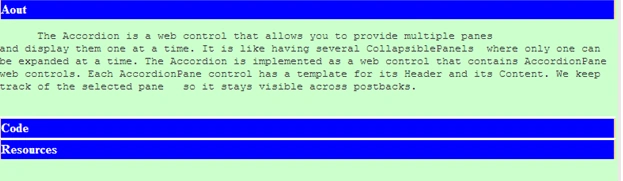
After clicking on the code About pane is collapsed and Code pane is selected, same for others also.
Mukesh KumarPosted Oct 19, 2015, 1:03 AM
Good One !
krishna angirekulaPosted Nov 28, 2014, 2:06 AM
yes
Dinkar ChavhanPosted Feb 27, 2011, 11:34 PM
can i used Gridview in Acccordian