
Angular 5 is catching the attention of all the developers. And .NET Core from Microsoft is already popular. So what happens if you create an Angular project on the command line, and then you want to integrate it with ASP.NET Core framework? Let us see!
Prerequisites
Step 0. Install npm and install Angular CLI
- npm install –g @angular/cli@latest
Here –g indicates you are installing globally, i.e., not for this folder only.
Let's assume you want to create a shopping cart application on an Angular 5 framework.
Step 1. Create an Angular project in the command line
Type “ng new classicbank”.
This will create a folder named “classicbank” and an Angular 5 based application with all subdirectories under /src folder. But more importantly, it will create files like appsetting.json, karma.conf.json, and package.json etc.
All the Angular files (.ts files) will be organized under \src folder.
Now, I want to create some components for the Angular project. For that, you can use the command -
Step 2. Create the asp.net core project at the command line.
Enter the folder by typing this command
>cd classicbank
Now, create the project
>dotnet new angular
This will create a new project in the .NET Core framework.
Now, open the above project in Visual Studio 2017.
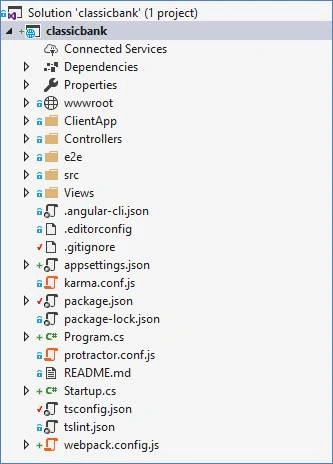
Step 3. Configuring startup.cs file to integrate static file
- if (env.IsDevelopment()) {
- app.UseDeveloperExceptionPage();
- }
- app.Use(async (context, next) => {
- await next();
- if (context.Response.StatusCode == 404 && !context.Request.Path.Value.StartsWith("/api/")) {
- context.Request.Path = "/index.html";
- await next();
- }
- });
- app.UseStaticFiles();
- app.UseDefaultFiles();
- app.UseMvcWithDefaultRoute();
Step 4. router-outlet tag in app.component.html
- <router-outlet></router-outlet>
Step 5. ng build command & ng serve command
Type the ng build command at the command prompt.
>ng build
This will build the Angular 4/5 application, and convert the TypeScript to JavaScript.
The ng serve will start the Angular 4/5 application. You can open it in the browser by typing localhost:4200
But the limitation of the ng serve is that it will serve only the static content, and the web API will not be available. So, for your application to fetch dynamic data from web API, you need to run the entire project through Visual Studio 2017.
Step 6. Running/debugging thru visual studio 2017
- Delete the webpack..config.js
- Delete the ClientApp folder. This folder is created by Visual Studio to store the static content like .ts files, .html files, and .spec.ts files. But we already have them under src folder
Modify the “angular-cli.js” file.
- "apps": [{
- "root": "src",
- "outDir": "wwwroot",
- "assets": ["assets", "favicon.ico"],
As you can see, the outDir is modified to wwwroot. So when we compile th .ts file and index.html files, they get created in wwwroot folder.
Jose PalalaPosted Aug 9, 2018, 3:32 AM
Here's an alternative way. (the reverse, dotnet first then angular cli inside). https://medium.com/@levifuller/building-an-angular-application-with-asp-net-core-in-visual-studio-2017-visualized-f4b163830eaa
Satyaprakash SamantarayPosted Apr 2, 2018, 4:43 PM
Can u put Ur output of this article so,that it can be easily understood ....