

Welcome everyone! It’s been a few days since I wrote my last article and it feels good to be back again. In this article let’s explore implementing the internationalization and localization in Angular 8. Before getting into implementation, let’s take an intro about what is internalization and localization in Angular.
Internationalization (i18n) and localization
Basically, internalization is like a process of designing an application in which the application will have the portability to support multiple languages with the required supporting files. As for localization, it's a process of translating the language from one to another. We can also describe it in this way too; it means localization will take the place of translating the required language of the user's needs.
Let’s get back to internalization and have an overview about why the internalization is so important. Consider when we are building a software application, of course, a team will be involved in developing it. First, we will take an overview on building an infrastructure based on a particular language, and then the app will be supported by numerous different demographics so, for that, we have to do the internalization process in which the application will support multiple languages.
In addition to that, we can use the third-party library functions for the internationalization.
In our Angular application, we just need to use ngx-translate, it’s one of the most popular libraries for internalization. The mentioned library function can be also used in both JIT and AOT compiler versions of the Angular application. The ngx-translate library is been supported by Angular 2+.
Prerequisites
- Angular CLI
- Visual Studio Code IDE
Setting-up
Step 1. First of all, let’s create a new Angular application by using the following command since Angular 9 has come along. Let's update the Angular CLI from the Angular previous version to Angular 9. Use the following command to update the Angular CLI.
npm install -g @angular/cli
Use the following command to check whether the CLI has been updated to CLI 9.
ng v
Now create a new Angular application by using the following command.
ng new AngularTranslator
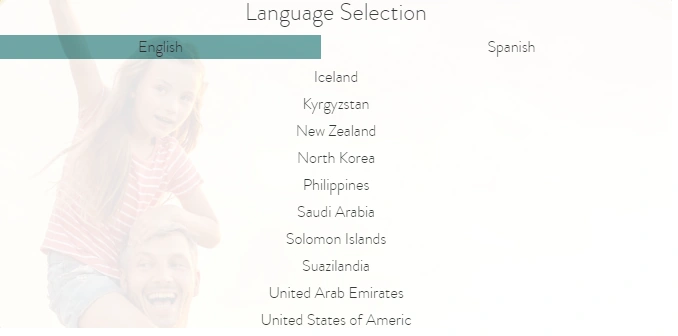
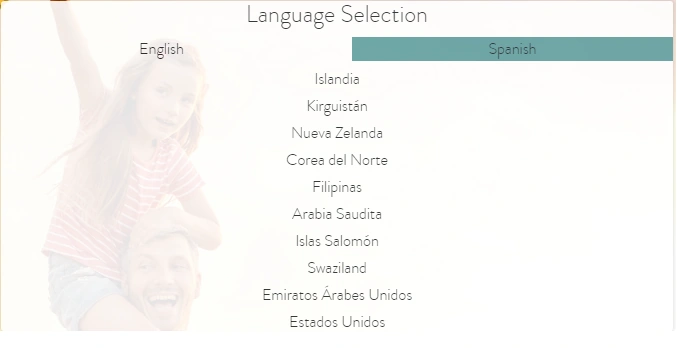
Step 2. Open the project in the Visual Studio Code IDE and let’s create a JSON file that contains a collection of different languages including English, Spanish, German, etc. Create the JSON file in the asset folder /assets/i18n/folder. In the following project, I have created two JSON collection files that support English and Spanish for 10 country names in both languages. For your kind reference please refer below. Create a JSON file named en.json and place the following code inside of it.
English-en.json
{
    "lbl-country-name1": "Iceland",
    "lbl-country-name2": "Kyrgyzstan",
    "lbl-country-name3": "New Zealand",
    "lbl-country-name4": "North Korea",
    "lbl-country-name5": "Philippines",
    "lbl-country-name6": "Saudi Arabia",
    "lbl-country-name7": "Solomon Islands",
    "lbl-country-name8": "Suazilandia",
    "lbl-country-name9": "United Arab Emirates",
    "lbl-country-name10": "United States of America"
}
Now create another JSON file in the same asset folder name it as es-json and place the following code inside of it.
Spanish-es.json
{
    "lbl-country-name1": "Islandia",
    "lbl-country-name2": "Kirguistán",
    "lbl-country-name3": "Nueva Zelanda",
    "lbl-country-name4": "Corea del Norte",
    "lbl-country-name5": "Filipinas",
    "lbl-country-name6": "Arabia Saudita",
    "lbl-country-name7": "Islas Salomón",
    "lbl-country-name8": "Swaziland",
    "lbl-country-name9": "Emiratos Árabes Unidos",
    "lbl-country-name10": "Estados Unidos"
}
The important point is not to forget to import the ngx-translate libraries into app.module.ts.
Open the app.module.ts file and replace the following as mentioned below.
import {
    TranslateModule,
    TranslateLoader,
    TranslateService
} from '@ngx-translate/core';

import {
    TranslateHttpLoader
} from '@ngx-translate/http-loader';

import {
    LanguageTranslationModule
} from './services/language-translation.module';

export function HttpLoaderFactory(https: HttpClient) {
    return new TranslateHttpLoader(https, './assets/i18n/', '.json');
}

@NgModule({
    imports: [
        LanguageTranslationModule,
        TranslateModule.forRoot({
            loader: {
                provide: TranslateLoader,
                useFactory: HttpLoaderFactory,
                deps: [HttpClient]
            }
        })
    ],
    declarations: [
        AppComponent,
    ],
    providers: [TranslateService],
    bootstrap: [AppComponent],
})
Haridhass ManiPosted Feb 13, 2020, 8:24 AM
Nice bro.....