


Image (skull) from http://bit.ly/freepikBrSkull
Welcome to my article, where I will help you start the quest to select the ideal technology for developing native, hybrid, web, SPA, or mobile applications between Angular and React, also known as React Native.
Dozens of publications on the internet can assist you in making a technical decision, and this is not the main point here, but to give you my perspective as a full-stack developer and tech lead for large Brazilian companies when I started my first time on projects with Angular and React.
Starting with
Before starting to develop with Angular and React, my background in development was in Microsoft technologies.
These experiences guided me to start working with them. Let's see what my first experience with each of them was like.
Angular: it took me almost a month to adapt and deeply comprehend, including routing, componentization NGRX, etc. Using Visual Studio instead of Visual Studio Code was challenging because VS Code is better suited and lightweight for front-end development.
React: It became significantly more manageable for me since I gained experience with Angular, and it became more accessible for me to master, even though it has other development complexities and necessary knowledge. With my background, including Angular, the learning curve was easier. The experience with it was better here since we were using Visual Studio Code.
What is the primary difference technically?
Angular is based on TypeScript, while React is based on JavaScript.
For some solutions, you will need to use React if you have a dependent framework in JavaScript; in the same way, if you have in TypeScript, you need to choose Angular.
About the history: AngularJS, initially written in JavaScript, was discontinued in 2010.
Development style
Both Angular and React can help us develop components. React is slightly easier to create and work with, while Angular provides a more structured code design and routing.
The biggest challenge in both projects was working with customized components and open-source software, which sometimes did not work as expected and provided little or no support. The components we created for the solutions were a new take on the wheel. I was already familiar with the professional components offered by Telerik, especially grids, inputs, and filters.
Using Telerik Framework
It is challenging to pick the best tool that gives the best return on investment (ROI), adds value to the product, is secure, and costs less to maintain over time.
To stand out from the crowd, we must make it simple, intuitive pages/views and reliable components with an excellent and professional look, and most importantly, highly maintainable, allowing us to respond to market needs with technical excellence.
Creating the user interface (UI) as an extension of the user experience (UX*) is desirable to capture the consumer's mind and soul. This is especially important when introducing new or revamped apps, products, and services to the market.
To be pretty and functional, is the minimum expected.
Fortunately, Telerik provides highly efficient, adaptable, and reliable components with specialized support, so our solutions don't have to reinvent the wheel.
Telerik's frameworks have the same look and feel, independent of the technology chosen—one less thing to worry about.
Code Sample
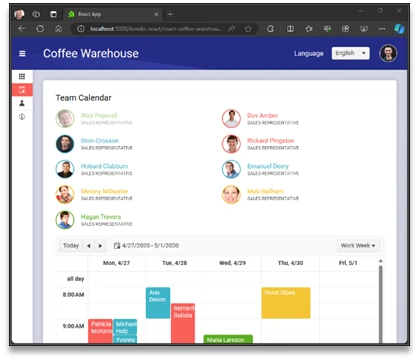
I added some code from the Planning feature to both samples so you can compare them a little.
It's necessary to explain that both frameworks use their version of KendoUI with their particularities.
Angular
Here I have a piece of the code for the Planning Coffee Wharehouse demo application:
Container with scheduler, source code at: https://github.com/telerik/kendo-angular/blob/master/examples-standalone/coffee-warehouse/src/app/components/planning/planning.component.html.
<div class="card-component">
    <kendo-scheduler
        [kendoSchedulerBinding]="data"
        [kendoSchedulerReactiveEditing]="createFormGroup"
        [selectedDate]="selectedDate"
        [selectedViewIndex]="1"
        [timezone]="'Etc/UTC'"
        style="height: 600px"
        startTime="08:00"
        endTime="19:00"
        [eventStyles]="setEventStyles"
    >
        <kendo-scheduler-day-view> </kendo-scheduler-day-view>
        <kendo-scheduler-work-week-view scrollTime="12:00"> </kendo-scheduler-work-week-view>
        <kendo-scheduler-week-view> </kendo-scheduler-week-view>
        <kendo-scheduler-month-view> </kendo-scheduler-month-view>

        <ng-template
            kendoSchedulerEditDialogTemplate
            autoFocusedElement=".title input"
            let-formGroup="formGroup"
            let-isNew="isNew"
            let-editMode="editMode"
        >
            <form class="k-form k-form-vertical" [formGroup]="formGroup">
                <fieldset class="k-form-fieldset">
                    <kendo-formfield orientation="vertical">
                        <span> Start </span>
                        <kendo-datetimepicker [popupSettings]="{ appendTo: 'root' }" [formControl]="formGroup.get('start')">
                        </kendo-datetimepicker>
                    </kendo-formfield>

                    <kendo-formfield orientation="vertical">
                        <span> End </span>
                        <kendo-datetimepicker [popupSettings]="{ appendTo: 'root' }" [formControl]="formGroup.get('end')">
                        </kendo-datetimepicker>
                    </kendo-formfield>

                    <kendo-formfield orientation="vertical">
                        <span> Title </span>
                        <kendo-textbox placeholder="Title" [formControl]="formGroup.get('title')"> </kendo-textbox>
                    </kendo-formfield>

                    <kendo-formfield>
                        <span> Description </span>
                        <kendo-textarea
                            [rows]="2"
                            placeholder="Add description to the event"
                            [formControl]="formGroup.get('description')"
                        >
                        </kendo-textarea>
                    </kendo-formfield>

                    <kendo-formfield>
                        <kendo-label class="k-checkbox-label" text="All Day Event">
                            <input type="checkbox" kendoCheckBox [formControl]="formGroup.get('isAllDay')" />
                        </kendo-label>
                    </kendo-formfield>

                    <kendo-formfield>
                        <span> Team </span>
                        <kendo-dropdownlist
                            [data]="teams"
                            [valuePrimitive]="true"
                            valueField="teamID"
                            textField="teamName"
                            [formControl]="formGroup.get('teamID')"
                        >
                            <ng-template kendoDropDownListValueTemplate let-dataItem>
                                <span class="k-team-mark" [ngStyle]="{ 'background-color': dataItem.teamColor }"></span> {{
                                    dataItem?.teamName
                                }}
                            </ng-template>
                            <ng-template kendoDropDownListItemTemplate let-dataItem>
                                <span class="k-team-mark" [ngStyle]="{ 'background-color': dataItem.teamColor }"></span>
                                {{ dataItem.teamName }}
                            </ng-template>
                        </kendo-dropdownlist>
                    </kendo-formfield>
                </fieldset>
            </form>

            <!-- Separate form for recurrence editor -->
            <form [formGroup]="formGroup" style="margin-top: 35px">
                <div *ngIf="isEditingSeries(editMode)">
                    <kendo-recurrence-editor [formControl]="formGroup.get('recurrenceRule')"> </kendo-recurrence-editor>
                </div>
            </form>
        </ng-template>
    </kendo-scheduler>
</div>
Join the conversation! Your thoughts help the community grow.