

I am here to continue the discussion around AngularJS. Today, we will discuss how to create custom animation using angular js. Also in case you have not had a look at our previous articles of this series, go through the following links:
- Learn AngularJS From Beginning: Basic - Part One
- Learn AngularJS From Beginning: Filter - Part Two
- Learn AngularJS From Beginning: Service - Part Three
- Learn AngularJS From Beginning: Directive - Part Four
- Learn AngularJS From Beginning: Form Data Binding - Part Five
- Learn AngularJS From Beginning: Global Object Service - Part Six
- Learn AngularJS From Beginning: Http Request or Ajax - Part Seven
- Learn AngularJS From Beginning: Rest API - Part Eight
- Learn AngularJS From Beginning: Route Url - Part Nine
- Learn AngularJS From Beginning: Animation - Part Ten
- Learn AngularJS From Beginning: Injection - Part Eleven
- Learn AngularJS From Beginning: Localisation - Part Twelve
- Learn AngularJS From Beginning: Unit Test of AngularJS Controller - Part Thirteen
- Learn AngularJS From Beginning: Unit Test of AngularJS Component - Part Fourteen
- Learn AngularJS From Beginning: Automatic Workflow (Grunt) - Part Fifteen
- Learn AngularJS From Beginning: Lazy Loading of Angular Files - Part Sixteen
- Learn AngularJS From Beginning: Google Map API - Part Seventeen
In this article, we will discuss how use AngularJS with advanced animation using $animation service.
The AngularJS animation module enables us to create animations with CSS3 or JavaScript. Now we will learn how to animate an AngularJS directive using purely JavaScript so that we can create animations even for browsers without support of CSS3, or integrate with some commonly used JavaScript animations libraries such as jQuery animate and GSAP JS. For this article, we will use jQuery as the JavaScript animations library because it's very intuitive and well known. We will integrate this library with AngularJS native directives so that we can easily get the built-in benefits of AngularJS and animate using jQuery.
First, we have to declare the animation using the animation() method; the declaration is really similar to the way in which you define an AngularJS factory. We specify the class of target elements where we want to display the animation on the first parameter of the animation method. The ngAnimate module of AngularJS checks whether there is any animation defined for the DOM manipulation event that is being triggered. It also checks for transitions, animations, and JavaScript animation callback functions. If at least one of these exists, it triggers the animations. For the JavaScript animations declaration, we define callback functions to be called when an element with the same class as defined on the animation method triggers an event like addClass. If there is a callback defined for this addClass event, it's called; otherwise, it skips the animation step.
- function firstJsAnimation() {
- var addClassAnimation = function (element, className, done) {
- if (className != 'animationClass') {
- return;
- }
- jQuery(element).slideUp(300, done);
- return function (isCancelled) {
- if (isCancelled) {
- element.stop();
- }
- };
- }
- var removeClassAnimation = function (element,className, done) {
- if (className != 'animationClass') {
- return;
- }
- jQuery(element).slideDown(300, done);
- return function (isCancelled) {
- if (isCancelled) {
- element.stop();
- }
- };
- }
- return {
- addClass: addClassAnimation,
- removeClass: removeClassAnimation
- };
- }
- var app = angular.module('myApp', ['ngAnimate']).animation(".firstJsAnimation", firstJsAnimation);
- <!DOCTYPE html>
- <html ng-app="myApp">
- <head>
- <title>AngularJS JavaScript animations - ngClass</title>
- <script src="jquery.min.js"></script>
- <script src="angular.min.js"></script>
- <script src="angular-animate.min.js"></script>
- <script src="index.js"></script>
- </head>
- <body>
- <link href="bootstrap.css" rel="stylesheet" />
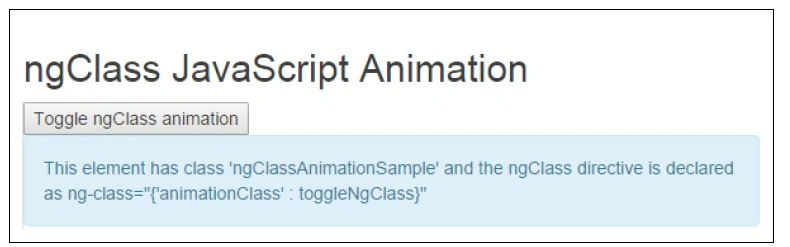
- <h2>ngClass JavaScript Animation</h2>
- <button ng-click="toggleNgClass = !toggleNgClass">
- Toggle ngClass animation
- </button>
- <div ng-class="{'animationClass' : toggleNgClass}" class="firstJsAnimation alert alert-info">
- This element has class 'ngClassAnimationSample' and the ngClass directive is declared as ng-class="{'animationClass' : toggleNgClass}"
- </div>
- </body>
- </html>
Using the $animate.move method
The method that moves one element from one place to another in DOM and triggers animation is $animate.move. It's used by the ngRepeat directive, and it can be used in any custom directive that moves DOM elements too. The signature is the same as the $animate.enter method; the only difference is that the element is not added to DOM, but it's moved:
$animate.move(element, parentElement, afterElement);
MoveDirective.js- var app = angular.module('myApp', ['ngAnimate'])
- .directive('moveDirective', function ($animate) {
- return {
- link: function ($scope, $element, $attrs) {
- var elements = $element.children();
- var count = 0;
- $element.on('click', function () {
- count++;
- if (count % 3 == 1) {
- $animate.move(angular.element(elements[2]), $element);
- } else if (count % 3 == 2) {
- $animate.move(angular.element(elements[1]), $element);
- } else {
- $animate.move(angular.element(elements[0]), $element);
- }
- $scope.$apply();
- });
- }
- }
- });
- <!DOCTYPE html>
- <html ng-app="myApp">
- <head>
- <title>AngularJS Custom Directives animations</title>
- <style>
- .moveItem.ng-move {
- -webkit-animation: 1s ng-move-repeat-animation;
- animation: 1s ng-move-repeat-animation;
- }
- </style>
- </head>
- <body>
- <h2>$animate move sample</h2>
- <p>Click on any element below to move elements:</p>
- <div move-directive="">
- <div class="element1 moveItem">Element 1</div>
- <div class="element2 moveItem">Element 2</div>
- <div class="element3 moveItem">Element 3</div>
- </div>
- <script src="angular.min.js"></script>
- <script src="angular-animate.min.js"></script>
- <script src="moveDirective.js"></script>
- </body>
- </html>
Former memberPosted May 12, 2017, 9:10 AM
Thanks for the info. i often saw you wrote article on angular and that is why i thought you work there with angular v2. does it mean angular is not using in matrix now because many company in kol working with angular.....at least with v1. tell me few good books on angular v1 and v2 because i am interested to learn. when i search amazon it show huge no of books on angular but i do not understand which one i should purchase. keep up the good job. thanks
Former memberPosted May 12, 2017, 8:39 AM
What i asked that you did not address that which version of ng is using in matrix for various product.
Former memberPosted May 12, 2017, 8:11 AM
Does not matter what is my real name. i just request you to come with a article. if possible do else leave. it has no business with my name.
Former memberPosted May 12, 2017, 8:04 AM
If possible write one article on angular with token auth with asp.net mvc where few view will be private and when user try to access those view then login view will appear and after login token will be return to client side. after authentication from the next subsequent request token will be pass to server just to verify token is expired or not....if expired then user will be redirected to login view. it is my request only. please come with this kind of article that may help many. thanks
Rajeesh MenothPosted May 28, 2016, 3:40 AM
Nice One
Ajay MalikPosted May 27, 2016, 4:59 AM
nice..
Sonu ChaudharyPosted May 26, 2016, 10:19 AM
good one
Ketak BhalsingPosted May 26, 2016, 2:10 AM
Nice Info...
Kuppurasu NagarajPosted May 25, 2016, 1:07 PM
Nice Sharing..