

Introduction
This article will help you understand the key differences among provider, factory, service, value and constant.
Step 1
Create a folder "Lab01" and create the files as mentioned below.
- HTML
- js
- min.js
Add the following code in index.HTML page.
- <!DOCTYPE html>
- <html lang="en-US">
- <head>
- <script src="angular.min.js"></script>
- <script src="app.js"></script>
- <style>
- .margin_top {
- margin-top: 10px;
- }
- </style>
- </head>
- <body>
- <div ng-app="myApp" >
- <table >
- <tr>
- <td >
- <div ng-controller="controller1" style="border:dashed;padding-bottom:100px;width:600px;">
- <label>Enter your name :</label>
- <input type="text" ng-model="name" ng-init="name='Dinesh Kushwaha'" />
- <h1>{{message}}</h1>
- <button ng-click="myProviderSayHello(name)" class="margin_top">Get Value From Provider</button>
- <button ng-click="myFactorySayHello(name)" class="margin_top">Get Value From Factory</button>
- <button ng-click="myServiceSayHello(name)" class="margin_top">Get Value From Service</button>
- <hr />
- <label >
- Provider called {{pcounter}} times.<br/>
- Factory called {{fcounter}} times.<br />
- Service called {{scounter}} times.
- </label>
- <hr />
- <label>
- FullName : {{pfullName}}<br />
- FullName : {{ffullName}}<br />
- FullName : {{sfullName}}<br />
- FullName : {{vfullName}}<br />
- FullName : {{cfullName}}
- </label>
- </div>
- </td>
- <td>
- <div ng-controller="controller2" style="border:dashed;padding-bottom:100px;width:600px;">
- <label>Enter your name :</label>
- <input type="text" ng-model="name" ng-init="name='Dinesh Kushwaha'" />
- <h1>{{message}}</h1>
- <button ng-click="myProviderSayHello(name)" class="margin_top">Get Value From Provider</button>
- <button ng-click="myFactorySayHello(name)" class="margin_top">Get Value From Factory</button>
- <button ng-click="myServiceSayHello(name)" class="margin_top">Get Value From Service</button>
- <hr />
- <label >
- Provider called {{pcounter}} times.<br />
- Factory called {{fcounter}} times.<br />
- Service called {{scounter}} times.
- </label>
- <hr />
- <label>
- FullName : {{pfullName}}<br />
- FullName : {{ffullName}}<br />
- FullName : {{sfullName}}<br />
- FullName : {{vfullName}}<br />
- FullName : {{cfullName}}
- </label>
- </div>
- </td>
- </tr>
- </table>
- </div>
- </body>
- </html>
Step 2
Add the following code in app.js
- var app = angular.module("myApp", []);
- var globalObject = { pcounter: 0, fcounter: 0, scounter: 0 };
- app.constant('appName', {
- appName: 'myApp',
- auther: 'Dinesh Kushwaha',
- fullName: 'Dinesh Kushwaha from constant',
- });
- app.value('user', {
- userName: 'dinesh.singh',
- fullName: 'Dinesh Kushwaha from value',
- email: '[email protected]',
- authenticationToken: '343sddjsdfwueiuyeiwbbzxcmb78687687'
- });
- app.provider("sharedObjectFromProvider", function () {
- globalObject.pcounter++;
- var name = null;
- this.setName = function (newName) {
- name = newName;
- };
- this.$get = function () {
- return {
- message: name,
- sayHello: function (name) {
- alert('Hello ' + name + ' You are in provider shared object');
- }
- };
- };
- });
- //This is existing module.
- function Person() {
- var _fullName = "Dinesh Kushwaha from factory.";
- this.fullName = _fullName;
- this.sayHello = function (name) {
- alert('Hello ' + name + ' You are in factory shared object');
- }
- }
- //For existing reusable module use factory.
- //Factory create shared object of existing module.
- app.factory("sharedObjectFromFactory", function () {
- globalObject.fcounter++;
- return new Person();
- });
- //For new shared module use service.
- //Service build shared object from scratch.
- app.service("sharedObjectFromService", function () {
- globalObject.scounter++;
- var _fullName = "Dinesh Kushwaha from service.";
- this.fullName = _fullName;
- this.sayHello = function (name) {
- alert('Hello ' + name + ' You are in service shared object');
- }
- });
- //Controller 1
- app.controller("controller1", function ($scope, sharedObjectFromProvider, sharedObjectFromFactory,
- sharedObjectFromService, appName, user) {
- $scope.message = "Controller 1";
- $scope.myProviderSayHello = sharedObjectFromProvider.sayHello;
- $scope.myFactorySayHello = sharedObjectFromFactory.sayHello;
- $scope.myServiceSayHello = sharedObjectFromService.sayHello
- $scope.pfullName = sharedObjectFromProvider.message;
- $scope.ffullName = sharedObjectFromFactory.fullName;
- $scope.sfullName = sharedObjectFromService.fullName;
- $scope.cfullName = appName.fullName;
- $scope.vfullName = user.fullName;
- $scope.pcounter = globalObject.pcounter;
- $scope.fcounter = globalObject.fcounter;
- $scope.scounter = globalObject.scounter;
- });
- //Controller 2
- app.controller("controller2", function ($scope, sharedObjectFromProvider, sharedObjectFromFactory,
- sharedObjectFromService, appName, user) {
- $scope.message = "Controller 2";
- $scope.myProviderSayHello = sharedObjectFromProvider.sayHello
- $scope.myFactorySayHello = sharedObjectFromFactory.sayHello
- $scope.myServiceSayHello = sharedObjectFromService.sayHello
- $scope.pfullName = sharedObjectFromProvider.message;
- $scope.ffullName = sharedObjectFromFactory.fullName;
- $scope.sfullName = sharedObjectFromService.fullName;
- $scope.cfullName = appName.fullName;
- $scope.vfullName = user.fullName;
- $scope.pcounter = globalObject.pcounter;
- $scope.fcounter = globalObject.fcounter;
- $scope.scounter = globalObject.scounter;
- });
- app.config(['sharedObjectFromProviderProvider', 'appName',
- function (sharedObjectFromProviderProvider, appName) {
- sharedObjectFromProviderProvider.setName('Dinesh Kushwaha from config.');
- }]);
Step 3
Download angular.min.js lib and reference it in index.html page as "<script src="angular.min.js"></script>".
Now run the index.html in Chrome web browser or any web browser & you will see the following result:
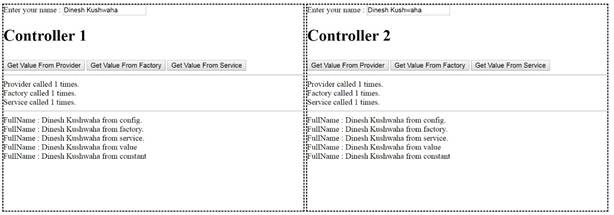
If you see the above screenshot then you will see a provider, factory, and service gets called only once for two different controllers. They are shared objects and singleton in nature. The same thing applies to value & constant.
When
When should we use them?
Provider & Constant
- If you want a shared object accessible in "config({ });"then you can use them because only provider & constant can be accessible in config.
- The provider is a singleton, instantiable (i.e. you can use the new keyword to create an instance of an object.) and configurable (i.e. you can use this config({})).
- Constant is singleton, configurable (i.e. you can use this config({})) but not instantiable (i.e. you cannot use new keyword to create instance of object.)
Join the conversation! Your thoughts help the community grow.