

Introduction
This article explains the Command Bar in Windows Phone 8.1 that was previously known as the AppBar in Windows Phone 7 and 8.
The Command Bar in Windows Phone 8.1 is much handier than the App Bar in Windows Phone 7 and 8 since it gives some cool features like Flyouts for the AppBar Buttons. (It is just similar to that of Windows Store apps.)
Step 1
To build a Windows Phone 8.1 application, ensure that you have Visual Studio 2013 and the Windows Phone 8.1 SDK installed in your system. Go to "New Project". Under "Installed" > "Templates" > "Visual C#" > "Store Apps" select "Windows Phone Apps" then select "Blank App (Windows Pone)" and provide it a name as you choose (here I am using "CommandBarWP8.1").
Step 2
Navigate to the "MainPage.xaml" section of the project and inside the Page attribute in the XAML before the Grid attribute add the following line of code:
- <Page.BottomAppBar>
- <CommandBar x:Name="myCommandBar">
- <AppBarButton x:Name="pinAppBtn" Label="Pin" Icon="Pin">
- <AppBarButton x:Name="pinAppBtn" Label="Pin" Icon="Pin">
- <AppBarButton.Flyout>
- <MenuFlyout>
- <MenuFlyoutItem x:Name="pinMenuBtn" Text="Pin to Start"/>
- </MenuFlyout>
- </AppBarButton.Flyout>
- </AppBarButton>
- </CommandBar>
- </Page.BottomAppBar>
Step 3
- <Page.BottomAppBar>
- <CommandBar x:Name="myCommandBar" >
- <CommandBar.PrimaryCommands>
- <AppBarButton Label="Add" Icon="Add"/>
- <AppBarButton Label="Favorite" Icon="Favorite"/>
- <AppBarToggleButton Label="Disable" Icon="DisableUpdates"/>
- </CommandBar.PrimaryCommands>
- </CommandBar>
- </Page.BottomAppBar>
- <Grid>
- </Grid>
- Primary Commands ,and
- Secondary Commands
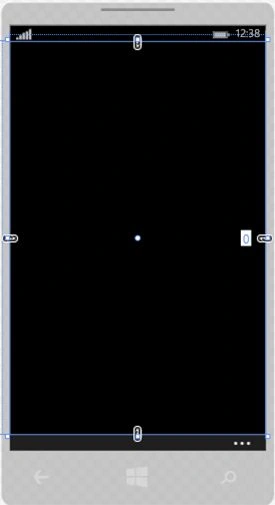
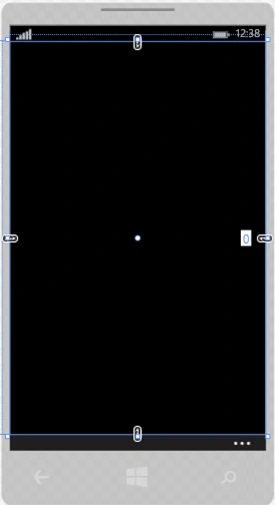
Now your MainPage will be like this:
Step 4
Now if you want to add some more options like a Menu, then you need to add the Secondary Command property of the Command Bar. So for the Menu add the following code:
- <Page.BottomAppBar>
- <CommandBar x:Name="myCommandBar" >
- <CommandBar.PrimaryCommands>
- <AppBarButton Label="Add" Icon="Add"/>
- <AppBarButton Label="Favorite" Icon="Favorite"/>
- <AppBarToggleButton Label="Disable" Icon="DisableUpdates"/>
- </CommandBar.PrimaryCommands>
- <CommandBar.SecondaryCommands>
- <AppBarButton Label="about" Icon="Important"/>
- </CommandBar.SecondaryCommands>
- </CommandBar>
- </Page.BottomAppBar>
- <Grid>
- </Grid>
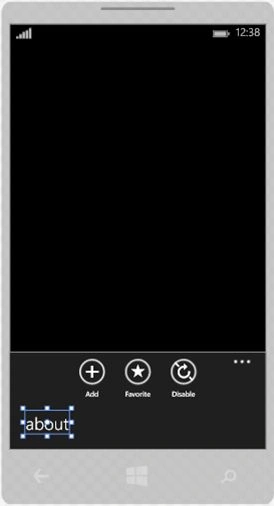
Now compile and run your project.

Initially when the MainPage opens you will see the app (Command) Bar.

Now when you press the three dots shown in the figure above, the menu will then be visible as in the following:
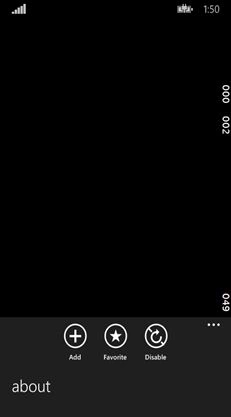
Now suppose you want that initially when the page is loaded the App Bar that is showing by default the App buttons won't be there or is in a hidden state. For this you just need to set the ClosedDisplayMode property of the CommandBar to "Minimal":
- <CommandBar x:Name="myCommandBar" ClosedDisplayMode="Minimal" >
Now when the application loads the page you will only see the three dots initially:

Step 5
So that's everything about a normal Command Bar control in Windows Phone 8.1.
There is also a very cool feature of the Command Bar, you can enable the flyouts for the Buttons in the Command Bar.
Now in your project remove all the code that you have added previously (it's just for Convenience).
- <Page.BottomAppBar>
- <CommandBar x:Name="myCommandBar">
- <AppBarButton x:Name="pinAppBtn" Label="Pin" Icon="Pin">
- </AppBarButton>
- </CommandBar>
- </Page.BottomAppBar>
- <Page.BottomAppBar>
- <CommandBar x:Name="myCommandBar">
- <AppBarButton x:Name="pinAppBtn" Label="Pin" Icon="Pin">
- <AppBarButton x:Name="pinAppBtn" Label="Pin" Icon="Pin">
- <AppBarButton.Flyout>
- <MenuFlyout>
- <MenuFlyoutItem x:Name="pinMenuBtn" Text="Pin to Start"/>
- </MenuFlyout>
- </AppBarButton.Flyout>
- </AppBarButton>
- </CommandBar>
- </Page.BottomAppBar>

That's all for the article.
In the future articles you will see more on Windows Phone 8.1. I am including the source code also.
If you have any suggestion or query then please comment.
Thanks.
gijs van BeekPosted Oct 9, 2015, 5:54 AM
thnx for the example, was searching for the secondary appbar buttons for a while now :)
Waqas AhmadPosted Oct 2, 2015, 2:24 PM
Not Correctly Working in VS2013 update 4
Gowtham RajamanickamPosted Apr 18, 2015, 4:00 AM
good one