

Introduction
When we see around, architectures mainly discuss about loose coupling , scalability , performance etc etc. Many architecture forget one of the important aspects in software is making application globalized. Depending on project some application would not really want to have multi-language based websites , but I am sure many will. So in this article we will go through a series of FAQ which will give you a quick start on making application multi-language based.
What is Unicode & Why was it introduced?
In order to understand the concept of Unicode we need to move little back and understand ANSI code. ASCII (ask key) stands for American Standard Code for Information Interchange. In ASCII format, every character is represented by one byte (i.e. 8 bits). So in short we can have 256 characters (2^8). Before UNICODE came in to picture programmers used code page to represent characters in different languages. Code page is a different interpretation of ASCII set. Code pages keep 128 characters for English and the rest 128 characters are tailored for a specific language.
Below is a pictorial representation of the same.
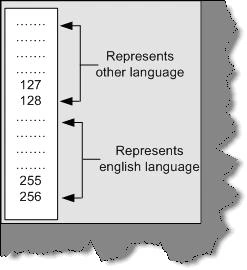
Figure 14.1:- Code page in action
There are following disadvantages of the CODE page approach:-
-
Some languages like Chinese have more than 5000 characters, which is difficult to represent only with 128-character set.
-
Only two languages can be supported at a one time. As said in the previous note you can use 128 for English and the rest 128 for the other language.
-
The end client should have the code page.
-
Code Representation change according to Operating system and Language used. That means a character can be represented in different numbers depending on operating system.
For all the above problems, UNICODE was introduced. UNICODE represents characters with 2 bytes. So if its two bytes that means 18 bits. You can now have 2^16 characters i.e. 65536 characters. That is a huge number you can include any language in the world. Further if you use surrogates you can have additional 1 million characters...Hmm that can include type of language including historian characters.
ASCII representation varied according to operating system and language. However, in UNICODE it assigns a unique letter for every character irrespective of Language or operating system, which makes programmers life much easier while developing international compatible applications.
Does .NET support UNICODE and how do you know it supports?
Yes, .NET definitely supports UNICODE. Try to see size of (char), you will see 2 bytes. Char type data type stores only one character, which needs only 8 bits, but because .NET has to support UNICODE, it uses 16 bits to store the same.
What is the difference between localization and globalization?
Below are the definition is which is taken from the Microsoft glossary.
Globalization: -It is the process of developing a program core whose features and code design are not solely based on a single language or locale.
Localization: - The process of adapting a program for a specific local market, which includes translating the user interface, resizing dialog boxes, customizing features (if necessary), and testing results to ensure that the program still works.
You can visualize globalization as more of architecture decisions. While localization is adapting your content to local market. Globalization phase occurs before localization phase.
What architecture decisions you should consider while planning for international software's?
Note: - Many programmers think its only converting the text from one language to other. It's a very wrong assumption that just by translating strings from one language to other language the software is localized. Interviewer will definitely get disappointed by such an answer. So let's try to visualize what are the design considerations to be taken when we design software globally.
- Avoid hard coding of strings in the project. Any display right from labels to error messages read it from a resource file.
- Length of the string is also of prime importance. It's a noted fact that when we translate English language in to other language the words increase by minimum 30 to 40 %. For instance you can see from the below figure how the Hindi text has increased as compared to English text.
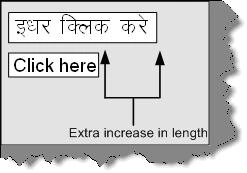
Figure 14.2: - Text length increase
So all your labels, message boxes should design in such a way that the text size mismatched gets adjusted. Do not crowd all your fields on one screen you will definitely end with the text length issue. Leave some room for expansion.
-
Decimal separator varies from locale to locale. For instance 25, 12.80 in the United States are 25.12,80 in Greece or Germany. Yes, you guessed right the decimal separator in Europe is a "," (Comma).
-
Calendar changes from country to country. Definitely, Gregorian calendar is the most used. However, there are some other calendars like Hebrew, Islamic, Chinese etc. All these calendars have huge differences. For instance, Nepal follows Nepali Calendar, which is 56.7 years ahead of Gregorian calendar. So according to cultural settings user can expect the dates accordingly.
-
Sort order is affected by language. You can see from the figure below Hindi and English languages have different sorting order.
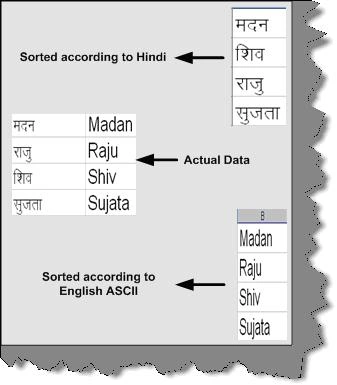
Figure 14.3: - Different sorting order according to locale
- Time varies from locale to locale. For instance, an 8 PM in India is 20:00 in Europe. In Europe, there is not concept of AM and PM.
- If you are using built-in fonts, use the resource file to bundle the same. You can load the fonts from the resource file rather than telling the user explicitly to install the fonts in his PC.
- Keyboards layout changes according locale and region. So be careful while designing the short cut keys. The function keys are mostly present in all key boards. Probably you can consider the function keys for short cut keys. Below is a sample Hindi key board. If you define CTRL + V as a short cut for paste functionality it can create confusion for Hindi users on the below key board.
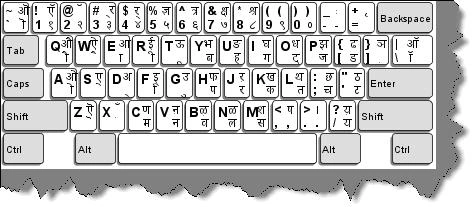
Figure 14.4: - Localized Hindi keyboard
Courtesy: - Image taken from http://www-306.ibm.com/
So you can see from the above points that making software adapt to global culture is not only related to string translation. It is much beyond that.
How do we get the current culture of the environment in windows and ASP.NET?
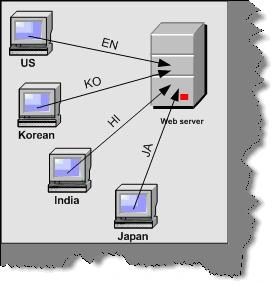
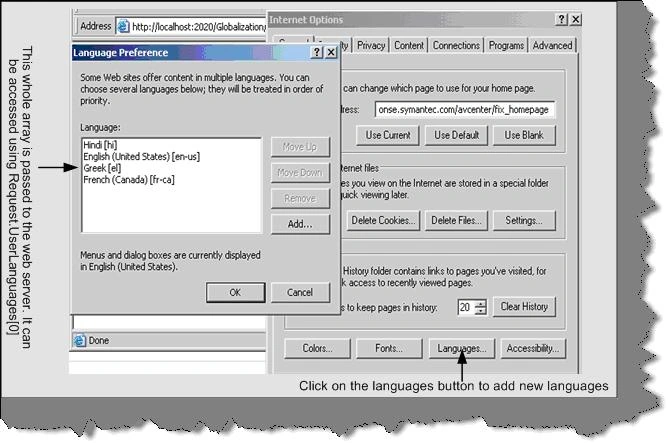
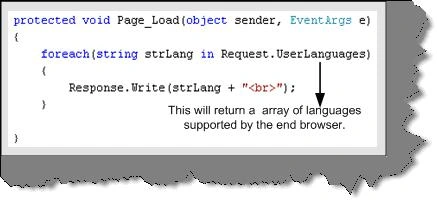
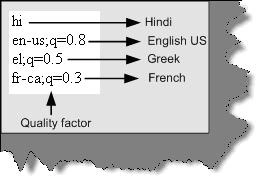
"CultureInfo.CurrentCulture" displays the current culture of the environment. For instance if you are running Hindi it will display "hi-IN". Please note one thing in mind "Current Culture" will only give you the culture on which your application is running. Therefore, if it is a windows application this will work fine. However, in ASP.NET 2.0 we need to know what culture the end user has.
VISHAL SINGLAPosted Mar 14, 2017, 6:13 AM
Please correct 2 Bytes = 16 bits in text "So if its two bytes that means 18 bits. You can now have 2^16 characters i.e. 65536 characters."