

"Android is a software stack for mobile devices that includes an operating system, middleware and key applications."
OR
"Android is software platform for mobile devices based on the Linux Operating System and developed by Google and the open Handset Alliance."
INFO:
The Android SDK provides the tools and libraries necessary to begin developing applications that run on Android-powered devices. It supports:
- Operating System: Linux Kernel - Version 2.6
- Emulator: on Mac, Windows, Linux
- Hardware Support:
1. GSM Telephony
2. Bluetooth, 3G, Wi-Fi
3. Camera, GPS, compass and Accelerometer
ARCHITECTURE:
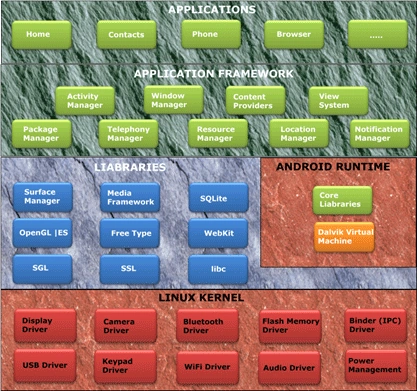

1. Applications:
Android applications are written in the Java programming language, and they run within a virtual machine (VM). It's important to note that the VM is not a JVM as we might expect, but is the Dalvik Virtual Machine, an open source technology. Each Android application runs within an instance of the Dalvik VM, which in turn resides within a Linux-kernel managed process, as shown below. Some of basic applications include a calendar, email client, SMS program, maps, making phone calls, accessing the Web browser, accessing our contacts list and others.
2. Application Framework:
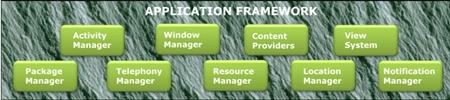
This is the skeleton or framework which all android developers have to follow. The developers can access all framework APIs an manage phone's basic functions like resource allocation, switching between processes or programs, telephone applications, and keeping track of the phone's physical location. Underlying all applications is a set of services and systems, including:
- Activity Manager
- Windows Manager
- Content Provider
- View System
- Package Manager
- Telephony Manager
- Resource Manager
- Location Manager
- Notification Manager
Where,
- Rich and extensible set of Views that can be used to build an application, including lists, grids, text boxes, buttons, and even an embeddable web browser.
- Content Providers that enable applications to access data from other applications (such as Contacts), or to share their own data.
- Resource Manager, providing access to non-code resources such as localized strings, graphics, and layout files.
- Notification Manager that enables all applications to display custom alerts in the status bar.
- An Activity Manager that manages the lifecycle of applications and provides a common navigation back stack.
The architecture is well designed to simplify the reuse of components. Think of the application framework as a set of basic tools with which a developer can build much more complex tools.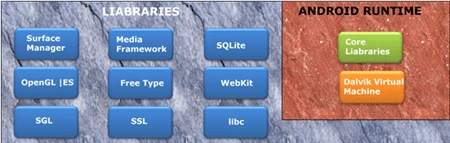
3. Libraries:
This layer consists of Android libraries written in C, C++, and used by various systems. These libraries tell the device how to handle different kinds of data and are exposed to Android developers via Android Application framework. Some of these libraries includes media, graphics, 3d, SQLite, web browser library etc.
Android Libc implementation:
A custom implementation, optimized for embedded use.
- BSD license
- Small size and fast code paths
- Very fast custom pthread implementation
- Built-in support for android-specific services (system properties, log capabilities)
- Doesn't support some POSIIX features
Storage, rendering, multimedia:
Provides the main features on the Android platform:
- SQLite, a simple relational database management system (No IIPC, single file)
- WebKit, an application framework that provides foundation for building a web browser
- Media Framework, based on PacketVideo openCORE platform (codec)
- Optimized 2D//3D graphic library based on OpenGL ES
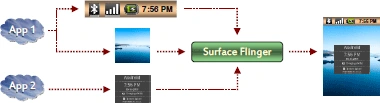
Surface Manager:
Provides a system-wide surface "composer" to render all the surfaces in a frame buffer.
- Can combined 2D and 3D surfaces
- Can use OpenGL ES and 2D hardware accelerator for its compositions
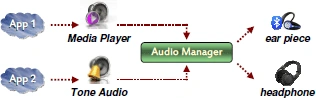
Audio Manager:
Processes multiple audio streams into PCM audio out paths.
- Handle several types of devices (headphone, ear piece, etc.)
- Redirects audio stream to the specified output
Hardware Abstraction Libraries:
Defines the interface that Android requires hardware "drivers" to implement.
- Set of standardized APIIs the developer will have to implement
- Available for all the components a manufacturer can integrate on its Android platform

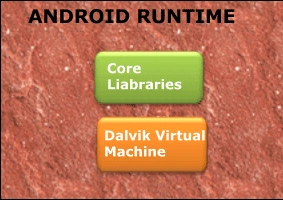
The Android runtime layer which includes set of core java libraries and DVM (Dalvik Virtual Machine) is also located in same layer.
4. Android Runtime:
This layer includes set of base libraries that are required for java libraries. Every Android application gets its own instance of Dalvik virtual machine. Dalvik has been written so that a device can run multiple VMs efficiently and it executes files in executable (.Dex) optimized for minimum memory.
Dalvik Virtual Machine:
An interpreter-only virtual machine (no JIIT), register based.
- Optimized for low memory requirements
- Designed to allow multiple VM instances to run at one
- Relying on underlying OS for process isolation, memory management and threading support
- Executes Dalvik Executables (DEX) files which are zipped into an Android Package (APK)
5. Linux Kernel:
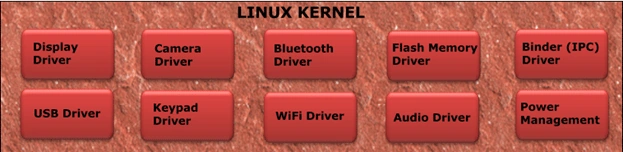
This layer includes Android's memory management programs, security settings, power management software and several drivers for hardware, file system access, networking and inter-process-communication. The kernel also acts as an abstraction layer between hardware and the rest of the software stack.
A Linux 2.6.24 fit for Android:
Some common features have been removed
- No GBLIC support
- No native windowing system
- Does not include the full set of Linux utilities
New Android specific components have been added
- Alarm, Android Shared Memory
- Kernel Memory Killer, Kernel Debugger, Logger
Power Management:
Based on the standard Linux Power Management, Android has its own component.
- Application uses user space library to inform the framework about its constraints.
- Constraints are implemented using lock mechanism.

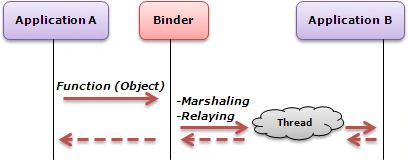
Binder:
Driver to facilitate inter-process communication between applications and services.
- A pool of threads is associated to each application to process incoming IIPC
- The driver performs mapping of object between two processes
- Binder uses an object reference as an address in a process's memory space
PLATFORM INITIALIZATION:
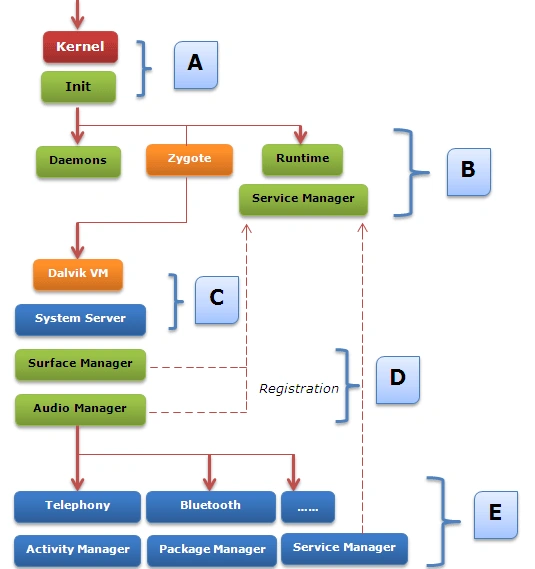
Explanation:
 The bootloader loads the "kernel" and starts the "Init" process. Then,
 "Daemons" for handling low level hardware interfaces are started up (USB, ADB,
 debugger, radio). After that,
"Zygote", the initial Dalvik VM process is created, and
"Runtime" process initiates the "Service Manager", a key element for "Binders"
and IPC communication.
 "Runtime" process requests "Zygote" to start a new instance of Dalvik for running the
 "System Server"
 The two first processes are able to handle graphic and audio outputs
  All the others android components are then started.
ANDROID GUI ARCHITECTURE:
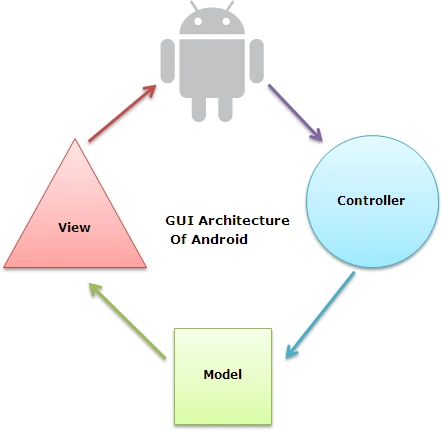
Android GUI is single-threaded, event-driven and built on a library of nestable components. The Android UI framework is organized around the common Model-View-Controller pattern.
The Model: The model represents data or data container. We can see it as a database of pictures on our device. Let's say, any user wants to hear an audio file, he clicks play button and it triggers an event in our app, now the app will get data from data store or database and as per input and creates data to be sent back to the user. We can refer this data as Model.
The View: The View is the portion of the application responsible for rendering the display, sending audio to speakers, generating tactile feedback, and so on.
Now as per above example, the view in a hypothetical audio player might contain a component that shows the album cover for the currently playing tune. User will always interact with this layer. User action's on this layer will trigger events that will go to the application functions.
The Controller: The Controller is the portion of an application that responds to external actions: a keystroke, a screen tap, an incoming call, etc. It is implemented as an event queue. On User's action, the control is passed over to controller and this will take care of all logic that needs to be done and prepare Model that need to be sent to view layer.
Join the conversation! Your thoughts help the community grow.