

Introduction
Today, in this article
let's work on some other concepts in HTML5.
Question Arises: What
is <aside> in Html 5?
In simple terms "It
display some content that can be wrapped up and placed somewhere on the
website. Ex: Job Ads, Promotion Ads and so on".
Question Arises: What
is <meter> in Html 5?
In simple terms "It
defines a specified range of Usage by the user. Ex: Disk Hard Drive Usage shown in
My Computer". This tag is only compatible with opera and chrome browsers.
Question Arises: What
is <hgroup> in Html 5?
In simple terms "It
defines a bunch of headings is wrapped up and place under the single container. Ex:
Sub Headings, Sub- Sub-Headings, Main Heading all are place under single hgroup
Tag".
So, I think we all are now
good to go and implement this concept.
Step 1: The Complete Code
of asidemeterhgroup.html looks like this:
Code:
- <!DOCTYPE html>
- <html lang="en">
- <head>
- <meta charset="utf-8" />
- <!-- Always force latest IE rendering engine (even in intranet) & Chrome Frame
- Remove this if you use the .htaccess -->
- <meta http-equiv="X-UA-Compatible" content="IE=edge,chrome=1" />
- <title>templates</title>
- <meta name="description" content="" />
- <meta name="author" content="Vijay" />
- <meta name="viewport" content="width=device-width; initial-scale=1.0" />
- <!-- Replace favicon.ico & apple-touch-icon.png in the root of your domain and delete these references -->
- <link rel="shortcut icon" href="/favicon.ico" />
- <link rel="apple-touch-icon" href="/apple-touch-icon.png" />
- </head>
- <body style="font-family: Verdana; font-size: 22">
- <div align="center">
- <header>
- <h1 style="color: gray">Aside, Meter , Hgroup Tags - HTML 5</h1>
- </header>
- <div align="center">
- <aside>
- <h1>Hello It's a small message from aside</h1>
- <p>Hello!! How you are doing</p>
- </aside>
- </div>
- <div align="center">
- <hgroup> <p style="color: red">Message from Hgroup</p>
- <h1>Hello !!! It's from H1</h1>
- <h2>Hello !!! It's from H2</h2>
- <h3>Hello !!! It's from H3</h3>
- </hgroup>
- </div>
- <div align="center">
- <p style="color: red">Hello Meter Value: <meter value="0.5" low="0" high="10">5 out of 10</meter></p>
- </div>
- <footer>
- <p style=" color: silver">© Copyright by Vijay Prativadi</p>
- </footer>
- </div>
- </body>
- </html>
Step 2:
The Output of the Application looks like this:
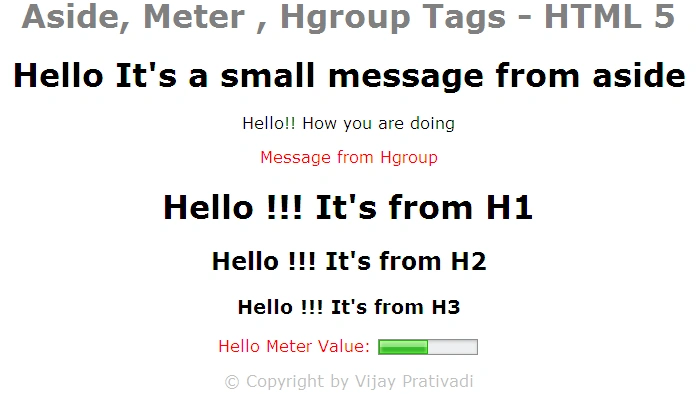
I hope this
the article is useful for you. I look forward to your comments and feedback.
Thanks, Vijay Prativadi...
Mahesh ChandPosted Feb 11, 2012, 1:37 PM
So Meter is like progress bar? I thought HTML 5 has its own progressbar? What about IE? You said one tag is not supported on IE? That is strange.