
Problem
How to serve static content (HTML, CSS, JavaScript, Images) from ASP.NET Core application.
Solution
Modify the Configure() method in Startup class to use middleware for static files.
- public void Configure(
- IApplicationBuilder app,
- IHostingEnvironment env)
- {
- app.UseStaticFiles(); // for files in wwwroot folder
- app.UseStaticFiles(new StaticFileOptions() // for files in content folder
- {
- FileProvider = new PhysicalFileProvider(
- Path.Combine(Directory.GetCurrentDirectory(), "content")),
- RequestPath = new PathString("/outside-content")
- });
- app.Run(async (context) =>
- {
- await context.Response.WriteAsync("Hello Static Files");
- });
- }
Add static content to www root and a custom content folder.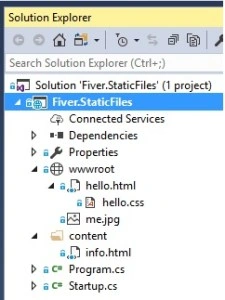
Access the files using site address.
- http://[site-address]/hello.html
- http://[site-address]/outside-content/info.html
Discussion
Static files are served by default from the wwwroot folder and can be accessed as if the content exists in your root folder. The default folder can be changed via WebHostBuilder in Program.cs using following code.
- UseWebRoot("public") // changed wwwroot to public
Static files can also be served from folders outside wwwroot by passing in StaticFileOptions to middleware and setting a FileProvider and RequestPath. This is useful when you want authorized access to files e.g. by returning FileResult action result from a secure controller.
Source Code
RAks BMPosted Apr 26, 2019, 1:43 AM
What if we want to serve files from cloud where i have stored?
Tridip BhattacharjeePosted Sep 14, 2017, 9:04 AM
In your project there was no folder called public then why you use this code UseWebRoot("public")......rather i found wwwroot folder exist in your code. this code UseWebRoot("public") not found in source code. thanks
Tridip BhattacharjeePosted Sep 14, 2017, 8:52 AM
I see your project folder structure and found there is a folder called wwwroot then why you tell me to create folder called public? i thought this code UseWebRoot("public") will change the wwwroot folder name virtually not physically. what you say?
Tridip BhattacharjeePosted Sep 14, 2017, 8:43 AM
This is not clear what u said "It will use public instead of wwwroot and the folder to serve static" the does code will change the name of wwwroot to public? if we store test.png file in wwwroot folder then what will be the url http://localhost:1020/public/test.png instead of http://localhost:1020/wwwroot/test.png
Tridip BhattacharjeePosted Sep 14, 2017, 7:56 AM
What is the meaning of this line UseWebRoot("public") ? if we comment this line then what will happen ? also give me code example if i need to server static file from other folder under main folder where site code exist? so here i asked few question. if possible answer. thanks