

Introduction
If we don't consider Blazor technology, there are two default frameworks for building web systems under .NET Core: Razor Pages and ASP.NET Core MVC. In this article, we want to test the performance of the CodeBehind Framework with the default frameworks of Razor Pages and ASP.NET Core MVC.
Before continuing the article, it is necessary to explain that in the CodeBehind framework, it is not mandatory to create MVC or only view, and every part of the system can be created as MVC or Model-View or Controller-View or only View and only one configuration in the Program.cs class is enough; unlike ASP.NET Core, Razor pages and MVC work separately and to use each one, a different configuration is needed in the Program.cs class. In this test, we created two projects from Razor pages and the CodeBehind framework in View only mode and put them on IIS; we also created two projects of ASP.NET Core MVC and CodeBehind framework in full MVC mode and placed them on IIS.
Test methods
Almost 2 minutes before running the tests, we checked the systems installed on the web server at least once to make sure that the systems were not sleeping. In this test, the requester and the responder are executed in the same system. In the future, if we have the necessary access to a network, we will spread the requester among several systems and place the responder in only one system to have reliable results.
Items used in the test
- Ryzen 5 PRO 4650G processor
- Windows 10
- IIS 10
- .Net Core 7.0
- CodeBehind framework 2.2
To create the requester, we created a console application that makes requests to the IIS IP using WebClient. The program requests IIS IP for 10 seconds and the number of responses is displayed in the output. Using a random class, this program requests a page between 1 and 10 per attempt. We built 20 executable files of this program; 10 built outputs for pageX routes (for ASP.NET Core) and 10 built outputs for pageX.aspx routes (for CodeBehind Framework).
Requester
Console.WriteLine("Start Program");

Random rand = new Random();
HttpClient webClient = new HttpClient();

string DataValue = "";
int i = 0;

DateTime startTime = DateTime.Now;

while ((DateTime.Now - startTime).TotalMilliseconds < 10000)
{
+   DataValue = webClient.GetStringAsync("localhost/page" + rand.Next(1, 11) + ".aspx").Result; // CodeBehind Framework
+   DataValue = webClient.GetStringAsync("localhost/page" + rand.Next(1, 11)).Result; // ASP.NET Core

    i++;
}

Console.WriteLine("Response Count: " + i + " - LastDataValue: " + DataValue);
Console.ReadKey();
Please note that each line of code specified in the class above has been tested separately.
Razor Pages VS CodeBehind Framework
In this test, we created Razor pages without models, and View pages in the CodeBehind framework were created without controllers and models.
CodeBehind Framework config in Program.cs class
using CodeBehind;
using SetCodeBehind;

var builder = WebApplication.CreateBuilder(args);

var app = builder.Build();

CodeBehindCompiler.Initialization(true);

app.Run(async context =>
{
    CodeBehindExecute execute = new CodeBehindExecute();
    await context.Response.WriteAsync(execute.Run(context));
});

app.Run();
The code above is for configuring the CodeBehind framework in ASP.NET Core.
Razor pages config in Program.cs class
var builder = WebApplication.CreateBuilder(args);

builder.Services.AddRazorPages();

var app = builder.Build();

app.MapRazorPages();

app.Run();
The code above is for configuring the Razor pages in ASP.NET Core.
View file (View file is the same in Razor pages and CodeBehind framework)
@page
@{
    string PageTitle = "Title";
    string BodyValue = "Body";
    Random rand = new Random();
}
<!DOCTYPE html>
<html>
<head>
    <meta charset="utf-8" />
    <title>@PageTitle</title>
</head>
<body>
	<div>
		@BodyValue
	</div>
	<div>
		<h1>@rand.Next(1000000)</h1>
	</div>
</body>
</html>
The above codes are repeated in 10 pages (page1.cshtml, page2.cshtml, page3.cshtml, ..., page10.cshtml in Razor pages and page1.aspx, page2.aspx, page3.aspx, ..., page10.aspx in CodeBehind framework).
As you can see, the View file is the same in both frameworks. Please note that Razor syntax in cshtml pages in ASP.NET Core is somewhat similar to Razor syntax in aspx pages in the CodeBehind framework, and the structure of fetching codes and compiling them in both frameworks is specific and different.
We tested each framework 10 times for this evaluation. Evaluation with 1 requester, evaluation with 2 requesters, ..., evaluation with 10 requesters.
Test results
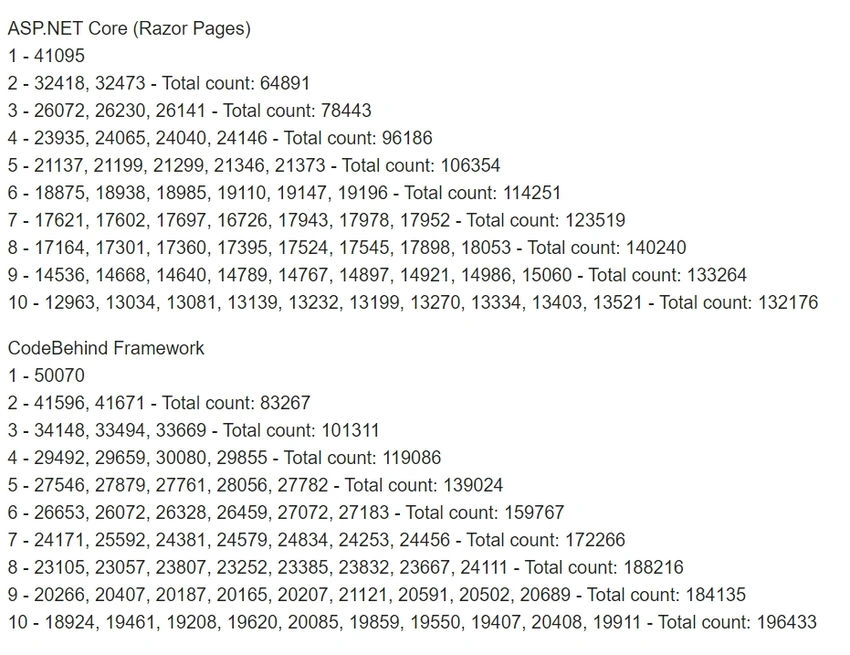
The numbers above show the number of responses per requester.
Chart of results

As shown in the chart, Razor pages get the highest number of responses (140,240) when running 8 requesters, and the CodeBehind framework gets the highest number of responses (196,433) with 10 requesters running. These results show us that the CodeBehind framework is up to 40% faster than Razor Pages.

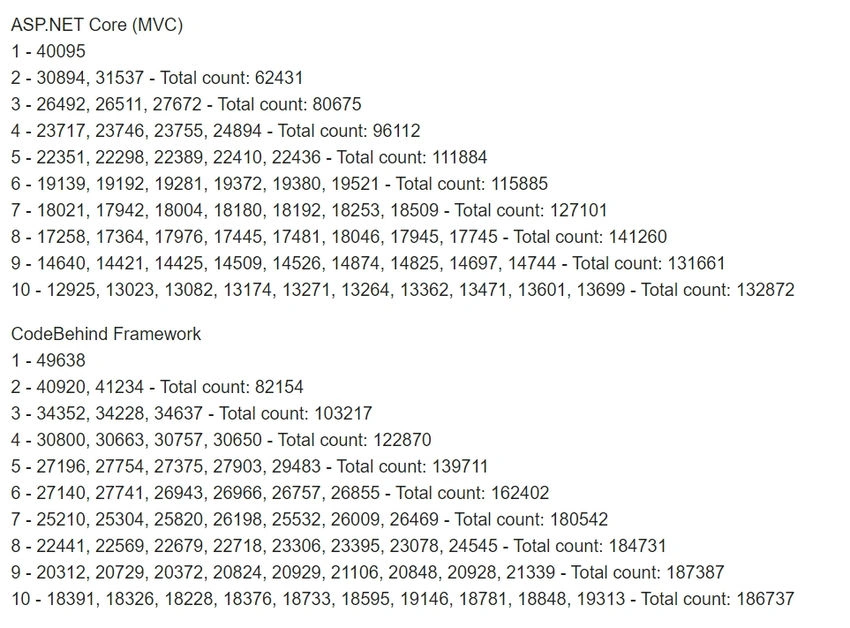

Join the conversation! Your thoughts help the community grow.