

Razor View Engine offers many UI controls, which eases the processing of many UI components when using an integration with the Server side. AJAx form control is one of many UI controls, which is being offered by Razor View engine.
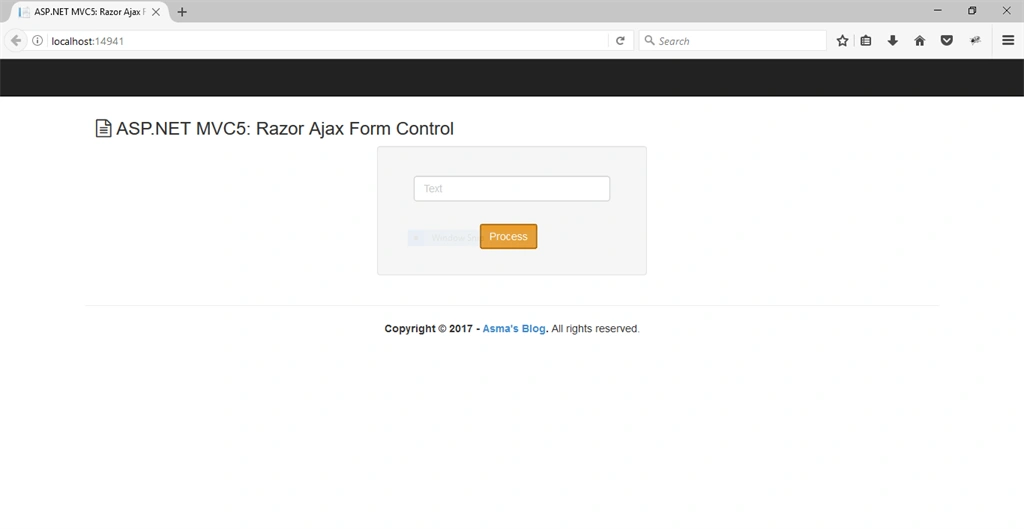
Today, I shall be demonstrating the usage of Razor view engine control i.e. "AJAX Form" control with ASP.NET MVC5 platform.
Following are some prerequisites before you proceed further in this tutorial.
- Knowledge of an ASP.NET MVC5.
- Knowledge of an HTML.
- Knowledge of JavaScript.
- Knowledge of Bootstrap.
- Knowledge of jQuery.
- Knowledge of C# programming.
You can download the complete source code for this tutorial or you can follow the step by step discussion below. The sample code is being developed in Microsoft Visual Studio 2015 Enterprise.
Let's begin now.
Step 1
Create a new MVC project and name it RazorAjaxControl.
Step 2
Open Views\Shared\_Layout.cshtml file and replace the code given below in it i.e.
- <!DOCTYPE html>
- <html>
- <head>
- <meta charset="utf-8" />
- <meta name="viewport" content="width=device-width, initial-scale=1.0">
- <title>@ViewBag.Title</title> @Styles.Render("~/Content/css") @Scripts.Render("~/bundles/modernizr")
- <!-- Font Awesome -->
- <link rel="stylesheet" href="https://maxcdn.bootstrapcdn.com/font-awesome/4.4.0/css/font-awesome.min.css" />
- <!-- Button Loader -->@Styles.Render("~/Plugin/Ladda-loader/css") </head>
- <body>
- <div class="navbar navbar-inverse navbar-fixed-top">
- <div class="container">
- <div class="navbar-header"> <button type="button" class="navbar-toggle" data-toggle="collapse" data-target=".navbar-collapse">
- <span class="icon-bar"></span>
- <span class="icon-bar"></span>
- <span class="icon-bar"></span>
- </button> </div>
- </div>
- </div>
- <div class="container body-content"> @RenderBody()
- <hr />
- <footer>
- <center>
- <p><strong>Copyright © @DateTime.Now.Year - <a href="http://wwww.asmak9.com/">Asma's Blog</a>.</strong> All rights reserved.</p>
- </center>
- </footer>
- </div> @*Scripts*@ @Scripts.Render("~/bundles/jquery") @Scripts.Render("~/bundles/jqueryval") @Scripts.Render("~/bundles/bootstrap")
- <!-- Custom Form -->@Scripts.Render("~/scripts/custom-form") @RenderSection("scripts", required: false) </body>
- </html>
In the code given above, we have simply added our basic layout.
Step 3
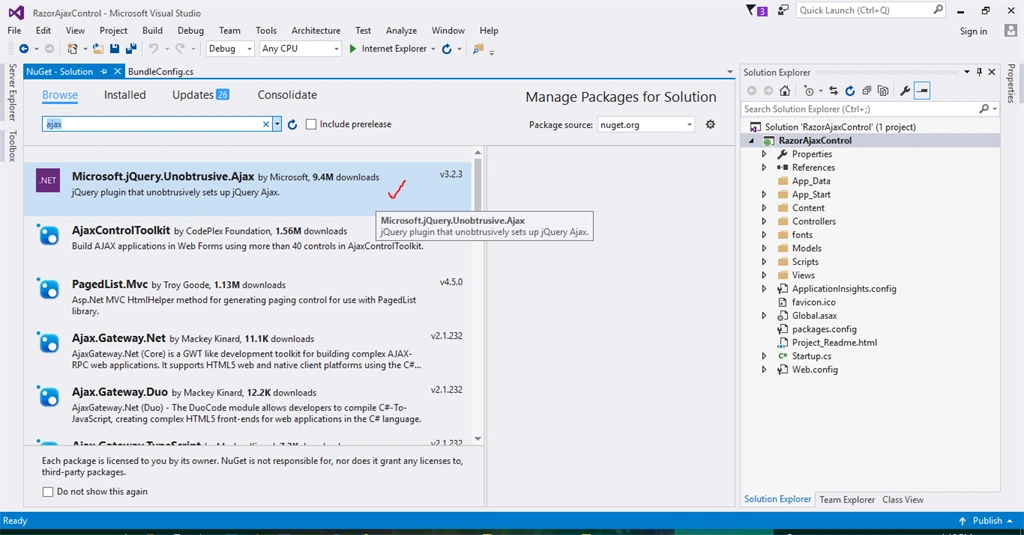
Before we move further in this tutorial, we need to first add jquery.unobtrusive-ajax.js library. To add this library, go to Tools->NuGet Package Manager->Manage NuGet Packages for Solution, followed by searching for jquery.unobtrusive-ajax library and install this library into your project, as shown below.
Step 4
- using System.Web;
- using System.Web.Optimization;
- namespace RazorAjaxControl {
- public class BundleConfig {
- // For more information on bundling, visit http://go.microsoft.com/fwlink/?LinkId=301862
- public static void RegisterBundles(BundleCollection bundles) {
- bundles.Add(new ScriptBundle("~/bundles/jquery").Include("~/Scripts/jquery-{version}.js"));
- // Jquery validator & unobstrusive ajax
- bundles.Add(new ScriptBundle("~/bundles/jqueryval").Include("~/Scripts/jquery.unobtrusive-ajax.js", "~/Scripts/jquery.unobtrusive-ajax.min.js", "~/Scripts/jquery.validate*", "~/Scripts/jquery.validate.unobtrusive.js", "~/Scripts/jquery.validate.unobtrusive.min.js"));
- // Use the development version of Modernizr to develop with and learn from. Then, when you're
- // ready for production, use the build tool at http://modernizr.com to pick only the tests you need.
- bundles.Add(new ScriptBundle("~/bundles/modernizr").Include("~/Scripts/modernizr-*"));
- bundles.Add(new ScriptBundle("~/bundles/bootstrap").Include("~/Scripts/bootstrap.js", "~/Scripts/respond.js"));
- // Custom Form
- bundles.Add(new ScriptBundle("~/scripts/custom-form").Include("~/Scripts/custom-form.js"));
- bundles.Add(new StyleBundle("~/Content/css").Include("~/Content/bootstrap.css", "~/Content/site.css"));
- }
- }
- }
In the configuration file given above, we have to simply add the required JavaScript and CSS style sheet files references in to our project.
Step 5
Now, create a new controller and name it Controllers\RazorAjaxController.cs and replace the code given below in it i.e.
- //-----------------------------------------------------------------------
- // <copyright file="RazorAjaxController.cs" company="None">
- // Copyright (c) Allow to distribute this code.
- // </copyright>
- // <author>Asma Khalid</author>
- //-----------------------------------------------------------------------
- namespace RazorAjaxControl.Controllers {
- using System;
- using System.Collections.Generic;
- using System.Linq;
- using System.Security.Claims;
- using System.Threading;
- using System.Threading.Tasks;
- using System.Web;
- using System.Web.Mvc;
- using Models;
- /// <summary>
- /// Ajax razor controller class.
- /// </summary>
- public class RazorAjaxController: Controller {#
- region Index view method.#region Get: /RazorAjax/Index
- method.
- /// <summary>
- /// Get: /RazorAjax/Index method.
- /// </summary>
- /// <returns>Return index view</returns>
- public ActionResult Index() {
- try {} catch (Exception ex) {
- // Info
- Console.Write(ex);
- }
- // Info.
- return this.View();
- }#
- endregion# region POST: /RazorAjax/Index
- /// <summary>
- /// POST: /RazorAjax/Index
- /// </summary>
- /// <param name="model">Model parameter</param>
- /// <returns>Return - RazorAjax content</returns>
- [HttpPost]
- [AllowAnonymous]
- [ValidateAntiForgeryToken]
- public ActionResult Index(RazorAjaxViewModel model) {
- try {
- // Verification
- if (ModelState.IsValid) {
- // Info.
- return this.Json(new {
- EnableSuccess = true, SuccessTitle = "Success", SuccessMsg = model.Text
- });
- }
- } catch (Exception ex) {
- // Info
- Console.Write(ex);
- }
- // Info
- return this.Json(new {
- EnableError = true, ErrorTitle = "Error", ErrorMsg = "Something goes wrong, please try again later"
- });
- }#
- endregion# endregion
- }
- }
Nishan AryalPosted Apr 12, 2020, 9:20 AM
Well explained.
Sayar GhoshPosted Apr 7, 2020, 7:02 AM
Thank you very much. Great job.
Domingo TapiaPosted Nov 11, 2017, 2:02 PM
Excelent work, congrat
Ansari TahirPosted Oct 30, 2017, 4:59 AM
How to call ajax ??