

Introduction
This article describes an approach to assessing the difference between a specified beginning and end date. The example was written in the context of comparing a birth date to a specific end date but the same approach could be used to calculate the number of years, months, and days between a specified start and end date.

Figure 1: Test Application Main Form
Getting Started:
In order to get started, unzip the included project and open the solution in the Visual Studio 2008 environment. In the solution explorer, you should note these files (Figure 2):
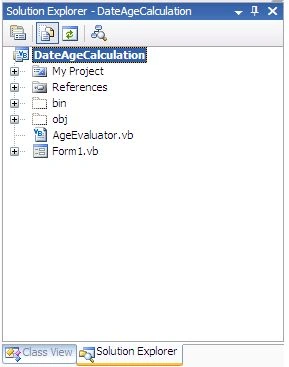
Figure 2: Solution Explorer
The solution contains a single project called DateAgeCalculation. This project contains a class entitled AgeEvaluator that is used to perform the date related calculations and a single form class used to test the AgeEvalator class. The form contains to date picker controls which are used to set the date of birth and the end date (used to simulate today as any day of the year).
Code: AgeEvaluator.vb
The AgeEvaluator class contains a couple of methods used to calculate either the total number of years the subject has been alive, or used to calculate the number of years, months, and days the subject has been alive. Further, the class determines whether or not the subject’s birthday will occur within 30, 60, or 90 days of the specified end date.
The class begins with the default imports:
Imports System
Imports System.Text
The next section contains the class declaration. There is no specified default constructor for the class as both contained methods are static.
''' <summary>
''' Class used to determine a person's age
''' based upon a date of birth and a specific
''' end date
''' </summary>
''' <remarks></remarks>
Public Class AgeEvaluator
The first method contained in this class is used to calculate the person’s age in years only. This method accepts the person’s date of birth as an argument and all calculations are based upon comparing the date of birth to the current date. The return type is specified as a nullable integer so that, if the method is passed a birthday that is greater than the current date, the method may return a null. The code in this method is annotated and you can follow what the method does by reading that annotation.
''' <summary>
''' Return a person's age in years based
''' upon that person's date of birth
''' </summary>
''' <param name="birthDay"></param>
''' <returns></returns>
''' <remarks></remarks>
Public Shared Function GetAgeInYears(ByVal birthDay As DateTime) As
Nullable(Of Integer)
' return null if the date of birth
' greater than the current date
If (birthDay > DateTime.Now) Then
Return Nothing
End If
' get the basic number of years
Dim years As Integer = DateTime.Now.Year - birthDay.Year
' adjust the years against this year's
' birthday
If (DateTime.Now.Month < birthDay.Month Or _
(DateTime.Now.Month = birthDay.Month And _
DateTime.Now.Day < birthDay.Day)) Then
years -= 1
End If
' don't return a negative number
' for years alive
If (years >= 0) Then
Return years
Else
Return 0
End If
End Function
That next method contained in the class is used to calculate the time a person has been alive in years, months, and days. The method returns an AgeBag class instance; this class will be described in the next section of this document but in general, it is a property bag used to hold the number of years, months, and days a person has been alive coupled with three Boolean values used to determine whether or not a person’s next birthday will fall within 30, 60, or 90 days of the end date specified in the methods arguments. This method is annotated and you may read what each section of the code does by following the annotation.
''' <summary>
''' Calculate the time a person has been alive in
''' days, months, and years, and return values
''' in an instance of the age bag class
''' </summary>
''' <param name="birthDate"></param>
''' <param name="endDate"></param>
''' <returns></returns>
''' <remarks></remarks>
Public Shared Function GetTimeAlive(ByVal birthDate As DateTime, _
ByVal endDate As DateTime) As AgeBag
If (endDate < birthDate) Then
System.Windows.Forms.MessageBox.Show("Invalid end date", "Error")
Return New AgeBag()
End If
Dim years As Integer = endDate.Year - birthDate.Year
Dim months As Integer = endDate.Month - birthDate.Month
Dim days As Integer = endDate.Day - birthDate.Day
' use the original days value
' to adjust the month where the
' day has passed
If (days < 0) Then
months -= 1
End If
' adjust month and years where
' month has passed
While (months < 0)
months += 12
years -= 1
End While
' adjust days for the current year
Dim timeSpan As TimeSpan = endDate â€"
birthDate.AddYears(years).AddMonths(months)
' dispose of fractional portion of total days
days = Convert.ToInt32(Math.Round(timeSpan.TotalDays))
' create and populate an instance of
' the age bag class to keep the values
' calculated for the birth date
Dim ab = New AgeBag()
ab.AgeDays = days
ab.AgeMonths = months
' get rid of negative number of years
If (years >= 1) Then
ab.AgeYears = years
Else
ab.AgeYears = 0
End If
' get the timespan between the date of birth and end date
Dim dtThisBirthday = New DateTime(DateTime.Now.Year, _
birthDate.Month, birthDate.Day)
Dim ts As TimeSpan = dtThisBirthday - endDate
' round off the fractional days portion and set
' the agebag property used to hold the days remaining
' before the next birthday
ab.DaysToBirthday = Convert.ToInt32(Math.Round(ts.TotalDays))
' if the days until the next birthday in
' a negative number (already passed), recalculate the days
' until the next birthday using the future birthday
If (ab.DaysToBirthday < 0) Then
Dim nextBirthday = New DateTime(endDate.Year + 1,
birthDate.Month, birthDate.Day)
Dim tsNext As TimeSpan = nextBirthday - endDate
ab.DaysToBirthday = Convert.ToInt32(Math.Round(tsNext.TotalDays))
' determine whether or not the subject's next
' birthday is between 61 and 90 days away
If (ab.DaysToBirthday <= 90 And ab.DaysToBirthday > 60) Then
ab.BirthdayIn90Days = True
End If
Else
ab.BirthdayIn90Days = False
' determine whether or not the subject's next
' birthday is between 60 and 31 days
If (ab.DaysToBirthday <= 60 And ab.DaysToBirthday > 30) Then
ab.BirthdayIn60Days = True
Else
ab.BirthdayIn60Days = False
' determine whether or not the subject's next
' birthday will fall within the next 30 days
If (ab.DaysToBirthday <= 30 And ab.DaysToBirthday >= 0) Then
ab.BirthdayIn30Days = True
Join the conversation! Your thoughts help the community grow.