

Async and await keywords of C# were introduced in C# 5.0. They were designed to make it easier to write asynchronous code, which can run in the background while other code is executing.
The "async" keyword marks a method asynchronous, meaning it can be run in the background while another code executes. When you mark a method as async, you can use the "await" keyword to indicate that the method should wait for the result of an asynchronous operation before continuing.
Use of 'async' and 'await' in C#
Asynchronous programming is a programming technique that allows code to be executed concurrently without blocking the execution of the calling thread. In other words, asynchronous code can run in the background while other code is executing. In synchronous programming, each line of code is executed sequentially, and the program waits for each operation to complete before moving on to the next one. This can lead to performance problems, particularly in programs that need to perform long-running operations like I/O or network requests.
Asynchronous programming allows programs to perform these operations without blocking the calling thread. When an asynchronous operation is started, the program continues to execute other code while it waits for the operation to complete. The program is notified when the operation is complete and can continue with the following line of code.
Asynchronous programming can be implemented using various techniques, such as callbacks, events, and promises. In C#, the "async" and "await" keywords provide a convenient way to write asynchronous code that looks similar to synchronous code, making it easier to read and maintain.
We will get all the benefits of traditional Asynchronous programming with much less effort with the help of async and await keywords.
Suppose we are using two methods as, Method1 and Method2, respectively, and both methods are not dependent on each other, and Method1 takes a long time to complete its task. In Synchronous programming, it will execute the first Method1, wait for the completion of this method, and then execute Method2. Thus, it will be a time-intensive process even though both methods are not depending on each other.
We can run all the methods parallelly using simple thread programming, but it will block UI and wait to complete all the tasks. To come out of this problem, we have to write too many codes in traditional programming, but if we use the async and await keywords, we will get the solutions in much less code.
Also, we will see more examples, and if any third Method, as Method3 has a dependency on method1, it will wait for the completion of Method1 with the help of await keyword.
Async and await in C# are the code markers that mark code positions from where the control should resume after completing a task.
Let's start with practical examples for understanding the programming concept.
Code examples of C# async await
We are going to take a console application for our demonstration.
Example 1
In this example, we will take two methods that are not dependent on each other.
Code sample
class Program
{
    static void Main(string[] args)
    {
        Method1();
        Method2();
        Console.ReadKey();
    }

    public static async Task Method1()
    {
        await Task.Run(() =>
        {
            for (int i = 0; i < 100; i++)
            {
                Console.WriteLine(" Method 1");
                // Do something
                Task.Delay(100).Wait();
            }
        });
    }


    public static void Method2()
    {
        for (int i = 0; i < 25; i++)
        {
            Console.WriteLine(" Method 2");
            // Do something
           Task.Delay(100).Wait();
        }
    }
}
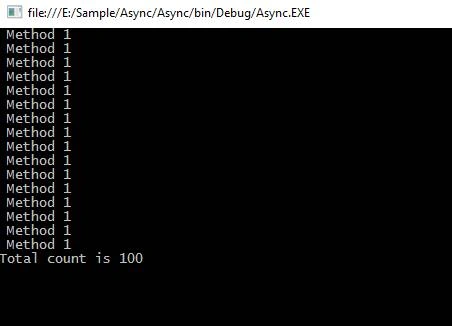
In the code above, Method1 and Method2 are not dependent on each other, and we call from the Main method.
Here, we can see Method1 and Method2 are not waiting for each other.
Output

Regarding the second example, suppose we have Method3, which depends on Method1.
Example 2
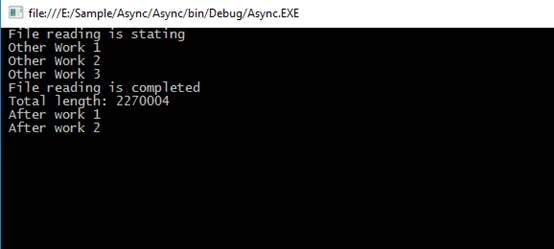
In this example, Method1 returns the total length as an integer value, and we pass a parameter as a length in Method3, which comes from Method1.
Here, we have to use await keyword before passing a parameter in Method3, and for it, we have to use the async keyword from the calling method.
If we use C# 7 or less, we cannot use the async keyword in the Main method for the console Application because it will give the error below.

IMAD AYOUBPosted May 15, 2023, 4:05 PM
This is the best article for me regarding Async Programming. Thanks a lot for sharing. Keep it up.
Jaydeep UPosted Sep 27, 2022, 7:04 PM
Sir, does async and await work the same for Web Application and Desktop Application?
Sarath BaijuPosted Sep 21, 2022, 6:57 PM
Hi vivek, why you add Task.Run() inside method1 ? I tried with the content inside the Task.Run() to Method1, where it works like a synchronous application. So it gets confusing to understand the concept.
Eric DiamPosted Apr 20, 2022, 12:40 PM
Wow this article is second on Google for C# async await but obviously the author doesn't get a clue about this topic + it is overly verbose. Why await Task.Run(() => in an async method? Not a word on synchronization context that is essential to understand await keyword effect in each context. Not a word on the TPL not on the async methods proposed by the BCL. Man, you're really good with SEO but don't do anything good for the community with such poor content.
HiramPosted Mar 27, 2022, 4:36 AM
Hi very good job ! thanks
Vijayakumar PonnambalamPosted Sep 18, 2021, 7:33 AM
Hi Vevek Kumar, Thanks for the nice explanation
Aryan KumarPosted Jul 3, 2021, 12:20 PM
Nice Explanation ????!
Abhi corneraroraPosted Jun 8, 2021, 7:15 AM
Poorly written and explained. no symmetry in examples to be clear for the reader.
Fazil BasheerPosted Jan 8, 2021, 12:20 PM
Hi Vevek Kumar, Thanks for the information.Suppose i am using c# version 6.Can you give small console app code handle async calls situaion like this.Eg. I am expecting number of messages that recieved from one async call, depending on that print number of messages in the next line.My issue it directly jumping into 2nd line without waiting for first async call completion, Thanks
Bassam AlugiliPosted Jan 7, 2021, 2:47 PM
I have fixed the major issues in this article and update the example to C# 9. A lot of information is out of date. Vivek Kumar I hope you have time to update the article; if not, I can update it completely!
Siva Sankaran SPosted Sep 9, 2020, 2:01 PM
Is this article updated ? In the 'Example 2' , it says ,"We cannot use async on Main method" . But that is before c#7.1. After c# 7.1 we can use. Is this article written before 2018 ?
hiuwa liPosted Aug 10, 2020, 8:01 AM
Hey, Vivek. Thank you so much. your explanation is simple and clear.
Ardmore ArdmorePosted Feb 11, 2020, 5:20 PM
Your second example is wrong. If you change 100 to 5 and 25 to 3, you will find out a different result.
Mallikarjun DasariPosted Feb 11, 2020, 5:51 AM
Great explanation
Summit RajputPosted Jan 29, 2020, 12:53 PM
If we call method4 just after method 3,so it holds the compiler for method 4 too.so,where is async programming..?
Summit RajputPosted Jan 29, 2020, 12:50 PM
Very confusing article
Imran ShaikhPosted Nov 21, 2019, 4:19 AM
Nice explanation.
sivaprakash sekarPosted Oct 15, 2019, 9:15 AM
Its doubt: the same thing threading was done then why we need asyn methods,if any thing exists tell me the different
Atta KumahPosted Sep 28, 2019, 7:43 PM
Very Spectacular Bro
Bavani MayanPosted Sep 28, 2019, 2:23 AM
Good article. We can easily understand... Thank you
Siva ChanduPosted Aug 5, 2019, 2:09 AM
Thanks Vivek for wonderful article
Rajan MishraPosted Jul 16, 2019, 3:14 AM
In which scenario we must use the async and await
tommy huangPosted Jul 9, 2019, 2:44 AM
Very helpful, thanks very much, it's a big help
Atta KumahPosted Jun 7, 2019, 9:52 AM
Very Awesome
Mayzar HlaingPosted Jun 5, 2019, 11:59 PM
Nice article.Thanks!
Khang VoPosted Jun 5, 2019, 3:17 AM
Nice article thank you.
Boopathi RajaPosted Mar 27, 2019, 10:44 PM
very nice and must learn...
Khaja MoizuddinPosted Mar 14, 2019, 12:12 AM
Very nice explanation Vivek Bhai...
sudhirraohPosted Sep 28, 2018, 9:12 AM
Very nice, Thanks!
Sumit SharmaPosted Sep 21, 2018, 1:57 AM
Well Explained!
Hiten PandyaPosted Sep 17, 2018, 2:23 AM
Good article on async and await. Thanks for sharing. It helps me a lot to understand these both keywords.
Ankit BajpaiPosted Jul 30, 2018, 8:05 AM
Instead of using task.Wait(); , i think you should have used await task. Both works differently. task.wait will make the main thread to wait till the task it is waiting on is running. While await task, will make the main thread free and the control jumps to caller of method having await task
Aamir PervezPosted Jul 8, 2018, 2:59 PM
Well explained.
Joginder BangerPosted Jun 25, 2018, 7:00 AM
Could you shared the another real time example of await and synch
Ashok SolankiPosted Jun 4, 2018, 5:25 AM
Super article boss..
KarunKumar NalamPosted Apr 16, 2018, 6:48 AM
Nice article thank you.
Sharmaine ManuelPosted Apr 2, 2018, 2:51 AM
Very useful thank you :)
Saroj ManikPosted Mar 21, 2018, 12:09 AM
Good job friend . Keep it up. (share your knowledge)
Sudhir RaoPosted Mar 17, 2018, 12:05 PM
Very informative and nice article. Thanks very much
Avinash LakidePosted Jan 29, 2018, 8:14 AM
Awesome brother, you explained in a very simple and better manner... very useful..
Danish ZaheerPosted Oct 13, 2017, 12:01 AM
That was very helpful , just wanted to know that how can we use it with MVC ? if u have any link pls share. thanku
shubham sharmaPosted Sep 25, 2017, 12:35 AM
Thanks vivek it is very helpful .... but i want to know what is use of task.Wait(); in line no. 7
Ammar ShaukatPosted Sep 8, 2017, 3:30 AM
This is very helping.. thank you.