
Audio-Video Module
In this section we will create the Audio-Video module step by step and you can use these instructions as a recipe for any other new modules.
Step 1. Design a database table for the Audio-Video module.
if exists (select * from dbo.sysobjects where id = object_id(N'[dbo].[Community_AudioVideos]') and OBJECTPROPERTY(id, N'IsUserTable') = 1)
drop table [dbo].[Community_AudioVideos]
GO
CREATE TABLE [dbo].[Community_AudioVideos] (
[AV_ContentPageId] [int] NOT NULL ,
[AV_BroadcastLink] [nvarchar] (255) COLLATE SQL_Latin1_General_CP1_CI_AS NOT NULL ,
[AV_SortOrder] [int] NULL ,
[Video] [bit] NULL ,
[Width] [smallint] NULL ,
[Height] [smallint] NULL
) ON [PRIMARY]
GO
ALTER TABLE [dbo].[Community_AudioVideos] WITH NOCHECK ADD
CONSTRAINT [PK_Community_AudioVideos] PRIMARY KEY CLUSTERED
(
[AV_ContentPageId]
) ON [PRIMARY]
GO
ALTER TABLE [dbo].[Community_AudioVideos] WITH NOCHECK ADD
CONSTRAINT [DF_Community_AudioVideos_Video] DEFAULT (1) FOR [Video],
CONSTRAINT [DF_Community_AudioVideos_Width] DEFAULT (250) FOR [Width],
CONSTRAINT [DF_Community_AudioVideos_Height] DEFAULT (250) FOR [Height]
GO
ALTER TABLE [dbo].[Community_AudioVideos] ADD
CONSTRAINT [FK_Community_AudioVideos_Community_ContentPages] FOREIGN KEY
(
[AV_ContentPageId]
) REFERENCES [dbo].[Community_ContentPages] (
[contentPage_id]
) ON DELETE CASCADE
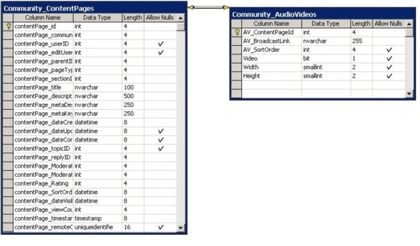
Figure 3 (Partial ERD diagram that represents Audio-Video content)
The "Community_Audio_Videos" table works together with its master table "Community_ContentPages" and they are joined with primary keys " AV_ContentPageId" and "ContentPageId" . The following list describes important attributes of the table Community_ AudioVideos:
- The AV_BroadCastlink attribute represents the url for a particular clip that is served by Windows Media server.
- The "Video" attribute acts as flag to determine whether the content is a video content(Video=1) or an audio content(Video=0).
- The Width and Height attributes represents the size of Windows Media Player.
- The "AV_SortOrder" attribute determines the display -order in the content list.
Step 2: Design a Business Entity Components(BEC) to represent a particular Audio-Video content.
namespace ASPNET.StarterKit.Communities
{
using System;
using System.Data.SqlClient;
/// <summary>
/// Represents all information about a particular AudioVideo Content.
/// </summary>
public class AudioVideoInfo:ContentInfo
{
string strAV_BroadcastLink=String.Empty;
bool bVideo;
short sWidth=0;
short sHeight=0;
/// <summary>
/// AudioVideoInfo Constructor
/// Calls base ContentInfo constructor to initialize general
// content information and then initialize link specific
// information from a SqlDataReader.
/// </summary>
/// <param name="dr"></param>
public AudioVideoInfo(SqlDataReader dr) : base(dr)
{
this.strAV_BroadcastLink = (string)dr["AV_BroadcastLink"];
this.bVideo=(bool)dr["Video"];
this.sWidth=(short)dr["Width"];
this.sHeight=(short)dr["Height"];
}
//*********************************************************************
//
// BroadcastLink Property
//
// Represents the URL for the Broadcast
//
//*********************************************************************
public string BroadcastLink
{
get {return this.strAV_BroadcastLink;}
set {this.strAV_BroadcastLink =value;}
}
/// <summary>
/// Indicates whether the content is video or audio
/// </summary>public bool Video
{
set
{
this.bVideo=value;
}
get
{
return bVideo;
}
}
/// <summary>
/// represents the width of media player
/// </summary>
public short Width
{
set
{
this.sWidth=value;
}
get
{
return (short) this.sWidth;
}
}
/// <summary>
/// represents the Height of media player
/// </summary>
public short Height
{
set
{
this.sHeight=value;
}
get
{
return (short) this.sHeight;
}
}
}
}
Figure 4 (BEC class for Audio-Video module)
3. Create a Database Gateway for Audio-Video content.
We have implemented the "AudioVideoUtility" class as Database-Gateway for the Audio-Video module. It is used to insert or update an Audio-Video content and it is also used to list all contents of a audio-video section. (see figure 5) . We haven't implemented any delete functionality on the AudioVideoUtility, class because we use the " void ContentPageUtility.DeleteContentPage(int contentPageID, int sectionID)" method to delete an Audio-Video content. This method will delete a particular row in the master table "Community_ContentPages" and the delete-cascade trigger will delete the its counter part in the "Community_AudioVideos" table.
Join the conversation! Your thoughts help the community grow.