

Authentication and Authorization are two major aspects while thinking about securing your application. Security is the main concern of modern applications because anyone can steal your data if it is not secured. So, if you are going to create an application where the data security is a primary concern, then think about Authentication and Authorization.
Authentication is the process to validate an anonymous user based on some credentials and Authorization process happens just after that and grants resources to this validated user. So, we can say, it's two-step validating process before providing the access of the resources or data.
We have many techniques to validate the users, like Windows Authentication, JWT Authentication, and Cookie Authentication etc. Today, we will learn how to implement and make ASP.NET Core MVC applications more secure using Cookie-based authentication and authorization. So, let's start the demonstration and create a fresh ASP.NET Core MVC project. You can refer to the following for the step by step process of creating an ASP.NET Core MVC application.
First Application in ASP.NET Core MVC 2.0
Be sure that while creating the project, your template should be Web Application (Model-View-Controller) and change the authentication as ‘No Authentication’.
You can download the code from here.
Here, you can choose the inbuilt Authentication functionality instead of ‘No Authentication’ and it will provide the readymade code. But we are choosing ‘No Authentication’ here because we are going to add our own Cookie-based authentication functionality in this demo and you will learn how to implement the Authentication and Authorization system from scratch.
We are choosing MVC template because we would like to see some Login and Logout functionality on UI along with Authentication and Authorization using Cookies. Now, click OK and it will take a few seconds and the project will be ready. Run it for checking if everything is working fine or not. Once everything is OK, you are ready to go.
Let’s move to the starting point of the ASP.NET Core application file which is “Startup.cs” where we configure the setting for the application like configuring the required services and configuring the middleware services etc. So, implementing the Authentication features, first, we have to add the authentication and then use it. So, let’s move to Startup.cs’s ConfigureService method and add the authentication feature using the following line of code, it will be just above services.AddMvc().
services.AddAuthentication(CookieAuthenticationDefaults.AuthenticationScheme)
        .AddCookie();
Now move to Configure in the startup.cs method and use the authentication features using the following line of code, it will be just above routing.
app.UseAuthentication();
Following is the whole code for adding the Authentication and using it.
using Microsoft.AspNetCore.Authentication.Cookies;
using Microsoft.AspNetCore.Builder;
using Microsoft.AspNetCore.Hosting;
using Microsoft.AspNetCore.Http;
using Microsoft.AspNetCore.Mvc;
using Microsoft.Extensions.Configuration;
using Microsoft.Extensions.DependencyInjection;
namespace CookieDemo
{
    public class Startup
    {
        public Startup(IConfiguration configuration)
        {
            Configuration = configuration;
        }
        public IConfiguration Configuration { get; }
        // This method gets called by the runtime. Use this method to add services to the container.
        public void ConfigureServices(IServiceCollection services)
        {
            services.Configure<CookiePolicyOptions>(options =>
            {
                // This lambda determines whether user consent for non-essential cookies is needed for a given request.
                options.CheckConsentNeeded = context => true;
                options.MinimumSameSitePolicy = SameSiteMode.None;
            });
         services.AddAuthentication(CookieAuthenticationDefaults.AuthenticationScheme).AddCookie();
            services.AddMvc().SetCompatibilityVersion(CompatibilityVersion.Version_2_1);
        }
        // This method gets called by the runtime. Use this method to configure the HTTP request pipeline.
        public void Configure(IApplicationBuilder app, IHostingEnvironment env)
        {
            if (env.IsDevelopment())
            {
                app.UseDeveloperExceptionPage();
            }
            else
            {
                app.UseExceptionHandler("/Home/Error");
            }
            app.UseStaticFiles();
            app.UseCookiePolicy();
            app.UseAuthentication();
            app.UseMvc(routes =>
            {
                routes.MapRoute(
                    name: "default",
                    template: "{controller=Home}/{action=Index}/{id?}");
            });
        }
    }
}
We can implement Authentication through the Login feature. In most of the applications today, Authorization is decided internally based on your role. So, now we are going to create an account login and logout feature, so just create one more controller as ‘AccountController.cs’ inside the controller's folder and add two action methods, one for rendering the Login View and the other one for posting user credentials data for logging in to the system. Here is the code for AccountController where we have implemented Login functionality.
using System;
using System.Collections.Generic;
using System.Linq;
using System.Security.Claims;
using System.Threading.Tasks;
using Microsoft.AspNetCore.Authentication;
using Microsoft.AspNetCore.Authentication.Cookies;
using Microsoft.AspNetCore.Mvc;
namespace CookieDemo.Controllers
{
    public class AccountController : Controller
    {
        public IActionResult Login()
        {
            return View();
        }
        [HttpPost]
        public IActionResult Login(string userName, string password)
        {
            if (!string.IsNullOrEmpty(userName) && string.IsNullOrEmpty(password))
            {
                return RedirectToAction("Login");
            }
            // Check the user name and password
            // Here can be implemented checking logic from the database
            if (userName == "Admin" && password == "password")
            {
                // Create the identity for the user
                var identity = new ClaimsIdentity(new[]
                {
                    new Claim(ClaimTypes.Name, userName)
                }, CookieAuthenticationDefaults.AuthenticationScheme);
                var principal = new ClaimsPrincipal(identity);
                var login = HttpContext.SignInAsync(CookieAuthenticationDefaults.AuthenticationScheme, principal);

                return RedirectToAction("Index", "Home");
            }
            return View();
        }
    }
}
The first login action method is rendering the UI for the login page and once you fill in the data required for Login as username and password then the second action method Login will work and send the Post request to the server.
In this method, first, we will check whether the username and password are empty then we will validate the username and password. Here, in this demonstration, we are checking the username and password with some dummy data. You can implement a database login instead of this.
After validating the user information, if everything is correct then we create Identity for that user and create the cookie information for it. Based on this principle data, we try to Sign In using a generic function called "SignInAsync" and if everything goes in the right direction then we redirect to the Home page.
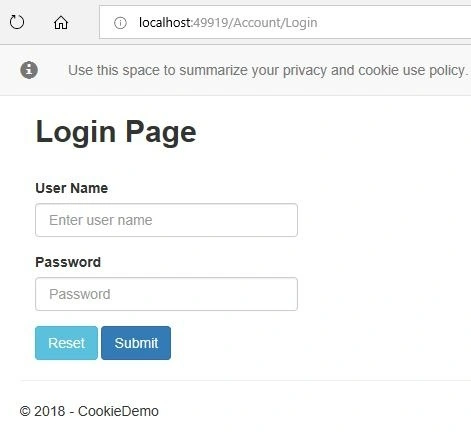
Now, let's create the Login view page from where we can give the functionality to the user to enter the username and password. So, right click on the Login action method and add a view without a model. It will automatically create the Account folder inside the Views under that will create the “login. cshtml” file. Just open it and create a container and add a form tag along with two textboxes for entering the username and password. Apart from this, create two separate buttons as “Submit” and “Reset”. Once you fill in the data and click on the submit button, it will call to the Login action method defined in the Account Controller using POST call. So, modify the code of “login. cshtml” as follows.
Sanjay ShekhawatPosted Jun 23, 2020, 1:03 AM
Thank u so much
Yogesh KhurpePosted May 1, 2020, 8:50 AM
It doesn't works.
Yogesh VedpathakPosted Mar 5, 2020, 6:45 AM
Awesome Article ...!!
borahan arslanPosted Jan 17, 2020, 10:52 PM
I tried but the [Authorize] attributes redirected to the login page. Did you test it? I think it doesn't work
Chittaranjan SwainPosted Sep 27, 2019, 5:35 AM
Nice One.....
B TongPosted Aug 6, 2019, 3:24 AM
Thank you very much
Lakshmi SandhyaPosted Jun 25, 2019, 7:36 AM
How to create login page using token based authentication with asp.net core
le namPosted May 2, 2019, 9:18 PM
Hi all! i customize page login for customer and admin with 2 page login using authorize roles authenticationschemes in .net core but nots success. please help me keyword or tutorial thanks.
Salman TariqPosted Apr 24, 2019, 7:58 AM
Good article but Logout not working
Natthakrit BaesiwPosted Mar 24, 2019, 12:00 AM
Cookies not working in Microsoft Edge web browser
Hunzla AliPosted Mar 10, 2019, 6:18 AM
I am getting everything in User.Identity null and Claims count also 0?
Amit Kumar SinghPosted Dec 14, 2018, 4:24 AM
Thanks for sharing.... Nice article !!
Arvind SinghPosted Dec 13, 2018, 10:57 PM
Nice article..
Sunil GuptaPosted Dec 13, 2018, 3:57 AM
Thank you for sharing, I created demo application and ran. It worked like champ.