

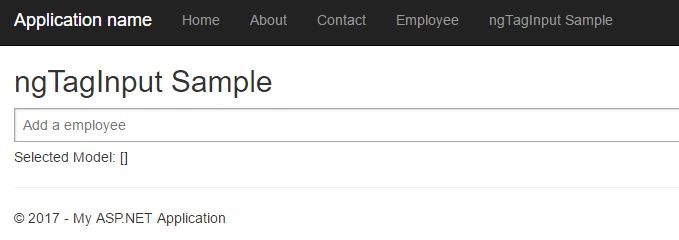
In this article, you will learn how to implement ngTagsInput directive in AngularJS. We will use Web API to get the data from SQL Server database with Entity Framework.
What is a tags input?
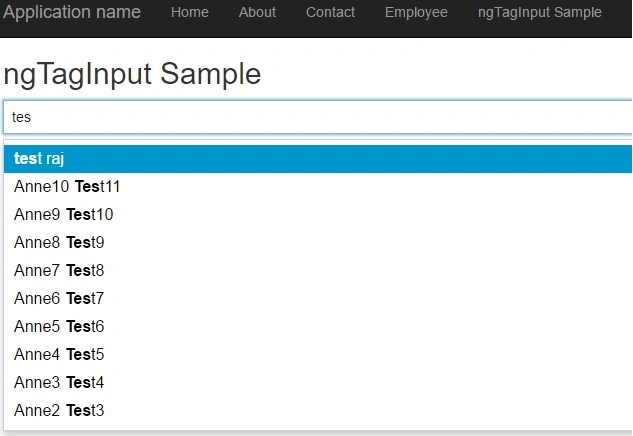
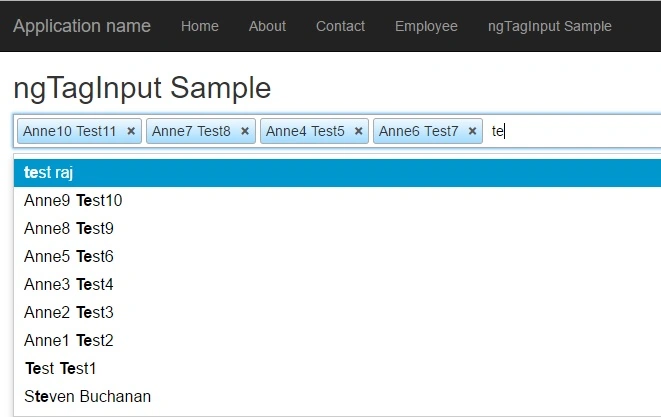
A tags input is an input box that automatically creates tags – also called tokens – out of typed text every time a certain key is pressed. It's useful for tagging and highlighting information right on the input box.
What is ngTagsInput?
ngTagsInput is a highly customizable tags input directive built for the AngularJS framework, with no external dependencies. It provides a <tags-input> element so you can semantically express you're using an input with tagging capabilities.
Where should I use it?
You can benefit from an input with tagging support when you want to let users enter tags for a post, select multiples contacts from a list, or any other situation where it's appropriate to have an inline, as-you-type list of items.
Stored Procedure
- USE [NORTHWND]
- GO
- /****** Object: StoredProcedure [dbo].[GetEmployee] Script Date: 11/15/2017 4:36:15 PM ******/
- SET ANSI_NULLS ON
- GO
- SET QUOTED_IDENTIFIER ON
- GO
- ALTER PROCEDURE [dbo].[GetEmployee]
- AS
- SELECT EmployeeID,
- FirstName,
- LastName,
- City,
- Region,
- PostalCode,
- Country,
- Notes
- FROM Employees
- ORDER BY EmployeeID DESC
Let’s work on Web API part first:
Model Class:
- public partial class GetEmployee_Result
- {
- public int EmployeeID { get; set; }
- public string FirstName { get; set; }
- public string LastName { get; set; }
- public string City { get; set; }
- public string Region { get; set; }
- public string PostalCode { get; set; }
- public string Country { get; set; }
- public string Notes { get; set; }
- }
- /// <summary>
- /// Get Employee using stored procedure
- /// </summary>
- /// <returns></returns>
- public async Task<IEnumerable<GetEmployee_Result>> GetEmployee()
- {
- try
- {
- return await db.Database.SqlQuery<GetEmployee_Result>("GetEmployee").ToListAsync();
- }
- catch (Exception ex)
- {
- throw ex;
- }
- }
- [RoutePrefix("api/EmployeeAPI")]
- public class EmployeeAPIController : ApiController
- {
- private readonly EmployeeVMBuilder _employeeVMBuilder = new EmployeeVMBuilder();
- // GET api/<controller>
- [Route("GetEmployee")]
- public async Task<IEnumerable<GetEmployee_Result>> GetEmployee()
- {
- return await _employeeVMBuilder.GetEmployee();
- }
- }
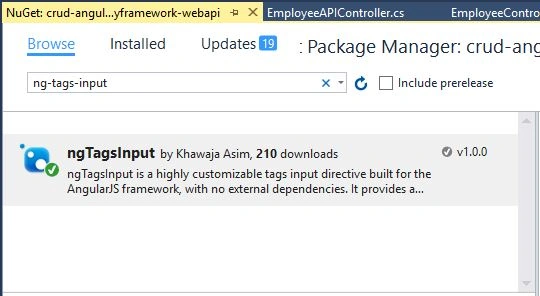
Add JavaScript files and CSS reference in BundleConfig.cs.
- bundles.Add(new StyleBundle("~/Content/css").Include(
- "~/Content/bootstrap.css",
- "~/Content/site.css",
- "~/Content/ui-grid.min.css",
- "~/Content/ng-tags-input.css"));
- bundles.Add(new ScriptBundle("~/bundles/angular").Include(
- "~/Scripts/angular.js",
- "~/Scripts/angular-route.js",
- "~/Scripts/ui-grid.js",
- "~/Scripts/angular-ui/ui-bootstrap.js",
- "~/Scripts/angular-ui/ui-bootstrap-tpls.js"));
- bundles.Add(new ScriptBundle("~/bundles/ngtagsInput").Include(
- "~/Scripts/ng-tags-input.js"));
- bundles.Add(new ScriptBundle("~/bundles/employee").Include(
- "~/Angular/app.js",
- "~/Angular/Services/employeeService.js",
- "~/Angular/Controller/employeeController.js",
- "~/Angular/Controller/editEmployeeController.js",
- "~/Angular/Controller/addEmployeeController.js",
- "~/Angular/Controller/ngtagsInputController.js"));
Pruthwiraj JagadalePosted Sep 6, 2018, 6:33 AM
Can you please provide this blog with Angular 2 or + versions
Rathrola Prem KumarPosted Dec 13, 2017, 2:26 AM
Plz attach your prjct in zip folder here, Thank you :)
Laxmidhar SahooPosted Dec 2, 2017, 6:23 AM
Actual a need this but scrambled around
Satyaprakash SamantarayPosted Nov 16, 2017, 11:03 AM
thats really interesting.....