

AutoComplete is an ASP.NET AJAX extender that can be attached to any TextBox control and will associate that control with a Popup panel to display a result returned from web services or retrieved from a database on the basis of text in a TextBox.
The Dropdown with name retrieved from the database or web service is positioned on the bottom-left of the TextBox.
Some Important properties of AutoCompleteExtender:
- TargetControlID: The TextBox control Id where the user types text to be automatically completed.
- EnableCaching: Whether client-side caching is enabled.
- CompletionSetCount: Number of suggestions to be retrieved from the web service.
- MinimumPrefixLength: Minimum number of characters that must be entered before getting suggestions from a web service.
- CompletionInerval: Time in milliseconds when the timer will kick in to get a suggestion using the web service.
- ServiceMethod: The web service method to be called.
- FirstRowSelected: Whether the first row is selected from the suggestion.
Example
Step 1
First we need to create a table like the following:
- Create table Friend(
- iId int identity(1,1) primary key,
- nvName nvarchar(50)
- )

Step 3
Create a website, then add a Web Form and copy the code.
- <%@ Page Language="C#" AutoEventWireup="true" CodeFile="Example.aspx.cs" Inherits="Example" %>
- <%@ Register Assembly="AjaxControlToolkit" Namespace="AjaxControlToolkit" TagPrefix="asp" %>
- <!DOCTYPE html PUBLIC "-//W3C//DTD XHTML 1.0 Transitional//EN" "http://www.w3.org/TR/xhtml1/DTD/xhtml1-transitional.dtd">
- <html xmlns="http://www.w3.org/1999/xhtml">
- <head runat="server">
- <title></title>
- </head>
- <body style="background-color:lightgray">
- <form id="form1" runat="server">
- <div>
- <asp:ScriptManager ID="ScriptManager1" runat="server" EnablePageMethods="true">
- </asp:ScriptManager>
- <asp:AutoCompleteExtender ServiceMethod="GetSearch" MinimumPrefixLength="1" CompletionInterval="10"
- EnableCaching="false" CompletionSetCount="10" TargetControlID="TextBox1" ID="AutoCompleteExtender1"
- runat="server" FirstRowSelected="false">
- </asp:AutoCompleteExtender>
- <asp:Label ID="Label1" runat="server" Text="Search Name"></asp:Label>
- <asp:TextBox ID="TextBox1" runat="server"></asp:TextBox>
- </div>
- </form>
- </body>
- </html>
Write the following code in the aspx.cs page:
- using System;
- using System.Collections.Generic;
- using System.Linq;
- using System.Web;
- using System.Web.UI;
- using System.Web.UI.WebControls;
- using System.Data;
- using System.Data.SqlClient;
- public partial class Example : System.Web.UI.Page
- {
- static SqlConnection con = new SqlConnection("data source=.\\sqlexpress;
- initial catalog=example;integrated security=true;"); //Create a Sql connection
- static SqlDataAdapter da;
- static DataTable dt;
- protected void Page_Load(object sender, EventArgs e)
- {
- }
- [System.Web.Script.Services.ScriptMethod()]
- [System.Web.Services.WebMethod]
- public static List<string> GetSearch(string prefixText)
- {
- DataTable Result = new DataTable();
- string str = "select nvName from Friend where nvName like '" + prefixText + "%'";
- da = new SqlDataAdapter(str, con);
- dt = new DataTable();
- da.Fill(dt);
- List<string> Output = new List<string>();
- for (int i = 0; i < dt.Rows.Count; i++)
- Output.Add(dt.Rows[i][0].ToString());
- return Output;
- }
- }
Now run the website and provide any input that will populate the following list:
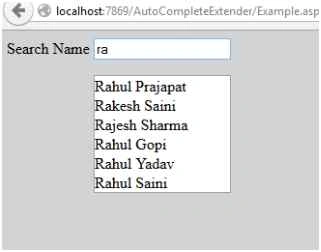
Note: You need to use the Ajax Control Toolkit library.
Abhishek ManePosted Aug 18, 2023, 5:34 AM
While using this code there are shown html code in list of that textbox
David EaglePosted Jun 4, 2020, 4:16 AM
I keep getting 500 Internal server error. UPDATE: Never mind, I just messed up my SQL statement.
alimohamad ASNPosted May 8, 2020, 5:31 AM
Hi what can we do if do filter table with several parameters such as route.page value or querystring?
Nandha Kumar NagarajanPosted Jun 26, 2019, 4:43 AM
Hi sir i have a little bit error in my table employee code starts with 0123,0145 something but there is not show 0 in extender like emp code is 0123 when i enter 0 it will shows 123 only theere is not bind zeros help me!!!!!!!!!!!!!!!
Rahul PrajapatPosted Aug 10, 2015, 4:10 AM
thanks Sibeesh Venu sir
Rahul PrajapatPosted Aug 10, 2015, 4:10 AM
thanks Chervine Bhiwoo sir, i don't know .
Rahul PrajapatPosted Aug 10, 2015, 4:09 AM
thanks Sandeep Kumar sir
Rahul PrajapatPosted Aug 10, 2015, 4:08 AM
thanks Rajeesh Menoth sir
Rahul PrajapatPosted Aug 10, 2015, 4:08 AM
thanks Ankit Bansal sir
Rahul PrajapatPosted Aug 10, 2015, 4:07 AM
thanks Shridhar Sharma sir
Rahul PrajapatPosted Aug 10, 2015, 4:07 AM
thanks Rakesh Chavda sir
Rahul PrajapatPosted Aug 10, 2015, 4:06 AM
thanks Santhakumar Munuswamy sir
Rahul PrajapatPosted Aug 10, 2015, 4:06 AM
thanks Pankaj Kumar Choudhary sir
Sibeesh VenuPosted Aug 10, 2015, 1:03 AM
Nice Share
Chervine BhiwooPosted Aug 9, 2015, 11:16 AM
Great! Can same be used with MVC?
Sandeep KumarPosted Aug 9, 2015, 4:29 AM
Nicely done :)
Rajeesh MenothPosted Aug 9, 2015, 3:51 AM
Nice One
Ankit BansalPosted Aug 8, 2015, 11:31 PM
nice share..
Shridhar SharmaPosted Aug 8, 2015, 8:12 PM
Nice
RakeshPosted Aug 8, 2015, 12:14 PM
Good one
Santhakumar MunuswamyPosted Aug 8, 2015, 10:04 AM
Nice Article. Thanks for sharing
Pankaj Kumar ChoudharyPosted Aug 8, 2015, 8:08 AM
Nice Explain ....