Background
Many times there is need to some suggested text when we are searching particular text from huge Records,so this type of requirement we can achieve by using the Ajax Control toolkit Auto Complete extender. So let us implement this requirement step by step as
What is the AutoComplete Extender ?
AutoComplete is an ASP.NET AJAX extender that can be attached to any TextBox control, and will associate that control with a popup panel to display words that begin with the prefix typed into the textbox. The dropdown with candidate words supplied by a web service is positioned on the bottom left of the text box.
Step 1: Create Table using given script as
- CREATE TABLE [dbo].[Countries](
- [CountryId] [int] IDENTITY(1,1) NOT NULL,
- [CountryName] [varchar](50) NULL,
- CONSTRAINT [PK_Countries] PRIMARY KEY CLUSTERED
- (
- [CountryId] ASC
- )WITH (PAD_INDEX = OFF, STATISTICS_NORECOMPUTE = OFF, IGNORE_DUP_KEY = OFF, ALLOW_ROW_LOCKS = ON, ALLOW_PAGE_LOCKS = ON) ON [PRIMARY]
- ) ON [PRIMARY]
-
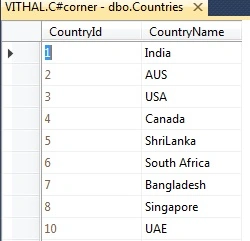
Insert some records into a table like as follows:
Step 2: Create web Application as:
- "Start" - "All Programs" - "Microsoft Visual Studio 2010".
- "File" - "New WebSite" - "C#" - "Empty WebSite" (to avoid adding a master page).
- Provide the web site a name such as "Autocomplete" or another as you wish and specify the location.
- Then right-click on Solution Explorer - "Add New Item" - Add Web Form.
- Drag and drop one textBoxes onto the <form> section of the Default.aspx page.
- Add AutoCompleteExtender from ToolBox
- Now the default.aspx page source code will look such as follows.
- <%@ Page Language="C#" AutoEventWireup="true" CodeFile="Default.aspx.cs" Inherits="_Default" %>
-
- <%@ Register Assembly="AjaxControlToolkit" Namespace="AjaxControlToolkit" TagPrefix="asp" %>
- <!DOCTYPE html PUBLIC "-//W3C//DTD XHTML 1.0 Transitional//EN" "http://www.w3.org/TR/xhtml1/DTD/xhtml1-transitional.dtd">
- <html xmlns="http://www.w3.org/1999/xhtml">
- <head runat="server">
- <title></title>
- </head>
- <body style="background-color: #0000FF">
- <form id="form1" runat="server">
- <asp:ScriptManager ID="ScriptManager1" runat="server" EnablePageMethods = "true">
-
- </asp:ScriptManager>
- <table style="margin-top:40px;color:White">
- <tr>
- <td>
- Search County
- </td>
- <td>
- <asp:TextBox ID="TextBox1" runat="server"></asp:TextBox>
- <asp:AutoCompleteExtender ServiceMethod="GetCompletionList" MinimumPrefixLength="1"
- CompletionInterval="10" EnableCaching="false" CompletionSetCount="1" TargetControlID="TextBox1"
- ID="AutoCompleteExtender1" runat="server" FirstRowSelected="false">
- </asp:AutoCompleteExtender>
- </td>
- </tr>
- </table>
- </form>
- </body>
- </html>
Step 3: Define connection string in Web.config file as:
- <connectionStrings>
- <add name ="Conn" connectionString ="Data Source=VITHAL;Initial Catalog=C#corner;User Id=sa;word=swift"/>
- </connectionStrings>
Note: Please make changes in above connection string as per your server location.
Step 4: Write Method in default.aspx.cs page to bind records from the database as:
- [System.Web.Script.Services.ScriptMethod()]
- [System.Web.Services.WebMethod]
- public static List<string> GetCompletionList(string prefixText, int count)
- {
- using (SqlConnection con = new SqlConnection())
- {
- con.ConnectionString = ConfigurationManager.ConnectionStrings["Conn"].ConnectionString;
- using (SqlCommand com = new SqlCommand())
- {
- com.CommandText = "select CountryName from Countries where " + "CountryName like @Search + '%'";
-
- com.Parameters.AddWithValue("@Search", prefixText);
- com.Connection = con;
- con.Open();
- List<string> countryNames = new List<string>();
- using (SqlDataReader sdr = com.ExecuteReader())
- {
- while (sdr.Read())
- {
- countryNames.Add(sdr["CountryName"].ToString());
- }
- }
- con.Close();
- return countryNames;
- }
- }
- }
Step 5: configure AutoCompleteExtender as per service calling method and TargetTextBox as:
- <asp:AutoCompleteExtender ServiceMethod="GetCompletionList"
- MinimumPrefixLength="1"
- CompletionInterval="10"
- EnableCaching="false"
- CompletionSetCount="1"
- TargetControlID="TextBox1"
- ID="AutoCompleteExtender1"
- runat="server"
- FirstRowSelected="false">
- </asp:AutoCompleteExtender>
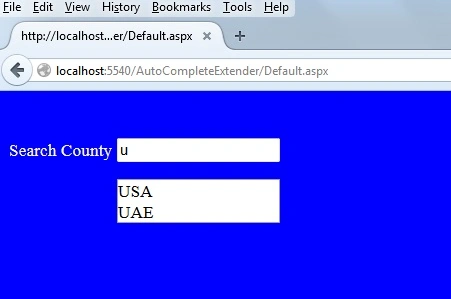
Step 6: Run the application and give any input it will populate following list as:
In the above example, records are populated from the database which name starts from U character.
Note
- For the detailed code, please download the sample Zip file.
- Perform changes in Web.config file as per your server location.
- You need to use the Ajax Control Toolkit library.
- To download latest Ajax control toolkit, click here Ajax ContolToolkit Download
Summary
For all the examples above, we have learned how to use the Ajax auto complete extender, I hope this article is useful for all readers. If you have a suggestion then please contact me.


Kinyanjui KamauPosted Apr 27, 2021, 4:00 PM
Hmm, I type a few characters and the whole page freezes. Is am using Webforms with a master page.
Waqas KhanPosted Apr 23, 2019, 10:32 PM
Anyone help me
Waqas KhanPosted Apr 23, 2019, 10:30 PM
Hi, this is not working.
Rajneesh ChaubeyPosted Apr 5, 2018, 1:31 AM
Hi Vithal, Nice Article. I have one question that we can attach both CountryName as well as ID. But on frontend when we write CountryName, ID should not be displayed? How can do that?
Mohammad MuneerAlamPosted Apr 24, 2017, 8:12 AM
It is giving me 500 internal server error in a content page.
Akshay MahurePosted Oct 24, 2015, 1:43 AM
0x800a139e - JavaScript runtime error: Sys.ArgumentException: Cannot deserialize. The data does not correspond to valid JSON.
Akshay MahurePosted Oct 24, 2015, 1:40 AM
it shows
Avinash RaoPosted Jul 29, 2015, 5:10 AM
not getting results.. can anyone help or guide to do it through MySQL DB using Stored Procedure instead of SQL Syntax
Vithal WadjePosted May 29, 2015, 3:24 PM
No,but other way is nothing.Need to check alternative
kashish khannaPosted May 29, 2015, 5:02 AM
Is this the right way to hit databse again and again for suggestions ?
Vithal WadjePosted Apr 28, 2015, 1:25 PM
use code as it is ,as shown in my article
Vithal WadjePosted Mar 20, 2015, 1:01 PM
it will work in content page
Salma SwalahinPosted Mar 20, 2015, 5:39 AM
I am facing the problem again in another project ,i am tring to do this in master.master and default.How I do this ,plz Give some solutions....
Vithal WadjePosted Mar 13, 2015, 1:15 PM
Textbox.Text.Trim();
nivas infoPosted Mar 13, 2015, 4:16 AM
Hi.. It worked.. Thanks.. Please tell me how to remove the space between "Textbox" and "Autocomplete Box"?
Salma SwalahinPosted Feb 22, 2015, 10:28 AM
I am using this in my masterpage ,but its not working,please give some suggestions.
Vithal WadjePosted Nov 18, 2014, 3:38 AM
download Ajax control Toolkit
Basavaraja HariyavvanavarPosted Nov 18, 2014, 2:48 AM
I am having, if (typeof(Sys) === 'undefined') throw new Error('ASP.NET Ajax client-side framework failed to load.'); error but i dont know how to fix it. please help me