

Let's begin.
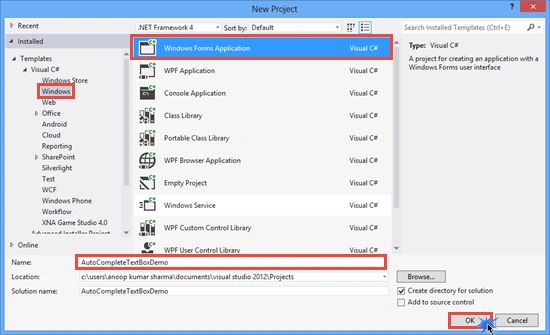
Create a new Windows Forms application.
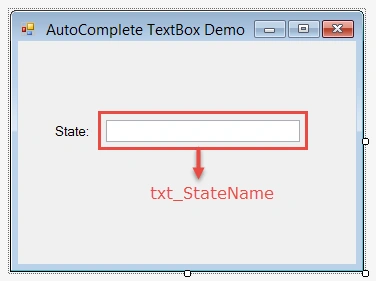
Drop a Label and TextBox control from the ToolBox.
Now go to the Code Behind file (.cs code) and add the following lines of code:
- using System;
- using System.Windows.Forms;
- namespace AutoCompleteTextBoxDemo
- {
- public partial class Form1 : Form
- {
- public Form1()
- {
- InitializeComponent();
- }
- //AutoCompleteData Method
- private void autoCompleteData()
- {
- //Set AutoCompleteSource property of txt_StateName as CustomSource
- txt_StateName.AutoCompleteSource = AutoCompleteSource.CustomSource;
- //Set AutoCompleteMode property of txt_StateName as SuggestAppend. SuggestAppend Applies both Suggest and Append
- txt_StateName.AutoCompleteMode = AutoCompleteMode.SuggestAppend;
- txt_StateName.AutoCompleteCustomSource.AddRange(new string[]{"Maharastra","Andhra Pradesh","Assam","Punjab","Arunachal
- Pradesh","Bihar","Goa","Gujarat","Haryana"});
- }
- private void Form1_Load(object sender, EventArgs e)
- {
- autoCompleteData();
- }
- }
- }
Preview

AutoComplete TextBox with Database:
In this example, we will Suggest/Append the data in the TextBox (txt_StateName) from the database. For demonstration, I have created a database (named Sample). Add a Table, tbl_State. The following is the table schema for creating tbl_State.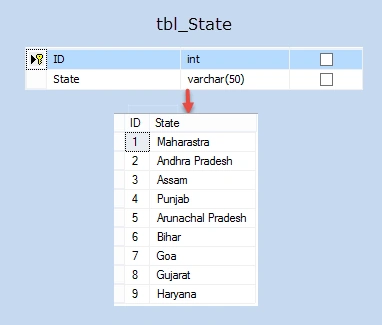
In this example, we will Suggest/Append the data in the TextBox (txt_StateName) from the database. For demonstration, I have created a database (named Sample). Add a Table, tbl_State. The following is the table schema for creating tbl_State.
Add the following lines of code:
- using System;
- using System.Windows.Forms;
- using System.Data.SqlClient;
- namespace AutoCompleteTextBoxDemo
- {
- public partial class Form2 : Form
- {
- public Form2()
- {
- InitializeComponent();
- }
- private void autoCompleteData()
- {
- SqlConnection con = new SqlConnection("Data Source=.;Initial Catalog=Sample;Integrated Security=true;");
- SqlCommand com = new SqlCommand("Select State from tbl_State", con);
- con.Open();
- SqlDataReader rdr = com.ExecuteReader();
- //AutoCompleteStringCollection Contains a collection of strings to use for the auto-complete feature on certain Windows Forms controls.
- AutoCompleteStringCollection autoCompleteCollection = new AutoCompleteStringCollection();
- while (rdr.Read())
- {
- autoCompleteCollection.Add(rdr.GetString(0));
- }
- //Set AutoCompleteSource property of txt_StateName as CustomSource
- txt_StateName.AutoCompleteSource = AutoCompleteSource.CustomSource;
- //Set AutoCompleteMode property of txt_StateName as SuggestAppend. SuggestAppend Applies both Suggest and Append
- txt_StateName.AutoCompleteMode = AutoCompleteMode.SuggestAppend;
- txt_StateName.AutoCompleteCustomSource = autoCompleteCollection;
- con.Close();
- }
- //Form2_Load Event
- private void Form2_Load(object sender, EventArgs e)
- {
- autoCompleteData();
- }
- }
- }
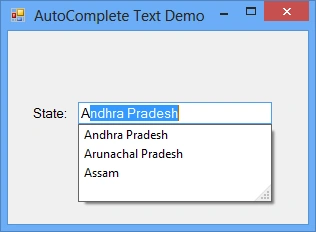
I hope you like it. Thanks.
Mohammed KhadirPosted Oct 31, 2016, 5:39 AM
Nice work Anoop, How to do the same from sql database with datagridview columns
Abhi SanghviPosted Oct 24, 2016, 1:45 PM
How do I make a textbox that only accepts numbers?
Abhi SanghviPosted Oct 6, 2016, 2:42 AM
[email protected] mail me auto complete textbox code using linq
Abhi SanghviPosted Oct 6, 2016, 2:41 AM
Can you help please i need this type code but using linq
Anoop Kumar SharmaPosted May 23, 2015, 1:23 PM
You're welcome.. majedul islam :-)
majedul islamPosted May 23, 2015, 1:18 PM
thanks
Anoop Kumar SharmaPosted Apr 23, 2015, 12:02 PM
Thanks Karthik Muthu Karuppan..!!
Karthik Muthu KaruppanPosted Apr 23, 2015, 11:27 AM
nice
Anoop Kumar SharmaPosted Apr 20, 2015, 7:11 AM
Thanks Amal Salah..!!
Amal SalahPosted Apr 20, 2015, 3:33 AM
this is helpful thanks