

Introduction
In this article we will create a TextBox that will suggest names from a SQL Server database column FirstName. Typing the first few characters will show matching names from the FirstName column as dropdown. The final output will be like:
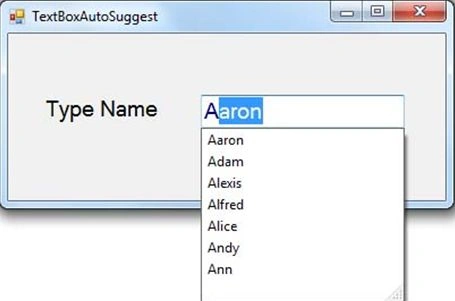
Step 1: Create a new Windows Forms Application and add a TextBox and a Label on the Form1 as in the above figure.
Step 2: Set the properties of the TextBox.
| Property Name | Value |
| (Name) | txtFirstName |
| AutoCompleteSource | CustomSource |
| AutoCompleteMode | SuggestAppend |
The AutoCompleteSource property sets the source for the auto complete data. It can be set to a AutoCompleteSource enumeration, FileSystem, HistoryList, RecentlyUsedList, AllUrl, AlSystemSources, FileSystemDirectories, CustomSource or None. Since we are getting our own data we set it to CustomSource.
The AutoCompleteMode property defines how text is suggested in the TextBox. It can be set to a AutoCompleteMode enumeration, Append, Suggest, SuggestAppend, None. Suggest displays all the suggestions as dropdown. Append displays the first value of the suggestion appended or selected in the TextBox; other values can be navigated using arrow keys. SuggestAppend displays suggested values as dropdown and the first value is appended in the TextBox.
Step 3: Write the code in the Load Event of Form1.
private void Form1_Load(object sender, EventArgs e)
{
string ConString = ConfigurationManager.ConnectionStrings["ConString"].ConnectionString;
using (SqlConnection con = new SqlConnection(ConString))
{
SqlCommand cmd = new SqlCommand("SELECT FirstName FROM Employees", con);
con.Open();
SqlDataReader reader = cmd.ExecuteReader();
AutoCompleteStringCollection MyCollection = new AutoCompleteStringCollection();
while (reader.Read())
{
MyCollection.Add(reader.GetString(0));
}
txtFirstName.AutoCompleteCustomSource = MyCollection;
con.Close();
}
}
Here, first we get a connection string from the App.Config file in the ConString variable. Then using SqlDataReader add FirstNames to a AutoCompleteStringCollection object MyCollection. AutoCompleteCustomSource accepts AutoCompleteStringCollection object.
ZAFAR IQBALPosted Mar 30, 2021, 3:58 AM
If your coded not work pls first check if your textbox multiple line "True". In true property set it not work..
Sahilpreet SinghPosted Jan 1, 2018, 1:15 AM
I have many connection strings in my app.config file.What should i do?It is showin error System.Configuration.ConnectionStringSettingsCollection.this[string].get returned null.
Monu DixitPosted Nov 20, 2017, 2:08 AM
Thanks its very helpful...
SubashPosted Sep 10, 2016, 5:29 AM
Useful one
SubashPosted Sep 10, 2016, 5:29 AM
Nice
Mohi UddinPosted Jul 17, 2015, 10:17 AM
Many Thanks. Its very helpful. But, enter keypress code is not working.
smaran kumarPosted Jun 17, 2015, 4:57 AM
its working, what if table has some 10000+ rows? It will take few seconds or minutes to load a window. I tried to do on textchanged, it failed. Please help
Imran PathanPosted Dec 10, 2014, 1:20 AM
If same name int database how can solve problem in autocomplete pls help me
kami kamkamPosted Sep 21, 2014, 4:23 AM
I%20want%20to%20create%20a%20TextBox%20that%20will%20suggest%20First%20names%20AND%20Last%20names%20from%202%20SQL%20Server%20database%20columns%20FirstName%20%20%26amp%3B%20%20LastName.%20%0AI%20mean%20%2C%20if%20I%20typed%20A%20%2C%20it%20suggests%20me%20Anna%2C%20Amita%20%2C..%20(from%20first%20name%20column)%20and%20also%20Anderson%20%2C%20Armandi%20%2C%20...%20(from%20the%20Family%20column).%20thank%20you%20.
Jayesh Babu A VPosted Aug 31, 2014, 9:09 AM
Thanks. Its very helpful. But, it doesn't work with multiline textbox
sabyasachi mishraPosted Feb 8, 2014, 2:10 AM
Thanks Deeapk very nice article
sunny saharawateditedPosted May 4, 2013, 6:00 AMEdited May 4, 2013, 6:01 AM
thanx sir its working but it has a problem if emp_name column has 2 or 3 emp with same name then it showing only 1 and how to find address coressponding to that name in new list pls reply sir soon..........
Naresh Babu GopavaramPosted Oct 21, 2012, 2:09 PM
nice article yar keep it up
selva kumarPosted Oct 12, 2012, 1:09 PM
its not suggesting all words yaar... if i'm having 3 words like selva,selvakumar,senna it suggesting ly first two words.... last word not displaying in suggestion list... plz i need answer.....
Gaurav GuptaPosted Apr 17, 2012, 11:56 PM
i want all records in the list includes suggested words.
Shubham SrivastavaPosted Apr 17, 2012, 5:30 PM
Appreciable work. Can we do this in web application also ?
Arjun PanwarPosted Apr 1, 2012, 11:50 PM
Really very nice work, thanks
Sudhakar ChaudharyPosted Apr 1, 2012, 3:41 AM
nice that is usefull for me thanks for sharing...