Introduction
While developing some app in Windows Phone 8 I intend to blog about how to create a simple game app that should help the fresh Windows Phone 8 developer.
Ball levitation a short tour
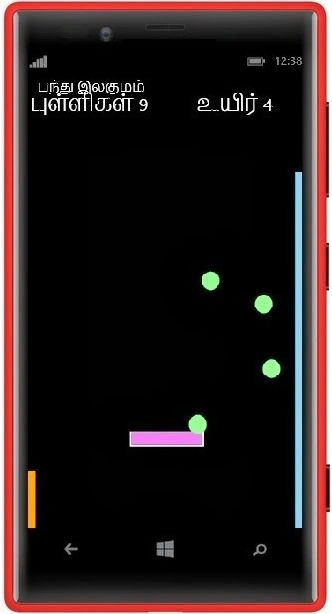
In this game a few balls are levitated and wandering around the space at a right angle. And the actual goal of the game is to keep the balls levitated using the disc by beating the ball before it reaches the screen's ultimate bottom.
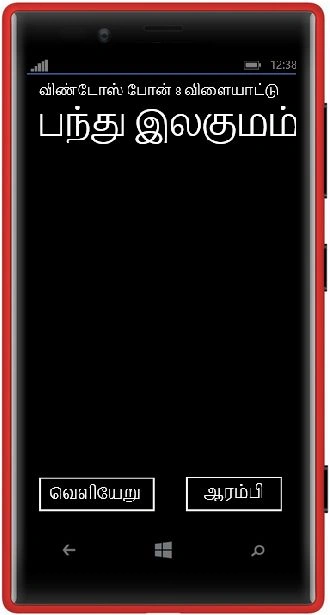
Start Screen Image
The following shows the Start Screen of the app.
Play Screen Image
The following shows the play screen image with the balls and disc.
XAML Code Behind the APP
App.xaml
<Application
x:Class="?????_???????.App"
xmlns="http://schemas.microsoft.com/winfx/2006/xaml/presentation"
xmlns:x="http://schemas.microsoft.com/winfx/2006/xaml"
xmlns:phone="clr-namespace:Microsoft.Phone.Controls;assembly=Microsoft.Phone"
xmlns:shell="clr-namespace:Microsoft.Phone.Shell;assembly=Microsoft.Phone">
<!--Application Resources-->
<Application.Resources>
<local:LocalizedStrings xmlns:local="clr-namespace:?????_???????" x:Key="LocalizedStrings"/>
</Application.Resources>
<Application.ApplicationLifetimeObjects>
<!--Required object that handles lifetime events for the application-->
<shell:PhoneApplicationService
Launching="Application_Launching" Closing="Application_Closing"
Activated="Application_Activated" Deactivated="Application_Deactivated"/>
</Application.ApplicationLifetimeObjects>
</Application>
MainPage.xaml
<phone:PhoneApplicationPage
x:Class="?????_???????.MainPage"
xmlns="http://schemas.microsoft.com/winfx/2006/xaml/presentation"
xmlns:x="http://schemas.microsoft.com/winfx/2006/xaml"
xmlns:phone="clr-namespace:Microsoft.Phone.Controls;assembly=Microsoft.Phone"
xmlns:shell="clr-namespace:Microsoft.Phone.Shell;assembly=Microsoft.Phone"
xmlns:d="http://schemas.microsoft.com/expression/blend/2008"
xmlns:mc="http://schemas.openxmlformats.org/markup-compatibility/2006"
mc:Ignorable="d"
FontFamily="{StaticResource PhoneFontFamilyNormal}"
FontSize="{StaticResource PhoneFontSizeNormal}"
Foreground="{StaticResource PhoneForegroundBrush}"
SupportedOrientations="Portrait" Orientation="Portrait"
shell:SystemTray.IsVisible="True">
<!--LayoutRoot is the root grid where all page content is placed-->
<Grid x:Name="LayoutRoot" Background="Transparent">
<Grid.RowDefinitions>
<RowDefinition Height="Auto"/>
<RowDefinition Height="*"/>
</Grid.RowDefinitions>
<!-- LOCALIZATION NOTE:
To localize the displayed strings copy their values to appropriately named
keys in the app's neutral language resource file (AppResources.resx) then
replace the hard-coded text value between the attributes' quotation marks
with the binding clause whose path points to that string name.
For example
Text="{Binding Path=LocalizedResources.ApplicationTitle, Source={StaticResource LocalizedStrings}}"
This binding points to the template's string resource named "ApplicationTitle".
Adding supported languages in the Project Properties tab will create a new resx file per language that can carry the translated values of your UI strings. The binding in these examples will cause the value of the attributes to be drawn from the .resx file that matches the CurrentUICulture of the app at run time. -->
<!--TitlePanel contains the name of the application and page title-->
<StackPanel x:Name="TitlePanel" Grid.Row="0" Margin="12,17,0,28">
<TextBlock Text="????????? ????? 8 ??????????" Style="{StaticResource PhoneTextNormalStyle}" Margin="12,0"/>
<TextBlock Text="????? ???????" Margin="9,17,0,0" FontSize="50"/>
</StackPanel>
<!--ContentPanel - place additional content here-->
<Grid x:Name="ContentPanel" Grid.Row="1" Margin="12,0,12,0">
<Button Content="??????" HorizontalAlignment="Left" Height="81" Margin="255,510,0,0" VerticalAlignment="Top" Width="191" Click="Button_Click_1"/>
<Button Content="???????? " HorizontalAlignment="Left" Height="80" Margin="0,511,0,0" VerticalAlignment="Top" Width="225" />
</Grid>
</Grid>
</phone:PhoneApplicationPage>
PlayScreen.xaml
<phone:PhoneApplicationPage
xmlns="http://schemas.microsoft.com/winfx/2006/xaml/presentation"
xmlns:x="http://schemas.microsoft.com/winfx/2006/xaml"
xmlns:phone="clr-namespace:Microsoft.Phone.Controls;assembly=Microsoft.Phone"
xmlns:shell="clr-namespace:Microsoft.Phone.Shell;assembly=Microsoft.Phone"
xmlns:d="http://schemas.microsoft.com/expression/blend/2008"
xmlns:mc="http://schemas.openxmlformats.org/markup-compatibility/2006"
xmlns:maps="clr-namespace:Microsoft.Phone.Maps.Controls;assembly=Microsoft.Phone.Maps"
xmlns:local="clr-namespace:?????_???????"
x:Class="?????_???????.PlayScreen"
FontFamily="{StaticResource PhoneFontFamilyNormal}"
FontSize="{StaticResource PhoneFontSizeNormal}"
Foreground="{StaticResource PhoneForegroundBrush}"
SupportedOrientations="Portrait" Orientation="Portrait"
mc:Ignorable="d"
shell:SystemTray.IsVisible="True">
<!--LayoutRoot is the root grid where all page content is placed-->
<Grid x:Name="LayoutRoot" Background="Transparent">
<Grid.RowDefinitions>
<RowDefinition Height="Auto"/>
<RowDefinition Height="*"/>
</Grid.RowDefinitions>
<!--TitlePanel contains the name of the application and page title-->
<StackPanel Grid.Row="0" Margin="12,17,0,28">
<TextBlock Text="????? ???????" Style="{StaticResource PhoneTextNormalStyle}"/>
<TextBlock Name="Header" FontSize="30" Margin="0,0,12,0"/>
</StackPanel>
<Grid Grid.Row="1">
<Grid.ColumnDefinitions>
<ColumnDefinition Width="Auto"/>
<ColumnDefinition Width="*"/>
<ColumnDefinition Width="Auto"/>
</Grid.ColumnDefinitions >
<Rectangle Name="Level" Grid.Column="0" Fill="Orange" Width="20" Height=" 100" VerticalAlignment ="Bottom"></Rectangle>
<Rectangle Name="Life" Grid.Column="2" Fill="SkyBlue" Width="20" Height=" 600" VerticalAlignment ="Bottom"></Rectangle>
<!--ContentPanel - place additional content here-->
<Grid x:Name="ContentPanel" Grid.Column="1" Margin="5,0,0,0">
<Button Name="Disc" Background="Violet" Content="" Height="51" Margin="0,485,0,0" VerticalAlignment="Top" Width="150" RenderTransformOrigin="-0.09,0.585"/>
<local:WanderingBall Name="Ball1" HorizontalAlignment="Left" Height="32" Margin="217,479,0,0" VerticalAlignment="Top" Width="30" RenderTransformOrigin="4.877,3.512"/>
<local:WanderingBall Name="Ball2" HorizontalAlignment="Left" Height="32" Margin="25,270,0,0" VerticalAlignment="Top" Width="30" RenderTransformOrigin="4.877,3.512"/>
<local:WanderingBall Name="Ball3" HorizontalAlignment="Left" Height="32" Margin="150,147,0,0" VerticalAlignment="Top" Width="30" RenderTransformOrigin="4.877,3.512"/>
<local:WanderingBall Name="Ball4" HorizontalAlignment="Left" Height="32" Margin="47,0,0,0" VerticalAlignment="Top" Width="30" RenderTransformOrigin="4.877,3.512"/>
<TextBlock Name="GameOver" HorizontalAlignment="Left" Height="92" FontWeight="Bold" Foreground="Violet" Visibility="Collapsed" FontSize="27" Margin="10,98,0,0" TextWrapping="Wrap" Text="?????????? ?????????" VerticalAlignment="Top" Width="415"/>
</Grid>
</Grid>
</Grid>
</phone:PhoneApplicationPage>
WanderingBall.xaml
<UserControl x:Class="?????_???????.WanderingBall"
xmlns="http://schemas.microsoft.com/winfx/2006/xaml/presentation"
xmlns:x="http://schemas.microsoft.com/winfx/2006/xaml"
xmlns:d="http://schemas.microsoft.com/expression/blend/2008"
xmlns:mc="http://schemas.openxmlformats.org/markup-compatibility/2006"
mc:Ignorable="d"
FontFamily="{StaticResource PhoneFontFamilyNormal}"
FontSize="{StaticResource PhoneFontSizeNormal}"
Foreground="{StaticResource PhoneForegroundBrush}"
d:DesignHeight="480" d:DesignWidth="480">
<Grid x:Name="LayoutRoot" Background="Transparent">
<Ellipse Fill="PaleGreen" />
</Grid>
</UserControl>
C# Code snippet behind this APP
MainPage.xaml.cs
using System;
using System.Collections.Generic;
using System.Linq;
using System.Net;
using System.Windows;
using System.Windows.Controls;
using System.Windows.Navigation;
using Microsoft.Phone.Controls;
using Microsoft.Phone.Shell;
using ?????_???????.Resources;
namespace ?????_???????
{
public partial class MainPage : PhoneApplicationPage
{
// Constructor
public MainPage()
{
InitializeComponent();
// Sample code to localize the ApplicationBar
//BuildLocalizedApplicationBar();
}
private void Button_Click_1(object sender, RoutedEventArgs e)
{
NavigationService.Navigate(new Uri("/PlayScreen.xaml", UriKind.Relative)); // Navigate to Play Screen
}
}
}
PlayScreen.xaml.cs
using System;
using System.Collections.Generic;
using System.Linq;
using System.Net;
using System.Windows;
using System.Windows.Controls;
using System.Windows.Navigation;
using Microsoft.Phone.Controls;
using Microsoft.Phone.Shell;
using System.Windows.Media;
using System.Windows.Threading;
namespace ?????_???????
{
public partial class PlayScreen : PhoneApplicationPage
{
public PlayScreen()
{
InitializeComponent();
this.Disc.ManipulationDelta += Disc_ManipulationDelta; // Hook Dock ManipulationDelta event to process touch actions
this.timer.Tick += new EventHandler(timer_Tick); // Have a Timer for level and life updates
this.timer.Start(); // Start the timer for frequent update
ButtonTransformGroup.Children.Add(translateTransform); // Add translate transform in to button transformgroup for triggering the translate action of the disc
Disc.RenderTransform = ButtonTransformGroup; // assign that transform to disc render
}
private TranslateTransform translateTransform = new TranslateTransform(); // Instance for controls translate actions
private TransformGroup ButtonTransformGroup = new TransformGroup(); // Instance of Transfrom group that hold the translate actions
private int points = 0; // varaiable for points
private string header = string.Empty; // Varaiable for header text
DispatcherTimer timer = new DispatcherTimer { Interval = TimeSpan.FromSeconds(0.5) }; // Instance of a timer for the regular updates of values
private void timer_Tick(object sender, EventArgs e)
{
int length = 0; // Counts of the ball that levitated
if (this.Ball1.Visibility == System.Windows.Visibility.Visible) // Check the visibility of ball 1
{
length++; // Increase the count by one
}
if (this.Ball2.Visibility == System.Windows.Visibility.Visible) // Check the visibility of ball 1
{
length++; // Increase the count by one
}
if (this.Ball3.Visibility == System.Windows.Visibility.Visible) // Check the visibility of ball 1
{
length++; // Increase the count by one
}
if (this.Ball4.Visibility == System.Windows.Visibility.Visible) // Check the visibility of ball 1
{
length++; // Increase the count by one
}
this.Life.Height = length * 150; // Indication value for life bar
points++; // Point increament
points = points+length; // Point value according to the balls levitated
if (length == 0 && points % 2 == 0 || length > 500) // Blinking animation logic
{
this.GameOver.Visibility = System.Windows.Visibility.Visible;
}
else
{
if (length != 0)
{
header = "????????? : " + points.ToString() + " ????? : " + length.ToString(); // Updating the points and life value
this.Header.Text = header;
this.Level.Height = points;
}
this.GameOver.Visibility = System.Windows.Visibility.Collapsed;
}
}
void Disc_ManipulationDelta(object sender, System.Windows.Input.ManipulationDeltaEventArgs e)
{
translateTransform.X += e.DeltaManipulation.Translation.X; // Assign Delta Manipulation value to transfrom for touch movement
}
}
}
WanderingBall.xaml.cs
using System;
using System.Collections.Generic;
using System.Linq;
using System.Net;
using System.Windows;
using System.Windows.Controls;
using System.Windows.Navigation;
using Microsoft.Phone.Controls;
using Microsoft.Phone.Shell;
using System.Windows.Shapes;
using System.Windows.Media;
using System.Windows.Threading;
namespace ?????_???????
{
public partial class WanderingBall : UserControl
{
DispatcherTimer timer = new DispatcherTimer { Interval = TimeSpan.FromSeconds(.001)}; // Instance of a timer that handle wandering actions of ball
private int top = 0; // Variable for top value
private int bottom = 0; // Variable for bottom value
private int left = 0; // Variable for left value
private int right = 0; // Variable for right value
private bool leftToRight = true; // Varibale indication of vertical direction
private bool topToBottom = true; // Varibale indication of horizontal direction
public int Step = 5; // Variable for ball step movement
private void setPosition()
{
if (top == 0 || bottom == 0 || left == 0 || right == 0) // Check to assign initial margin
{
top = (int)this.Margin.Top; // Assign top margin
bottom = (int)this.Margin.Bottom; // Assign bottom margin
left = (int)this.Margin.Left; // Assign left margin
right = (int)this.Margin.Right; // Assign right margin
}
var parent = this.Parent as Grid; // Get parent grid
Button disc = parent.Children[0] as Button; // Get the disc for bounds
var discRect = disc.RenderTransform.TransformBounds(new Rect(175, 0, disc.ActualWidth, disc.ActualHeight)); // Get the Disc bounds
if (this.Margin.Left >= parent.ActualWidth - this.ActualWidth) // Check for right most border
{
leftToRight = false; // Change the direction from right tot left
}
if (this.Margin.Left <= 0) // Check for left most border
{
leftToRight = true; // Change the direction to left to right
}
if (this.Margin.Top <= disc.Margin.Top && this.Margin.Top >= (disc.Margin.Top - this.ActualHeight / 2 ) && this.Margin.Left < discRect.Left + disc.Width && this.Margin.Left > discRect.Left) // Check if ball hits disc
{
topToBottom = false; // Change the direction from bottom to top
}
if (this.Margin.Top <= 0) // Check for top most border
{
topToBottom = true; // Change the direction from top to bottom
}
if (this.Margin.Top >= parent.ActualHeight) // ball's ultimate bottom
{
this.Visibility = System.Windows.Visibility.Collapsed; // Collapse the fallen ball
timer.Stop(); // Stop the timer
}
if (leftToRight) // Check for the horizontal direction
{
left = left + Step; // move ball left to right
}
else
{
left = left - Step; // move ball right to left
}
if (topToBottom) // Check for the vertical direction
{
top = top + Step; // move ball top to bottom
}
else
{
top = top - Step; // move ball bottom to top
}
}
private void timer_Tick(object sender, EventArgs e)
{
setPosition(); // call for positioning
this.Margin = new Thickness(left, top, right, bottom); // Adjust the ball margin
}
public WanderingBall()
{
InitializeComponent();
this.timer.Tick+=new EventHandler(timer_Tick); // Hook the event of timer that handle ball wandering
this.timer.Start(); // Start the timer
}
}
}


Gyanender SharmaPosted Nov 9, 2013, 12:01 PM
Please use English while taking such screenshots it will be easy to understand