

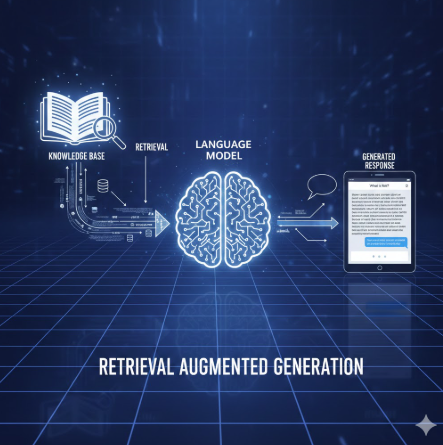
One of the most impactful real-world applications of Vector Databases (VDB) is in the field of education, specifically when paired with the reasoning power of Large Language Models (LLMs). This synergy is made possible through a technique called Retrieval-Augmented Generation (RAG).
What is RAG?
RAG is a framework that enhances an LLM by providing it with specific, relevant context retrieved from an external knowledge base.
While a VDB is excellent at storing and retrieving information based on semantic similarity, it cannot "explain" that information on its own. Conversely, while an LLM is great at reasoning and induction, it often lacks access to specific or private data and can sometimes "hallucinate" (make things up).
By combining them, we create a tool that can retrieve precise data and reformat it into natural, human language.
A Practical Example: The "Hamlet" Tutor
Imagine a student studying William Shakespeare's Hamlet. The play is complex, the language is archaic, and the student needs a tutor to answer specific questions.

Building a "Hamlet Expert" with RAG
With RAG, we can build a specialized "teacher" that can answer any Hamlet-related question based specifically on the text of the play. The idea of building this "Hamlet Expert" is simple and follows a clear workflow.
Step 1: Embedding the Text
First, we embed the original text of Hamlet into a Vector Database (VDB). For this project, I used a PDF version of the play. The VDB I am using is Qdrant, an open-source tool that can run locally on a laptop.
Step 2: Semantic Search
Once the data is stored, we use the VDB's semantic search feature to find answers to a student's question.
Step 3: LLM Generation
Finally, we pass the Top-N results to the LLM. We provide a specific prompt instructing the LLM to act as a "Hamlet Expert." This ensures the AI uses the retrieved text to provide accurate, scholarly answers as if it were a real teacher.
   #Extract entire text from Hamlet PDF
    pages_data = extract_text_from_pdf(PDF_PATH)
    total_chars = sum(len(page['text']) for page in pages_data)

    #Split the text to chunks
    chunks_with_metadata = chunk_text_with_metadata(pages_data, chunk_size=1000, overlap=200)

    #Perform embedding by chunks
    chunk_texts = [chunk['text'] for chunk in chunks_with_metadata]
    embeddings = create_embeddings(chunk_texts, openai_client)
The Chunking Process: chunk_text_with_metadata()
The chunk_text_with_metadata() method is used to split the entire text into different chunks.
There are two main reasons we perform chunking:
Model Optimization: The entire play is too large for the model to process at once. LLMs generally work best with context windows around 1,000–2,000 characters.
Search Precision: By splitting the play into smaller chunks, the Vector Database can pinpoint specific scenes more accurately, which increases search precision.
Before splitting the text, I also capture the Act and page number for each chunk. This metadata is stored in the VDB alongside the text, allowing the "Hamlet Expert" to provide the exact source for every answer it gives..
def chunk_text_with_metadata(pages_data: List[Dict], chunk_size: int = 1000, overlap: int = 200) -> List[Dict]:
    """Split text into overlapping chunks while preserving page and act/scene metadata."""
    chunks_with_metadata = []
    current_act = None
    current_scene = None

    # Create a continuous text with position markers
    full_text = ""
    char_to_page = []

    for page_data in pages_data:
        page_text = page_data['text']
        page_num = page_data['page_num']

        # Update act/scene tracking
        act, scene = detect_act_scene(page_text)
        if act:
            current_act = act
        if scene:
            current_scene = scene

        # Track character positions to page numbers
        for char in page_text:
            char_to_page.append({
                'page_num': page_num,
                'act': current_act,
                'scene': current_scene
            })

        full_text += page_text + "\n"
        char_to_page.append({
            'page_num': page_num,
            'act': current_act,
            'scene': current_scene
        })
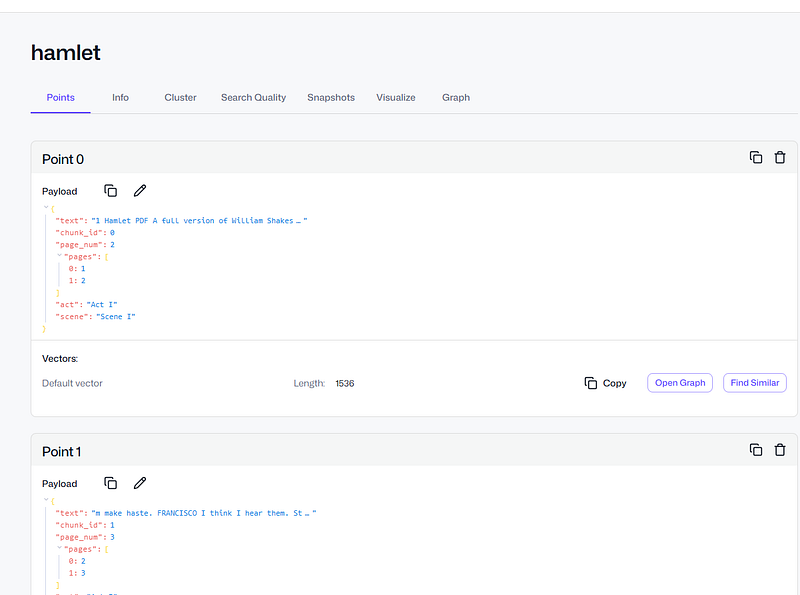
So the data in VDB will look like this:
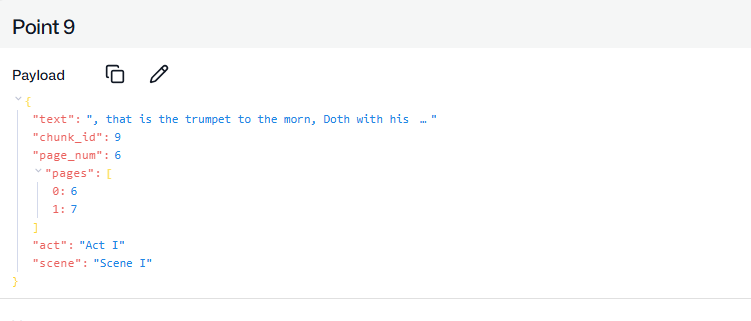
We keep track and page number and act, so this can return to user during answer the question, user can use this info to cross check with the original plays.
We also store overlap text data(200 char in my case) to the VDB, instead of perform hard cut off, like split each chunk to 1000 characters.
while start < text_length:
        end = min(start + chunk_size, text_length)
        chunk_text = full_text[start:end]

        if chunk_text.strip():
            # Get metadata from the middle of the chunk
            mid_pos = min(start + chunk_size // 2, len(char_to_page) - 1)
            metadata = char_to_page[mid_pos]

            # Collect all pages this chunk spans
            chunk_pages = set()
            for i in range(start, min(end, len(char_to_page))):
                chunk_pages.add(char_to_page[i]['page_num'])

            chunks_with_metadata.append({
                'text': chunk_text,
                'page_num': metadata['page_num'],
                'pages': sorted(list(chunk_pages)),
                'act': metadata['act'],
                'scene': metadata['scene']
            })

        start += chunk_size - overlap
Preserving Context with Overlap
When we split the text, we also use a technique called overlap. The reason we perform overlap is to preserve context that might otherwise be lost if we used a "hard cut-off" at a fixed number of characters.
Scenario 1: Without Overlap
If we simply cut the text at 1,000 characters, a famous line might get broken:
Chunk 1: "…HAMLET: To be or not to be, that is the ques-"
Chunk 2: "tion: whether 'tis nobler in the mind to suffer…"
In this case, both chunks lose their meaning because the word "question" is split in half.
Scenario 2: With Overlap (200 characters)
By allowing chunks to overlap, we ensure the meaning remains intact:
Chunk 1 (Chars 0–1,000): "…HAMLET: To be or not to be, that is the ques-"
Chunk 2 (Chars 800–1,800): "HAMLET: To be or not to be, that is the question: whether 'tis nobler in the mind to suffer…"
By overlapping 200 characters, Chunk 2 now contains the full context of the sentence. Once the text is properly chunked with this overlap, we embed all chunks and store them in the Vector Database.
def create_embeddings(texts: List[str], client: OpenAI) -> List[List[float]]:
    """Create embeddings using OpenAI API."""
    embeddings = []


    for i, text in enumerate(texts):
        if i % 10 == 0:
            print(f"Processing chunk {i}/{len(texts)}")

        response = client.embeddings.create(
            model="text-embedding-3-small",
            input=text
        )
        embeddings.append(response.data[0].embedding)

    return embeddings
The reason we choose model text-embedding-3-small as embedding model because it's cheap and has improved semantic training.
Then we stored it to the VDB
    embeddings = create_embeddings(chunk_texts, openai_client)


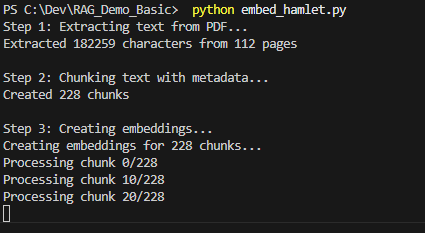
    store_in_qdrant(chunks_with_metadata, embeddings, qdrant_client, COLLECTION_NAME)
It will look like this , process chunk by chunk and insert into the collection.
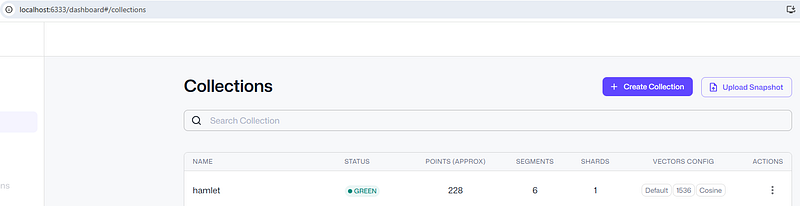
A collection named 'Hamlet' has been created in my local dashboard for Qdrant , http://localhost:6333/dashboard#/collections.
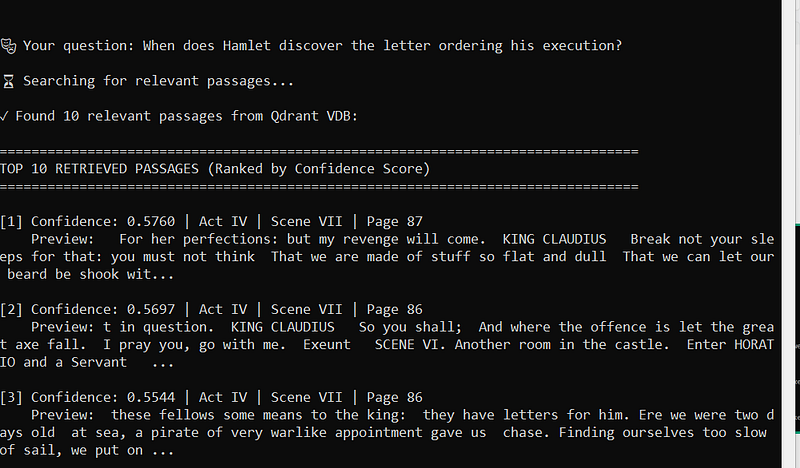
Now for the answering question from user, if I asked a question "When does Hamlet discover the letter ordering his execution?", it will look like this:
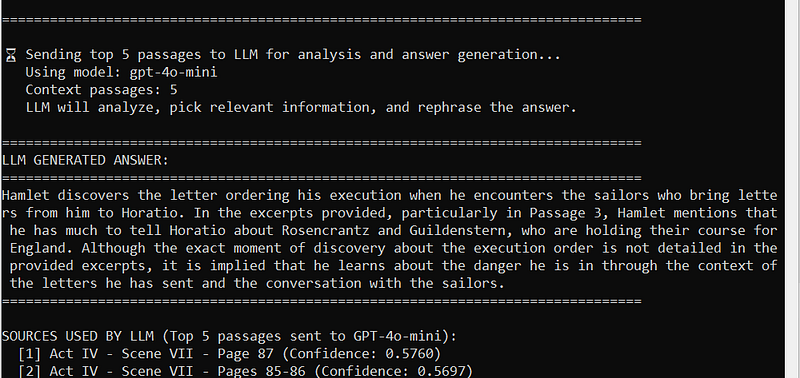
How the Hamlet Expert Answers Questions
As seen in the demo, there are two main steps to answering a student's question about Hamlet.
Step 1: Semantic Retrieval
First, the VDB uses its built-in semantic search to return the top 10 highest-scoring results from the collection. (You can read my previous article for a deep dive into how semantic search works).
Step 2: LLM Induction and Reasoning
Next, these 10 results are passed to the LLM. By leveraging the LLM's ability to perform reasoning and induction, it selects the best 5 answers from those results and synthesizes a response that sounds like a human teacher.
The Secret Recipe: Prompt Engineering
It is important to remember that our VDB only contains the raw text of the play. However, a question like "When does Hamlet discover the letter ordering his execution?" requires human-like context. The original play doesn't literally say "Hamlet discovered the letter while meeting a sailor"; it describes the event through dialogue.
To bridge this gap, we use Prompt Engineering. This is the "secret recipe" that tells the LLM how to behave. Here is the prompt used in my demo to ensure the AI acts as a true Shakespearean expert:
[Insert your specific prompt text here, e.g., "You are an expert on William Shakespeare's Hamlet. Use the following 10 context snippets to answer the user's question…"]
openai_client = OpenAI(api_key=os.getenv("OPENAI_API_KEY"))

#prompt that send to open AI API
prompt = f"""You are a helpful assistant answering questions about
 Shakespeare's Hamlet.
Use the following excerpts from Hamlet to answer the user's question.
If the answer cannot be found in the excerpts, say so.

Context from Hamlet:
{context}

User Question: {query}

Answer:"""

    response = openai_client.chat.completions.create(
        model="gpt-4o-mini",
        messages=[
            {"role": "system", "content": "You are a knowledgeable assistant helping users understand Shakespeare's Hamlet."},
            {"role": "user", "content": prompt}
        ],
        temperature=0.7,
        max_tokens=500
    )
Implementation and Role Playing
In this demo, I am using the OpenAI API by providing an API key, but you can use any LLM — including local models.
The "secret recipe" for the AI's behavior is the System Prompt. I used a technique called "role-playing" to assign the LLM a specific role: a helpful assistant specializing in Shakespeare's Hamlet.
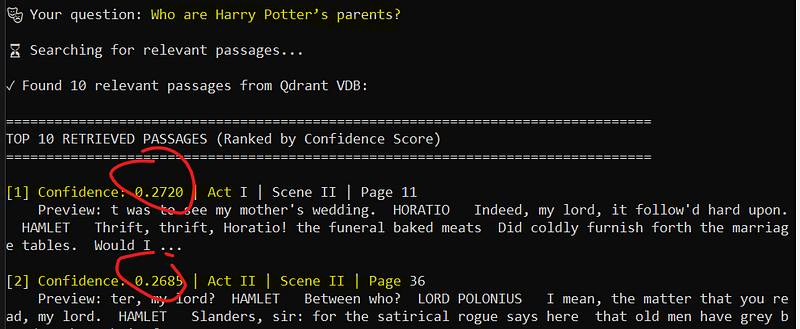
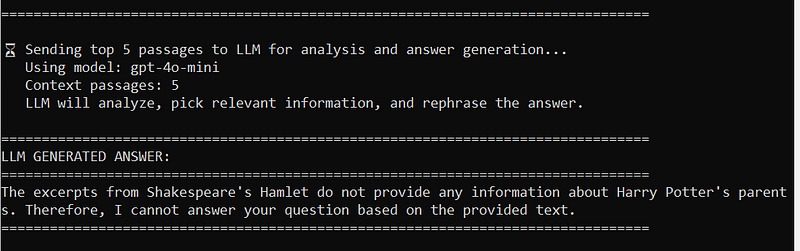
I also added a safety instruction: if the answer cannot be found in the provided chunks, the LLM should simply say it doesn't know. For example, if I ask a question about Harry Potter, the VDB will still return the 10 most "similar" chunks it can find, but the LLM will recognize they are irrelevant and refuse to invent a fake answer.
Tuning the "Expert": Temperature and Tokens
To fine-tune how the "Hamlet Expert" speaks, we adjust two key settings:
Temperature: This controls the randomness of the responses. I used 0.7 for moderate creativity. You can lower it to 0.3 for more factual, literal answers, or raise it toward 2.0 for a more creative, poetic style.
Max Tokens: This sets a hard limit on the response length. I set it to 500 for detailed explanations, but you could use 150–200 for short, punchy answers.
The Future of Education
That's all! A simple yet very powerful RAG demo. Imagine a student using this as a study aid with an entire textbook. Because each response provides the page number for double-checking, it is like having a world-class professor by your side who never gets tired or frustrated.
I am truly inspired by the power of RAG. If used properly, we can dramatically increase the quality of education — especially in underdeveloped countries with fewer resources. This technology has the potential to increase the common knowledge of the entire world.
You may download my demo code via my Github.
Join the conversation! Your thoughts help the community grow.