Table of Contents
- Create and Insert Query
- Simple SQL Select Query
- Aggregate and Scalar Function
- Date Function
- Other Select Function
- Where
- Group BY and Having Clause
- Sub Query
- Joins
- UNION and UNION ALL.
- Common Table Expressions(CTE) - With
- View
- Pivot
- Stored Procedure (SP)
- Functions
- SQL Server Coding Standards
- Few Worked Examples
1. Create and Insert Query
Before we start we will first create a table and insert some sample data into it so we can use these tables in our select class. I want to explain the table design with actual data since that will help the reader to understand this in detail.
In database design the important phase is to create a table with proper normalization with primary and foreign key relationships.
Now in this example we will assume we need to create a restaurant Order Management tables with relationships.
For this we need an Order Master, an Order Detail and an Item Master as the major tables. We will use these 3 tables in this article. First let's start by creating the tables. As I have said, we will use the 3 tables here in this article so we start by creating the Item Master as the first table. As the name suggests this table will be used to store the items.
Create Table
Item Master: Here we have created an ItemMaster with the necessary fields. As I already said, we need to make a plan about our project. List all the necessary tables we need to create for the project and describe and list all the fields to be created for each table. Here I used Item_Code as a primary key field that will be used in another table for the reference to this main table.
- CREATE TABLE [dbo].[ItemMasters](
- [Item_Code] [varchar](20) NOT NULL,
- [Item_Name] [varchar](100) NOT NULL,
- [Price] Int NOT NULL,
- [TAX1] Int NOT NULL,
- [Discount] Int NOT NULL,
- [Description] [varchar](200) NOT NULL,
- [IN_DATE] [datetime] NOT NULL,
- [IN_USR_ID] [varchar](20) NOT NULL,
- [UP_DATE] [datetime] NOT NULL,
- [UP_USR_ID] [varchar](20) NOT NULL,
- CONSTRAINT [PK_ItemMasters] PRIMARY KEY CLUSTERED
- (
- [Item_Code] ASC
- )WITH (PAD_INDEX = OFF, STATISTICS_NORECOMPUTE = OFF, IGNORE_DUP_KEY = OFF, ALLOW_ROW_LOCKS = ON, ALLOW_PAGE_LOCKS = ON) ON [PRIMARY]
- ) ON [PRIMARY]
- INSERT INTO [ItemMasters] ([Item_Code],[Item_Name],[Price],[TAX1],[Discount],[Description],[IN_DATE]
- ,[IN_USR_ID],[UP_DATE],[UP_USR_ID])
- VALUES
- ('Item001','Coke',55,1,0,'Coke which need to be cold',GETDATE(),'SHANU'
- ,GETDATE(),'SHANU')
- INSERT INTO [ItemMasters] ([Item_Code],[Item_Name],[Price],[TAX1],[Discount],[Description],[IN_DATE]
- ,[IN_USR_ID],[UP_DATE],[UP_USR_ID])
- VALUES
- ('Item002','Coffee',40,0,2,'Coffe Might be Hot or Cold user choice',GETDATE(),'SHANU'
- ,GETDATE(),'SHANU')
- INSERT INTO [ItemMasters] ([Item_Code],[Item_Name],[Price],[TAX1],[Discount],[Description],[IN_DATE]
- ,[IN_USR_ID],[UP_DATE],[UP_USR_ID])
- VALUES
- ('Item003','Chiken Burger',125,2,5,'Spicy',GETDATE(),'SHANU'
- ,GETDATE(),'SHANU')
- INSERT INTO [ItemMasters] ([Item_Code],[Item_Name],[Price],[TAX1],[Discount],[Description],[IN_DATE]
- ,[IN_USR_ID],[UP_DATE],[UP_USR_ID])
- VALUES
- ('Item004','Potato Fry',15,0,0,'No Comments',GETDATE(),'SHANU'
- ,GETDATE(),'SHANU')
Note: First please understand what Master and Detail means. If you don't understand what a Master and a Detail are then I will explain that first. Master means there is one main record and in the details we have all the details of the main record.
Say for example we have a restaurant and an order for one Coke, one Burger and one Potato Fries. Which means I have make an order from the waiter with 3 Items. So the Order_No for the example can be “Ord0001” and this Order_No will have the 3 items so first we create the Order Master.
- CREATE TABLE [dbo].[OrderMasters](
- [Order_No] [varchar](20) NOT NULL,
- [Table_ID] [varchar](20) NOT NULL,
- [Description] [varchar](200) NOT NULL,
- [IN_DATE] [datetime] NOT NULL,
- [IN_USR_ID] [varchar](20) NOT NULL,
- [UP_DATE] [datetime] NOT NULL,
- [UP_USR_ID] [varchar](20) NOT NULL,
- CONSTRAINT [PK_OrderMasters] PRIMARY KEY CLUSTERED
- (
- [Order_No] ASC
- )WITH (PAD_INDEX = OFF, STATISTICS_NORECOMPUTE = OFF, IGNORE_DUP_KEY = OFF, ALLOW_ROW_LOCKS = ON, ALLOW_PAGE_LOCKS = ON) ON [PRIMARY]
- ) ON [PRIMARY]
- INSERT INTO [OrderMasters]
- ([Order_No],[Table_ID] ,[Description],[IN_DATE],[IN_USR_ID],[UP_DATE],[UP_USR_ID])
- VALUES
- ('Ord_001','T1','',GETDATE(),'SHANU' ,GETDATE(),'SHANU')
- INSERT INTO [OrderMasters]
- ([Order_No],[Table_ID] ,[Description],[IN_DATE],[IN_USR_ID],[UP_DATE],[UP_USR_ID])
- VALUES
- ('Ord_002','T2','',GETDATE(),'Mak' ,GETDATE(),'MAK')
- INSERT INTO [OrderMasters]
- ([Order_No],[Table_ID] ,[Description],[IN_DATE],[IN_USR_ID],[UP_DATE],[UP_USR_ID])
- VALUES
- ('Ord_003','T3','',GETDATE(),'RAJ' ,GETDATE(),'RAJ')
- CREATE TABLE [dbo].[OrderDetails](
- [Order_Detail_No] [varchar](20) NOT NULL,
- [Order_No] [varchar](20) CONSTRAINT fk_OrderMasters FOREIGN KEY REFERENCES OrderMasters(Order_No),
- [Item_Code] [varchar](20) CONSTRAINT fk_ItemMasters FOREIGN KEY REFERENCES ItemMasters(Item_Code),
- [Notes] [varchar](200) NOT NULL,
- [QTY] INT NOT NULL,
- [IN_DATE] [datetime] NOT NULL,
- [IN_USR_ID] [varchar](20) NOT NULL,
- [UP_DATE] [datetime] NOT NULL,
- [UP_USR_ID] [varchar](20) NOT NULL,
- CONSTRAINT [PK_OrderDetails] PRIMARY KEY CLUSTERED
- (
- [Order_Detail_No] ASC
- )WITH (PAD_INDEX = OFF, STATISTICS_NORECOMPUTE = OFF, IGNORE_DUP_KEY = OFF, ALLOW_ROW_LOCKS = ON, ALLOW_PAGE_LOCKS = ON) ON [PRIMARY]
- ) ON [PRIMARY]
- --Now let’s insert the 3 items for the above Order No 'Ord_001'.
- INSERT INTO [OrderDetails]
- ([Order_Detail_No],[Order_No],[Item_Code],[Notes],[QTY]
- ,[IN_DATE],[IN_USR_ID],[UP_DATE],[UP_USR_ID])
- VALUES
- ('OR_Dt_001','Ord_001','Item001','Need very Cold',3
- ,GETDATE(),'SHANU' ,GETDATE(),'SHANU')
- INSERT INTO [OrderDetails]
- ([Order_Detail_No],[Order_No],[Item_Code],[Notes],[QTY]
- ,[IN_DATE],[IN_USR_ID],[UP_DATE],[UP_USR_ID])
- VALUES
- ('OR_Dt_002','Ord_001','Item004','very Hot ',2
- ,GETDATE(),'SHANU' ,GETDATE(),'SHANU')
- INSERT INTO [OrderDetails]
- ([Order_Detail_No],[Order_No],[Item_Code],[Notes],[QTY]
- ,[IN_DATE],[IN_USR_ID],[UP_DATE],[UP_USR_ID])
- VALUES
- ('OR_Dt_003','Ord_001','Item003','Very Spicy',4
- ,GETDATE(),'SHANU' ,GETDATE(),'SHANU')
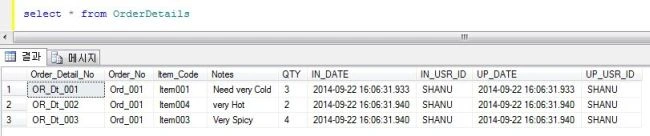
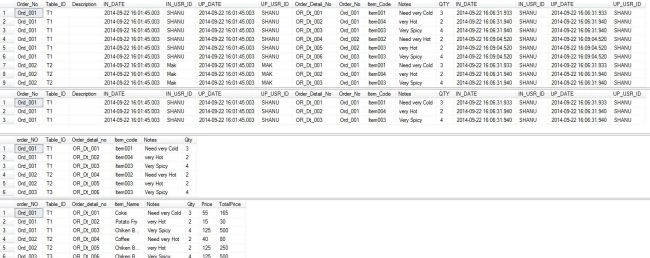
Here we can see the same ordre_No for 3 different details with different items. Refer to the Item Master for the Item Name details. We will see in detail the select query uses the following in this article. Now we insert another Order Master detail into the Detail tables.
- INSERT INTO [OrderDetails]
- ([Order_Detail_No],[Order_No],[Item_Code],[Notes],[QTY]
- ,[IN_DATE],[IN_USR_ID],[UP_DATE],[UP_USR_ID])
- VALUES
- ('OR_Dt_004','Ord_002','Item002','Need very Hot',2
- ,GETDATE(),'SHANU' ,GETDATE(),'SHANU')
- INSERT INTO [OrderDetails]
- ([Order_Detail_No],[Order_No],[Item_Code],[Notes],[QTY]
- ,[IN_DATE],[IN_USR_ID],[UP_DATE],[UP_USR_ID])
- VALUES
- ('OR_Dt_005','Ord_002','Item003','very Hot ',2
- ,GETDATE(),'SHANU' ,GETDATE(),'SHANU')
- INSERT INTO [OrderDetails]
- ([Order_Detail_No],[Order_No],[Item_Code],[Notes],[QTY]
- ,[IN_DATE],[IN_USR_ID],[UP_DATE],[UP_USR_ID])
- VALUES
- ('OR_Dt_006','Ord_003','Item003','Very Spicy',4
- ,GETDATE(),'SHANU' ,GETDATE(),'SHANU')
Can someone tell me what a Select Query in SQL is? A Select is the one basic and most important DML statement of SQL. So what is DML in SQL? DML stands for Data Manipulation Language. That means these statements are used to manipulate the data that already exists. As the name suggests the SELECT statement selects one or more columns with one or more data to display from our DB with our optional filters.
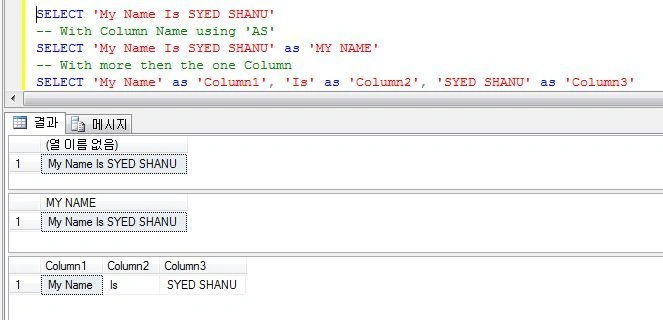
For example now I want to display my Name in the SQL Server. So as a result I will use the select statement here as an example.
- SELECT 'My Name Is SYED SHANU'
- -- With Column Name using 'AS'
- SELECT 'My Name Is SYED SHANU' as 'MY NAME'
- -- With more then the one Column
- SELECT 'My Name' as 'Column1', 'Is' as 'Column2', 'SYED SHANU' as 'Column3'
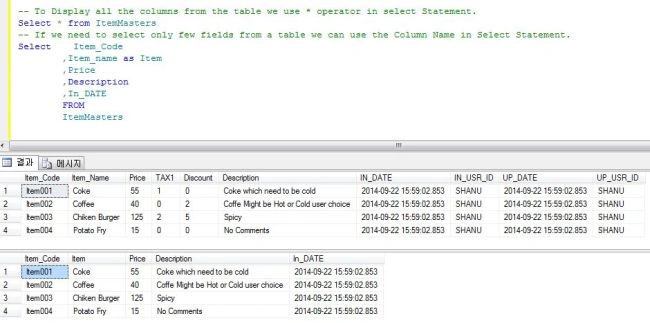
Select Statement from Table
- -- To Display all the columns from the table we use * operator in select Statement.
- Select * from ItemMasters
- -- If we need to select only few fields from a table we can use the Column Name in Select Statement.
- Select Item_Code
- ,Item_name as Item
- ,Price
- ,Description
- ,In_DATE
- FROM
- ItemMasters
3. Simple Aggregate and Scalar Function
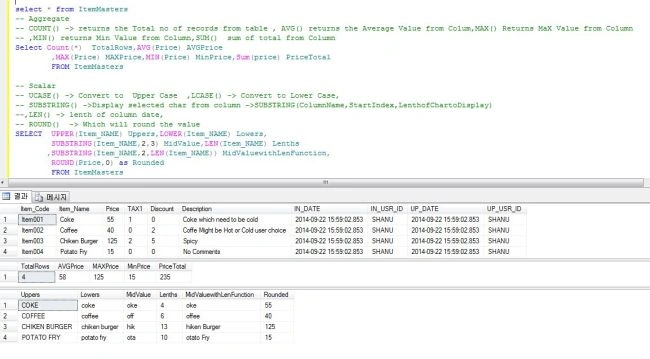
Aggregate and Scalar Functions are builtin functions of SQL Server that we can be use in our select statements. For example a few Aggregate and Scalar functions are Count, Max, Sum, Upper, lower, Round and and so on. Here in comments I have explained each of its uses.
We can use our tblItemMaster with all these builtin functions.
- select * from ItemMasters
- -- Aggregate
- -- COUNT() -> returns the Total no of records from table , AVG() returns the Average Value from Colum,MAX() Returns MaX Value from Column
- -- ,MIN() returns Min Value from Column,SUM() sum of total from Column
- Select Count(*) TotalRows,AVG(Price) AVGPrice
- ,MAX(Price) MAXPrice,MIN(Price) MinPrice,Sum(price) PriceTotal
- FROM ItemMasters
- -- Scalar
- -- UCASE() -> Convert to Upper Case ,LCASE() -> Convert to Lower Case,
- -- SUBSTRING() ->Display selected char from column ->SUBSTRING(ColumnName,StartIndex,LenthofChartoDisplay)
- --,LEN() -> lenth of column date,
- -- ROUND() -> Which will round the value
- SELECT UPPER(Item_NAME) Uppers,LOWER(Item_NAME) Lowers,
- SUBSTRING(Item_NAME,2,3) MidValue,LEN(Item_NAME) Lenths
- ,SUBSTRING(Item_NAME,2,LEN(Item_NAME)) MidValuewithLenFunction,
- ROUND(Price,0) as Rounded
- FROM ItemMasters
4. Date Function
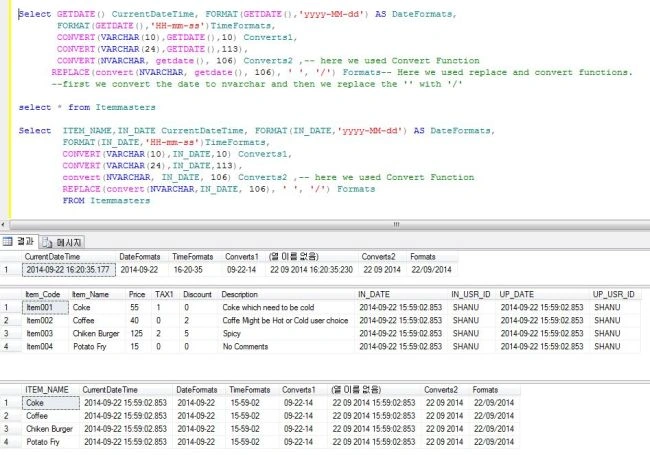
In all our projects and tables we use the date column. The Date function plays a very important role in all our projects. So we should be very careful with date functions since sometimes these functions will be trickier. We need to select appropriate date functions and formats in our projects. Let's see a few examples of those here.
- -- GETDATE() -> to Display the Current Date and Time
- -- Format() -> used to display our date in our requested format
- Select GETDATE() CurrentDateTime, FORMAT(GETDATE(),'yyyy-MM-dd') AS DateFormats,
- FORMAT(GETDATE(),'HH-mm-ss')TimeFormats,
- CONVERT(VARCHAR(10),GETDATE(),10) Converts1,
- CONVERT(VARCHAR(24),GETDATE(),113),
- CONVERT(NVARCHAR, getdate(), 106) Converts2 ,-- here we used Convert Function
- REPLACE(convert(NVARCHAR, getdate(), 106), ' ', '/') Formats-- Here we used replace and --convert functions.
- --first we convert the date to nvarchar and then we replace the '' with '/'
- select * from Itemmasters
- Select ITEM_NAME,IN_DATE CurrentDateTime, FORMAT(IN_DATE,'yyyy-MM-dd') AS DateFormats,
- FORMAT(IN_DATE,'HH-mm-ss')TimeFormats,
- CONVERT(VARCHAR(10),IN_DATE,10) Converts1,
- CONVERT(VARCHAR(24),IN_DATE,113),
- convert(NVARCHAR, IN_DATE, 106) Converts2 ,-- here we used Convert Function
- REPLACE(convert(NVARCHAR,IN_DATE, 106), ' ', '/') Formats
- FROM Itemmasters
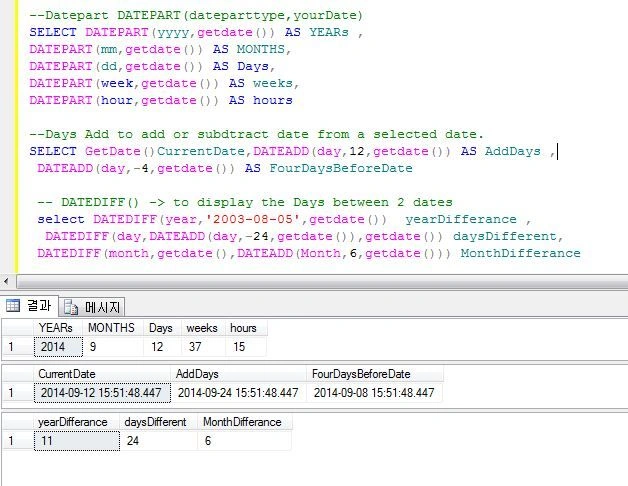
- DatePart: We use the datepart to display the selected Year, Month and Day.
- DateADD: We use dateadd to display or add or subrtract days from the selected date.
- DateDIff: We use dateDiff to calculate the difference between 2 dates.
- --Datepart DATEPART(dateparttype,yourDate)
- SELECT DATEPART(yyyy,getdate()) AS YEARs ,
- DATEPART(mm,getdate()) AS MONTHS,
- DATEPART(dd,getdate()) AS Days,
- DATEPART(week,getdate()) AS weeks,
- DATEPART(hour,getdate()) AS hours
- --Days Add to add or subdtract date from a selected date.
- SELECT GetDate()CurrentDate,DATEADD(day,12,getdate()) AS AddDays ,
- DATEADD(day,-4,getdate()) AS FourDaysBeforeDate
- -- DATEDIFF() -> to display the Days between 2 dates
- select DATEDIFF(year,'2003-08-05',getdate()) yearDifferance ,
- DATEDIFF(day,DATEADD(day,-24,getdate()),getdate()) daysDifferent,
- DATEDIFF(month,getdate(),DATEADD(Month,6,getdate())) MonthDifferance
5. Other Select Function
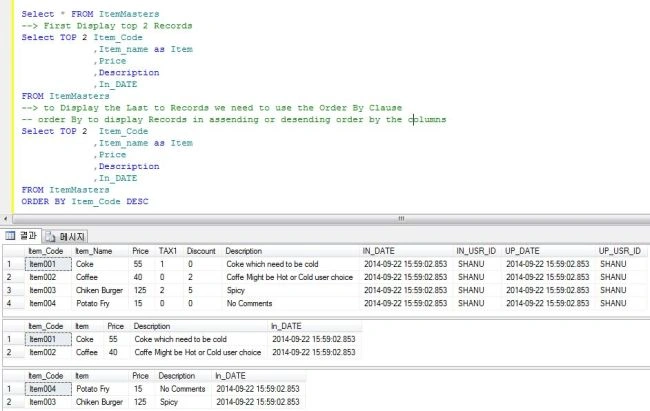
Top: To display the Top First or Last selected records first we see how to select the first or Top records and last to the Top records from the Select statement.
Order By: This is used in a SQL Select statement to display the records in ascending or descending order by the columns.
- <a name="5">
- --Top to Select Top first and last records using Select Statement.
- Select * FROM ItemMasters
- --> First Display top 2 Records
- Select TOP 2 Item_Code
- ,Item_name as Item
- ,Price
- ,Description
- ,In_DATE
- FROM ItemMasters
- --> to Display the Last to Records we need to use the Order By Clause
- -- order By to display Records in assending or desending order by the columns
- Select TOP 2 Item_Code
- ,Item_name as Item
- ,Price
- ,Description
- ,In_DATE
- FROM ItemMasters
- ORDER BY Item_Code DESC</a>
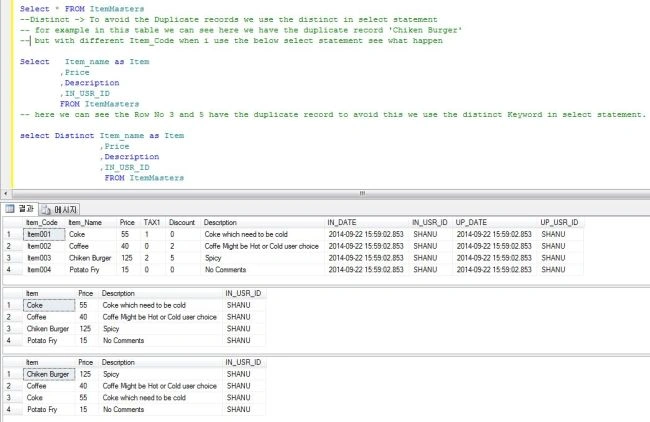
Distinct: The distinct keyword is used in select statements to avoid the duplicate records.
- <a name="5">
- Select * FROM ItemMasters
- --Distinct -> To avoid the Duplicate records we use the distinct in select statement
- -- for example in this table we can see here we have the duplicate record 'Chiken Burger'
- -- but with different Item_Code when i use the below select statement see what happen
- Select Item_name as Item
- ,Price
- ,Description
- ,IN_USR_ID
- FROM ItemMasters
- -- here we can see the Row No 3 and 5 have the duplicate record to avoid this we use the distinct Keyword in select statement.
- select Distinct Item_name as Item
- ,Price
- ,Description
- ,IN_USR_ID
- FROM ItemMasters</a>
6. Where Clause
The where clause is very important in SQL Select statements. Why we use a where clause and what is use of where clause. Where clause is nothing but a filter of the records using some condition.
Now for example we consider a table has 10,000 records. If we use a select query to display the records then the load time might be long to display all the data. In that case we can use a condition and display some specific data.
For example we can use the Where Clause to display the records for the past 1 week or 1 month.
We can consider our restaurant Order Detail table, for example we consider an Order Detail table to have 10,000 records but for sure for one Order_No there will not be more than 100 records in the Order Detail. Now let's see a few where clause uses.
- Select * from ItemMasters
- Select * from OrderDetails
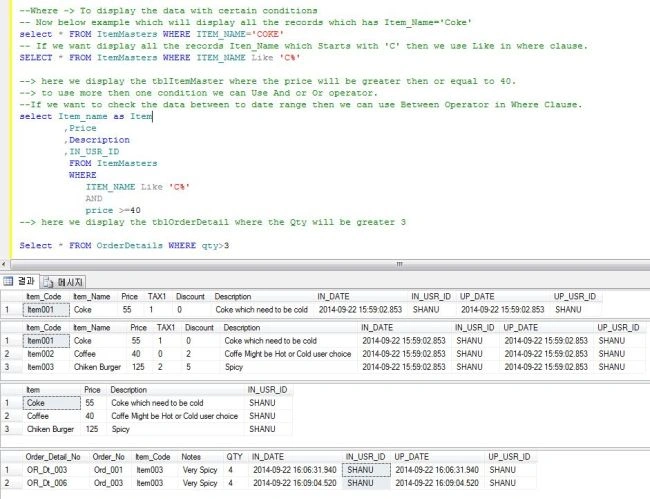
- --Where -> To display the data with certain conditions
- -- Now below example which will display all the records which has Item_Name='Coke'
- select * FROM ItemMasters WHERE ITEM_NAME='COKE'
- -- If we want display all the records Iten_Name which Starts with 'C' then we use Like in where clause.
- SELECT * FROM ItemMasters WHERE ITEM_NAME Like 'C%'
- --> here we display the ItemMasters where the price will be greater then or equal to 40.
- --> to use more then one condition we can Use And or Or operator.
- --If we want to check the data between to date range then we can use Between Operator in Where Clause.
- select Item_name as Item
- ,Price
- ,Description
- ,IN_USR_ID
- FROM ItemMasters
- WHERE
- ITEM_NAME Like 'C%'
- AND
- price >=40
- --> here we display the OrderDetails where the Qty will be greater 3
- Select * FROM OrderDetails WHERE qty>3
Where In Clause
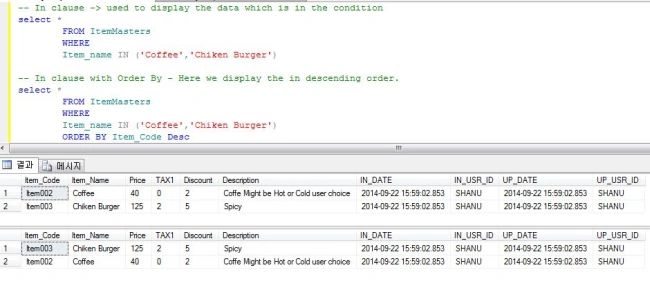
- -- In clause -> used to display the data which is in the condition
- select *
- FROM ItemMasters
- WHERE
- Item_name IN ('Coffee','Chiken Burger')
- -- In clause with Order By - Here we display the in descending order.
- select *
- FROM ItemMasters
- WHERE
- Item_name IN ('Coffee','Chiken Burger')
- ORDER BY Item_Code Desc
Where Between keyword
- -- between -> Now if we want to display the data between to date range then we use betweeen keyword
- select * FROM ItemMasters
- WHERE
- In_Date BETWEEN '2014-09-22 15:59:02.853' AND '2014-09-22 15:59:02.853'
- select * FROM ItemMasters
- WHERE
- ITEM_NAME Like 'C%'
- AND
- In_Date BETWEEN '2014-09-22 15:59:02.853' AND '2014-09-22 15:59:02.853'
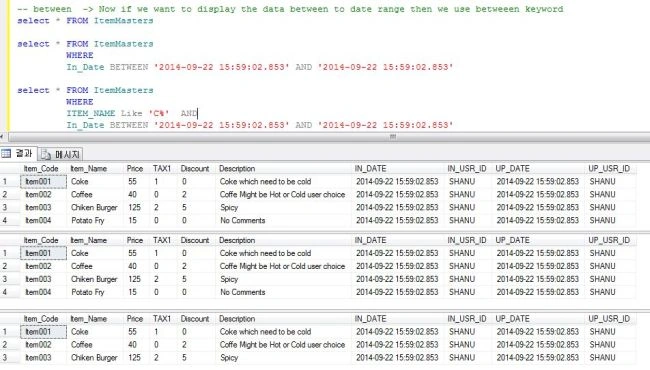
To display the records within a range we use the between keyword in the where clause.
7. Group BY Clause
A Group by Clause will display records as a result of a combined set or result of the same related records.
- --Group By -> To display the data with group result.Here we can see we display all the AQggregate result by Item Name
- Select ITEM_NAME,Count(*) TotalRows,AVG(Price) AVGPrice
- ,MAX(Price) MAXPrice,MIN(Price) MinPrice,Sum(price) PriceTotal
- FROM
- ItemMasters
- GROUP BY ITEM_NAME
- -- Here this group by will combine all the same Order_No result and make the total or each order_NO
- Select Order_NO,Sum(QTy) as TotalQTY
- FROM OrderDetails
- where qty>=2
- GROUP BY Order_NO
- -- Here the Total will be created by order_No and Item_Code
- Select Order_NO,Item_Code,Sum(QTy) as TotalQTY
- FROM OrderDetails
- where qty>=2
- GROUP BY Order_NO,Item_Code
- Order By Order_NO Desc,Item_Code
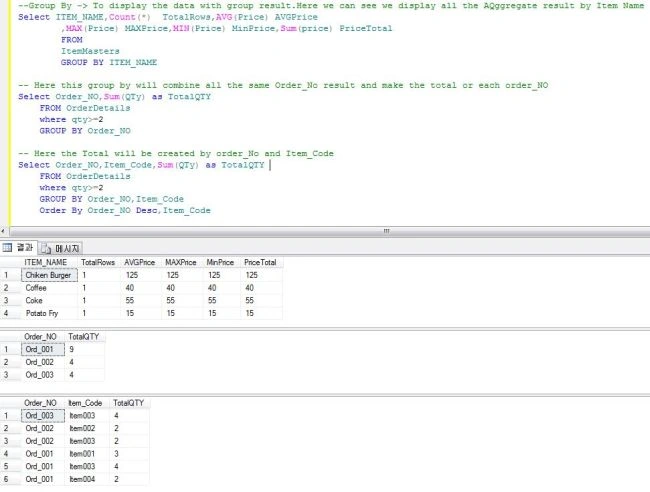
Group By and Having Clause
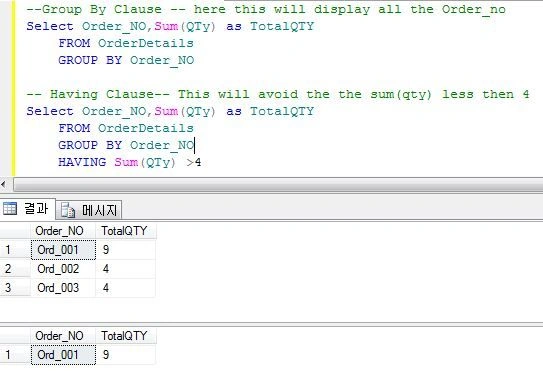
The Having and Group By clauses don't support aggregate functions. To use aggregate functions we use a having clause in a Select statement.
- --Group By Clause -- here this will display all the Order_no
- Select Order_NO,Sum(QTy) as TotalQTY
- FROM OrderDetails
- GROUP BY Order_NO
- -- Having Clause-- This will avoid the the sum(qty) less then 4
- Select Order_NO,Sum(QTy) as TotalQTY
- FROM OrderDetails
- GROUP BY Order_NO
- HAVING Sum(QTy) >4
8. Sub Query
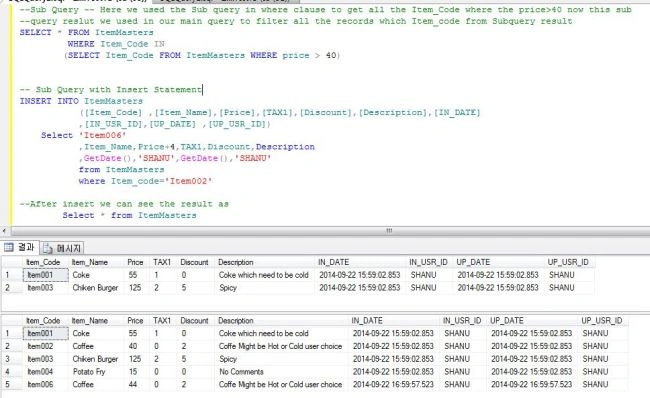
A Sub Query can be called an Inner Query or nested query that can be used in a Where clause of a select, insert, update or delete statement.
- --Sub Query -- Here we used the Sub query in where clause to get all the Item_Code where the price>40 now this sub
- --query reslut we used in our main query to filter all the records which Item_code from Subquery result
- SELECT * FROM ItemMasters
- WHERE Item_Code IN
- (SELECT Item_Code FROM ItemMasters WHERE price > 40)
- -- Sub Query with Insert Statement
- INSERT INTO ItemMasters ([Item_Code] ,[Item_Name],[Price],[TAX1],[Discount],[Description],[IN_DATE]
- ,[IN_USR_ID],[UP_DATE] ,[UP_USR_ID])
- Select 'Item006'
- ,Item_Name,Price+4,TAX1,Discount,Description
- ,GetDate(),'SHANU',GetDate(),'SHANU'
- from ItemMasters
- where Item_code='Item002'
- --After insert we can see the result as
- Select * from ItemMasters

9. Joins
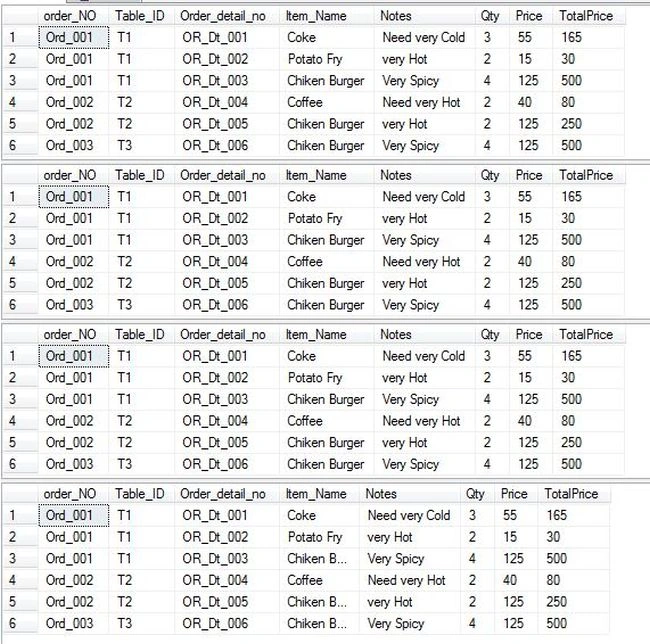
So far we have seen all the somethings related to one table. Now we see how to join more than one table and display the results. Select statements will not be effective until we use a Join. The main purpose of using SQL Server is to use the normalization and increase the performance by displaying the records. With normalization we split large tables into small related tables. Now we need to display the related table data as a result of one single select statement. To accomplish this we use a Join in our SQL Select statement and combine all the data and display it.
Simple Join
- --Now we have used the simple join with out any condition this will display all the
- -- records with duplicate data to avaoid this we see our next example with condition
- SELECT * FROM Ordermasters,OrderDetails
- -- Simple Join with Condition now here we can see the duplicate records now has been avoided by using the where checing with both table primaryKey field
- SELECT *
- FROM
- Ordermasters as M, OrderDetails as D
- where M.Order_NO=D.Order_NO
- and M.Order_NO='Ord_001'
- -- Now to make more better understanding we need to select the need fields from both
- --table insted of displaying all column.
- SELECT M.order_NO,M.Table_ID,D.Order_detail_no,Item_code,Notes,Qty
- FROM
- Ordermasters as M, OrderDetails as D
- where M.Order_NO=D.Order_NO
- -- Now lets Join 3 table
- SELECT M.order_NO,M.Table_ID,D.Order_detail_no,I.Item_Name,D.Notes,D.Qty,I.Price,
- I.Price*D.Qty as TotalPrice
- FROM
- Ordermasters as M, OrderDetails as D,ItemMasters as I
- where
- M.Order_NO=D.Order_NO AND D.Item_Code=I.Item_Code

Inner Join, Left Outer Join, Right Outer Join and Full outer Join
We can see each join example as in the following with comments.
- --INNER JOIN
- --This will display the records which in both table Satisfy here i have used Like in where class which display the
- SELECT M.order_NO,M.Table_ID,D.Order_detail_no,I.Item_Name,D.Notes,D.Qty,I.Price,I.Price*D.Qty as TotalPrice
- FROM
- Ordermasters as M Inner JOIN OrderDetails as D
- ON M.Order_NO=D.Order_NO
- INNER JOIN ItemMasters as I
- ON D.Item_Code=I.Item_Code
- WHERE
- M.Table_ID like 'T%'
- --LEFT OUTER JOIN
- --This will display the records which Left side table Satisfy
- SELECT M.order_NO,M.Table_ID,D.Order_detail_no,I.Item_Name,D.Notes,D.Qty,I.Price,I.Price*D.Qty as TotalPrice
- FROM
- Ordermasters as M LEFT OUTER JOIN OrderDetails as D
- ON M.Order_NO=D.Order_NO
- LEFT OUTER JOIN ItemMasters as I
- ON D.Item_Code=I.Item_Code
- WHERE
- M.Table_ID like 'T%'
- --RIGHT OUTER JOIN
- --This will display the records which Left side table Satisfy
- SELECT M.order_NO,M.Table_ID,D.Order_detail_no,I.Item_Name,D.Notes,D.Qty,I.Price,I.Price*D.Qty as TotalPrice
- FROM
- Ordermasters as M RIGHT OUTER JOIN OrderDetails as D
- ON M.Order_NO=D.Order_NO
- RIGHT OUTER JOIN ItemMasters as I
- ON D.Item_Code=I.Item_Code
- WHERE
- M.Table_ID like 'T%'
- --FULL OUTER JOIN
- --This will display the records which Left side table Satisfy
- SELECT M.order_NO,M.Table_ID,D.Order_detail_no,I.Item_Name,D.Notes,D.Qty,I.Price,I.Price*D.Qty as TotalPrice
- FROM
- Ordermasters as M FULL OUTER JOIN OrderDetails as D
- ON M.Order_NO=D.Order_NO
- FULL OUTER JOIN ItemMasters as I
- ON D.Item_Code=I.Item_Code
- WHERE
- M.Table_ID like 'T%'

10. UNION and UNION ALL
Before we see joins in SQL. In a join we join 2 or more tables and display all the common related result. If we need to display 2 or more tables to be combined and return all the data then we use a UNION or UNION ALL.
Here we can see UNION and UNION ALL. So what do you think about the difference between these two?
A Union will display only the unique results but a Union ALL will display the data with duplicate results also.
If we only need the distinct results of combining tables then we can use a UNION. If we need the results with duplicate data then we use the UNION ALL. That means it will display all the data.
Note: Both or All Select Column count, Name and data type should be the same to use a Union in SQL.
The syntax for using a union is like:
- Select column1,Colum2 from Table1
- Union
- Select Column1,Column2 from Table2
- Select column1,Colum2 from Table1
- Union All
- Select Column1,Column2 from Table2
- --Select with different where condition which display the result as 2 Table result
- select Item_Code,Item_Name,Price,Description FROM ItemMasters where price <=44
- select Item_Code,Item_Name,Price,Description FROM ItemMasters where price >44
- -- Union with same table but with different where condition now which result as one table which combine both the result.
- select Item_Code,Item_Name,Price,Description FROM ItemMasters where price <=44
- UNION
- select Item_Code,Item_Name,Price,Description FROM ItemMasters where price >44
- -- Union ALL with Join sample
- SELECT M.order_NO,M.Table_ID,D.Order_detail_no,I.Item_Name,D.Notes,D.Qty,I.Price,I.Price*D.Qty as TotalPrice
- FROM
- Ordermasters as M (NOLOCK) Inner JOIN OrderDetails as D
- ON M.Order_NO=D.Order_NO INNER JOIN ItemMasters as I
- ON D.Item_Code=I.Item_Code WHERE I.Price <=44
- Union ALL
- SELECT M.order_NO,M.Table_ID,D.Order_detail_no,I.Item_Name,D.Notes,D.Qty,I.Price,I.Price*D.Qty as TotalPrice
- FROM
- Ordermasters as M (NOLOCK) Inner JOIN OrderDetails as D
- ON M.Order_NO=D.Order_NO INNER JOIN ItemMasters as I
- ON D.Item_Code=I.Item_Code WHERE I.Price>44
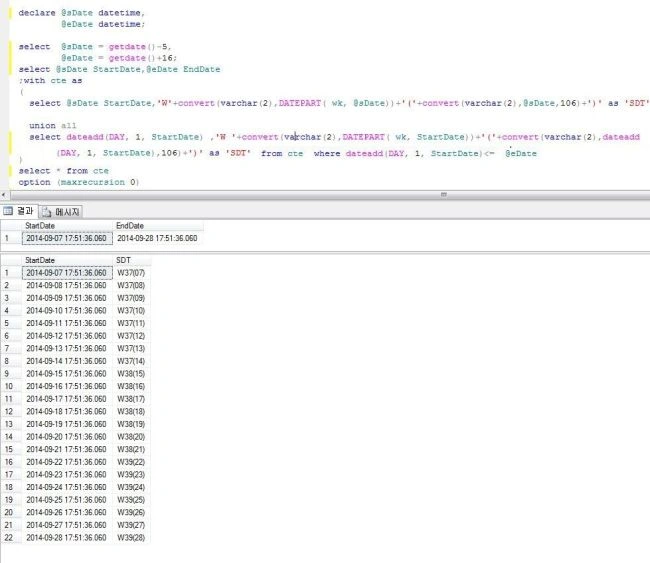
A Common Table Expression (CTE) is a temporary named result set that you can reference within a SELECT, INSERT, UPDATE, or DELETE statement.
We need to use the With clause in CTE. CTE will be very useful for displaying the records in some certain range. Here now for a simple example I have 2 dates with certain ranges, for example I have a Start_Date and an End_Date. Both have a 20 days difference. Now if I want to display all the dates with weekNo and WeekStart Day then as a result here we can see this query created using CTE.
- declare @sDate datetime,
- @eDate datetime;
- select @sDate = getdate()-5,
- @eDate = getdate()+16;
- --select @sDate StartDate,@eDate EndDate
- ;with cte as
- (
- select @sDate StartDate,'W'+convert(varchar(2),
- DATEPART( wk, @sDate))+'('+convert(varchar(2),@sDate,106)+')' as 'SDT'
- union all
- select dateadd(DAY, 1, StartDate) ,
- 'W'+convert(varchar(2),DATEPART( wk, StartDate))+'('+convert(varchar(2),
- dateadd(DAY, 1, StartDate),106)+')' as 'SDT'
- FROM cte
- WHERE dateadd(DAY, 1, StartDate)<= @eDate
- )
- select * from cte
- option (maxrecursion 0)

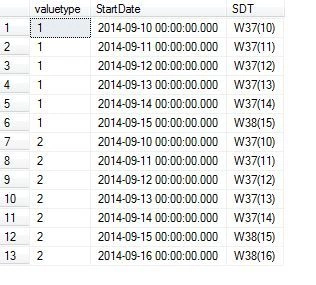
In the following Multiple CTE sample I have used more than one CTE. Now let's see how to use the Multiple CTE. Here you can see in the following sample as in the preceding that will display all the days but with one more CTE added.
In this example I have used a UNION ALL.
- declare @sDate datetime,@eDate datetime;
- declare @sDate1 datetime,@eDate1 datetime;
- select @sDate = '2014-09-10', @eDate = '2014-09-15';
- select @sDate1 = '2014-09-10', @eDate1 = '2014-09-18';
- WITH cte
- AS (
- select '1' valuetype ,@sDate StartDate,'W'+convert(varchar(2),DATEPART( wk, @sDate))+'('+convert(varchar(2),@sDate,106)+')' as 'SDT'
- union all
- select valuetype, dateadd(DAY, 1, StartDate) ,'W'+convert(varchar(2),DATEPART( wk, StartDate))+'('+convert(varchar(2),dateadd(DAY, 1, StartDate),106)+')' as 'SDT'
- from cte
- where dateadd(DAY, 1, StartDate)<= @eDate
- ),
- cte2
- AS (
- select '2' valuetype, @sDate StartDate,'W'+convert(varchar(2),DATEPART( wk, @sDate1))+'('+convert(varchar(2),@sDate1,106)+')' as 'SDT'
- union all
- select '2' valuetype, dateadd(DAY, 1, StartDate) ,'W'+convert(varchar(2),DATEPART( wk, StartDate))+'('+convert(varchar(2),dateadd(DAY, 1, StartDate),106)+')' as 'SDT'
- from cte
- where dateadd(DAY, 1, StartDate)<= @eDate1
- )
- SELECT * FROM cte
- union all
- SELECT * FROM cte2
- option (maxrecursion 0)

12. View
Many people will be confused whether a view is the same as a select. In a view we use the same select query but we need a view. So what is the use of a view?
I will say a view will be very useful in actual projects.
For example we have a long select query with more than 20 columns and more than 4 table joins. We write one big query and for that suppose we need to use that query in other places we need to call that query. Let's see the uses of views in SQL.
- Speed: Views can be used to increase the performance.
- Security: If suppose we have an Order Detail Table and it has a total of items sold, a Total price and so on. Since those fields can be viewed only by the administrator or manager and for the user they just need to only see the itemname and ItemPrice. Then in that case we can create a view for the user to display only the itemName and Price.
- If we need to join more than one table and need to display that in several places then in that case we can use a View.
- CREATE
- VIEW viewname
- AS
- Select ColumNames from yourTable
- Example :
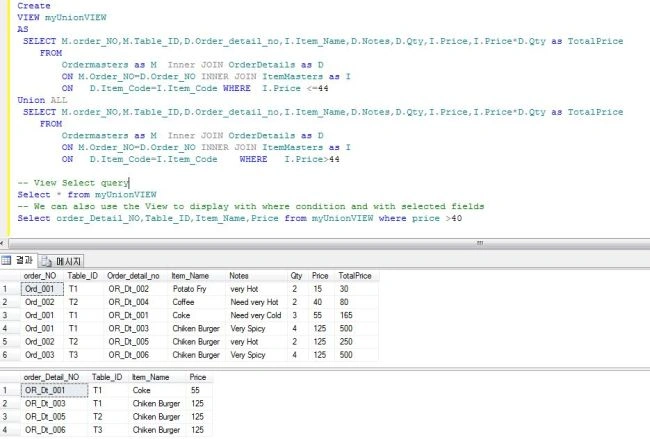
- -- Here we create view for our Union ALL example
- Create
- VIEW myUnionVIEW
- AS
- SELECT M.order_NO,M.Table_ID,D.Order_detail_no,I.Item_Name,D.Notes,D.Qty,I.Price,
- I.Price*D.Qty as TotalPrice
- FROM
- Ordermasters as M Inner JOIN OrderDetails as D
- ON M.Order_NO=D.Order_NO INNER JOIN ItemMasters as I
- ON D.Item_Code=I.Item_Code WHERE I.Price <=44
- Union ALL
- SELECT M.order_NO,M.Table_ID,D.Order_detail_no,I.Item_Name,D.Notes,D.Qty,I.Price,
- I.Price*D.Qty as TotalPrice
- FROM
- Ordermasters as M Inner JOIN OrderDetails as D
- ON M.Order_NO=D.Order_NO INNER JOIN ItemMasters as I
- ON D.Item_Code=I.Item_Code WHERE I.Price>44
- -- View Select query
- Select * from myUnionVIEW
- -- We can also use the View to display with where condition and with selected fields
- Select order_Detail_NO,Table_ID,Item_Name,Price from myUnionVIEW where price >40

13. Pivot
Why do we use a pivot in our SQL? So many people ask how to display the data from a row to a column. Yes we can do that using a Pivot. Using a Pivot we can display the rows as columns and display the average or sum of items of that. For example I want to display all the items with the price as a column and for that we can use a pivot. Now let's see an sample.
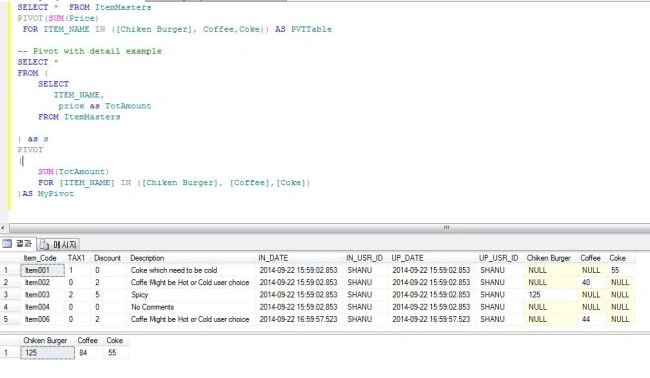
Here we can see an example that displays all the records of tblItemMaster with ItemName as a column and display the price in each row of items.
- -- Simple Pivot Example
- SELECT * FROM ItemMasters
- PIVOT(SUM(Price)
- FOR ITEM_NAME IN ([Chiken Burger], Coffee,Coke)) AS PVTTable
- -- Pivot with detail example
- SELECT *
- FROM (
- SELECT
- ITEM_NAME,
- price as TotAmount
- FROM ItemMasters
- ) as s
- PIVOT
- (
- SUM(TotAmount)
- FOR [ITEM_NAME] IN ([Chiken Burger], [Coffee],[Coke])
- )AS MyPivot

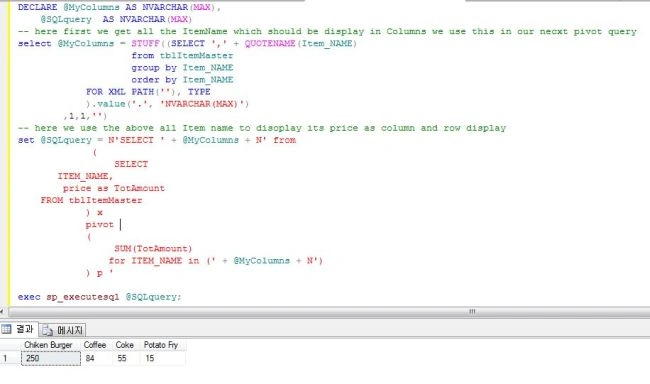
Here we can see one more important example that will display all the Item Names as columns. To use this first we need to add all the item names to a variable. Then we can use this variable to display as a pivot. See the following example.
- DECLARE @MyColumns AS NVARCHAR(MAX),
- @SQLquery AS NVARCHAR(MAX)
- -- here first we get all the ItemName which should be display in Columns we use this in our necxt pivot query
- select @MyColumns = STUFF((SELECT ',' + QUOTENAME(Item_NAME)
- FROM ItemMasters
- GROUP BY Item_NAME
- ORDER BY Item_NAME
- FOR XML PATH(''), TYPE
- ).value('.', 'NVARCHAR(MAX)')
- ,1,1,'')
- -- here we use the above all Item name to disoplay its price as column and row display
- set @SQLquery = N'SELECT ' + @MyColumns + N' from
- (
- SELECT
- ITEM_NAME,
- price as TotAmount
- FROM ItemMasters
- ) x
- pivot
- (
- SUM(TotAmount)
- for ITEM_NAME in (' + @MyColumns + N')
- ) p '
- exec sp_executesql @SQLquery;

14. Stored Procedure (SP)
I saw many times in Code Project many people asking questions about how to write more than one query in SQL Server and use them in our C# program. For example many people ask how to run a Select, Insert and Update at the same time in SQL. Well we actually cannot run all the queries at the same time but we can use Store Procedures to execute them all one by one. A SP is nothing but a function we can write once and use many times and also perform various tasks with different parameter values.
In our example now I want to insert a new item into a table Item Master but before inserting I want to generate my itemCode. To do that for example as a simple method I will use the count of records and add one value to it and generate my item Code.
Syntax
- CREATE PROCEDURE [ProcedureName]
- AS
- BEGIN
- -- Select or Update or Insert query.
- END
- To execute SP we use
- exec ProcedureName
- -- =============================================
- -- Author : Shanu
- -- Create date : 2014-09-15
- -- Description : To Display Pivot Data
- -- Latest
- -- Modifier : Shanu
- -- Modify date : 2014-09-15
- -- =============================================
- -- exec USP_SelectPivot
- -- =============================================
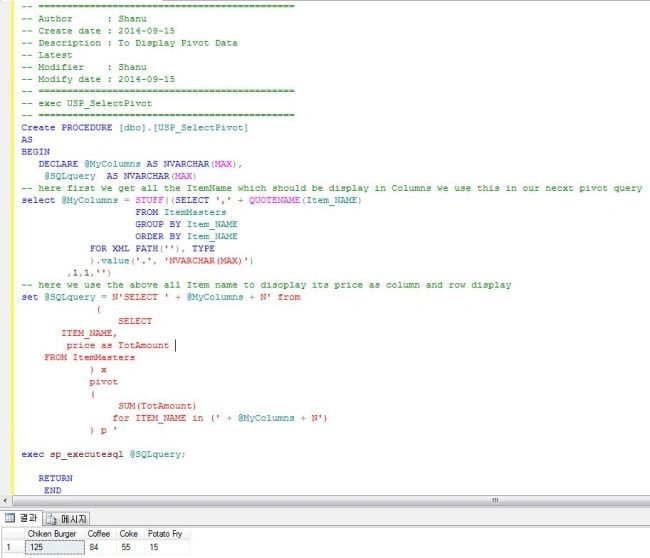
- Create PROCEDURE [dbo].[USP_SelectPivot]
- AS
- BEGIN
- DECLARE @MyColumns AS NVARCHAR(MAX),
- @SQLquery AS NVARCHAR(MAX)
- -- here first we get all the ItemName which should be display in Columns we use this in our necxt pivot query
- select @MyColumns = STUFF((SELECT ',' + QUOTENAME(Item_NAME)
- FROM ItemMasters
- GROUP BY Item_NAME
- ORDER BY Item_NAME
- FOR XML PATH(''), TYPE
- ).value('.', 'NVARCHAR(MAX)')
- ,1,1,'')
- -- here we use the above all Item name to disoplay its price as column and row display
- set @SQLquery = N'SELECT ' + @MyColumns + N' from
- (
- SELECT
- ITEM_NAME,
- price as TotAmount
- FROM ItemMasters
- ) x
- pivot
- (
- SUM(TotAmount)
- for ITEM_NAME in (' + @MyColumns + N')
- ) p '
- exec sp_executesql @SQLquery;
- RETURN
- END

Note to alter the SP we use an Alter procedure procedureName.
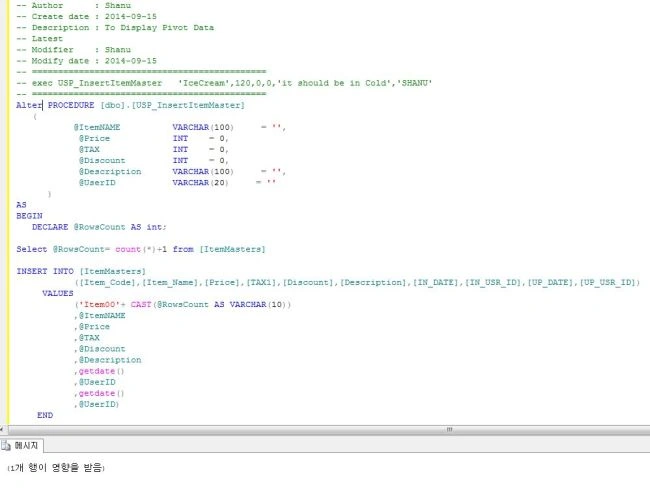
Select and insert SP
- -- Author : Shanu
- -- Create date : 2014-09-15
- -- Description : To Display Pivot Data
- -- Latest
- -- Modifier : Shanu
- -- Modify date : 2014-09-15
- -- =============================================
- -- exec USP_InsertItemMaster 'IceCream',120,0,0,'it should be in Cold','SHANU'
- -- =============================================
- Create PROCEDURE [dbo].[USP_InsertItemMaster]
- (
- @ItemNAME VARCHAR(100) = '',
- @Price INT = 0,
- @TAX INT = 0,
- @Discount INT = 0,
- @Description VARCHAR(100) = '',
- @UserID VARCHAR(20) = ''
- )
- AS
- BEGIN
- DECLARE @RowsCount AS int;
- Select @RowsCount= count(*)+1 from [ItemMasters]
- INSERT INTO [ItemMasters]
- ([Item_Code],[Item_Name],[Price],[TAX1],[Discount],[Description],[IN_DATE],[IN_USR_ID],[UP_DATE],[UP_USR_ID])
- VALUES
- ('Item00'+ CAST(@RowsCount AS VARCHAR(10))
- ,@ItemNAME
- ,@Price
- ,@TAX
- ,@Discount
- ,@Description
- ,getdate()
- ,@UserID
- ,getdate()
- ,@UserID)
- END

15. Functions
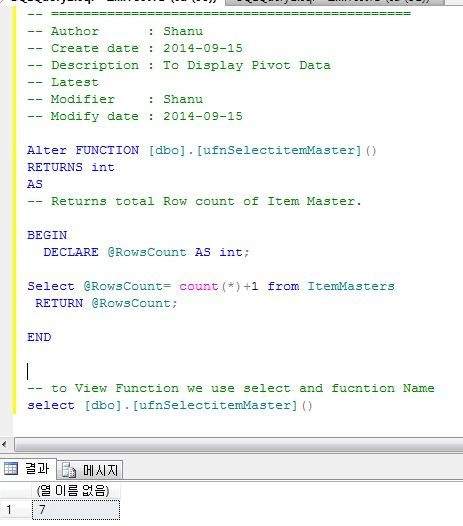
In this article we have already seen a few pre-defined system functions like MAX(), SUM(), GetDate() and and so on. Now let’s see how to create a user defined function.
If someone were to ask me what a function is and what is the use of a function then in a simple way I will say that if I want to execute or perform some action several times with a different meaning then I will create a function and call it whenever I need it. The following is the syntax to create a function.
- <a style="font-size: 14px; color: #111111">
- Create Function functionName
- As
- Begin
- END
- </a>
- <a style="font-size: 14px; color: #111111">
- -- =============================================
- -- Author : Shanu
- -- Create date : 2014-09-15
- -- Description : To Display Pivot Data
- -- Latest
- -- Modifier : Shanu
- -- Modify date : 2014-09-15
- Alter FUNCTION [dbo].[ufnSelectitemMaster]()
- RETURNS int
- AS
- -- Returns total Row count of Item Master.
- BEGIN
- DECLARE @RowsCount AS int;
- Select @RowsCount= count(*)+1 from ItemMasters
- RETURN @RowsCount;
- END
- -- to View Function we use select and fucntion Name
- select [dbo].[ufnSelectitemMaster]()
- </a>

Here we can see another function that will return the last date of a month from a given date.
- -- =============================================
- -- Author : Shanu
- -- Create date : 2014-09-15
- -- Description : To Display Pivot Data
- -- Latest
- -- Modifier : Shanu
- -- Modify date : 2014-09-15
- ALTER FUNCTION [dbo].[ufn_LastDayOfMonth]
- (
- @DATE NVARCHAR(10)
- )
- RETURNS NVARCHAR(10)
- AS
- BEGIN
- RETURN CONVERT(NVARCHAR(10), DATEADD(D, -1, DATEADD(M, 1, CAST(SUBSTRING(@DATE,1,7) + '-01' AS DATETIME))), 120)
- END
- SELECT dbo.ufn_LastDayOfMonth('2014-09-01')AS LastDay
- </a>
Here are a few SQL Coding Standards sites. Kindly refer to these links and follow the SQL Standards in your queries.
- SQL Server Database Coding Standards and Guidelines.
- SQL Server – Database Coding Standards and Guidelines – Part 1
Example 1: To Display Every Week Sunday.
In some case we need to display all the days that should be Sunday, Monday and so on. For example to list all the days of work that start on Sunday.
Here now let's see our following example. I have the From Date and the To Date. Now I want to display all the Sundays alone between this range.
For this we can use our preceding CTE, the same example. Now using the CTE we get all the dates between 2 dates. Now what we need to do is to select only the Sunday dates. I have used the temp table to store all the Sundays and display the result.
- declare @FromDate datetime,
- @ToDate datetime;
- IF OBJECT_ID('tempdb..#TEMP_EveryWk_Snday') IS NOT NULL
- DROP TABLE #TEMP_EveryWk_Snday
- DECLARE @TOTALCount INT
- SET @FromDate = getdate();
- SET @ToDate = DATEADD(Month, 3,getdate());
- Select @TOTALCount= DATEDIFF(dd,@FromDate,@ToDate);
- WITH d AS
- (
- SELECT top (@TOTALCount) AllDays = DATEADD(DAY, ROW_NUMBER()
- OVER (ORDER BY object_id), REPLACE(@FromDate,'-',''))
- FROM sys.all_objects
- )
- SELECT Distinct DATEADD(DAY, 1 - DATEPART(WEEKDAY, AllDays),
- CAST(AllDays AS DATE))WkStartSundays
- INTO #TEMP_EveryWk_Snday
- FROM d
- WHERE
- AllDays <= @ToDate
- Select WkStartSundays WEEKSTART_Sunday,
- DATENAME(dw,WkStartSundays) Day_Name
- FROM #TEMP_EveryWk_Snday
If I have missed any SQL query that you want to understand then kindly leave me a comment, I will be happy to add those with examples to this article. I have attached a Zip file that has this article as a Word file for your easy access.

Udaya kumarPosted Apr 15, 2015, 1:17 AM
Nice article
sreenivasa kPosted Feb 24, 2015, 12:35 PM
nice article for startup
Rahul Kumar SaxenaPosted Feb 24, 2015, 7:20 AM
All the best Syed Shanu....
Syed ShanuPosted Feb 24, 2015, 7:04 AM
Thank you rahul.Now writing one article related to Angular Js and mvc ur article help me lot.
Rahul Kumar SaxenaPosted Feb 24, 2015, 6:50 AM
Good Collection...
Keyur PatelPosted Feb 24, 2015, 6:42 AM
Good effort. It would be really helpful. Nice!
Ramchand RepallePosted Feb 24, 2015, 6:19 AM
Great effort..!!. Nice to see mostly used examples at one place.
Hussain AhmedPosted Feb 24, 2015, 5:32 AM
Very Nice
Prasham SabadraPosted Feb 24, 2015, 4:56 AM
Thanks for sharing! Nice Article.
swapnilPosted Feb 24, 2015, 3:17 AM
good article