

Databases in SQL Server
There are basically the following two types of databases in SQL Server:
- System Databases.
- User Databases.
System Databases in SQL Server
System databases are databases that are created when SQL Server is installed. These databases are used for various operational and management activities for SQL Server.
Types of System Databases
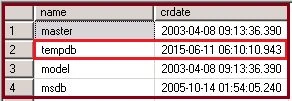
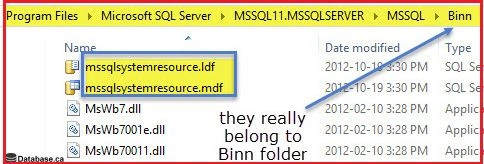
There are basically four system databases in SQL Server, master, msdb, tempdb and model that we can see. Apart from that, there is one more system database resource database that is hidden and read-only. Let's move ahead with each system database.

Figure 1: System Database

Figure 2: System Database
Master Database in SQL Server
- All the system-level information for a SQL Server record by the master database.
- The dbid (database id ) of master is 1.
- The master database has SIMPLE RECOVERY MODEL.
- It is a very important database and we must have the backup.
- Without the master database the server can't be started.
Assume the master database files are missing or inaccessible, will SQL Server start or up?
Answer: No, SQL Server will not start because the master database is the important database and all the configuration and information needed to start the SQL Server is stored in the master database itself hence without the master database SQL server will not start.
- Master database contains information about the server configuration. We can see the server configuration with the following query:
select * from sys.sysconfigures;
- Master database contains information about all other databases and their location on SQL Server. We can see the information with executing the following query:
select * from sys.sysdatabases; or sp_helpdb
- Master database contains information about logins in SQL Server. The following is the query by which we can see it:
select * from sys.syslogins;
- Master database also contains information about users on SQL Server. The following is the query to see user details:
select * from sys.sysusers;
- Master and mastlog are the logical file names of master database.
master.mdf ( data file ) and mastlog.ldf are the physical files of master database.
Query to see the physical file location of the master database:
- SELECT name, physical_name FROM sys.database_files;

Figure 3: Master Database
For more information on the master database use the following link:
Model Database in SQL Server
- The Model database acts as a template database used in creation of new databases.
- The dbid of the model database is 3.
- By default the model database has FULL RECOVERY MODEL.
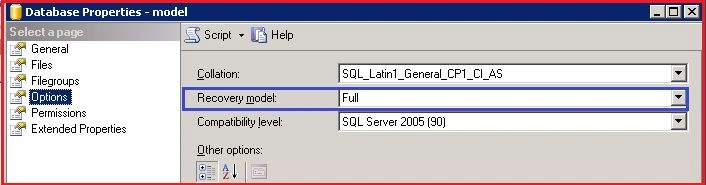
Figure 4: Recovery Model
- We can take a backup of the model database.
- Modeldev and modellog are the logical file names of the model database.
- Model.mdf ( data file ) and modellog.ldf are the physical files of the model database.
- The same query can be use to see the physical file location of the model database:
- SELECT name, physical_name FROM sys.database_files;

Figure 5: Data Table
A user has created a new database. What will be the recovery model of that database?
Answer: Because the model database acts as a template database, when a user creates a new database it will inherit the property of the model database and as we know by default the recovery model of the model database is FULL (until or unless the user changes it), hence the new database is created by the user with FULL RECOVERY MODEL.
For more information on the model database use the following link:
MSDB Database in SQL Server
- A MSDB database stores information related to backups, SQL Server Agent information, SQL Server Jobs, alerts and so on.
- The Dbid of the msdb database is 4.
- The recovery model of a msdb database is SIMPLE.
- We can take backup of a msdb database.
- MSDBData and MSDBLog are the logical file names of a msdb database.
- MSDBData.mdf (data file) and MSDBLog.ldf are the physical files of a msdb database.
- The same query can be used to see the physical file location of a msdb database:



Hari LakkakulaPosted Jul 11, 2018, 12:40 PM
We can take master db backup?
Debaditya MondalPosted Nov 8, 2016, 1:17 AM
Nice and helpful article ..but i have a question..why msdb creation time differ than master?
Ankur MistryPosted Dec 22, 2015, 1:12 PM
Thanks for sharing nice article
Dominique CejaPosted Jun 29, 2015, 1:25 PM
Great information. Simple and clear!
Yashwant VishwakarmaPosted Jun 14, 2015, 12:51 AM
Thanks Santhakumar
Santhakumar MunuswamyPosted Jun 12, 2015, 2:30 PM
Thanks for nice article :)
Moise SAWADOGOPosted Jun 12, 2015, 11:05 AM
Simple & Clear ! thanks.
Yashwant VishwakarmaPosted Jun 12, 2015, 7:46 AM
Thank You Pankaj :-)
Jaipal ReddyPosted Jun 12, 2015, 7:43 AM
Nice one. ! keep explore the treasure of knowledge.
Pankaj Kumar ChoudharyPosted Jun 12, 2015, 6:08 AM
Really This article develop new concepts about system database ... Thanks For sharing this Article @Yashwant Sir.........
RakeshPosted Jun 12, 2015, 5:54 AM
Good information
Sibeesh VenuPosted Jun 12, 2015, 1:44 AM
Good One.
NitinPosted Jun 12, 2015, 1:35 AM
good one