

Introduction
Databases are the backbone of every type of application and it is, to a great degree, basic to give cautious thought to database programming. I've seen numerous occasions where database projects are disregarded, suspecting that it's something straightforward that can be done by anyone. Indeed, that is wrong.
I have seen a large number of the engineers with a lot of knowledge in programming dialect and SQL Servers. However, I think they are not holding a candle to the current situation's best practices. That is the reason I have chosen to compose this article on "Best Practices, Coding Conventions, and Programming Guidelines in SQL Server ".
Databases are the backbone of every type of application and it is, to a great degree, basic to give cautious thought to database programming. I've seen numerous occasions where database projects are disregarded, suspecting that it's something straightforward that can be done by anyone. Indeed, that is wrong.
I have seen a large number of the engineers with a lot of knowledge in programming dialect and SQL Servers. However, I think they are not holding a candle to the current situation's best practices. That is the reason I have chosen to compose this article on "Best Practices, Coding Conventions, and Programming Guidelines in SQL Server ".

Coding norms and rules are critical for any engineer on the way to a fruitful profession. A coding standard is an arrangement of rules, tenants, and directions on the most proficient method to compose the code. Coding benchmarks ought to be sufficiently adaptable or ought to deal with the circumstance where they ought not forestall best practices for coding. These are the rules fundamentally that need to be looked after for better understanding.
Useful links related to SQL server query
Now, I have decided to share some important points to use "Best Practices,Coding Conventions and Programming Guidelines in SQL Server." We can see them below.
Avoid multiple Joins in a single SQL Query
Always try to abstain from composing a SQL query using multiple joins that incorporates outer joins, cross apply, outer joins apply, and other complex sub inquiries. It lessens the decisions for Optimizer to choose the join request and join sort. At some point, Optimizer is compelled to utilize the settled nested joins, independent of the execution outcomes for questions with unnecessarily complex cross apply or sub query. For e.g.
Always try to abstain from composing a SQL query using multiple joins that incorporates outer joins, cross apply, outer joins apply, and other complex sub inquiries. It lessens the decisions for Optimizer to choose the join request and join sort. At some point, Optimizer is compelled to utilize the settled nested joins, independent of the execution outcomes for questions with unnecessarily complex cross apply or sub query. For e.g.
- SELECT
- T1.p_id,
- T1.k_id,
- MIN(case when T2.T2_id = 1 then T2.pos else null end) AS xyz,
- MIN(case when T2.T2_id = 2 then T2.pos else null end) AS xyz1
- FROM
- Table T1
- INNER JOIN Table T2 ON t2.p_id = T1.p_id
- AND T2.k_id = T1.k_id
- AND T2.t2_id =any ( 1,2)
- WHERE
- T1.p_id = 1
- AND T1.c_id = 1
- GROUP BY
- 1,
- 2
- LIMIT 1
Try to avoid use of Non-correlated Scalar Sub Query
You can re-compose your query to evacuate a non-connected scalar sub query as a different query, rather than part of the principle query and store the yield in a variable, which can be alluded to, in the main query or later part of the batch. This will give better alternatives to the Optimizer, which may return exact cardinality that evaluates alongside a superior arrangement. e.g
You can re-compose your query to evacuate a non-connected scalar sub query as a different query, rather than part of the principle query and store the yield in a variable, which can be alluded to, in the main query or later part of the batch. This will give better alternatives to the Optimizer, which may return exact cardinality that evaluates alongside a superior arrangement. e.g
- SELECT Name FROM Table WHERE Id = (SELECT City FROM table2 WHERE state='UP')
- SELECT T1.name FROM table1 T1 WHERE T1.Id = (SELECT T2.City FROM Table T2 WHERE T2.city=T1.Id)
If you want to know about Non-correlated query and correlated query, click here.
Avoid using TEXT or NTEXT datatypes in SQL for storing the large textual data
Make an effort not to use TEXT or NTEXT datatypes for putting away expansive literary information. The TEXT datatype has some innate issues connected with it. For instance, you can't straightforwardly create or upgrade the content information using the INSERT or UPDATE statement. Rather, you need to use exceptional articulations like READTEXT, WRITETEXT, and UPDATETEXT.
Make an effort not to use TEXT or NTEXT datatypes for putting away expansive literary information. The TEXT datatype has some innate issues connected with it. For instance, you can't straightforwardly create or upgrade the content information using the INSERT or UPDATE statement. Rather, you need to use exceptional articulations like READTEXT, WRITETEXT, and UPDATETEXT.
There is, additionally, a considerable measure of bugs connected with reproducing tables containing content segments. In this way, on the off chance, you don't need to store more than 8 KB of content, using CHAR(8000) or VARCHAR(8000) datatypes.
Order By
Never use any column numbers in the ORDER BY clause in SQL statement. As per the given example below, the 2nd query is faster than the 1st query. e.g
Never use any column numbers in the ORDER BY clause in SQL statement. As per the given example below, the 2nd query is faster than the 1st query. e.g
- ------------Incorrect way------------
- SELECT Id, Name
- FROM Table1
- ORDER BY 3 -- never used number.
- ------------Correct way---------------
- SELECT id, Name
- FROM Table1
- ORDER BY Name
We know that Index can drastically decrease the information recovery time yet reversely affect DML operations, which may corrupt query execution. With this reality, Indexing is a testing errand, yet could enhance the SQL query execution and give you best query reaction time.
Syntax
- CREATE NONCLUSTERED xyz INDEX <IndexName>
- ON <tbl_name>
- (
- Colmn1,
- Colmn2,
- .......
- ........
- )
Declare variable
In spite of the fact that T-SQL has no understanding of constants (like the ones in the C language), variable can fill a similar need. Using variables rather than steady values inside your query enhances comprehensibility and viability of your code. Now, we can see the example below.
In spite of the fact that T-SQL has no understanding of constants (like the ones in the C language), variable can fill a similar need. Using variables rather than steady values inside your query enhances comprehensibility and viability of your code. Now, we can see the example below.
- SELECT id, Name
- FROM table
- WHERE Status IN (5,6)
- DECLARE @Id, @status
- SELECT @Id = 5, @Status = 1
- SELECT id, name
- FROM Table
- WHERE Status IN (@status, @id)
@Debug parameter
Continuously add a @Debug parameter to your stored procedure. This can be of BIT information sort. At the point when a 1 is passed for this parameter, print all the moderate results, variable substance using SELECT or PRINT articulations and when 0 is passed, don't print anything. This aides in fast investigation of stored procedure systems, as you don't need to include and expel these PRINT/SELECT articulations prior and then after investigating issues.
Continuously add a @Debug parameter to your stored procedure. This can be of BIT information sort. At the point when a 1 is passed for this parameter, print all the moderate results, variable substance using SELECT or PRINT articulations and when 0 is passed, don't print anything. This aides in fast investigation of stored procedure systems, as you don't need to include and expel these PRINT/SELECT articulations prior and then after investigating issues.
Constraint in SQL server
I have seen many times in different projects that developers already create constraints in SQL table without any name. I think it will throw problems when you alter or remove the data. So, we need to create constraints with proper names. Refer the given image.
I have seen many times in different projects that developers already create constraints in SQL table without any name. I think it will throw problems when you alter or remove the data. So, we need to create constraints with proper names. Refer the given image.
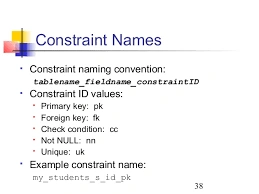
As per the image, we can see that all constraint names start form constraint key i.e pk,fk,uk etc.....So, you just need to write a query with constraint name.
- CREATE TABLE Table1
- (
- Id int NOT NULL,
- CONSTRAINT Name UNIQUE(id)
- )
Ensure your stored procedure returns an answer demonstrating their status. Institutionalize on the arrival estimations of stored procedure for success and failure. The RETURN statement is implied for returning the execution status, not information.
Output parameter
If any stored procedure returns a single row data, consider returning the data using OUTPUT parameters in the place of a SELECT query and Output parameter is faster than the data returned by SELECT query.
If any stored procedure returns a single row data, consider returning the data using OUTPUT parameters in the place of a SELECT query and Output parameter is faster than the data returned by SELECT query.
Max GainePosted Aug 12, 2020, 7:48 AM
In your section: "Try to avoid use of Non-correlated Scalar Sub Query"; what would be the performance difference difference between your solutions and and "SELECT T1.name FROM table1 T1 WHERE exists = (SELECT NULL FROM Table T2 WHERE T2.city=T1.Id)
Thennarasu NPosted Jan 27, 2017, 6:45 AM
Great job Brother and Keep Going on...
Bikesh SrivastavaPosted Nov 30, 2016, 4:11 AM
Nagaraj S Yes i can understand...i'll do correct that line of code.
Nagaraj SPosted Nov 30, 2016, 1:33 AM
@BIKESH SRIVASTAVA ......Nicely written. Under the topic "Try to avoid use of Non-correlated Scalar Sub Query" i wonder that you missed where condtion (state='UP') in the second query. Please correct me if i am wrong.