

INITIAL CHAMBER
Step 1
Open VS10, make an empty website and give it the name "DropDownList".
Step 2
You will see your empty website in Solution Explorer that may be in the right hand side of VS10. Right-click on that website and select “Add New Item". A new window will open, from that you must select "web form" and give the "Dropdownlist.aspx".
In ASP.Net we use .aspx files for design purposes, we also make a short design for our project but at a later time. You will see in the Solution Explorer two files "dropdownlist.aspx" and "dropdownlist.aspx.cs". For now assume that the ".aspx page" is for design purposes (front end, for advanced people) and the ".cs page" is used for coding purposes (back end, for advanced people).
Step 3
Again go to Add New Item and select SQL Server Database then press OK. In the prompt you will be asked "Do you want to add your database into the "App_Data Folder" or not ?" Better say "YES", the reason behind yes is, If you had chosen "No" than your database will be out of security and it can easily be hacked by SQL Injection attacks but suppose your database is inside some sort of Security like VS10 has in the form of the folder "APP_DATA" folder then it will be very hard for attackers to get to your database.
Step 4
Open your Server Explorer (if anyhow vs10 is not showing you the Server Explorer then in the View menu select Server Explorer, that will show your Servers). To make it simple, press "CTRL+ALT+S". Here you go, can you see it? Tell me in the comments, I'll be waiting.
Step 5
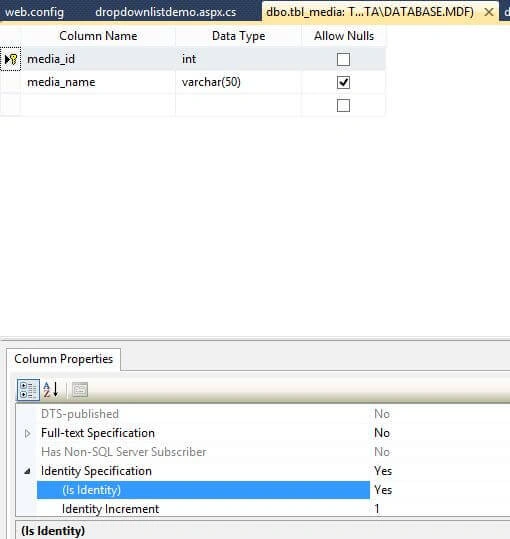
In Server Explorer, you will see your database ("Database.mdf") file that you had just added. Click on your database, you will see many options (like tables, Stored Procedures and many more). For now add a table to your database by going to Table then right-click and select Add new table.
Make it like this and make it "IS IDENTITY= "TRUE" in the bottom part as shown in the below image :
DESIGN CHAMBER
Step 6
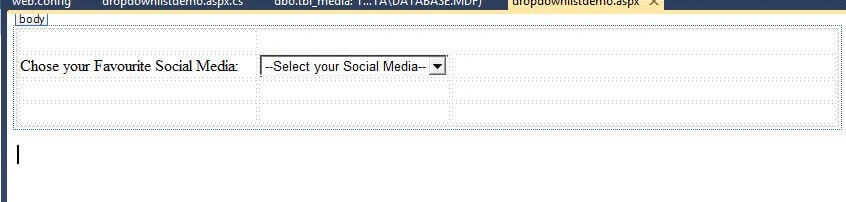
Open your Dropdownlist.aspx page for designing your application. Try to make it like the following.
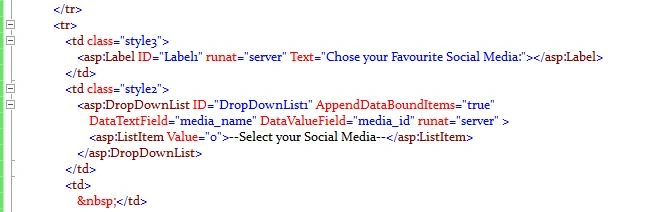
Here is your code to add a dropdown from the Toolbar:
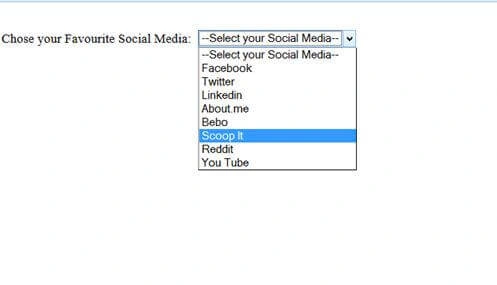
Here is your design:

Shubham AgrawalPosted Sep 23, 2017, 2:00 AM
But i want to If i select any value then my data should save otherwise if you dont select the any value so you dont submit the page.
Arul RPosted Oct 28, 2015, 5:45 AM
Nice share!!!
Karthik Muthu KaruppanPosted May 4, 2015, 1:58 PM
Good one
NitinPosted May 4, 2015, 12:57 PM
good
Abhishek JaiswalPosted May 4, 2015, 12:55 PM
good one! :)
Khargesh RajputPosted May 4, 2015, 1:44 AM
nice
Nilesh JadavPosted May 4, 2015, 1:14 AM
Most welcome ... :)
Santhakumar MunuswamyPosted May 3, 2015, 11:40 PM
Thanks for nice article
Gowtham RajamanickamPosted May 3, 2015, 10:47 PM
good