

Introduction
This article explains how to bind data to a GridView using jQuery.
Sometimes before I need to show some data in a grid but not show the redirected page on any type of click obviously I choose jQuery. I bind the data to the GridView using Ajax calls and jQuery.
If you inspect the GridView in your browser then you must have noticed that the GridView has <th>, <tr> and <td> tags to show the data so I used this technique to bind the data to the Grid :).
Step 1
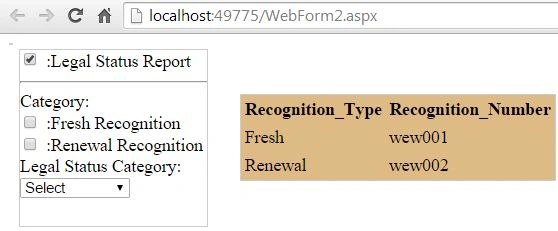
First of all I create some checkboxes on which the Grid needs to be bound, on each new click the new data is to be shown. So here I am simply creating some checkboxes for examples.
- <table>
- <tr>
- <td>
- <div id="div1" style="width: 170px; height: 160px;">
- <asp:CheckBox ID="chk1" runat="server" />
- <asp:Label ID="lbl" runat="server" Text=":Legal Status Report" AssociatedControlID="chk1"></asp:Label>
- <hr />
- Category:
- <br />
- <asp:CheckBox runat="server" ID="chk2" />
- :Fresh Recognition
- <br />
- <asp:CheckBox runat="server" ID="chk3" />
- :Renewal Recognition
- <br />
- Legal Status Category:
- <br />
- <asp:DropDownList ID="drp2" Width="100px" runat="server">
- <asp:ListItem Text="Select" Selected="True"></asp:ListItem>
- <asp:ListItem Text="Item1"></asp:ListItem>
- </asp:DropDownList>
- </div>
- </td>
- </tr>
- </table>
Now I add a GridView that is to be bound on different clicks:
- <asp:GridView ID="grd" runat="server" BackColor="#DEBA84" BorderColor="#DEBA84" BorderStyle="None" BorderWidth="1px" CellPadding="3" CellSpacing="2">
- <FooterStyle BackColor="#F7DFB5" ForeColor="#8C4510" />
- <HeaderStyle BackColor="#A55129" Font-Bold="True" ForeColor="White" />
- <PagerStyle ForeColor="#8C4510" HorizontalAlign="Center" />
- <RowStyle BackColor="#FFF7E7" ForeColor="#8C4510" />
- <SelectedRowStyle BackColor="#738A9C" Font-Bold="True" ForeColor="White" />
- <SortedAscendingCellStyle BackColor="#FFF1D4" />
- <SortedAscendingHeaderStyle BackColor="#B95C30" />
- <SortedDescendingCellStyle BackColor="#F1E5CE" />
- <SortedDescendingHeaderStyle BackColor="#93451F" />
- </asp:GridView>
Step 2
Now our jQuery work begins. First of all add a jQuery library so that our jQuery code can work otherwise it will give you an error something like "$ is not defined" and this error can only be seen in the console so don't try to find it in the UI.
Just add this line and your jQuery will start working:
- <script src="//code.jquery.com/jquery-1.10.2.js"></script>
Now I wrote the following code for the click of the first checkbox:
- <script>
- $(document).ready(function () {
- $('#chk1').click(function () {
- $('#grd').empty();
- load_Data();
- }
- })
- });
- </script>
Here I call the function load_Data(). In this function the Ajax call is made for a web method that is on the aspx.cs page:
- function load_Data() {
- debugger;
- $.ajax({
- type: 'POST',
- contentType: "application/json; charset=utf-8",
- url: 'WebForm2.aspx/Get_Data',
- data: "{}",
- dataType: 'JSON',
- success: function (response) {
- $('#grd').append("<tr><th>Recognition_Type </th><th>Recognition_Number </th></tr>")
- for (var i = 0; i < response.d.length; i++) {
- debugger;
- $('#grd').append("<tr><td>" + response.d[i].Recognition_Type + "</td><td>" + response.d[i].Recognition_Number + "</td></tr>")
- };
- },
- error: function () {
- alert("Error");
- }
- });
- return false;
- };
In the code behind web method a simple SQL connection is made for retrieving some data from a table named "testReport". From this data a list is created that is returned to the Ajax success function.
- [WebMethod]
- public static List<Info> Get_Data()
- {
- SqlConnection conn = new SqlConnection(@"your connection");
- DataTable dt = new DataTable();
- conn.Open();
- SqlCommand cmd = new SqlCommand("select * from testReport", conn);
- cmd.CommandType = CommandType.Text;
- var d = cmd.ExecuteReader();
- dt.Load(d);
- List<Info> list = new List<Info>();
- Info info;
- foreach (DataRow dr in dt.Rows)
- {
- info = new Info(dr["Recognition_Type"].ToString(), dr["Recognition_No"].ToString());
- list.Add(info);
- }
- conn.Close();
- return list;
- }
- public class Info
- {
- public Info(string recognition_type, string recognition_number)
- {
- this.Recognition_Type = recognition_type;
- this.Recognition_Number = recognition_number;
- }
- private string _type;
- private string _number;
- public string Recognition_Type
- {
- get { return _type; }
- set { _type = value; }
- }
- public string Recognition_Number
- {
- get { return _number; }
- set { _number = value; }
- }
- }
When the list is returned it goes into the success function otherwise when an error occurs it will g into the error function.
On reaching the success function some headings are appended to the GridView because it works like a table on the UI.
After this data is recieved it is append to the columns of the GridView.
- success: function (response) {
- $('#grd').append("<tr><th>Recognition_Type </th><th>Recognition_Number </th></tr>")
- for (var i = 0; i < response.d.length; i++) {
- $('#grd').append("<tr><td>" + response.d[i].Recognition_Type + "</td><td>" + response.d[i].Recognition_Number + "</td></tr>")
- };
- },
- error: function () {
- alert("Error");
- }
Step 4
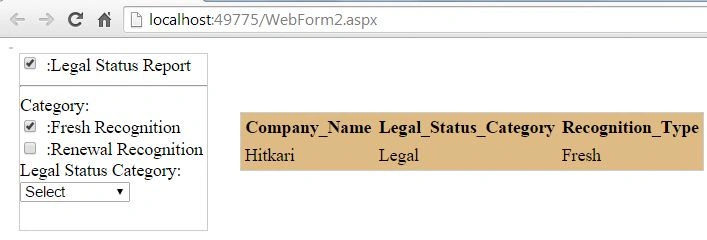
Now if some other checkbox is checked then a new function is called named "load_Fresh_Data()" but before calling this function the Grid is made empty so that new data can be bound to the Grid.
- $('#CheckBox1').click(function () {
- $('#grd').empty();
- load_RND_Data();
- });
In this new function again the same procedure executes, in other words again an Ajax call is made, again a SQL connection is created and some data is fetched, a list is returned to the success function that is bound to the columns of the GridView otherwise an error message is shown.
- function load_RND_Data() {
- $.ajax({
- type: 'POST',
- contentType: "application/json; charset=utf-8",
- url: 'WebForm2.aspx/load_RND_Data',
- data: "{}",
- dataType: 'JSON',
- success: function (response) {
- $('#grd').append("<tr><th>Company_Name </th><th>Legal_Status_Category </th></tr>")
- for (var i = 0; i < response.d.length; i++) {
- $('#grd').append("<tr><td>" + response.d[i].Company_Name + "</td><td>" + response.d[i].Legal_Status_Category + "</td></tr>")
- };
- },
- error: function () {
- alert("Error");
- }
- });
- return false;
- };
sundaramoorthy sPosted Oct 2, 2020, 5:40 AM
It works.. only when use table instead of grid.. my code is here script type="text/javascript"> $(document).ready(function () { $("#GVCategoryMenu").empty(); load_Data(); }); function load_Data() { //debugger; $.ajax({ type: "POST", url: "BindGBJquery.aspx/Get_Data", contentType: "application/json; charset=utf-8", //data: "{}", dataType: "JSON", success: function (response) { alert(response.d); $("#GVCategoryMenu").append("<tr><th># </th><th>Collection Name </th><th>Category </th><th>Edit </th></tr>") for (var i = 0; i < response.d.length; i++) { //debugger; alert(response.d[i].Collection_Name); $("#GVCategoryMenu").append("<tr><td>" + response.d[i].SlNo + "</td><td>" + response.d[i].Collection_Name + "</td><td>" + response.d[i].Category_Id + "</td><td></td></tr>") }; }, error: function () { alert("Error"); } }); return false; }; </script><table id="GVCategoryMenu"></table>
kalu singh raoPosted Aug 2, 2016, 2:13 AM
Nice
Ram JagabathulaPosted Jan 22, 2015, 1:32 AM
Nice.. I'm just looking for this.. informative..TQ..
Saurabh GuptaPosted Jan 15, 2015, 12:51 AM
give me your email address
Anubhav ChaudharyPosted Jan 15, 2015, 12:27 AM
Bro How could I know what problem you are getting, you are getting data in success that means problem is in binding, it might be possible that column names are not matching with the data coming in success. I doesn't knew what you are getting in success, i doesn't knew what are your column names at DB, you should call one of your seniors who have the knowledge of jquery and show your problem to him.
Saurabh GuptaPosted Jan 15, 2015, 12:11 AM
"$("[id$=gvCustomers]").empty" i have use this for clear my gridview data and then i have call my function to appand gridview $("[id$=gvCustomers]").append(row); "it does not append data"
Saurabh GuptaPosted Jan 15, 2015, 12:06 AM
i have check through "debugger" data come in object but not view in gridview.
Vithal WadjePosted Jan 14, 2015, 11:18 PM
nice
Anubhav ChaudharyPosted Jan 14, 2015, 1:06 PM
write "debugger" at the starting of success function and check what you are getting and put a debugger at error also so that you can check exact reason for error, check result in console of browser.
Saurabh GuptaPosted Jan 14, 2015, 7:27 AM
i pass the parameter still it not append my gridview
Saurabh GuptaPosted Jan 14, 2015, 7:22 AM
@Anubhav its my code
Anubhav ChaudharyPosted Jan 14, 2015, 6:57 AM
Are you getting error in my code??? This is your code or you can say it's mine code which is modified by you. I think you havn't passed the same parameters or number of parameters or type of parameters at GetCustomers function which is at default page. Make sure Parameters are same at both end.
Saurabh GuptaPosted Jan 14, 2015, 6:46 AM
function load_Data() { var pageIndex = 100; var pageCount; $.ajax({ type: "POST", url: "Default.aspx/GetCustomers", data: JSON.stringify({ 'pageIndex': pageIndex, 'mincart': minCarat, 'maxcart': maxCarat }), contentType: "application/json; charset=utf-8", dataType: "json", success: function (response) { // $('#gvCustomers').append("<tr><th>Recognition_Type </th><th>Recognition_Number </th></tr>") var xmlDoc = $.parseXML(response.d); var xml = $(xmlDoc); pageCount = parseInt(xml.find("PageCount").eq(0).find("PageCount").text()); var customers = xml.find("Customers"); $("[id*=gvCustomers] .loader").remove(); $('#gvCustomers').append("<tr><th>Recognition_Type </th><th>Recognition_Number </th></tr>") customers.each(function () { var customer = $(this); var row = $("[id$=gvCustomers] tr").eq(1).clone(true); $(".Shape", row).html(customer.find("Shape").text()); $(".Carat", row).html(customer.find("Carat").text()); $(".Cut", row).html(customer.find("Cut1").text()); $(".Color", row).html(customer.find("Color1").text()); $(".Clarity", row).html(customer.find("Clarity1").text()); $(".Polish", row).html(customer.find("Polish1").text()); $(".Symmetry", row).html(customer.find("Symmetry1").text()); $(".Depth", row).html(customer.find("Depth1").text()); $(".Table_", row).html(customer.find("Table_1").text()); $(".Floroscence", row).html(customer.find("Floroscence1").text()); $(".Culet", row).html(customer.find("Culet1").text()); $(".Price_Ct", row).html(customer.find("Price_Ct1").text()); $(".Price", row).html(customer.find("Price1").text()); $("[id$=gvCustomers]").append(row); //it does not append data in my gridview }); }, failure: function (response) { alert(response.d); }, error: function (response) { alert(response.d); } }); };
Saurabh GuptaPosted Jan 14, 2015, 6:42 AM
when i pass parameter
Anubhav ChaudharyPosted Jan 14, 2015, 6:17 AM
Where you are getting error?
Saurabh GuptaPosted Jan 14, 2015, 6:09 AM
it give error undefine