
We will make our database in MS Access and bind that data to our GridView.
Initial chamber
Step 1: Open Visual Studio 2010 and create an empty website and give it a suitable name Gridview_demo
Step 2: In Solution Explorer you will get your empty website, Add a web form by going like the following:
For Web Form:
Gridview_demo (Your Empty Website) - Right click and Add New Item Web Form. Name it Gridview_demo.aspx.
Database chamber
Open your MS Access 2007 or whatever version you have and click on Blank Database, then Create.
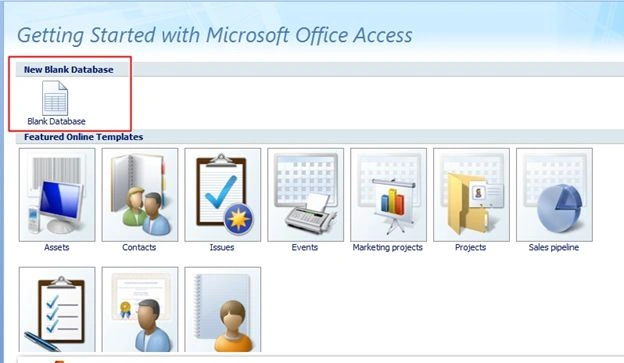
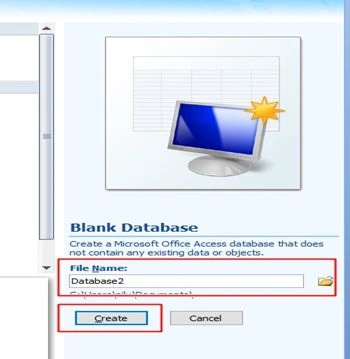
After creating a database in the left pane you see your default table, then right click on that table and go to Design View. Here in Design view we will add some entity to our table.
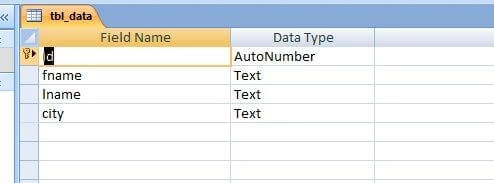
When you will get the complete design, again go to the table [tbl_data] and right click on Datasheet View. Feed some data in those fields, so that we can bind our data.
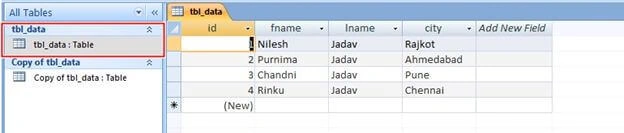
Creating Connection between MS Access and Visual Studio
Open Visual Studio, then in Server Explorer go to Connect to Database and Add Connection window will open like the following image.

Click on Change, you will get a new window of Change Data Source as in the following image.

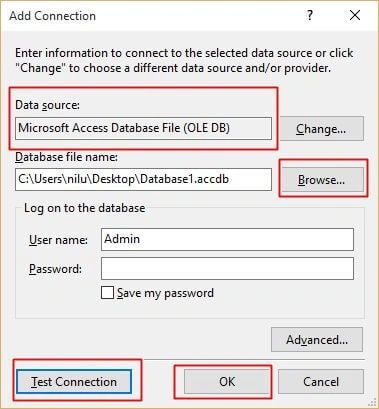
Here you saw Microsoft Access Database been taken as Data source because we have access database with us. After that you have to browse the database (access database) that you saved, browse it and click Test Connection. If it says Test Connection succeeded, then you can go ahead with the other process, otherwise you have to repeat the process.
Design chamber
Step 3: Open Gridview_demo.aspx file where we will create our design for binding GridView.
Gridview_demo.aspx:

Bind GridView With MS Access Database In ASP.NET C#
Join the conversation! Your thoughts help the community grow.
Sign in to leave a comment
It is the same account you read, post and publish with — and you will come straight back to this page.

Shasahnk KuchibhotlaPosted Nov 8, 2017, 2:20 PM
I'm getting the following exception: + $exception {"The 'Microsoft.ACE.OLEDB.12.0' provider is not registered on the local machine."} System.InvalidOperationException
Arul RPosted Oct 28, 2015, 5:34 AM
Good one !!!
Nilesh JadavPosted Sep 14, 2015, 8:08 AM
Malakondareddy Kurapati is it solved ??
Malakondareddy KurapatiPosted Sep 11, 2015, 6:41 AM
I got an error like "Could not find installable ISAM" . Could you please help me to solve this error ?
Karthikeyan KPosted Sep 7, 2015, 11:10 PM
Good one sir...Thanks for sharing
Pankaj Kumar ChoudharyPosted Sep 7, 2015, 7:55 PM
Nice Explain Sir.........
Shridhar SharmaPosted Sep 7, 2015, 4:58 PM
good one Nilesh.
Santhakumar MunuswamyPosted Sep 7, 2015, 3:43 PM
Good One. Thanks for sharing
Mohammed IbrahimPosted Sep 7, 2015, 3:39 PM
nice
RakeshPosted Sep 7, 2015, 3:27 PM
Good one
Rajeesh MenothPosted Sep 7, 2015, 2:37 AM
Nice Share