

Also demonstrated the each controls paging. We learn here how to bind controls with data without a database and how to handle paging on the controls.
Here you learn how to add a list to a GridView as a Data Source.
Read this also:
Initial chamber
Step 1
Open your Visual Studio and create an empty website, provide a suitable name such as GridViewUsingList.
Step 2
In Solution Explorer you get your empty website, then add web forms.
For Web Form
GridViewUsingList (your empty website). Right-click and select Add New Item -> Web Form. Name it DatagridviewList.aspx.
Design chamber
Step 3
Open the DatagridviewList.aspx file and write some code for the design of the application. This is the design phase.
Here I've design a GridView Control and used a property here:
- <form id="form1" runat="server">
- <div>
- <asp:GridView ID="GridView1" AllowPaging="true" PageSize="5" OnPageIndexChanging="GridView1_PageIndexChanging"
- runat="server"></asp:GridView>
- </div>
- lt;
- /form>
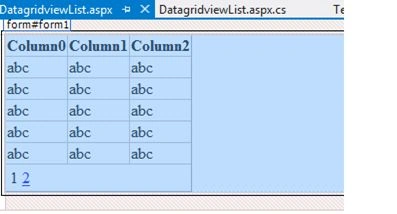
Figure 1
Now your design page looks as in the following.
Design Page
- <%@ Page Language="C#" AutoEventWireup="true" CodeFile="DatagridviewList.aspx.cs" Inherits="DatagridviewList" %>
- <!DOCTYPE html>
- <html xmlns="http://www.w3.org/1999/xhtml">
- <head runat="server">
- <title></title>
- </head>
- <body>
- <form id="form1" runat="server">
- <div>
- <asp:GridView ID="GridView1" AllowPaging="true" PageSize="5" OnPageIndexChanging="GridView1_PageIndexChanging"
- runat="server"></asp:GridView>
- </div>
- </form>
- </body>
- </html>
- <?xml version="1.0"?>
- <!--
- For more information on how to configure your ASP.NET application, please visit
- http://go.microsoft.com/fwlink/?LinkId=169433
- -->
- <configuration>
- <system.web>
- <compilation debug="true" targetFramework="4.5">
- <assemblies>
- <add assembly="Microsoft.Office.Interop.Word, Version=14.0.0.0, Culture=neutral, PublicKeyToken=71E9BCE111E9429C"/>
- </assemblies>
- </compilation>
- <httpRuntime targetFramework="4.5"/>
- </system.web>
- <connectionStrings>
- <add name="DefaultConnection" connectionString="Data Source=.\SQLEXPRESS;Integrated Security=true;Initial Catalog=ProductDb;" providerName="System.Data.SqlClient"/>
- </connectionStrings>
- <appSettings>
- <add key="MyServices.MyService" value="http://localhost/MySampleService/MyService.asmx"/>
- </appSettings>
- </configuration>
Step 4
In the code chamber we will write some code so that our application works.
Adding the following namespaces in the namespace section of your code behind page as in the following:
- using System;
- using System.Collections.Generic;
- using System.Linq;
- using System.Web;
- using System.Web.UI;
- using System.Web.UI.WebControls;
Code behind Page
- using System;
- using System.Collections.Generic;
- using System.Linq;
- using System.Web;
- using System.Web.UI;
- using System.Web.UI.WebControls;
- public partial class DatagridviewList : System.Web.UI.Page
- {
- protected void Page_Load(object sender, EventArgs e)
- {
- if (!IsPostBack)
- BindGridList();
- }
- protected List<Emp> GetEmpList()
- {
- List<Emp> lEmp = new List<Emp>();
- Emp oemp = new Emp(1234, "Upendra", "Noida");
- lEmp.Add(oemp);
- oemp = new Emp(1234, "Upendra", "Noida");
- lEmp.Add(oemp);
- oemp = new Emp(1294, "Manish", "Noida");
- lEmp.Add(oemp);
- oemp = new Emp(1245, "Gitendra", "Delhi");
- lEmp.Add(oemp);
- oemp = new Emp(1734, "Upendra", "Noida");
- lEmp.Add(oemp);
- oemp = new Emp(1224, "Amit", "Delhi");
- lEmp.Add(oemp);
- oemp = new Emp(1204, "Jacob", "Noida");
- lEmp.Add(oemp);
- oemp = new Emp(1374, "Vishal", "Noida");
- lEmp.Add(oemp);
- oemp = new Emp(1934, "Rahul", "Noida");
- lEmp.Add(oemp);
- return lEmp;
- }
- protected void BindGridList()
- {
- GridView1.DataSource = GetEmpList();
- GridView1.DataBind();
- }
- protected void GridView1_PageIndexChanging(object sender, GridViewPageEventArgs e)
- {
- GridView1.PageIndex = e.NewPageIndex;
- BindGridList();
- }
- }
- public class Emp
- {
- public int ID { get; set; }
- public string Name { get; set; }
- public string City { get; set; }
- public Emp(int id, string name, string city)
- {
- this.ID = id;
- this.Name = name;
- this.City = city;
- }
- }
Paging Code
- protected void GridView1_PageIndexChanging(object sender, GridViewPageEventArgs e)
- {
- GridView1.PageIndex = e.NewPageIndex;
- BindGridList();
- }
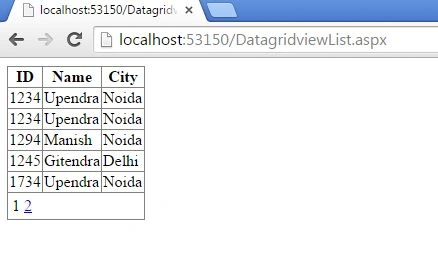
Figure 2
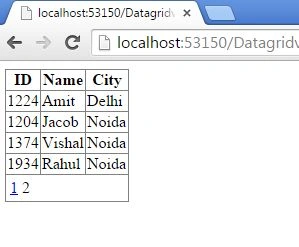
Figure 3
I hope you liked this. Have a good day. Thank you for reading.
Sibeesh VenuPosted Aug 10, 2015, 1:03 AM
Nice Share
RakeshPosted Aug 8, 2015, 12:23 PM
Good one
Rajeesh MenothPosted Aug 8, 2015, 6:15 AM
Nice One
Chervine BhiwooPosted Aug 8, 2015, 2:18 AM
Good One!
Santhakumar MunuswamyPosted Aug 8, 2015, 2:07 AM
Good article. Thanks for sharing
Nilesh JadavPosted Aug 8, 2015, 12:29 AM
Nice one sir
Pankaj Kumar ChoudharyPosted Aug 7, 2015, 10:16 PM
Nice Share Sir.......