

Introduction
While developing for the web in front-end JavaScript, we have access to localStorage and sessionStorage, which are key-value data stores that exist within the user's web browser. These data stores are sandboxed to each website, meaning every website only has access to its own data store, and cannot access localStorage and sessionStorage objects being saved from another website.
The data in these data stores is considered to be volatile, meaning it is not permanent storage and it's never guaranteed to be there. The browser can decide to delete this data or the user can use a PC cleanup tool and all the stored data will be gone.
What's the difference between localStorage and sessionStorage?
Luckily they are easy to differentiate.
- sessionStorage data only exists while the browser tab, or session, stays open. Once the user closes the tab or exits their web browser, your sessionStorage data is cleared.
- localStorage data will persist until cleared by the browser or from some user action.
Security implications of using browser storage
It is important to note that even though this data is sandboxed, storing sensitive user data in the browser can lead to many vulnerabilities, especially if your website is the victim of an XSS (Cross-site scripting) attack. For example, if your website includes a third-party script like this,
<script src="https://someawesomewebsite.com/someawesomelibrary.js"></script>
and if that website is compromised, an attacker can potentially insert malicious JavaScript into the library that will retrieve data from localStorage and sessionStorage and send it to their server! Yikes.
Since the security implications of using localStorage are debated, I will focus on the use of sessionStorage in this article. Session storage can be considered somewhat safer, keeping in mind the data is deleted when the session ends.
This is just a friendly reminder to be mindful about the kind of data you store in the web browser.
How can we use sessionStorage in Blazor Server?
With the release of .NET 5, there have been many additions to Blazor Server and Blazor WebAssembly. With these additions we now have access to new classes, such as
- ProtectedLocalStorage
- ProtectedSessionStorage
These classes give us access to the client-side sessionStorage and localStorage from within our server-side C# code! Not only is this fact great by itself, these classes are also very easy to use, and they encrypt the data instead of storing it as plaintext.
Note. Although the data is encrypted, it isn't immune to the potential security risks mentioned before.
To begin using these classes, we must first import the class (either in our _Imports.razor file or in the component itself.)
@using Microsoft.AspNetCore.Components.Server.ProtectedBrowserStorage;
And add the following line at the top of your Blazor Component,
@inject ProtectedSessionStorage storage
This will tell the Dependency Injection service to give us a ProtectedSessionStorage instance.
Then to set or get data,
// Set
await storage.SetAsync("greeting", "Hello, World!");

// Get
var greeting = await storage.GetAsync<string>("greeting");
It really is that simple!
Example
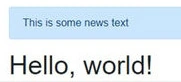
Breaking News control
Let's say in our web app we want to have a news alert appear at the top of the page with any breaking news. The user can dismiss this banner, and if it's dismissed, it won't appear again during this session. This is a perfect use-case for session storage because we want the banner to stay dismissed until the next time the user opens your web app.
John IwaszPosted Jan 30, 2023, 2:30 AM
Any suggestions for encrypting data in the local store in a webassembly Blazor app? The Microsoft.AspNetCore.Components.Server.ProtectedBrowserStorage namespace is only available in a Blazor Server app.
Guillermo PerezPosted Apr 18, 2021, 5:19 PM
Unable to resolve service for type 'Microsoft.AspNetCore.Components.Server.ProtectedBrowserStorage.ProtectedBrowserStorage' any idea of what's the problem??