

Sometimes, we need to transfer data from one device to another device in a short range,and for that we need to use the Bluetooth protocol.

To manage Bluetooth is easy. An external library is available to manage Bluetooth in Universal Windows 10 applications. This library hides all the device discovery and connection stuff behind a well behaved interface. It makes it really easy to bind to events that you can use to drive your user interface.
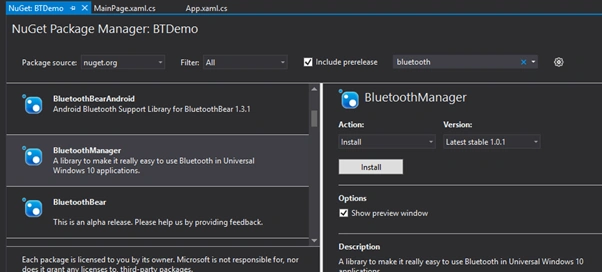
You can find the library on Nuget with the name BluetoothManager.
Let’s see the steps.
Create new Windows 10 UWP app and install the BluetoothManager like the following screen.
Now create instance from BluetoothManager to bind the events like the following code.
- BluetoothManager manager = new BluetoothManager();
- manager.StatusChangedNotification += new BluetoothManager.StatusChangedDelegate(statusChanged);
- manager.DiagnosticsChangedNotification += new BluetoothManager.DiagnosticsMessageDelegate(messageReceived);
- manager.Initialise("DeviceName");
- private void messageReceived(string message)
- {
- }
- private void statusChanged(BluetoothManager.ManagerStatus status)
- {
- }
- manager.SendStringAsync("Test String");
amir motahariPosted Aug 2, 2017, 4:57 PM
Very nice, but i have question how to receive string
Delpin Susai RajPosted Aug 28, 2016, 6:22 AM
Good
JB LeePosted Jul 21, 2016, 9:42 PM
Is it working? It always "No devices found" with all my Bluetooth devices
Ammar ShaukatPosted May 23, 2016, 3:27 AM
you can make an example application using this library ? @suresh
Munesh SharmaPosted May 22, 2016, 11:45 AM
nice
Kuppurasu NagarajPosted May 22, 2016, 5:29 AM
Nice Sharing..
Prasanna MuraliPosted May 20, 2016, 12:38 AM
Nice one
Neeraj KumarPosted May 19, 2016, 7:16 AM
Nice article
Debasis SahaPosted May 19, 2016, 6:25 AM
Good One..
Mohammed IbrahimPosted May 19, 2016, 6:06 AM
nice