

In this post, we are going to implement the Braintree payment gateway with ASP.NET Core 2.1.
Based on the previous post, this article is extended to implement a payment gateway. We are going to modify/extend the existing sample application by downloading the full source code from GitHub.

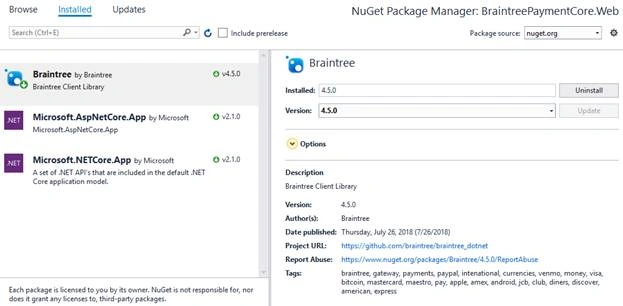
Let’s get started by opening the existing application. First of all, we are going to add a Braintree package. Go to NuGet to install the Braintree .NET Client Library, which is supported by both the .NET Framework and .NET Core.
Configuration
This is where we configure the environment and merchant with the API key for Braintree.
public class BraintreeConfiguration : IBraintreeConfiguration
{
    public string Environment { get; set; }
    public string MerchantId { get; set; }
    public string PublicKey { get; set; }
    public string PrivateKey { get; set; }
    private IBraintreeGateway BraintreeGateway { get; set; }

    public IBraintreeGateway CreateGateway()
    {
        Environment = System.Environment.GetEnvironmentVariable("BraintreeEnvironment");
        MerchantId = System.Environment.GetEnvironmentVariable("BraintreeMerchantId");
        PublicKey = System.Environment.GetEnvironmentVariable("BraintreePublicKey");
        PrivateKey = System.Environment.GetEnvironmentVariable("BraintreePrivateKey");

        if (MerchantId == null || PublicKey == null || PrivateKey == null)
        {
            Environment = "sandbox";
            MerchantId = "9j4ynyf697k9685t";
            PublicKey = "25sy94dv3rqgg355";
            PrivateKey = "b0d5e1b1fa9dc24c263a3e83a148a7b3";
        }
        return new BraintreeGateway(Environment, MerchantId, PublicKey, PrivateKey);
    }
    public IBraintreeGateway GetGateway()
    {
        if (BraintreeGateway == null)
        {
            BraintreeGateway = CreateGateway();
        }
        return BraintreeGateway;
    }
}
Payments Controller
Generate Client-Token
Initially, an HttpGet method named GenerateToken gets called to generate the client token for authorization to initialize the client UI.
[HttpGet, Route("GenerateToken")]
public object GenerateToken()
{
    var gateway = config.GetGateway();
    var clientToken = gateway.ClientToken.Generate();
    return clientToken;
}
Create Transaction
Finally, the transaction is done with Amount and PaymentMethodNonce, which is payment authorization for the customer generated by the client script.
[HttpPost, Route("Checkout")]
public object Checkout(vmCheckout model)
{
    string paymentStatus = string.Empty;
    var gateway = config.GetGateway();
    var request = new TransactionRequest
    {
        Amount = model.Price,
        PaymentMethodNonce = model.PaymentMethodNonce,
        Options = new TransactionOptionsRequest
        {
            SubmitForSettlement = true
        }
    };
    Result<Transaction> result = gateway.Transaction.Sale(request);
    if (result.IsSuccess())
    {
        paymentStatus = "Succeeded";

        // Do Database Operations Here
    }
    else
    {
        string errorMessages = "";
        foreach (ValidationError error in result.Errors.DeepAll())
        {
            errorMessages += "Error: " + (int)error.Code + " - " + error.Message + "\n";
        }
        paymentStatus = errorMessages;
    }
    return paymentStatus;
}
Here is the complete code for the Payments Controller.
[ApiController, Route("api/[controller]"), Produces("application/json")]
public class PaymentsController : ControllerBase
{
    public IBraintreeConfiguration config = new BraintreeConfiguration();
    public static readonly TransactionStatus[] transactionSuccessStatuses =
    {
        TransactionStatus.AUTHORIZED,
        TransactionStatus.AUTHORIZING,
        TransactionStatus.SETTLED,
        TransactionStatus.SETTLING,
        TransactionStatus.SETTLEMENT_CONFIRMED,
        TransactionStatus.SETTLEMENT_PENDING,
        TransactionStatus.SUBMITTED_FOR_SETTLEMENT
    };
    [HttpGet, Route("GenerateToken")]
    public object GenerateToken()
    {
        var gateway = config.GetGateway();
        var clientToken = gateway.ClientToken.Generate();
        return clientToken;
    }
    [HttpPost, Route("Checkout")]
    public object Checkout(vmCheckout model)
    {
        string paymentStatus = string.Empty;
        var gateway = config.GetGateway();
        var request = new TransactionRequest
        {
            Amount = model.Price,
            PaymentMethodNonce = model.PaymentMethodNonce,
            Options = new TransactionOptionsRequest
            {
                SubmitForSettlement = true
            }
        };
        Result<Transaction> result = gateway.Transaction.Sale(request);
        if (result.IsSuccess())
        {
            paymentStatus = "Succeeded";

            // Do Database Operations Here
        }
        else
        {
            string errorMessages = "";
            foreach (ValidationError error in result.Errors.DeepAll())
            {
                errorMessages += "Error: " + (int)error.Code + " - " + error.Message + "\n";
            }
            paymentStatus = errorMessages;
        }
        return paymentStatus;
    }
}

dine ramuPosted Jan 12, 2021, 2:04 PM
I have an error while using this application gulp is not installed how to install gulp.Please help me.
raja duraiPosted Oct 28, 2019, 2:16 AM
Hai where you config the PaymentMethodNonce. may i know that?
deepak goyalPosted May 9, 2019, 6:39 AM
Can you share braintree paypal integration code. And thanks for this method
Ed NicholasPosted Feb 5, 2019, 8:05 PM
Your PaymentsController.cs example references an undeclared type vmCheckout. Where is that defined?
yesubabu kPosted Jan 18, 2019, 12:09 AM
Need to get keys from database
yesubabu kPosted Jan 18, 2019, 12:09 AM
How can i use for multiple merchants ?
Kshitiz BhargavPosted Oct 18, 2018, 12:48 AM
Same with Angular 6
Ben HayatPosted Aug 21, 2018, 4:58 AM
Could you please make a Vue client post as well? Thanks!