

SharePoint implements permission inheritance at every level. It means that the permission of the parent is inherited by the child element. Let's say, if the user has the permission to access a site then each list within the site can also be accessed by the same user as the list inherits permission from Site Parent. However, it is not possible in every business scenario. There would be the requirement where we have to assign a unique permission to a child object so that only specific users can access the sensitive contents within the child.
We can break the inheritance out of the box from the permissions page by following the steps, listed below:
- Open the permissions page of the SharePoint object say site/list and break the inheritance.
- Remove the groups or the users, who don’t have the privilege to view the contents.
- Grant permissions to the new groups or the users, who have the privilege to view the contents.
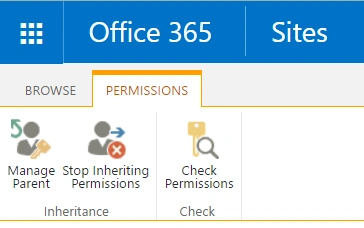
We can implement this using JavaScript object model, as well. Let’s see how to do it.
- Add reference to jquery file,
- <script language="javascript" type="text/javascript" src="//ajax.googleapis.com/ajax/libs/jquery/1.8.1/jquery.min.js"></script>
- <script language="javascript" type="text/javascript">
- Within the document, ready function is to be called- SP.SOD.executeFunc, so as to load the on the demand script SP.js . Call the main starting point function, breakInheritance.
- SP.SOD.executeFunc('sp.js', 'SP.ClientContext', breakInheritance);
- Instantiate the client context and get the list instance. Once, the list object is retrieved, break inheritance of the object.
- var clientContext = new SP.ClientContext.get_current();
- var oList = clientContext.get_web().get_lists().getByTitle('DemoList');
- //Break inheritence
- oList.breakRoleInheritance(true, false);
- Load the client context and execute the batch, which will send the request to the Server and perform the entire JavaScript object model operations as a batch.
Output- clientContext.load(oList);
- clientContext.executeQueryAsync(QuerySuccess,QueryFailure);

Reset Permission Inheritance
Now, we can reset the inheritance, so that the object inherits permission from its parent object using resetRoleInheritance method. as shown below:
- var clientContext = new SP.ClientContext.get_current();
- var oList = clientContext.get_web().get_lists().getByTitle('DemoList');
- //Reset inheritence
- oList.resetRoleInheritance();
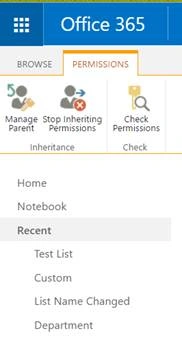
We can test this in SharePoint, by adding it to the Content Editor Web part, as shown below:
- Save the code, given below to a text file and save it into one of the SharePoint Library, Site Assets.
- <script language="javascript" type="text/javascript" src="//ajax.googleapis.com/ajax/libs/jquery/1.8.1/jquery.min.js"></script>
- <script language="javascript" type="text/javascript">
- $(document).ready(function()
- {
- SP.SOD.executeFunc('sp.js', 'SP.ClientContext', breakInheritance);
- });
- function breakInheritance()
- {
- //Get the client context and list object
- var clientContext = new SP.ClientContext.get_current();
- var oList = clientContext.get_web().get_lists().getByTitle('DemoList');
- //Break inheritence
- oList.breakRoleInheritance(true, false);
- //Load the client context and execcute the batch
- clientContext.load(oList);
- clientContext.executeQueryAsync(QuerySuccess, QueryFailure);
- }
- function QuerySuccess()
- {
- console.log("Inheritence has been broken.");
- }
- function QueryFailure(sender, args)
- {
- console.log('Request failed' + args.get_message());
- }
- </script>
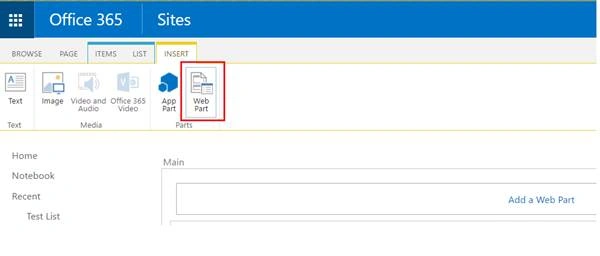
- Go to the edit settings of the SharePoint page and click on Web part from the Insert tab, as shown below:
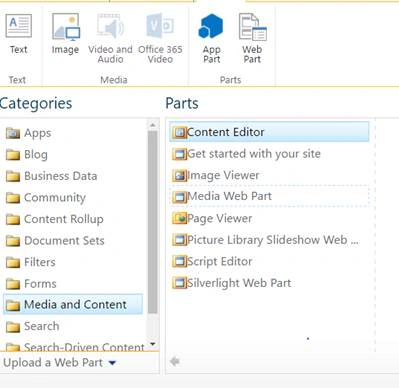
- Add Content Editor Web part,
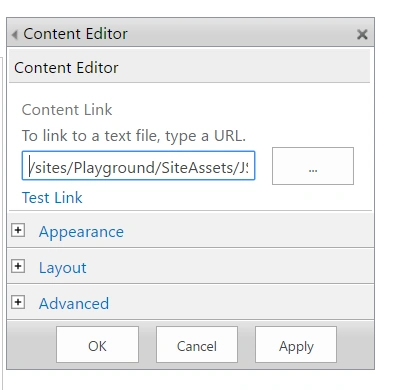
- Click on Edit Web art from Content Edit Web part. Assign the URL of the script text file and click Apply.
We can see that the permission has been broken for the list, as shown below:
Sergio GiustiPosted May 14, 2018, 10:20 AM
Hi, do you know of a way to reset the permissions inheritance for all items within a library including those inside of folders? All the scripts i have tried only hit the root of the library but not files or subfolders. Thanks
Santhakumar MunuswamyPosted Jun 9, 2016, 12:35 AM
Thank you for nice share
Vignesh ManiPosted Jun 7, 2016, 6:57 AM
Nice
Debasis SahaPosted Jun 7, 2016, 12:55 AM
Nice share..
Sonu ChaudharyPosted Jun 6, 2016, 1:52 PM
nice share