

Introduction
This article is about microservice architecture and is mainly focused on why microservice architecture has a leading edge over monolithic architecture. This article also describes how to develop a microservice in .NET Core 3.1 with API Gateway using Ocelot.
Microservices
Microservice architecture is an approach of developing a single application as a suite of small services, each runs independently and communicate with each other. It splits an entire application into a smaller set of interconnected services, instead of building a single monolithic application.
Microservice Communication
There are many protocols available for communication, depending on the communication type you want to use. If you're using a synchronous request/response-based communication mechanism, protocols such as HTTP and REST approaches are the best approaches.
If you're communicating between services internally (within your Docker host or microservices cluster), you can use asynchronous protocols, message-based communication mechanisms such as Azure bus service, AMQP, and so on.
Microservice vs Monolithic
Monolithic architecture is a traditional approach that deals with developing a single application as a whole, it's easy to develop and test, but the main concern of monolithic architecture comes while redeploying an application during an update. In monolithic architecture, a complete application needs to be redeployed for each and every update.
The other drawbacks include the fact that a bug in an application can completely bring down an entire application, and the application startup time takes too long because of its size. To overcome all the drawbacks of monolithic architecture, microservices come into play.
Now let's discuss how to create a microservices in .NET core 3.1 with API gateway.
In this demo, I created a .NET Core 3.1 Web API using Entity framework core. In my upcoming article, let's look some in-depth concepts of EF core that includes the code first approach and the database first approach. In this demo, I simply used the code first approach for developing a web API.
Create an empty solution
Usually, microservice architecture contains a single solution that contains many services. Hence, create a project in VS 2019, choose .NET core, and add an empty template.
Add a Web API and name it as Web Service 1
Add a web API project to an existing solution. Once it is added, You can find a web API service available under the solution. In this web API, the code first approach in EF core is used to create a database in SQL. If you need other actions to perform, add those as per requirement in your web API.
Add a Web API and name it as Web Service 2
Add a web API project to an existing solution. Once it is added, You can find a web api service available under the solution. In this web api, Code first approach in EF core is used to create a database in SQL. Repeat the steps given above and create a web API project and name it as web service 2.
Ocelot
Ocelot is a .NET API Gateway. Ocelot plays an important role in .NET core microservices and service-oriented architecture that need a unified point of entry into their system. Ocelot works by manipulating the HttpRequest object into a state specified by its configuration until it reaches a middleware where it creates a HttpRequestMessage object which is used to make a request to a downstream service.
Features of Ocelot
- Routing
- Service Fabric
- Kubernetes
- WebSockets
- Authentication
- Authorization
- Load Balancing
Refer the link to learn more about Ocelot, documentation.
Create a Web API and add Ocelot.json
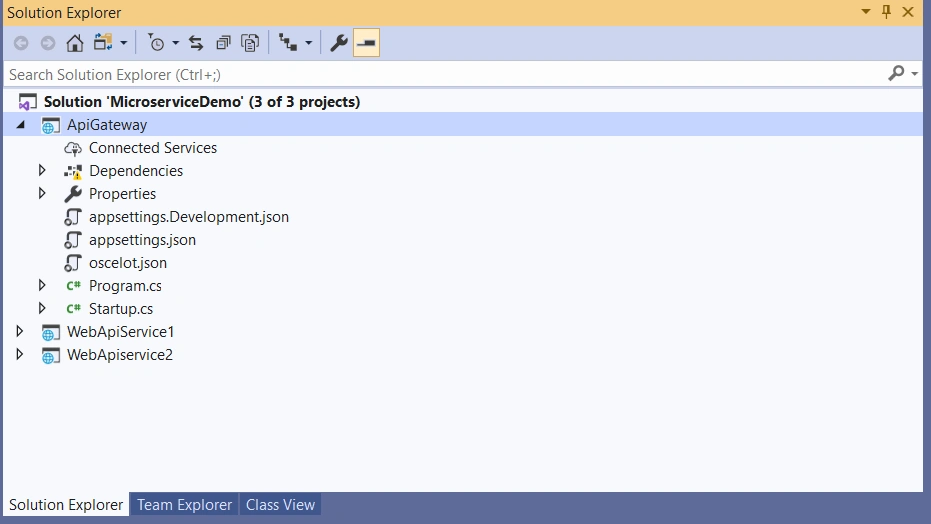
Add a web API project to an existing solution. Once it is added, you can find a web api service available under the solution. In this web API, we are going to perform gateway activities. To perform gateway activity, add a JSON file to this empty web API solution and give the details of upstream and downstream, as given in the below code.


Ramesh KumarPosted Mar 5, 2021, 10:50 AM
Ocelot :My requirement is I receive a parameter from client and pass it to my first downstream service and then use a data from response of the downstream service as a parameter to the next downstream service.is it possible or not by using Ocelot
Hamid KhanPosted Feb 3, 2021, 7:11 PM
Thanks Menaka Baskarpillai for sharing..................
Hamid KhanPosted Feb 3, 2021, 7:11 PM
Very good article....................
Menaka Priyadharshini BPosted Jul 15, 2020, 1:23 AM
Let me add sure
Sagar ChowdhuryPosted Jul 14, 2020, 2:44 PM
Very nice article. Do you have this source code in github ?
Mukesh MuruganPosted Jul 13, 2020, 5:24 PM
Great read!
Sundaram SubramanianPosted Jul 6, 2020, 7:16 AM
Good to Know :) .