

TL;DR: I built a serverless AutoML platform that trains ML models for ~$10-25/month (20 jobs). Upload CSV, select the target column, and get a trained model—no ML expertise required. Training costs ~$0.02/job vs $0.03-0.16/job on SageMaker—but the real savings come from avoiding always-on infrastructure.
Prerequisites
To deploy this project yourself, you'll need:
AWS Account with admin access
AWS CLI v2 configured (
aws configure)Terraform >= 1.9
Docker is installed and running.
Node.js 20+ and pnpm (for frontend)
Python 3.11+ (for local development)
⏱️ Deployment time: ~15 minutes from clone to working platform
The Problem
AWS SageMaker Autopilot is powerful, but the total cost of ownership can be high for prototyping:
Training costs: $0.034-0.16/job (10 min), depending on instance type—reasonable for occasional use
Real-time endpoints: A single ml.c5.xlarge endpoint costs ~$150/month running 24/7
Set up overhead: SageMaker Studio requires initial configuration and a learning curve
For side projects where I train occasionally and don't need real-time inference, I wanted a simpler, cheaper alternative with portable models I could use anywhere.
Goals:
Upload CSV → Get trained model (
.pkl) - portable, not locked to AWSAuto-detect classification vs regression
Generate EDA reports automatically
Training cost < $0.05/job for small-medium datasets
Total cost under $25/month for moderate usage (20 jobs)
Architecture Decision: Why Lambda + Batch (Not Containers Everywhere)
The key insight: ML dependencies (265MB) exceed Lambda's 250MB limit, but the API doesn't need them.
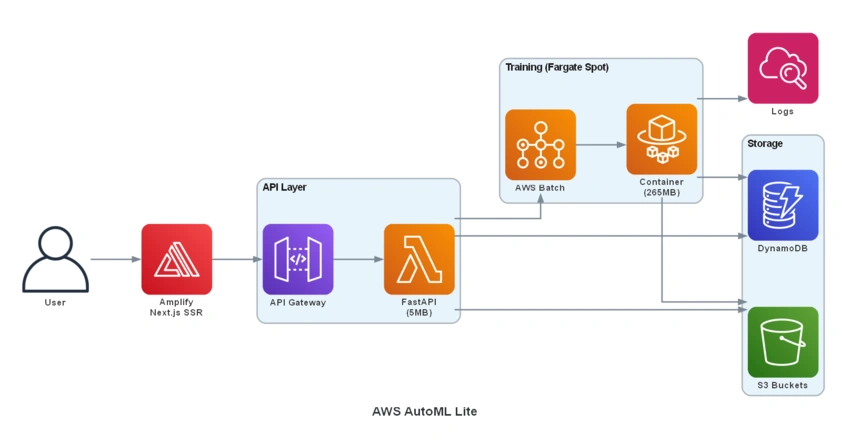
Split architecture benefits:
Lambda: Fast cold starts (~200ms), cheap ($0.0000166/GB-sec)
Batch/Fargate Spot: 70% cheaper than on-demand, handles 15+ min jobs
No always-on containers = no idle costs
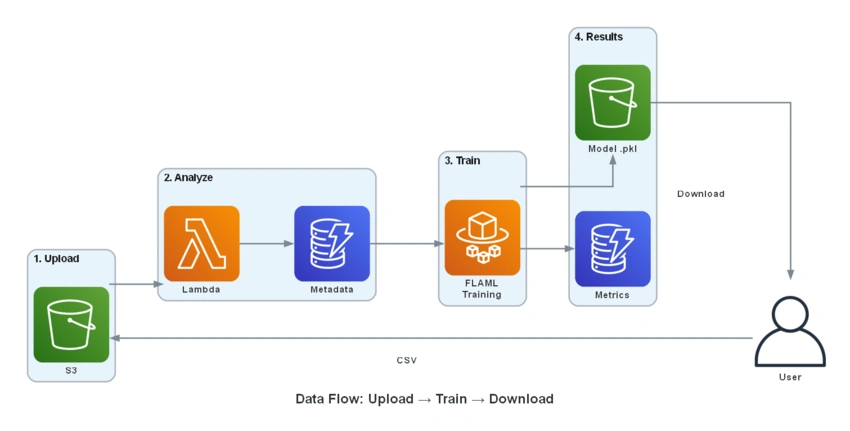
Data Flow
Tech Stack
| Component | Technology | Why |
|---|---|---|
| Backend API | FastAPI + Mangum | Async, auto-docs, Lambda-ready |
| Training | FLAML + scikit-learn | Fast AutoML, production-ready |
| Frontend | Next.js 16+ Tailwind | SSR support via Amplify |
| Infrastructure | Terraform | Reproducible, multi-env |
| CI/CD | GitHub Actions + OIDC | No stored AWS credentials |
Key Implementation Details
1. Smart Problem Type Detection
The UI automatically detects if a column should be classification or regression:
# Classification if: <20 unique values OR <5% unique ratio
def detect_problem_type(column, row_count):
    unique_count = column.nunique()
    unique_ratio = unique_count / row_count

    if unique_count < 20 or unique_ratio < 0.05:
        return 'classification'
    return 'regression'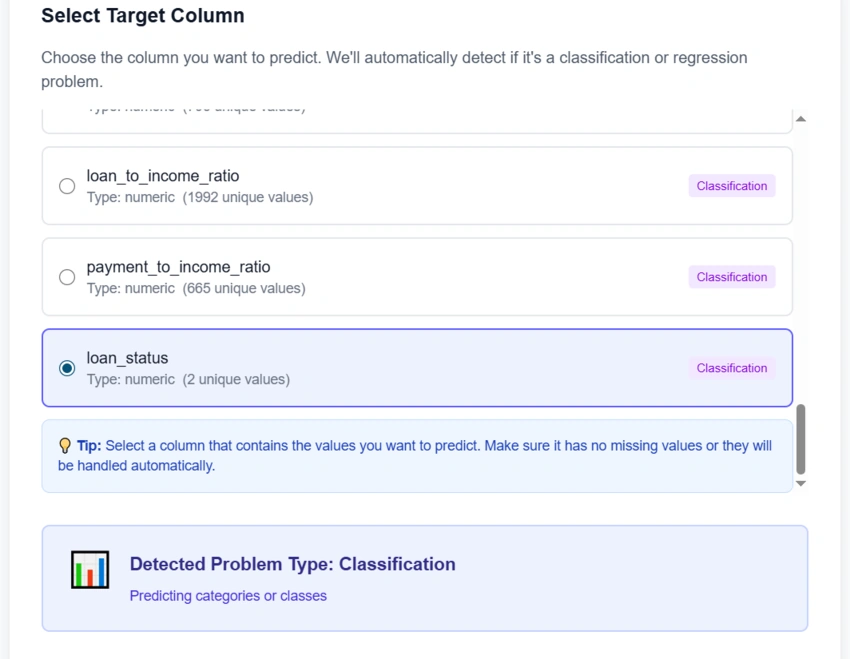
2. Environment Variable Cascade (Critical Pattern)
Training container runs autonomously on Batch. It receives ALL context via environment variables:
Terraform → Lambda env vars → batch_service.py → containerOverrides → train.pyIf you add a parameter to train.py, you MUST also add it to containerOverrides in batch_service.py.
# batch_service.py
container_overrides = {
    'environment': [
        {'name': 'DATASET_ID', 'value': dataset_id},
        {'name': 'TARGET_COLUMN', 'value': target_column},
        {'name': 'JOB_ID', 'value': job_id},
        {'name': 'TIME_BUDGET', 'value': str(time_budget)},
        # ... all S3/DynamoDB configs
    ]
}
3. Auto-Calculated Time Budget
Based on dataset size:
| Rows | Time Budget |
|---|---|
| < 1K | 2 min |
| 1K-10K | 5 min |
| 10K-50K | 10 min |
| > 50K | 20 min |
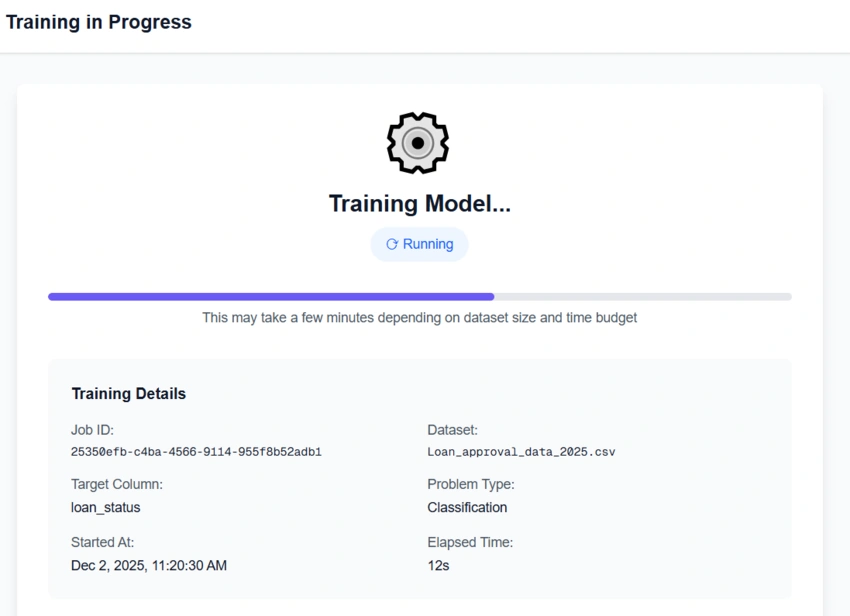
4. Training Progress Tracking
Real-time status via DynamoDB polling (every 5 seconds):
5. Generated Reports
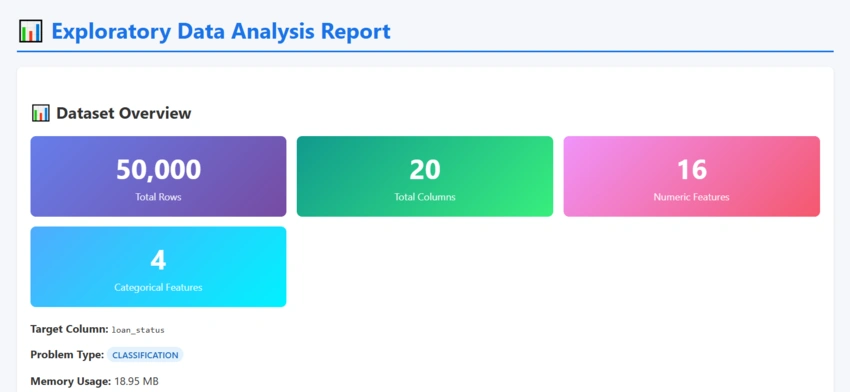
EDA Report - Automatic data profiling:
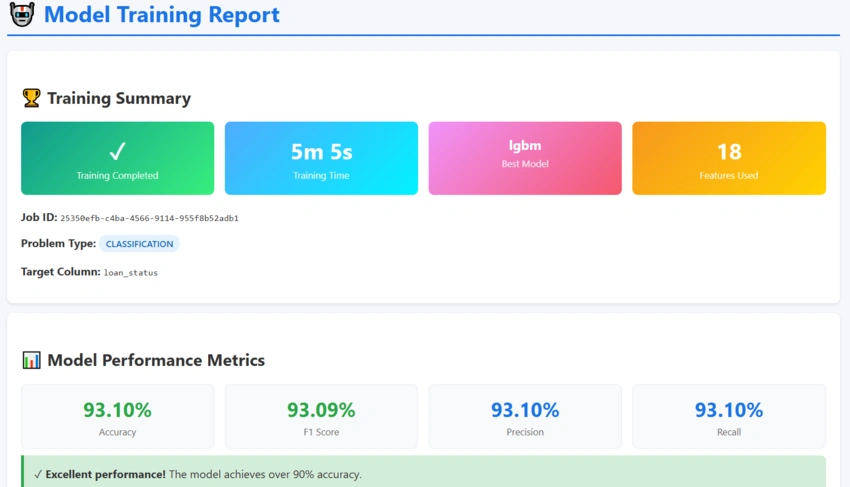
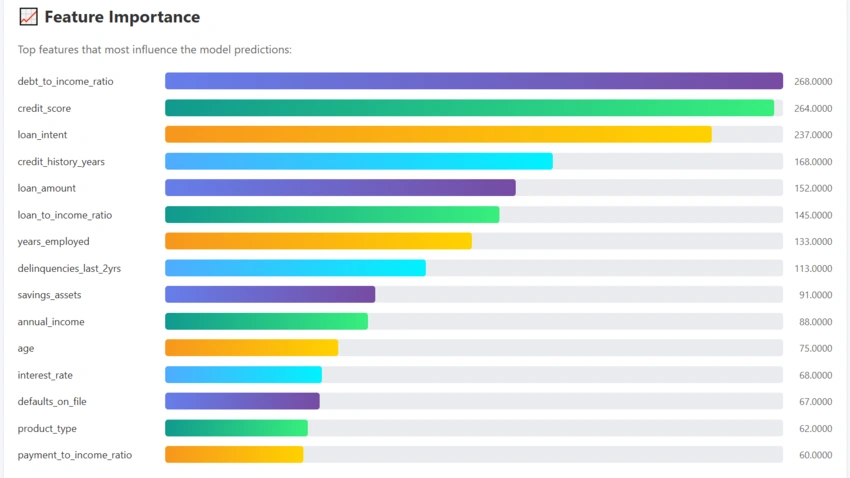
Training Report - Model performance and feature importance:
CI/CD with GitHub Actions + OIDC
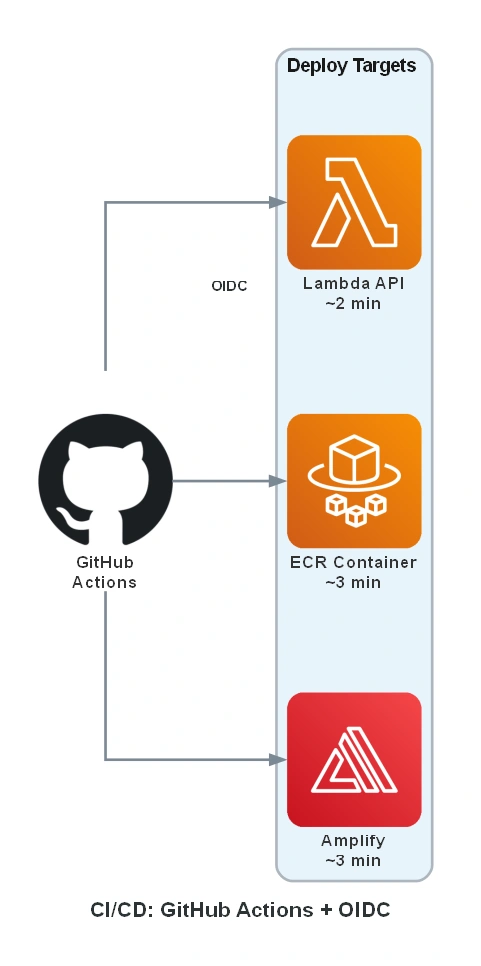
No AWS credentials stored in GitHub. Uses OIDC for secure, temporary authentication.
Required IAM Permissions (Least Privilege)
{"Statement": [
    {
      "Sid": "CoreServices",
      "Effect": "Allow",
      "Action": ["s3:*", "dynamodb:*", "lambda:*", "batch:*", "ecr:*"],
      "Resource": "arn:aws:*:*:*:automl-lite-*"
    },
    {
      "Sid": "APIGatewayAndAmplify",
      "Effect": "Allow",
      "Action": ["apigateway:*", "amplify:*"],
      "Resource": "*"
    },
    {
      "Sid": "IAMRoles",
      "Effect": "Allow",
      "Action": ["iam:*Role*", "iam:*RolePolicy*", "iam:PassRole"],
      "Resource": "arn:aws:iam::*:role/automl-lite-*"
    },
    {
      "Sid": "ServiceLinkedRoles",
      "Effect": "Allow",
      "Action": "iam:CreateServiceLinkedRole",
      "Resource": "arn:aws:iam::*:role/aws-service-role/*"
    },
    {
      "Sid": "Networking",
      "Effect": "Allow",
      "Action": ["ec2:Describe*", "ec2:*SecurityGroup*", "ec2:*Tags"],
      "Resource": "*"
    },
    {
      "Sid": "Logging",
      "Effect": "Allow",
      "Action": "logs:*",
      "Resource": "arn:aws:logs:*:*:log-group:/aws/*/automl-lite-*"
    }]}
Removed (not needed): CloudFront, X-Ray, ECS (Batch manages it internally).
Deployment Flow
Push to dev  → Auto-deploy to DEV
Push to main → Plan → Manual Approval → Deploy to PROD
Granular deployments save time:
Lambda only: ~2 min
Training container: ~3 min
Frontend: ~3 min
Full infrastructure: ~10 min
Cost Breakdown (20 jobs/month)
| Service | Monthly Cost |
|---|---|
| AWS Amplify | $5-15 |
| Lambda + API Gateway | $1-2 |
| Batch (Fargate Spot) | $2-5 |
| S3 + DynamoDB | $1-2 |
| Total | $10-25 |
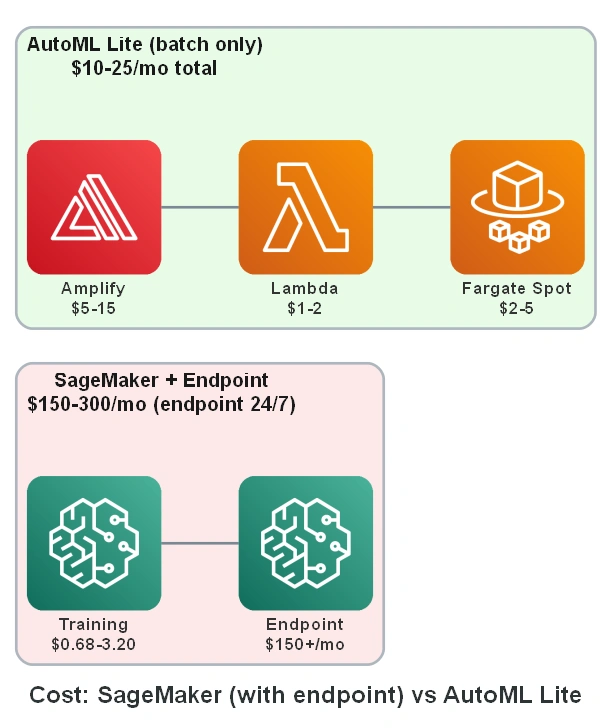
Fair comparison with SageMaker:
Training only (SageMaker): ~$0.68-3.20/month for 20 jobs—actually comparable!
Training + Endpoint (SageMaker): ~$150-300/month (ml.c5.xlarge 24/7)
AutoML Lite (all-in): $10-25/month (includes frontend, API, storage)
The headline cost difference comes from infrastructure model: AutoML Lite is fully serverless with no always-on components, while SageMaker real-time endpoints run 24/7.
Training Cost by Time: Detailed Comparison
Important context: The following comparison focuses on training costs only. SageMaker's value proposition includes managed infrastructure, model registry, A/B testing, and enterprise compliance—features that justify higher costs for production workloads.
The real cost difference lies in training time costs. Here's a detailed breakdown:
AWS AutoML Lite (Fargate Spot - 2 vCPU, 4GB RAM)
Using Fargate Spot prices for US East (N. Virginia) - December 2025:
vCPU: $0.000011244/vCPU-second → $0.0405/vCPU-hour
Memory: $0.000001235/GB-second → $0.00445/GB-hour
Fargate Spot discount: Up to 70% off on-demand prices
| Training Time | vCPU Cost | Memory Cost | Total Cost |
|---|---|---|---|
| 2 min (<1K rows) | $0.0027 | $0.0006 | $0.003 |
| 5 min (1K-10K rows) | $0.0067 | $0.0015 | $0.008 |
| 10 min (10K-50K rows) | $0.0135 | $0.0030 | $0.017 |
| 20 min (>50K rows) | $0.0270 | $0.0059 | $0.033 |
| 1 hour (complex model) | $0.0810 | $0.0178 | $0.099 |
SageMaker AI Training (ml.m5.xlarge - 4 vCPU, 16GB RAM)
Using SageMaker Training prices for US East (N. Virginia) - December 2025:
ml.m5.xlarge: $0.23/hour (4 vCPU, 16GB RAM)
ml.m4.4xlarge: $0.96/hour (16 vCPU, 64GB RAM)
ml.c5.xlarge: $0.204/hour (4 vCPU, 8GB RAM)
Free Tier: 50 hours of m4.xlarge or m5.xlarge (first 2 months only)
| Training Time | ml.c5.xlarge | ml.m5.xlarge | ml.m4.4xlarge |
|---|---|---|---|
| 2 min | $0.007 | $0.008 | $0.032 |
| 5 min | $0.017 | $0.019 | $0.080 |
| 10 min | $0.034 | $0.038 | $0.160 |
| 20 min | $0.068 | $0.077 | $0.320 |
| 1 hour | $0.204 | $0.230 | $0.960 |
Cost Comparison Summary (20 training jobs/month)
Assuming average 10 min training time per job:
| Solution | Per-Job Cost | 20 Jobs/Month | Annual Cost |
|---|---|---|---|
| AutoML Lite (Fargate Spot) | $0.017 | $0.34 | $4.08 |
| SageMaker (ml.c5.xlarge) | $0.034 | $0.68 | $8.16 |
| SageMaker (ml.m5.xlarge) | $0.038 | $0.76 | $9.12 |
| SageMaker (ml.m4.4xlarge) | $0.160 | $3.20 | $38.40 |
Key insight: For pure training costs, AutoML Lite is 50-90% cheaper than equivalent SageMaker training instances due to Fargate Spot pricing. However, SageMaker training alone is affordable—the $150+/month figure refers to always-on inference endpoints, not training.
The Real Cost Driver: Inference Endpoints
| Scenario | SageMaker | AutoML Lite |
|---|---|---|
| Training only (20 jobs, 10 min each) | $0.68-3.20/month | $0.34/month |
| + Real-time endpoint (24/7) | +$150-300/month | N/A (batch only) |
| + EDA reports | Manual/extra cost | Included |
| + Model portability | SageMaker-locked | Download .pkl |
💡 When SageMaker wins: If you need real-time inference with auto-scaling and SLA guarantees, SageMaker endpoints are worth the cost. AutoML Lite is optimized for training and batch inference scenarios.
When SageMaker Makes Sense
Despite higher costs, SageMaker excels when you need:
GPU training (ml.p3, ml.g4dn instances)
Built-in HPO (Hyperparameter Optimization)
Model Registry and versioning
A/B testing for production models
Enterprise compliance requirements
💡 Pro tip: SageMaker offers 50 free training hours on m4.xlarge/m5.xlarge for the first 2 months. Great for evaluation!
Prices as of December 2025. Always check AWS Pricing Calculator for current rates.
Feature Comparison: SageMaker vs AutoML Lite
| Feature | SageMaker Autopilot | AWS AutoML Lite |
|---|---|---|
| Training Cost (10 min job) | $0.034-0.16 | ~$0.02 |
| Real-time Inference | ✅ Yes ($150+/mo) | ❌ Batch only |
| Total Cost (20 jobs/mo) | $0.68-3.20 training only | $10-25 (all-in) |
| Setup Time | 30+ min (Studio setup) | ~15 min |
| Portable Models | ❌ SageMaker format | ✅ Download .pkl |
| ML Expertise Required | Medium | None |
| Auto Problem Detection | ✅ Yes | ✅ Yes |
| EDA Reports | ❌ Manual | ✅ Automatic |
| Infrastructure as Code | ❌ Console-heavy | ✅ Full Terraform |
| GPU Training | ✅ Yes (ml.p3, ml.g4dn) | ❌ CPU only |
| Model Registry | ✅ Built-in | ❌ Manual |
| A/B Testing | ✅ Built-in | ❌ Not available |
| Free Tier | 50h training (2 months) | Fargate Spot only |
| Best For | Production ML pipelines | Prototyping & side projects |
Using Your Trained Model
Download the .pkl file and use Docker for predictions:
# Build prediction container
docker build -f scripts/Dockerfile.predict -t automl-predict .

# Show model info
docker run --rm -v ${PWD}:/data automl-predict /data/model.pkl --info

# Predict from CSV
docker run --rm -v ${PWD}:/data automl-predict \
  /data/model.pkl -i /data/test.csv -o /data/predictions.csv
Lessons Learned
Container size matters: 265MB ML deps forced the Lambda/Batch split
Environment variable cascade: Document your data flow or debugging becomes painful
Fargate Spot is great: 70% savings, rare interruptions for short jobs
FLAML over AutoGluon: Smaller footprint, faster training, similar results
What's Next? (Future Roadmap)
[ ] ONNX Export - Deploy models to edge devices
[ ] Model Comparison - Train multiple models, compare metrics side-by-side
[ ] Real-time Updates - WebSocket instead of polling
[ ] Multi-user Support - Cognito authentication
[ ] Hyperparameter UI - Fine-tune FLAML settings from the frontend
[ ] Email Notifications - Get notified when training completes
Contributions welcome! Check the GitHub Issues for good first issues.
Try It Yourself
GitHub: cristofima/AWS-AutoML-Lite
git clone https://github.com/cristofima/AWS-AutoML-Lite.git
cd AWS-AutoML-Lite/infrastructure/terraform
terraform init && terraform apply
Join the conversation! Your thoughts help the community grow.