

Introduction
- Chatbots are becoming essential tools for businesses, helping to improve customer service and automate various tasks. While there are many ready-made chatbot solutions available, they often don't meet specific business needs. This is why creating a chatbot using your own data is important. It ensures the chatbot understands and responds to your customers in the best way possible.
- Azure OpenAI offers a powerful platform for building such custom chatbots. It combines OpenAI's advanced language models with Microsoft Azure's strong infrastructure. This combination allows you to create smart chatbots that can understand and generate human-like text and tailor them to work with your specific data. This means your chatbot can give more accurate and relevant responses.
- In this article, we will walk you through how to build a chatbot with Azure OpenAI using your own data. We will cover everything from setting up your Azure account to training the chatbot with your data and deploying it for use. Whether you want to improve customer service, automate support, or create new ways to engage users, this guide will help you create a chatbot that fits your needs perfectly.
Prerequisites
Before you begin building a chatbot with Azure OpenAI using your own data, there are a few prerequisites you'll need to meet:
- Azure Subscription: You need an active Azure subscription to access Azure OpenAI services. If you don’t have one, you can sign up for a free account on the Azure website.
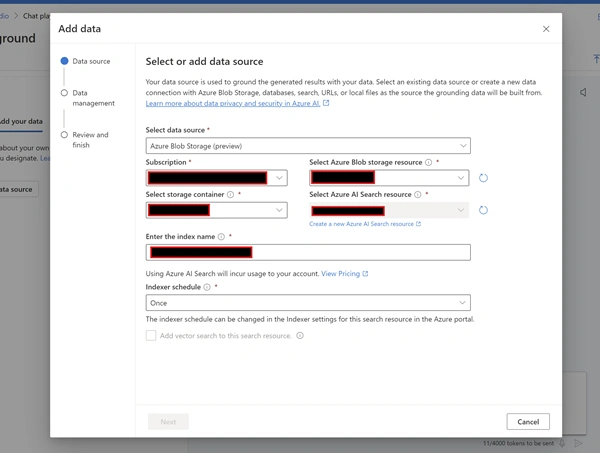
- Basic Knowledge of Azure Services: Familiarity with Azure services, including Azure Cognitive Services and Azure Storage, will be helpful. Understanding how to navigate the Azure portal and manage resources is essential. Your own data should be available in blob storage
- Programming Knowledge: Basic knowledge of programming, particularly in Python or another programming language that supports RESTful API calls, is necessary. You'll be writing scripts to interact with Azure OpenAI and process data.
Let's start Step by Step implementation
Step 1. Create Azure OpenAI service.
- Open https://portal.azure.com/
- Log in with your Azure account.
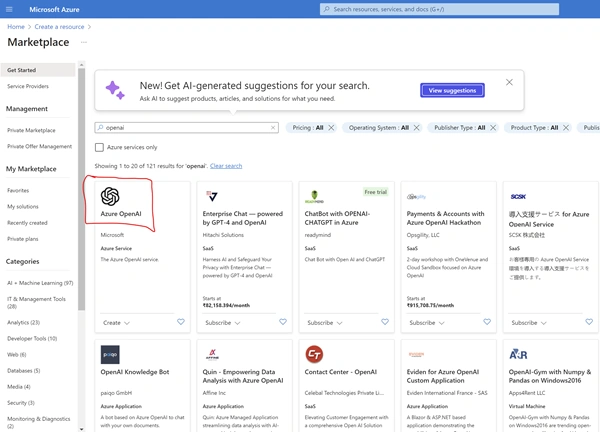
- Click on Create Resource - Azure OpenAI
- Azure OpenAI combines OpenAI's advanced language models with Microsoft Azure's robust infrastructure, enabling the creation of intelligent applications that understand and generate human-like text. It provides a powerful platform for developing custom solutions tailored to specific business needs.
- Search for Azure OpenAI service and click on it.
- Provide basic details.
- Fill in the necessary information, including the subscription, resource group, and region. Then, specify the name and pricing tier for your Azure OpenAI resource.
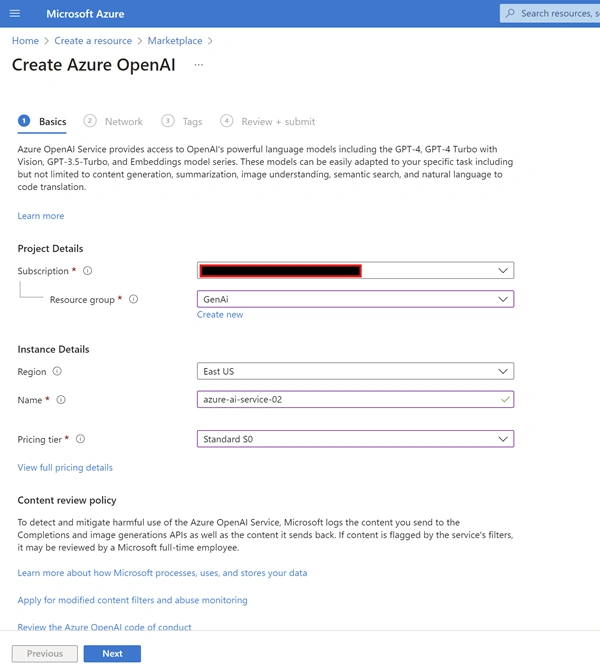
- Once all details are completed, click "Review + Create" to proceed with the resource creation.

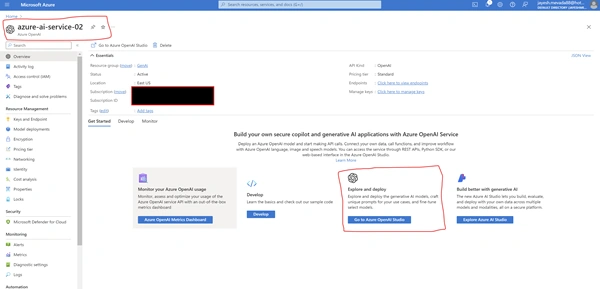
- Once the Resource is Created, Proceed to Step 2
Join the conversation! Your thoughts help the community grow.