

Let’s have a quick review of ASP.NET MVC Architecture. So when the request arrives at our application MVC Framework hands off that request to an action in a controller, this action most of the time returns view which is then parsed by razor view engine and then eventually html markup is returned to the client. So in this approach html markup is generated on the server and then returned to the client.
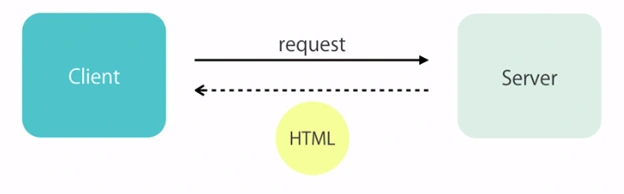
There is an alternative way to generate the html markup, we can generate it on the client. So instead of our action returning html markup, they can return raw data.
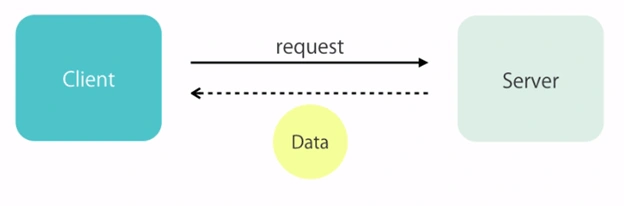
What is the benefit of this approach?
There are a number of benefits of generating markup on the client.
- It requires less server resources (it potentially improves the scalability of the application because each client will be responsible for generating their own views)
- Raw Data often requires less bandwidth than html markup. So the data potentially arrives faster at the client. And this can improve the perceived performance of the application.
- This approach supports the broad range of clients like mobile and tablet apps.
These apps are simply called endpoints get the data and generate the view locally. We call these end points Data Services (Web APIs) because they just return data not markup.
Web APIs are not just limited to cross devices, it also iswidely used in our Web Applications to add the new features. Many popular websites like Youtube, Facebook and Twitter expose public data services which we can consume in our web applications. We can merge their data with the data in our application and provide new experiences to the new user. These are the benefits.
These data services are just not only to get the data, we’ve services to modify the data like adding the customer etc. The framework we use to build these data services is called web apis. This framework was developed after ASP.Net MVC but it follows the same architecture and principals of ASP.NET MVC so it has routings, controllers, actions, actionresult and so on. There are also a few minor differences that we’ll see here. In .Net Core, Microsoft has merged these both frameworks (ASP.NET MVC & ASP.NET Web API) into a single framework.
Restful Convention
So you know what http services and web api are, here we’ll develop an application which supports afew different kinds of requests.
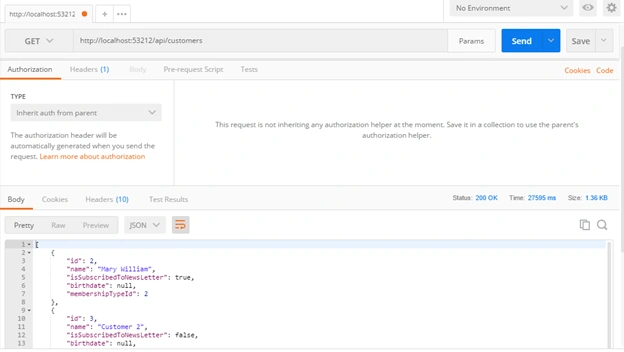
GET /api/customers (to get the list of customers)
GET /api/customers/1 (to get the single customer)
POST /api/ customers (to add the customer and add the customers data in request body)
Don’t confuse about GET and POST request of the data, we use get request to get the list of the resource or data. And we use post request to create the new one.
Now to update the student we use PUT request.
PUT /api/customers/1
So the id of the customer is in the url and the actual data or properties to update will be in the request body. And finally to delete the student.
Delete /api/customers/1
We send HttpDelete request to the end point. So what you see here, in terms of request types and endpoints is a standard convention referred to ask REST (Representational State Transfer)
Building An API
This class derives from ApiController as opposed to Controller. If you’re working with any existing project then just add a new folder in controllers folder and add the api controller here, add these actions but before defining the actions in apis, this is my Customer model class
- public class Customer
- {
- public int Id { get; set; }
- [Required]
- [StringLength(255)]
- public string Name { get; set; }
- public bool IsSubscribedToNewsLetter { get; set; }
- [Display(Name = "Date of Birth")]
- [Min18YearsIfAMember]
- public DateTime? Birthdate { get; set; }
- // Kamal hogya wese
- [Display(Name = "Membership Type")]
- public byte MembershipTypeId { get; set; }
- // it allows us to navigate from 1 type to another
- public MembershipType MembershipType { get; set; }
- }
And here is my DbContext class
- public class ApplicationDbContext : IdentityDbContext<ApplicationUser>
- {
- public ApplicationDbContext()
- : base("DefaultConnection", throwIfV1Schema: false)
- {
- }
- public static ApplicationDbContext Create()
- {
- return new ApplicationDbContext();
- }
- public DbSet<Customer> Customers { get; set; }
- public DbSet<MembershipType> MembershipTypes { get; set; }
- }
Now it would be easy for you to write actions for Api.
- public IEnumerable<Customer> GetCustomers()
- {
- }
Because we’re returning a list of objects, this action by convention will respond to
- // Get /api/customers
So this is the convention built into ASP.Net Web API. Now in this action we are going to use our context to get the customers from the database.
- namespace MyAPI.Controllers.Api
- {
- public class CustomersController : ApiController
- {
- private readonly ApplicationDbContext _context;
- public CustomersController()
- {
- _context = new ApplicationDbContext();
- }
- // GET /api/customers
- public IEnumerable<Customer> GetCustomers()
- {
- return _context.Customers.ToList();
- }
- }
- }
If the resource isn’t found, we return not found httpresponse otherwise we return the object.
- // POST /api/customers
- [HttpPost]
- public Customer CreateCustomer(Customer customer)
- {
- }
So this is the customer argument which will be in the request body and ASP.NET Web API Framework will automatically initialize this. Now we should mark this action with HttpPost because we’re creating the resource. And if we’re following the naming convention then we don’t even need to place the action verb on the action.
- // POST /api/customers
- public Customer PostCustomer(Customer customer)
- {
- }
But originally it isn’t a good approach. Let’s suppose you refactor the code in the future and rename your action then surely your code will break. So always prefer to use Http verbs on the top of action.
Now let’s insert the customer object into the database with post request of api action.
- // POST /api/customers
- [HttpPost]
- public Customer CreateCustomer(Customer customer)
- {
- if (!ModelState.IsValid)
- {
- throw new HttpResponseException(HttpStatusCode.BadRequest);
- }
- _context.Customers.Add(customer);
- _context.SaveChanges();
- return customer;
- }
Another action -- let’s suppose we want to update the record.
- // PUT /api/customers/1
- [HttpPut]
- public void UpdateCustomer(int id, Customer customer)
- {
- if (!ModelState.IsValid)
- {
- throw new HttpResponseException(HttpStatusCode.BadRequest);
- }
- var custmr = _context.Customers.SingleOrDefault(x => x.Id == id);
- // Might be user sends invalid id.
- if (custmr == null)
- {
- throw new HttpResponseException(HttpStatusCode.NotFound);
- }
- custmr.Birthdate = customer.Birthdate;
- custmr.IsSubscribedToNewsLetter = customer.IsSubscribedToNewsLetter;
- custmr.Name = customer.Name;
- custmr.MembershipTypeId = customer.MembershipTypeId;
- _context.SaveChanges();
- }
Here in this scenario, different people have different opinions to return the void or the object.
And if we make the delete action of Api,
- // Delete /api/customers/1
- [HttpDelete]
- public void DeleteCustomer(int id)
- {
- var custmr = _context.Customers.SingleOrDefault(x => x.Id == id);
- // Might be user sends invalid id.
- if (custmr == null)
- {
- throw new HttpResponseException(HttpStatusCode.NotFound);
- }
- _context.Customers.Remove(custmr);
- // Now the object is marked as removed in memory
- // Now it is done
- _context.SaveChanges();
- }
This is how we use restful convention to build the api.
Testing the API
If we run the application and request the api controller, we can see the list of customers in XML based language.
http://localhost:53212/api/customers
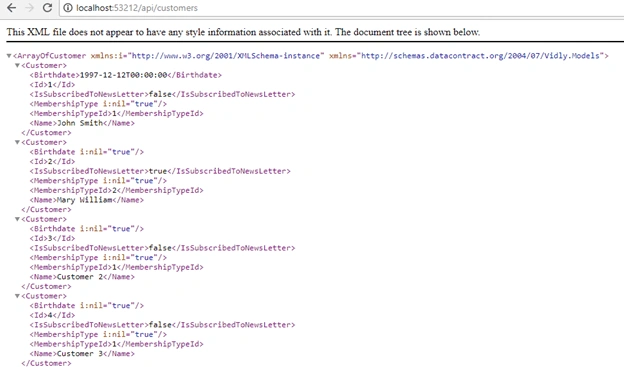
So ASP.NET Web API has what we call media formatter. So what we return from an action (in our case the list of customer will be formatted based on what the client asks) let me explain what I mean and what I’m trying to say.
Inspect the browser on above screen and refresh the page, here you’ll see the customer request.
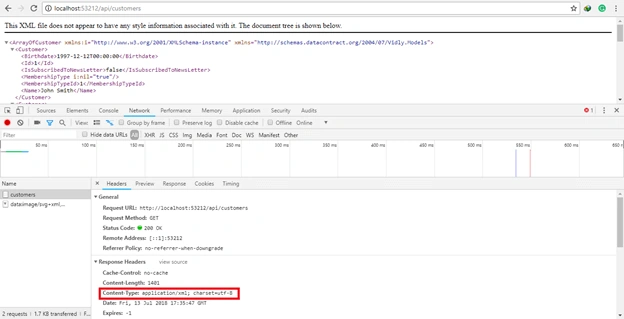
Here look at Content Type, if you don’t set the content type header in our request by default the server assumes application/xml.
Note
General is the Request Header, Response Headers is our Response Header here. As you can see in Request Header, we don’t have any content type. Now let me show you the best way to test the api and get the data in json.
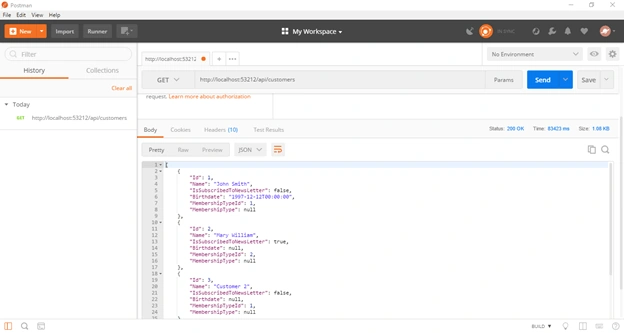
Install Postman Desktop App in your machine. And copy the browser link with localhost port number and paste it into the postman.
And here we put the url of the request with localhost and here the response comes back in json
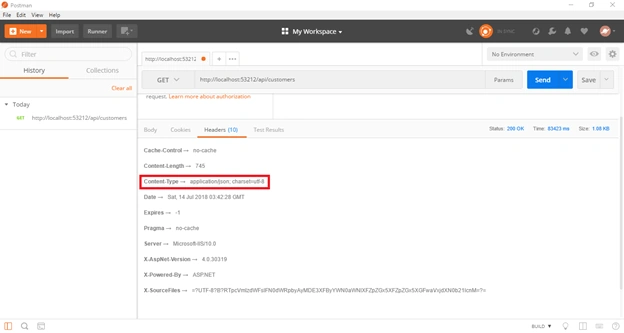
And if we click on the Header tab, here we’ll see our request header content type is application/json
Most of the time we’ll be using json because it is native for javascript code and much faster than xml. XML media format is largely used in large organizations like governments because they’re behind the modern technology. Json format is more lightweight because it doesn’t have redundant opening and closing tabs like xml.
Little Confusion
Sometimes when you’re working with Apis or with postman, mostly people confuse about the interface of Postman because they have not ever used postman before. It is very simple just keep in mind,
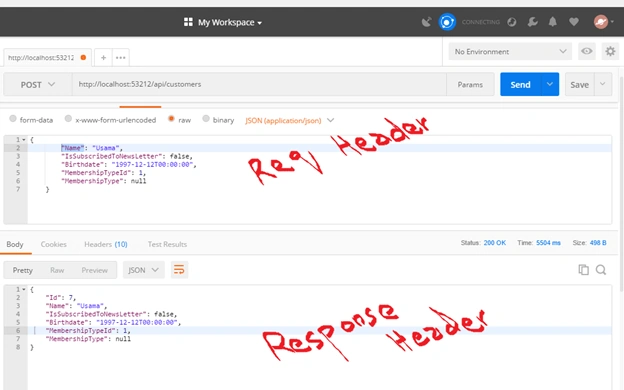
So if you’re working with request and trying to change some information of request then focus on request header and if you’re monitoring the response then watch the results in response headers. As they’re looking same and sometimes when the scroll down the request header vanishes. So don’t confuse about the things.
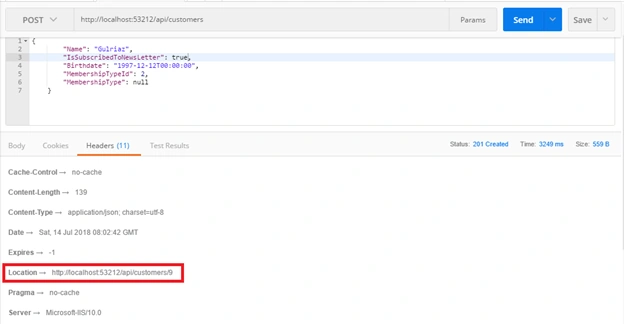
Now let’s insert a customer in the database with Api Post Action.
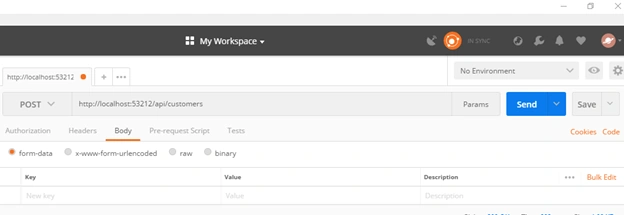
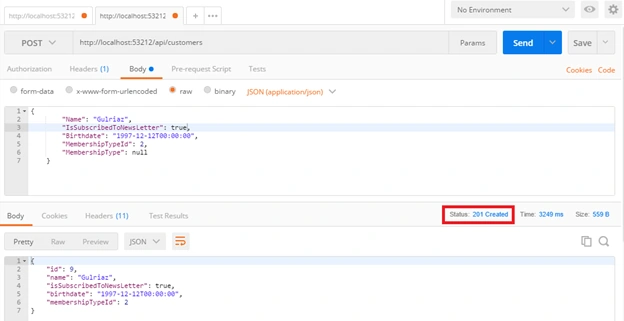
Select the Post request from the dropdown and in request body tab. You can insert the customer with key value pairs on clicking form-data. But most of the time we use json format. So click on raw and write the json here.
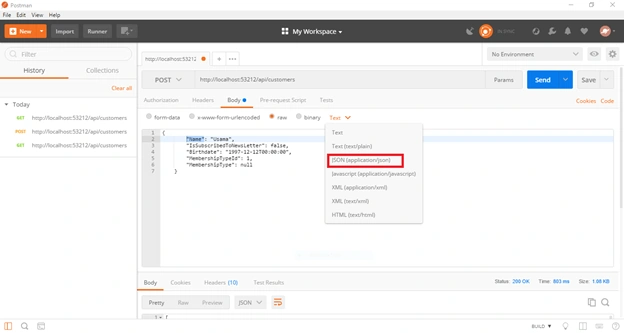
Don’t put Id property in json because it is a hard and fast rule when we insert the data in the database, the id is automatically generated on the server.
Now click on Send Button and here I’ve successfully inserted the data with Post api action and it gets the response.
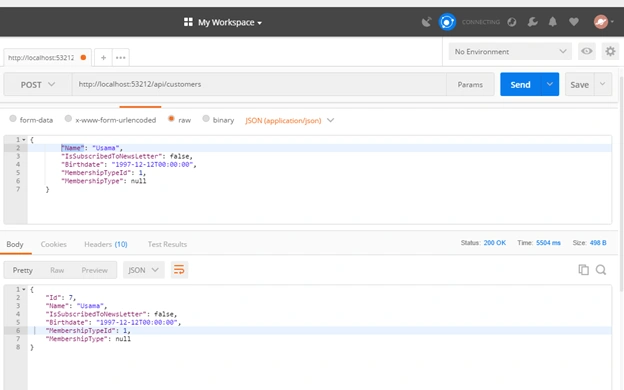
Here the above block is request block and the below block is response block.
You might face some kind of error here like this.
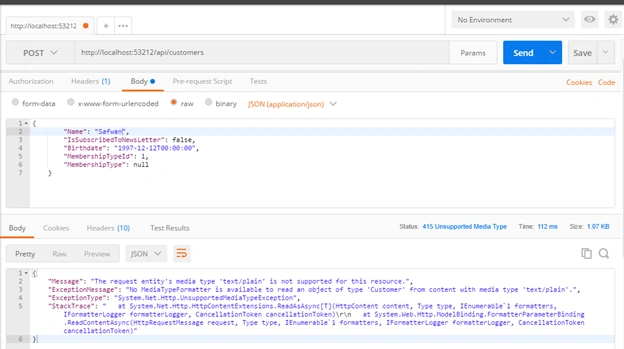
If you read the error message ‘The request entity’s media type ‘text/plain’ is not supported for this resource’. This is the error message.
Now to resolve this error. Click on Header tab and add the value for content-type (‘application/json’)
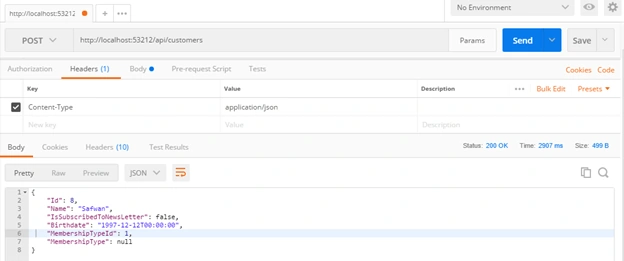
And here the values has been added. Look the status code for request is 200 OK and we can see the response body below.
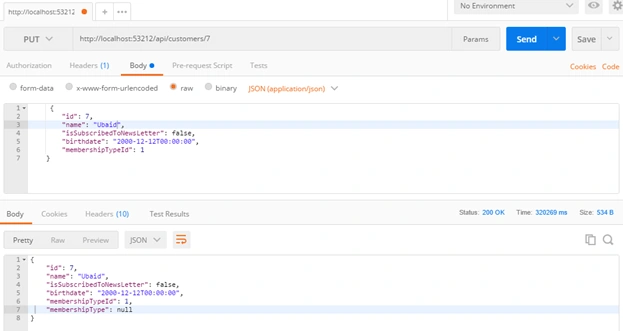
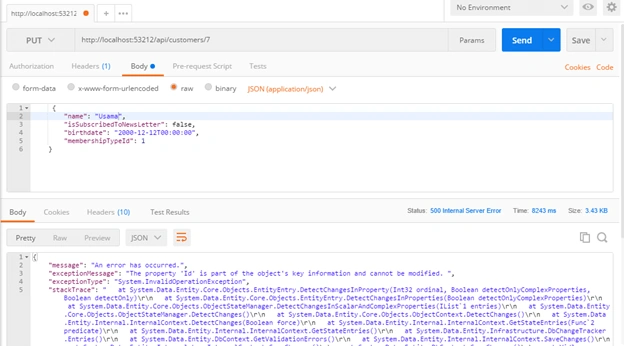
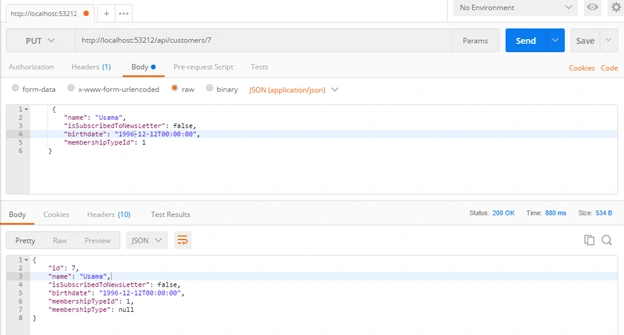
Now let’s update the customer entity.
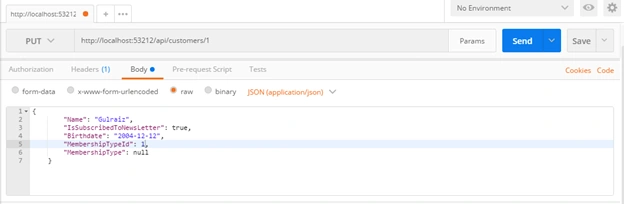
And look it has been updated.
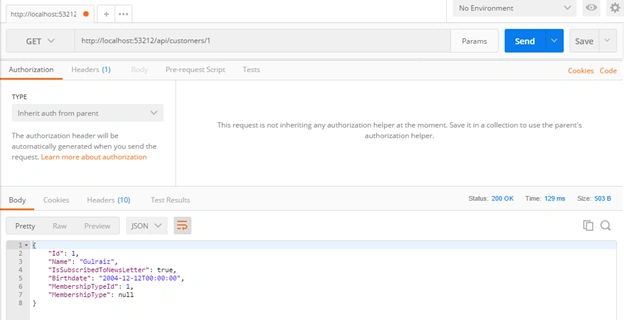
Now let’s delete one record similarly, just select Delete in dropdown and specify the id with forward slash in the url and click on Send button. It will be automatically deleted.
Best Practice
The best practice is when you build the api and before consuming it in the application. It would be better to test the api through Postman.
Data Transfer Objects (DTO)
So now we’ve build this api but there are a couple of issues with this design. Our api receives or returns Customer object. Now you might be thinking what’s wrong with this approach? Actually Customer object is part of the domain model of our application. It is considered implementation details which can change frequently as we implement new features in our applications and these changes potentially grab existing clients that are dependent on the customer object; i.e., if we rename or remove our property this can impact the clients that are dependent upon the property. So basically we make the contract of the api as stable as possible. And here we use DTOs.
DTO is the plain data structure and is used to transfer data from the client on server or vice versa that’s why we call it data transfer object. By creating DTOs, we reduce the chances of our APIs breaking as we refactor our domain model. Of course we should remember that changing these DTOs can be costly. So the most important thing is our api should not receive or return the Customer model class object.
Another issue by using domain object here in API is we’re opening the security holes in our application. A hacker can easily pass additional data in json and they will be mapped to our domain object. What if one of these properties should not be updated, a hacker can easily bypass this but if we use DTO we can simply exclude the properties that can be updated. So add a new folder in your project with name DTOs and add the class CustomerDTO and copy all the properties of Customer domain model class with their data annotation attributes and paste it in CustomerDTO. Now remove the navigation properties from CustomerDTO because it is creating the dependency to MembershipType domain model class.
- namespace MyAPI.DTOs
- {
- public class CustomerDTO
- {
- public int Id { get; set; }
- [Required]
- [StringLength(255)]
- public string Name { get; set; }
- public bool IsSubscribedToNewsLetter { get; set; }
- [Min18YearsIfAMember]
- public DateTime? Birthdate { get; set; }
- public byte MembershipTypeId { get; set; }
- }
- }
Now the next thing is we want to use to CustomerDTO in our api instead of Customer domain class object. So to reduce a lot of code to bind the properties one by one, we use Automapper.
Automapper
Install the automapper package from Package Manager Console.
PM > Install-Package Automapper -version:4.1
Now add the new class in App_Start (MappingProfile.cs) and inherit it from Profile
- using AutoMapper;
- namespace MyAPI.App_Start
- {
- public class MappingProfile : Profile
- {
- }
- }
Now create the constructor and add the mapping configuration between 2 types.
Vikas SrivastavaPosted Jul 23, 2018, 1:13 AM
Its helpful thanks for sharing.
Viknaraj ManogararajahPosted Jul 20, 2018, 7:06 PM
thank you for sharing
Hadshana KamalanathanPosted Jul 20, 2018, 4:06 AM
Nice explanation...
maha lakshmiPosted Jul 19, 2018, 8:44 PM
Nice article