

In this article, we’ll create a dashboard with beautiful charts using Recharts in an Angular frontend and a Node JS backend. For now, we’ll use hardcoded data to focus on the UI. Later, you can connect real data.
1.1. Install Angular CLI
Make sure you have Node.js installed. Then install Angular CLI globally:
npm install -g @angular/cli
1.2. Create a New Angular Project
ng new dashboard-app
cd dashboard-app
1.3. Create the Dashboard Component
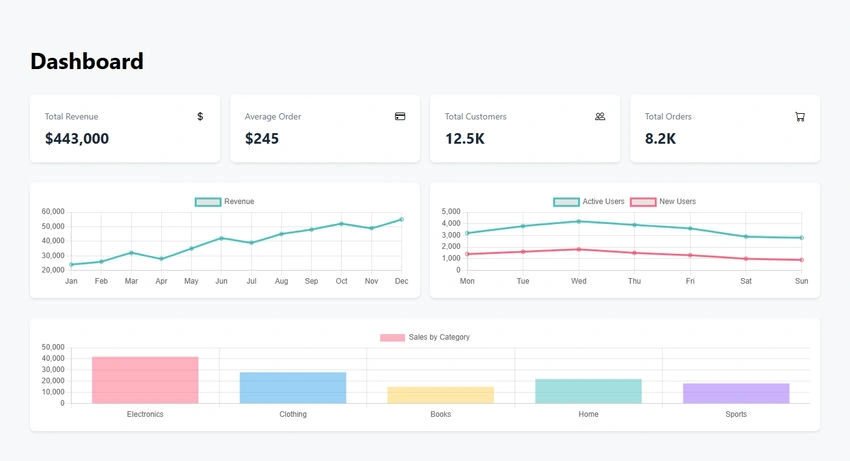
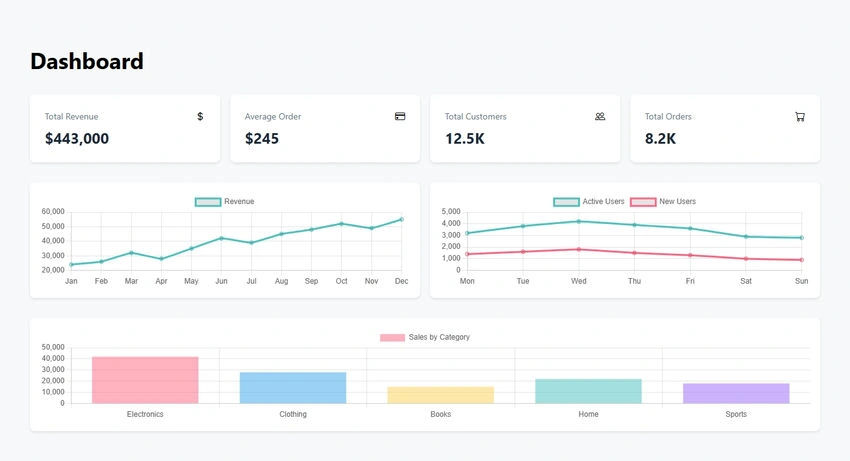
We’ll create a DashboardComponent with hard-coded data for revenue, user activity, and sales. The component uses Chart.js to render three charts: a line chart for revenue, a line chart for user activity, and a bar chart for sales by category.
Here’s the code for dashboard.component.ts.
import { Component, OnInit } from '@angular/core';
import { CommonModule } from '@angular/common';
import { Chart } from 'chart.js/auto';

interface ChartData {
  month: string;
  revenue: number;
}

@Component({
  selector: 'app-dashboard',
  standalone: true,
  imports: [CommonModule],
  template: `
    <div class="dashboard-container p-8">
      <h1 class="text-4xl font-bold mb-8">Dashboard</h1>

      <!-- Stats Grid -->
      <div class="stats-grid mb-8">
        <div class="stat-card" *ngFor="let stat of stats">
          <div class="stat-header">
            <span class="stat-title">{{stat.title}}</span>
            <i class="stat-icon" [class]="stat.icon"></i>
          </div>
          <div class="stat-value">{{stat.value}}</div>
        </div>
      </div>

      <!-- Charts -->
      <div class="charts-grid mb-8">
        <div class="chart-container">
          <canvas id="revenueChart"></canvas>
        </div>
        <div class="chart-container">
          <canvas id="userActivityChart"></canvas>
        </div>
      </div>

      <div class="chart-container">
        <canvas id="salesChart"></canvas>
      </div>
    </div>
  `,
  styles: [`
    .dashboard-container {
      max-width: 1400px;
      margin: 0 auto;
    }

    .stats-grid {
      display: grid;
      grid-template-columns: repeat(auto-fit, minmax(250px, 1fr));
      gap: 1rem;
    }

    .stat-card {
      background: white;
      padding: 1.5rem;
      border-radius: 8px;
      box-shadow: 0 2px 4px rgba(0,0,0,0.1);
    }

    .stat-header {
      display: flex;
      justify-content: space-between;
      align-items: center;
      margin-bottom: 0.5rem;
    }

    .stat-title {
      font-size: 0.875rem;
      color: #64748b;
    }

    .stat-value {
      font-size: 1.5rem;
      font-weight: bold;
      color: #1e293b;
    }

    .charts-grid {
      display: grid;
      grid-template-columns: repeat(auto-fit, minmax(400px, 1fr));
      gap: 1rem;
    }

    .chart-container {
      background: white;
      padding: 1rem;
      border-radius: 8px;
      box-shadow: 0 2px 4px rgba(0,0,0,0.1);
    }
  `]
})
export class DashboardComponent implements OnInit {
  stats = [
    { title: 'Total Revenue', value: '$443,000', icon: 'bi bi-currency-dollar' },
    { title: 'Average Order', value: '$245', icon: 'bi bi-credit-card' },
    { title: 'Total Customers', value: '12.5K', icon: 'bi bi-people' },
    { title: 'Total Orders', value: '8.2K', icon: 'bi bi-cart' }
  ];

  revenueData = {
    labels: ['Jan', 'Feb', 'Mar', 'Apr', 'May', 'Jun', 'Jul', 'Aug', 'Sep', 'Oct', 'Nov', 'Dec'],
    datasets: [{
      label: 'Revenue',
      data: [24000, 26000, 32000, 28000, 35000, 42000, 39000, 45000, 48000, 52000, 49000, 55000],
      borderColor: 'rgb(75, 192, 192)',
      tension: 0.1
    }]
  };

  userActivityData = {
    labels: ['Mon', 'Tue', 'Wed', 'Thu', 'Fri', 'Sat', 'Sun'],
    datasets: [
      {
        label: 'Active Users',
        data: [3200, 3800, 4200, 3900, 3600, 2900, 2800],
        borderColor: 'rgb(75, 192, 192)',
        tension: 0.1
      },
      {
        label: 'New Users',
        data: [1400, 1600, 1800, 1500, 1300, 1000, 900],
        borderColor: 'rgb(255, 99, 132)',
        tension: 0.1
      }
    ]
  };

  salesData = {
    labels: ['Electronics', 'Clothing', 'Books', 'Home', 'Sports'],
    datasets: [{
      label: 'Sales by Category',
      data: [42000, 28000, 15000, 22000, 18000],
      backgroundColor: [
        'rgba(255, 99, 132, 0.5)',
        'rgba(54, 162, 235, 0.5)',
        'rgba(255, 206, 86, 0.5)',
        'rgba(75, 192, 192, 0.5)',
        'rgba(153, 102, 255, 0.5)'
      ]
    }]
  };

  constructor() {}

  ngOnInit(): void {
    this.createCharts();
  }

  private createCharts(): void {
    // Revenue Chart
    new Chart('revenueChart', {
      type: 'line',
      data: this.revenueData,
      options: {
        responsive: true,
        maintainAspectRatio: false
      }
    });

    // User Activity Chart
    new Chart('userActivityChart', {
      type: 'line',
      data: this.userActivityData,
      options: {
        responsive: true,
        maintainAspectRatio: false
      }
    });

    // Sales Chart
    new Chart('salesChart', {
      type: 'bar',
      data: this.salesData,
      options: {
        responsive: true,
        maintainAspectRatio: false
      }
    });
  }
}
Code in app.component.ts
Join the conversation! Your thoughts help the community grow.