From SQL and Blob Storage to Azure AI Search, Foundry IQ, and Microsoft Foundry Agents
A practical architecture and implementation guide for secure, grounded, intelligent enterprise search and agentic AI solutions on Microsoft Azure.
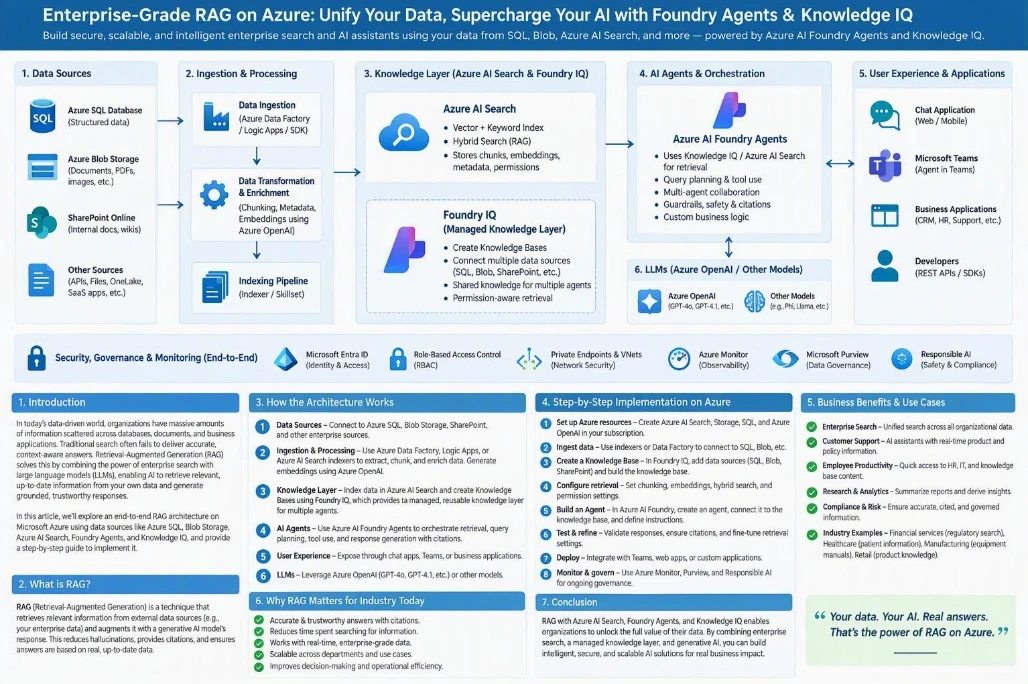
Core architecture: Enterprise Data -> Azure AI Search -> Foundry IQ -> Foundry Agents -> LLM and Business Tools -> Enterprise Applications |
Article element | Suggested content |
Article description | Retrieval-Augmented Generation is transforming enterprise search from document discovery into grounded answers. This article explains how Azure SQL, Blob Storage, Azure AI Search, Foundry IQ, Microsoft Foundry Agents, language models, and enterprise APIs can work together in a secure and scalable architecture. |
Suggested tags | Azure, Generative AI, RAG, Agentic AI, Azure AI Search, Microsoft Foundry, Foundry IQ, AI Agents, Enterprise AI, Vector Search, LLM, Cloud Architecture |
Best suited for | LinkedIn Articles, Medium, Dev.to, WordPress, technical communities, and internal engineering portals |
1. Introduction
Organizations today do not have a shortage of data. They have a challenge of finding the right information at the right time and turning it into trustworthy, actionable knowledge.
Enterprise information is usually distributed across Azure SQL Database, Azure Blob Storage, SharePoint, PDFs, Office documents, OneLake, REST APIs, SaaS platforms, internal applications, and existing search platforms.
Traditional enterprise search typically returns documents or links matching keywords. Modern users expect to ask a natural-language question and receive a concise answer supported by the organization's actual policies and data. This is where Retrieval-Augmented Generation becomes valuable.
2. What Is Retrieval-Augmented Generation?
Retrieval-Augmented Generation, commonly called RAG, combines information retrieval with generative AI.
RAG = Retrieval + Relevant Context + Generative AI |
Instead of asking a Large Language Model to answer only from model training, a RAG application searches an approved enterprise knowledge source first. Relevant information is retrieved and provided to the model as context.
User question
-> Search enterprise knowledge
-> Retrieve and rank relevant evidence
-> Provide context to the LLM
-> Generate a grounded response
-> Return the answer with sources |
The LLM does not need to become the organization's database. Enterprise information remains in enterprise systems, while relevant evidence is retrieved when a question is asked.
3. Why RAG Matters for Businesses
Capability | Business value |
Natural-language search | Users can ask questions without knowing the exact terminology used in source documents. |
Current enterprise knowledge | Knowledge is retrieved from configured sources at query time rather than relying only on model training. |
Grounded responses | Retrieved evidence is supplied as context before the model creates an answer. |
Traceability | Source links and metadata can show which document, section, or system supports the answer. |
Reusable knowledge | A governed knowledge layer can support multiple agents, copilots, portals, and applications. |
4. Enterprise RAG Architecture on Microsoft Azure
A production-grade architecture can be divided into six logical layers. Each layer has a specific responsibility and can evolve independently while remaining protected by identity, networking, governance, and observability controls.
Layer | Key Azure components | Primary responsibility |
1. Data sources | Azure SQL, Blob or ADLS, SharePoint, OneLake, APIs, business systems | Provide structured and unstructured enterprise information. |
2. Ingestion and enrichment | Azure AI Search indexers and skillsets, SDK-based pipelines, ETL or event-driven processing | Extract, normalize, chunk, enrich, embed, and index content. |
3. Knowledge and retrieval | Azure AI Search and Foundry IQ | Provide keyword, vector, hybrid, filtered, and reusable knowledge retrieval. |
4. Agent orchestration | Microsoft Foundry Agents | Understand intent, plan queries, select tools, apply instructions, and compose responses. |
5. Models and tools | Azure OpenAI or selected models, SQL/API tools, business actions | Generate responses and access live or transactional capabilities. |
6. User experience | Web, mobile, Teams, CRM, support platforms, REST APIs | Expose the assistant or agent within business workflows. |
Cross-cutting controls: Microsoft Entra ID | Managed Identity | RBAC | Private Networking | Monitoring | Governance | Responsible AI | Audit Logging |
5. Data Ingestion, Chunking, Metadata, and Embeddings
Structured sources such as Azure SQL contain customers, accounts, products, transactions, cases, compliance records, and reference data. Unstructured sources such as Blob Storage contain policies, contracts, manuals, reports, presentations, images, and knowledge articles.
Typical ingestion pipeline
Enterprise source -> Content extraction -> Text cleanup -> Chunking -> Metadata enrichment -> Embedding generation -> Azure AI Search index |
Why chunking matters
Sending a large document to a model for every question is inefficient and introduces irrelevant context. Chunking creates smaller, logically coherent retrieval units. Each chunk should remain understandable and retain its connection to the original source.
Recommended metadata
Metadata field | Purpose |
Document name and source URL | Traceability to the original content |
Section or heading | Preserves local document context |
Document type and category | Supports filtering and routing |
Version and effective date | Helps distinguish current and historical content |
Country, department, or product | Applies business context |
Security group or access scope | Supports permission-aware retrieval design |
Embeddings and vector search
An embedding converts content into a numerical representation of semantic meaning. The user query is embedded using a compatible process, and vector similarity can retrieve conceptually related passages even when the wording differs.
6. Azure AI Search and Hybrid Retrieval
Azure AI Search can serve as the retrieval engine. A practical index normally contains searchable text, vector fields, metadata, source details, and authorization attributes.
Retrieval method | Best suited for |
Keyword search | Exact identifiers, product codes, document numbers, names, and precise domain terminology. |
Vector search | Semantic intent, synonyms, natural-language questions, and terminology variations. |
Hybrid search | Combining lexical precision with semantic similarity. |
Metadata filtering | Restricting results by country, department, document type, product, version, or authorization information. |
Semantic ranking | Reordering candidate results so the most useful evidence is passed to the model. |
User query -> Keyword retrieval + Vector retrieval -> Apply filters -> Merge candidates -> Semantic reranking -> Best evidence -> LLM |
7. Foundry IQ and Reusable Knowledge
When an organization builds multiple agents, implementing a separate retrieval stack for every agent becomes harder to manage. A shared knowledge layer enables approved knowledge to be organized and reused across multiple agent experiences.
Concept | Description |
Knowledge source | Represents an origin of searchable enterprise information, such as a search index or connected content source. |
Knowledge base | Provides a higher-level, reusable retrieval capability that can combine and organize one or more knowledge sources. |
Shared knowledge layer | Allows multiple agents to use governed enterprise knowledge rather than duplicating retrieval implementations. |
HR Agent ------|
IT Agent ------|
Finance Agent -|--> Shared Foundry IQ knowledge layer -> Knowledge bases -> Azure AI Search and connected sources |
8. Foundry Agents and Agentic RAG
Microsoft Foundry Agents provide the orchestration layer. An agent can interpret the request, decide whether knowledge or another tool is required, retrieve evidence, call controlled APIs, and use a language model to compose the response.
Classic RAG
Question -> Create query or embedding -> Search -> Retrieve top results -> Build model context -> LLM -> Answer |
Agentic RAG
Complex question -> Query planning -> Break into subqueries -> Retrieve from multiple sources -> Rerank -> Combine evidence -> Generate grounded response |
Agentic retrieval is most useful when a request contains multiple parts, needs evidence from different systems, or must combine knowledge retrieval with live data and controlled actions.
9. Combining SQL, RAG, and Business Tools
Not everything should be implemented through RAG. |
User need | Recommended capability |
What does the policy say? | RAG or enterprise knowledge retrieval |
Which procedure applies? | RAG with metadata filtering and source references |
What is the customer's current status? | Controlled SQL or business API tool |
Calculate a balance or perform deterministic validation | Dedicated service, API, or database logic |
Update a case or create a workflow item | Authorized business action with auditing |
KYC example
A corporate-account question may require live customer facts from SQL together with document requirements from a KYC knowledge base. The agent can retrieve both, compare the current state with the governing requirements, and explain which evidence appears to be missing.
User -> Foundry Agent
-> SQL/API tool: customer and document state
-> Foundry IQ: KYC policy requirements
-> Agent combines evidence
-> Grounded response with source references |
10. Industry Use Cases
Industry or function | Representative use cases |
Financial services | KYC and compliance assistants, regulatory search, policy guidance, employee knowledge, and case research. |
Healthcare | Operational procedures, policy discovery, approved research search, and equipment knowledge. |
Manufacturing | Maintenance manuals, troubleshooting guidance, engineering documentation, and SOP assistants. |
Retail | Product knowledge, support guidance, policy discovery, and catalog search. |
Enterprise functions | HR, IT, finance, legal, procurement, travel, and internal policy assistants. |
Customer service | Agent assistance, support knowledge, case summarization, and guided resolution. |
11. Step-by-Step Azure Implementation
Phase 1: Define the business scope
Identify target users, priority questions, authoritative sources, security boundaries, required citations, latency expectations, actions, and success measures.
Phase 2: Provision the foundation
Create the required Azure resources, which may include Storage, SQL Database, Azure AI Search, a Microsoft Foundry project, model deployments, Foundry IQ, hosting, monitoring, and Key Vault.
Phase 3: Prepare and ingest content
Extract, normalize, chunk, enrich, embed, and index approved content. Include incremental updates, versioning, and failure handling.
Phase 4: Design the search index
Define searchable text, vectors, metadata, source fields, filters, and security attributes.
Phase 5: Configure retrieval
Test keyword, vector, hybrid, filtering, and semantic-ranking behavior against a representative question set.
Phase 6: Build the knowledge layer
Create and test reusable Foundry IQ knowledge bases and connect the required knowledge sources.
Phase 7: Build the agent
Choose the model, define domain instructions, connect knowledge and tools, set guardrails, and specify behavior when evidence is insufficient.
Phase 8: Add controlled tools and actions
Expose live information through governed APIs and add authorized business actions only where required.
Phase 9: Integrate the experience
Connect the agent to web, mobile, Teams, CRM, support, or API-based experiences.
Phase 10: Evaluate and operate
Test retrieval, groundedness, citations, authorization, latency, cost, ingestion health, and tool reliability. Improve the solution continuously.
12. Security, Governance, Evaluation, and Monitoring
Enterprise RAG should be treated as a distributed business application, not simply an LLM experiment. Security must extend from the user and application to the agent, retrieval layer, tools, and source systems.
Control area | Recommended design focus |
Identity | Use Microsoft Entra ID and managed identities where appropriate. |
Authorization | Apply least-privilege RBAC and enforce source or document-level access boundaries. |
Networking | Use private networking and private endpoints when required by the organizational security model. |
Secrets | Use Azure Key Vault for secrets that cannot be replaced by identity-based authentication. |
Governance | Apply data lifecycle, audit, content safety, Responsible AI, and sensitive-information requirements. |
Observability | Monitor ingestion, indexing, retrieval, model usage, latency, errors, authorization failures, and business actions. |
Evaluation dimension | Key question |
Retrieval relevance | Did the system retrieve the correct evidence? |
Retrieval completeness | Did the system retrieve enough evidence to answer appropriately? |
Groundedness | Does the response remain aligned with the retrieved evidence? |
Citation quality | Do the cited sources support the corresponding statements? |
Answer usefulness | Is the answer clear, relevant, and actionable? |
Security | Did retrieval and tool execution respect authorization boundaries? |
Operational quality | Are latency, availability, failure rates, resource use, and cost acceptable? |
13. Recommended Production Architecture and Conclusion
Users
-> Web, Teams, mobile, CRM, support platform, or enterprise API
-> Foundry Agent orchestration
-> Foundry IQ knowledge base -> Azure AI Search -> Blob, SharePoint, and approved enterprise sources
-> SQL and API tools -> Live business data
-> Business actions -> Authorized transactions
-> Azure OpenAI or selected model -> Response generation
Protected end to end by Entra ID, Managed Identity, RBAC, network security, monitoring, governance, and Responsible AI controls |
The greatest value of RAG is not simply the ability to chat with documents. The larger opportunity is to create a governed bridge between enterprise information, intelligent retrieval, generative AI, agents, and operational systems.
On Azure, the architecture can be summarized as Enterprise Data -> Azure AI Search -> Foundry IQ -> Foundry Agents -> Model and Business Tools -> Enterprise Applications.
Do not design RAG as only a chatbot feature. Design it as the governed knowledge and retrieval layer for the enterprise AI platform. |

Join the conversation! Your thoughts help the community grow.