

Introduction
Have you ever asked a chatbot a question like "What is the relationship between Alice and Bob?" and received a disappointing answer? Traditional RAG (Retrieval-Augmented Generation) struggles with these questions because it only finds similar text chunks—it doesn't understand connections.
GraphRAG solves this problem. Developed by Microsoft Research, GraphRAG transforms your documents into a knowledge graph with entities (people, projects, technologies) and relationships between them. This enables your AI to answer complex, multi-hop questions that standard RAG simply cannot handle.
What You'll Learn
In this article, you'll learn how to:
Set up Microsoft GraphRAG with Azure OpenAI
Build a knowledge graph from interconnected documents
Query the graph using local and global search
Visualize and explore the extracted entities and relationships
Prerequisites
Python 3.10+
Azure OpenAI resource with GPT-4o and text-embedding-3-small deployments
Basic familiarity with Python and command line
Standard RAG vs GraphRAG
Before diving into the implementation, let's understand why GraphRAG matters.
| Question Type | Standard RAG | GraphRAG |
|---|---|---|
| Find documents about Project Alpha | ✅ Works well | ✅ Works well |
| Who works with Emily Harrison? | ❌ Limited | ✅ Excellent |
| What are the connections to Project Alpha? | ❌ Can't do this | ✅ Traverses relationships |
| What themes span the entire organization? | ❌ No global view | ✅ Community-level analysis |
GraphRAG builds a graph structure where:
Entities are the nodes (people, projects, technologies)
Relationships are the edges connecting them
Communities are clusters of related entities detected automatically
Project Setup
Step 1: Create the Project Structure
maf-graphrag-series/
├── .env                    # Azure OpenAI credentials
├── settings.yaml           # GraphRAG configuration
├── requirements.txt        # Python dependencies
├── run_index.ps1           # Build the knowledge graph
├── run_query.ps1           # Query the knowledge graph
├── input/
│   └── documents/          # Your source documents
├── output/                 # Generated graph (auto-created)
└── prompts/                # Custom prompt templates
Step 2: Install Dependencies
Create a virtual environment and install GraphRAG:
python -m venv .venv
.venv\Scripts\activate      # Windows
pip install graphrag==1.2.0 python-dotenvImportant: We use GraphRAG v1.2.0 specifically. Newer versions have breaking API changes.
Step 3: Configure Azure OpenAI
Create a .env file with your Azure OpenAI credentials:
AZURE_OPENAI_API_KEY=your-api-key-here
AZURE_OPENAI_ENDPOINT=https://your-resource.openai.azure.com/
AZURE_OPENAI_API_VERSION=2024-08-01-preview
AZURE_OPENAI_CHAT_DEPLOYMENT=gpt-4o
AZURE_OPENAI_EMBEDDING_DEPLOYMENT=text-embedding-3-small
Step 4: Create settings.yaml
This is the main GraphRAG configuration file:
models:
  chat:
    type: azure_openai_chat
    api_key: ${AZURE_OPENAI_API_KEY}
    api_base: ${AZURE_OPENAI_ENDPOINT}
    model: gpt-4o
    deployment_name: gpt-4o
    api_version: 2024-08-01-preview

  embeddings:
    type: azure_openai_embedding
    api_key: ${AZURE_OPENAI_API_KEY}
    api_base: ${AZURE_OPENAI_ENDPOINT}
    model: text-embedding-3-small
    deployment_name: text-embedding-3-small
    api_version: 2024-08-01-preview

vector_store:
  type: lancedb
  db_uri: output/lancedb
  collection_name: default

input:
  type: file
  file_type: text
  base_dir: input/documents

chunks:
  size: 1200
  overlap: 100
Key settings explained:
models.chat: GPT-4o extracts entities and answers queries
models.embeddings: Creates vector embeddings for semantic search
vector_store: LanceDB stores embeddings locally (no cloud database needed)
chunks: Documents are split into 1200-token chunks with 100-token overlap
Sample Documents
For this tutorial, we created three interconnected markdown documents about a fictional company called TechVenture Inc.
company_org.md - Organizational structure:
# TechVenture Inc. - Company Organization

TechVenture Inc. is a mid-sized technology company specializing in
AI-powered enterprise solutions. The company employs over 150 people
across three main divisions.

## Executive Leadership- **Sarah Chen** - Chief Executive Officer (CEO)
- **Michael Rodriguez** - Chief Technology Officer (CTO)
- **Lisa Wang** - Chief Operating Officer (COO)
...
project_alpha.md - Project details:
# Project Alpha - Technical Specification

## Project Overview
Project Alpha is TechVenture's flagship AI initiative, focused on
building an enterprise-grade AI assistant platform.

**Project Lead:** Dr. Emily Harrison
**Technical Architect:** David Kumar
**Budget:** $8 million
**Timeline:** 18 months (Q1 2025 - Q2 2026)
...
team_members.md - Team profiles:
# TechVenture Inc. - Team Directory

## Dr. Emily Harrison**Role:** Head of AI Research, Project Alpha Lead
**Reports to:** Michael Rodriguez (CTO)
**Expertise:** Natural Language Processing, Knowledge Graphs
...
The magic happens when GraphRAG discovers that "Dr. Emily Harrison" mentioned in all three documents is the same person, automatically connecting the organizational chart, project details, and team profiles.
Building the Knowledge Graph
Create the Indexing Script
Create run_index.ps1 to handle Windows encoding issues and load environment variables:
# run_index.ps1 - Build the knowledge graph

$ScriptDir = Split-Path -Parent $MyInvocation.MyCommand.Path
Set-Location $ScriptDir

# Fix Windows UTF-8 encoding issues$OutputEncoding = [console]::InputEncoding = [console]::OutputEncoding = `
    New-Object System.Text.UTF8Encoding
$env:PYTHONUTF8 = 1

# Load .env fileGet-Content ".env" | ForEach-Object {
    if ($_ -match '^([^=#]+)=(.*)$') {
        [Environment]::SetEnvironmentVariable($matches[1], $matches[2], 'Process')
    }
}

# Run GraphRAG indexingWrite-Host "Starting GraphRAG indexing..." -ForegroundColor Cyan
$VenvPath = Join-Path $ScriptDir ".venv\Scripts\python.exe"
& $VenvPath -m graphrag index --root $ScriptDir
Run the Indexing
Execute the script:
.\run_index.ps1The indexing process takes 5-15 minutes depending on document size and Azure OpenAI quota. You'll see progress output like:
🔄 Processing documents...
🔍 Extracting entities...
🔗 Detecting relationships...
🏘️ Building communities...
✅ Indexing complete!
What Gets Generated
After indexing, the output/ folder contains:
| File | Description |
|---|---|
| create_final_entities.parquet | Extracted entities (people, projects, etc.) |
| create_final_relationships.parquet | Connections between entities |
| create_final_communities.parquet | Detected community clusters |
| create_final_community_reports.parquet | AI-generated summaries per community |
| lancedb/ | Vector embeddings for semantic search |
Querying the Knowledge Graph
GraphRAG offers two search methods, each optimized for different question types.
Local Search (Entity-Focused)
Best for specific questions about entities and their direct relationships.
Create run_query.ps1:
# run_query.ps1 - Query the knowledge graph

param(
    [Parameter(Mandatory=$true)]
    [ValidateSet("local", "global")]
    [string]$Method,

    [Parameter(Mandatory=$true)]
    [string]$Query
)

$ScriptDir = Split-Path -Parent $MyInvocation.MyCommand.Path
Set-Location $ScriptDir

# UTF-8 encoding fix$OutputEncoding = [console]::InputEncoding = [console]::OutputEncoding = `
    New-Object System.Text.UTF8Encoding
$env:PYTHONUTF8 = 1

# Load .envGet-Content ".env" | ForEach-Object {
    if ($_ -match '^([^=#]+)=(.*)$') {
        [Environment]::SetEnvironmentVariable($matches[1], $matches[2], 'Process')
    }
}

Write-Host "Running $Method search..." -ForegroundColor Cyan
Write-Host "Query: $Query" -ForegroundColor Yellow

$VenvPath = Join-Path $ScriptDir ".venv\Scripts\python.exe"
& $VenvPath -m graphrag query `
    --method $Method `
    --query $Query `
    --root $ScriptDir `
    --data "$ScriptDir\output" `
    --community-level 2
Example: Local Search
.\run_query.ps1 "Who leads Project Alpha and what is their role?" -Method localResponse:
Leadership of Project Alpha
Project Alpha is led by Dr. Emily Harrison, who serves as the Project Lead. Dr. Harrison is the Head of AI Research at TechVenture Inc., and she plays a pivotal role in overseeing the overall project strategy and research direction.
Her responsibilities include coordinating between all contributing teams, managing product management aspects, hosting demo sessions, providing monthly updates, and managing timeline risks.
Dr. Harrison's role is supported by a team of specialists, including Dr. James Mitchell, who focuses on large language model integration, and Sophia Lee, who works on knowledge graph construction.
[Data: Entities (4); Reports (4); Relationships (75, 93)]
Notice how GraphRAG:
Found Emily Harrison across multiple documents
Connected her to her team members
Provided context about her responsibilities
Cited the source data used
Global Search (Thematic)
Best for broad questions that span the entire organization.
.\run_query.ps1 "What are the main strategic initiatives at TechVenture?" -Method globalResponse:
Main Themes at TechVenture Inc.
TechVenture Inc. is a mid-sized technology company that specializes in AI-powered enterprise solutions. The company employs over 150 people across three main divisions.
Strategic Initiatives
Project Alpha is TechVenture Inc.'s flagship initiative, focused on developing an AI assistant platform. It integrates cutting-edge technologies such as natural language processing, knowledge graph technology, and real-time data analytics. The project is expected to launch in Q3 2026 with a budget of $8 million.
Azure Migration is another significant cross-departmental initiative. Led by Jennifer Park with support from David Kumar's engineering team, this project enhances the company's cloud capabilities.
[Data: Reports (0, 2, 5, 7)]
Global search analyzes community reports—AI-generated summaries of entity clusters—to provide a bird's-eye view.
Visualizing the Knowledge Graph
The Jupyter notebook 01_explore_graph.ipynb helps you understand what GraphRAG extracted.
Loading the Entities
import pandas as pd

# Load entities
entities_df = pd.read_parquet("output/create_final_entities.parquet")

print(f"Total entities: {len(entities_df)}")
print(f"\nEntity types:")
print(entities_df['type'].value_counts())
Output:
Total entities: 40

Entity types:
PERSON          18
ORGANIZATION    11
PROJECT          5
TECHNOLOGY       3
EVENT            3
GraphRAG automatically classified 40 entities across 5 types from just 3 documents. The majority are people (18) and organizations (11), which makes sense for our company documentation.
Complete Entity Table
To see all extracted entities, we display them in a simple table:
# Show all entities in a table
entity_table = entities_df[['title', 'type']].copy()
entity_table.columns = ['Entity', 'Type']
entity_table = entity_table.sort_values('Type').reset_index(drop=True)
entity_table.index = entity_table.index + 1
entity_table
First 15 and last 5 entities extracted from the documents, sorted by type.
| Entity | Type | |
|---|---|---|
| 1 | AI RESEARCH DEPARTMENT | |
| 2 | SLACK | |
| 3 | ROBERT THOMPSON | |
| 4 | COMPANY ORGANIZATIONAL STRUCTURE | |
| 5 | SOFTWARE ENGINEER | |
| 6 | COMPANY ORG | DOCUMENT |
| 7 | TEAM MEMBERS | DOCUMENT |
| 8 | TEAM MEMBER PROFILES | DOCUMENT |
| 9 | AZURE MIGRATION | EVENT |
| 10 | CUSTOMER PORTAL | EVENT |
| 11 | PROJECT ALPHA | EVENT |
| 12 | PRODUCT ENGINEERING DEPARTMENT | ORGANIZATION |
| 13 | INFRASTRUCTURE DEPARTMENT | ORGANIZATION |
| 14 | PRODUCT DIVISION | ORGANIZATION |
| 15 | PROJECT ALPHA TEAM | ORGANIZATION |
| 36 | RACHEL ADAMS | PERSON |
| 37 | KEVIN WRIGHT | PERSON |
| 38 | JENNIFER PARK | PERSON |
| 39 | PRIYA PATEL | PERSON |
| 40 | CARLOS MARTINEZ | PERSON |
Building the Network Graph
import networkx as nx
import matplotlib.pyplot as plt

# Load relationships
relationships_df = pd.read_parquet("output/create_final_relationships.parquet")

# Create graph
G = nx.Graph()

# Add nodes (entities)for _, entity in entities_df.iterrows():
    G.add_node(entity['title'], type=entity['type'])

# Add edges (relationships)  for _, rel in relationships_df.iterrows():
    G.add_edge(rel['source'], rel['target'], description=rel['description'])

print(f"Nodes: {G.number_of_nodes()}")
print(f"Edges: {G.number_of_edges()}")
print(f"Network density: {nx.density(G):.4f}")
Output:
Nodes: 40
Edges: 45
Network density: 0.0577
Visualizing Connections
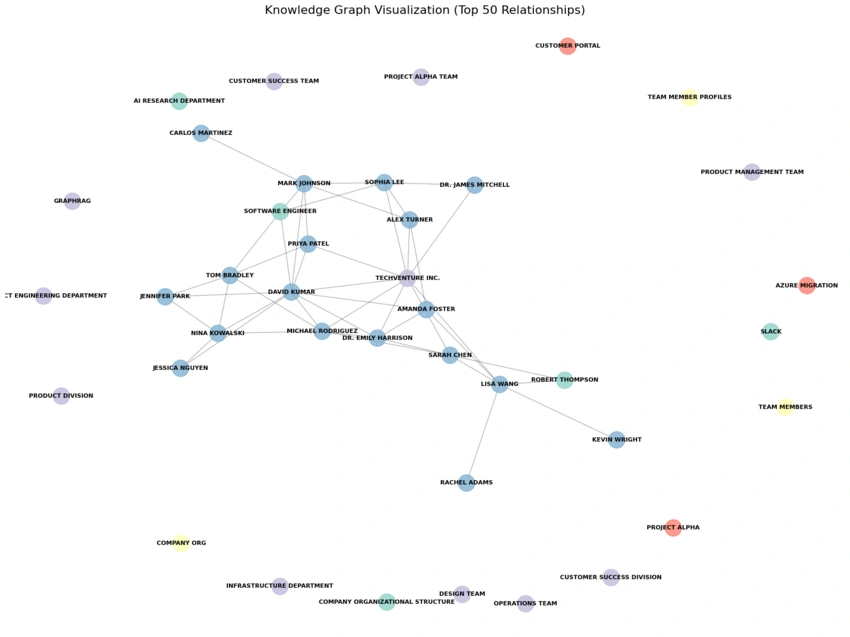
Network visualization showing entities as nodes and relationships as edges. Colors represent entity types: blue for people, green for organizations, orange for projects.
Finding the Most Connected Entities
# Calculate degree centrality
centrality = nx.degree_centrality(G)
top_entities = sorted(centrality.items(), key=lambda x: x[1], reverse=True)[:5]

print("Top 5 connected entities:")
for entity, score in top_entities:
    print(f"  {entity}: {score:.3f}")
Output:
Top 5 connected entities:
  David Kumar: 0.256
  Dr. Emily Harrison: 0.231
  Project Alpha: 0.205
  Michael Rodriguez: 0.179
  TechVenture Inc.: 0.154
This reveals that David Kumar is the most connected person in the organization—a useful insight that would be hard to discover by reading the documents manually.
Key Insights and Lessons Learned
1. GraphRAG Version Matters
We tried three versions before settling on v1.2.0:
v3.0.1: Incompatible CLI structure
v2.7.1: Had an
InputReaderFactorybugv1.2.0: Stable with prompt fixes
Lesson: Pin your GraphRAG version in requirements.txt.
2. Prompt Template Compatibility
GraphRAG v1.2.0 has a bug where custom prompts cannot include {max_length} or {max_report_length} placeholders—the code doesn't pass these parameters.
Fix: Remove these placeholders from prompt files:
summarize_descriptions.txtglobal_search_map_system_prompt.txtcommunity_report_text.txt
3. Azure OpenAI Regional Availability
Not all embedding models are available in all regions:
| Region | text-embedding-3-small | text-embedding-3-large |
|---|---|---|
| eastus | ✅ | ✅ |
| westus | ✅ | ❌ |
| southcentralus | ❌ | ❌ |
Lesson: Check Azure OpenAI model availability before deploying.
4. No Incremental Indexing
GraphRAG currently requires full reindexing when you add new documents. This is because:
Community detection needs the complete graph
Entity resolution merges entities across all documents
Hierarchical summaries depend on global structure
Lesson: Plan for reindexing costs in production scenarios.
5. Windows UTF-8 Encoding
PowerShell on Windows defaults to non-UTF-8 encoding, causing crashes with special characters.
Fix: Add this to your scripts:
$OutputEncoding = [console]::InputEncoding = [console]::OutputEncoding = `
    New-Object System.Text.UTF8Encoding
$env:PYTHONUTF8 = 1
Conclusion
Microsoft GraphRAG transforms how we build AI applications that need to understand complex relationships. Instead of just finding similar text, GraphRAG builds a true knowledge graph that enables:
Entity-focused queries (local search) for specific questions
Thematic queries (global search) for organizational insights
Relationship traversal for multi-hop reasoning
Community analysis for discovering hidden patterns
What's Next?
In Part 2 of this series, we'll expose GraphRAG as an MCP (Model Context Protocol) server, enabling integration with AI agents using Microsoft Agent Framework. This opens the door to building intelligent agents that can query knowledge graphs as part of their reasoning process.
Repository
The complete code for this tutorial is available on GitHub:
Repository: github.com/cristofima/maf-graphrag-series
Documentation: See
docs/folder for detailed implementation notes
Join the conversation! Your thoughts help the community grow.