Introduction
With the rise of cross-platform application development, .NET Multi-platform App UI (MAUI) has emerged as a robust framework, empowering developers to create versatile applications for multiple platforms using a single codebase. By combining the capabilities of .NET MAUI with GitHub Actions, developers can automate their Continuous Integration/Continuous Deployment (CI/CD) workflows, streamlining the development process and enhancing collaboration. This article provides intermediate-level developers with a comprehensive tutorial on leveraging self-hosted runners on Mac within the GitHub Actions environment to build and deploy .NET MAUI applications efficiently.
Setting up self-hosted runners
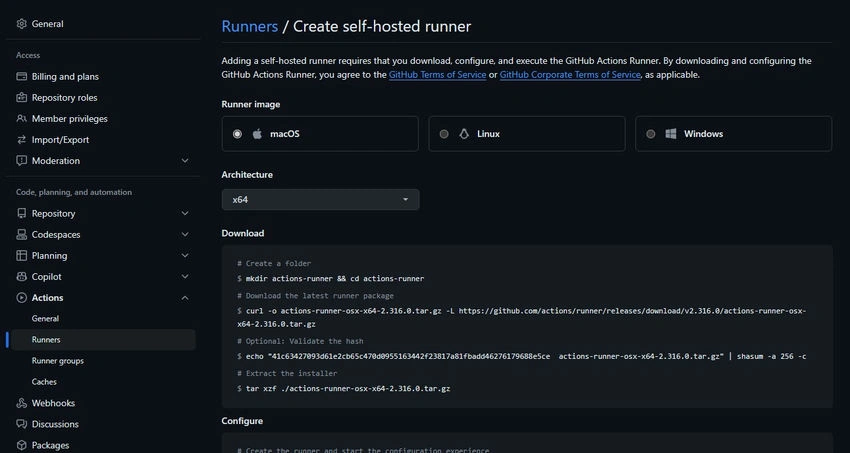
Setting up self-hosted runners on Mac for .NET MAUI applications involves several key steps.
- Install and Configure: Download and install the self-hosted runner application from the GitHub repository's "Settings" tab, following the provided instructions. Customize runner settings, such as concurrent job limits and labels, to suit your needs.
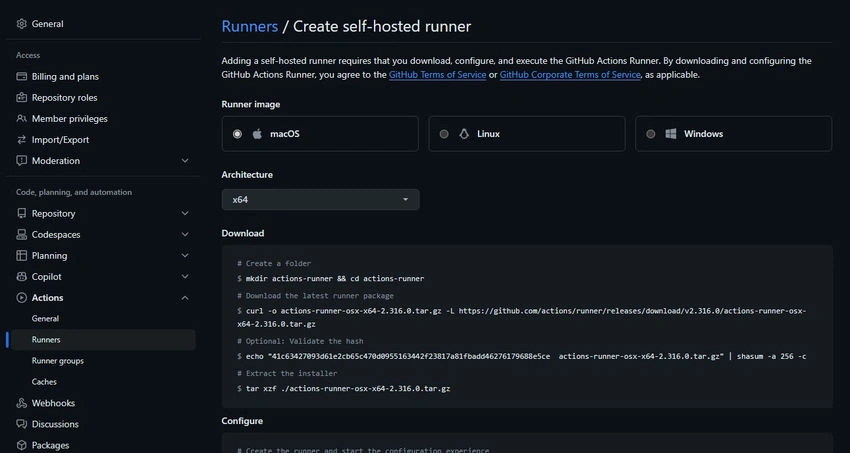
- Register with GitHub: Register the installed runner with GitHub by running the provided registration command, specifying your repository URL and authentication token. Confirm successful registration in the repository's "Settings" tab.
- Configuration Options: Explore configuration options to tailor runner behavior, including environment variables for passing parameters to workflows.
- Verify Connectivity: Ensure proper connectivity by triggering a test workflow or job and monitoring the runner's status and logs in the GitHub Actions interface. This setup establishes a reliable infrastructure for automating CI/CD workflows, enhancing collaboration, and accelerating development cycles for .NET MAUI applications.
Configuring GitHub actions workflow
In this section, we delve into the process of configuring a GitHub Actions workflow for building and deploying .NET MAUI applications. GitHub Actions provides a powerful platform for automating various tasks, including CI/CD workflows, and by creating a tailored workflow file, developers can define the specific steps and actions needed to build, test, and deploy their .NET MAUI projects seamlessly.
Example workflow
name: "Build and Deploy .NET MAUI App"
on:
  push:
    branches:
      - main
env:
  DOTNET_VERSION: "8.0"
  ANDROID_TARGET: "net8.0-android34.0"
  PROJECT_FILE: "path/to/your/project.csproj"

jobs:
  continuous-integration:
    runs-on: self-hosted
    name: Continuous Integration
    steps:
      - name: Checkout
        uses: actions/checkout@v4
      - name: Setup .NET
        uses: actions/setup-dotnet@v4
        with:
          dotnet-version: ${{ env.DOTNET_VERSION }}
      - name: Install .NET MAUI
        run: dotnet workload install maui --ignore-failed-sources
      - name: Run tests
        run: dotnet test --configuration Debug ${{ env.PROJECT_FILE }}
  continuous-deployment-android:
    runs-on: self-hosted
    needs: continuous-integration
    name: Continuous Deployment (Android)

    steps:
      - name: Checkout
        uses: actions/checkout@v4
      - name: Setup .NET
        uses: actions/setup-dotnet@v4
        with:
          dotnet-version: ${{ env.DOTNET_VERSION }}
      - name: Install .NET MAUI
        run: dotnet workload install maui --ignore-failed-sources
      - name: Build Android
        run: dotnet build -f ${{ env.ANDROID_TARGET }} --configuration Release ${{ env.PROJECT_FILE }}
This GitHub Actions workflow, titled "Build and Deploy .NET MAUI App," automates the Continuous Integration (CI) and Continuous Deployment (CD) processes for a .NET MAUI application. Triggered on pushes to the main branch, the workflow consists of two jobs: "continuous-integration" and "continuous-deployment-android." The "continuous-integration" job runs tests on the application's codebase, ensuring its integrity and functionality. Subsequently, the "continuous-deployment-android" job builds the .NET MAUI app for Android platforms, using specified .NET and MAUI versions, and deploys the resulting artifact for further testing or distribution. By leveraging self-hosted runners, this workflow streamlines the development and deployment pipelines for .NET MAUI apps.
Next Steps
Now that you've set up a comprehensive CI/CD workflow for your .NET MAUI application using GitHub Actions, there are several additional steps you can take to further enhance your development and deployment process. Firstly, consider implementing code signing for your application to ensure its authenticity and integrity. By obtaining appropriate certificates and integrating them into your workflow, you can sign your .NET MAUI app before deployment, providing users with added security and confidence in your product. Additionally, explore options for automating the deployment of your app to distribution platforms such as Google Play Store. By configuring GitHub Actions to handle the deployment process, including uploading artifacts and managing release versions, you can streamline the delivery of updates to your users, reducing manual effort and ensuring timely releases.
Summary
you've successfully implemented a full CI/CD workflow for your .NET MAUI application within a single GitHub Actions workflow file. By leveraging self-hosted runners, you've automated the testing, building, and deployment processes, ensuring consistent and reliable delivery of your application. With the addition of code signing and automated deployment to distribution platforms, you can further optimize your workflow, enhancing security, efficiency, and user experience. Embrace these next steps to unlock the full potential of CI/CD automation and take your .NET MAUI development to the next level.


Join the conversation! Your thoughts help the community grow.