
Summary
This article assumes a working knowledge of ADO.NET, and examines it and its influence on the middle tier. It introduces a fictitious business model and lists some requirements to help us focus on the middle tier. It also introduces a new mechanism called SQLData, which combines both the ADO.NET DataSet and the ADO.NET DataReader into a single mechanism. The SQLData struct is used as the basis for developing a middle tier. Finally, the performance of the SQLData struct is measured and contrasted with a wizard-generated strongly typed DataSet. Many .NET items such as interfaces, enumerators, and delegates are used.
The Middle tier
In a traditional three-tiered approach to software development the middle tier, or business object layer as it is sometimes referred to, is the layer of architecture that models and enforces the business rules and/or data of an organization. A properly designed middle tier should express itself in a highly readable form, be robust, be resilient to change, and be distinct from the user interface. Generally, component-based architectures that can express the business rules and processes, as well as scale to meet demand, work well for creating middle-tier architecture. Enter .NET.
You may be asking, Why, of all the new technologies and features in the Microsoft .NET Framework, should I focus on the middle tier? Hasn't enough attention already been paid to this area? There are two main reasons this article focuses on the middle tier.
First, the introduction of the Microsoft .NET Framework and its comprehensive class library will attract many newcomers, converts, and old-time Microsoft C++ ATL COM guys like myself. At first glance, the .NET Framework can be overwhelming -- not with its complexity, but with the breadth of infrastructure only a .NET namespace away. The point here is that although technology is always changing, good software development practices span technologies. This article looks at the .NET Framework from the middle-tier point of view because thats where many of us labor. Also, many developers who previously worked only in ASP script are going to find themselves either working on or writing the middle tier, because the ASP.NET programming model uses the same first class language(s) that the middle tier uses. ASP.NET developers will be writing .NET components -- and this is good for the industry, as more people will be available to work on core infrastructure. Many developers, new and old and with varying experience and backgrounds, will find themselves challenged by the task of writing a coherent middle tier -- whether they know that's what theyre writing or not. Some mentoring will have to take place, and I hope this article will help some get a foothold in the .NET Framework.
Second, I have seen the introduction of XML cause confusion, especially with respect to its relationship to the middle tier. Some developers are even drifting, knowingly or unknowingly, back to what I call the monolithic application. Why write a middle-tier component when SQL Server 2000 can retrieve our data in native XML? We could then transform the data into HTML through XSL/XSLT and go directly to the browser. Why create a middle-tier component with all of its methods and properties? The answer to this question is an article in itself. Suffice it to say that you have to be able to receive the data back from the browser. Do you receive the modified XML and simply stuff it directly into the database? If there are no business rules associated with the data thats a possibility; this is not very likely, however, even for the smallest application. There is nothing preventing a middle-tier component from offering itself up as XML data; the trick is to know how to handle the modified XML data when its received, and to invoke the proper business logic.
My caution to the reader: Be careful if you are currently weighing the decision to develop a new project without a well-defined middle tier. This is not to say that it cannot be done successfully, but there is considerable risk involved in attempting to do so.
Our Data Model and Requirements
The example we are going to use throughout this article will be a very simple human resources middle-tier model. We will need four business objects: an Employees collection, an Employee object, a Dependents collection, and a Dependent object. An Employee can have zero to many Dependents. Let's look at our hierarchical model.
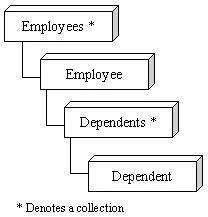

Our requirements are as follows. We want both our Employees and Dependents collections to be able to hold instances of our individual business objects. At the same time, we want to be able to create and work with our individual business objects outside of our collections in cases where we desire only one record of data. When working with read-only data, we want to use the ADO.NET DataReader class for performance reasons, and the ADO.NET DataSet class when we desire writeable data. We want to use these two different data access mechanisms without affecting the readability of our code. Finally, we want to avoid calling the new operator as much as possible and thereby reduce our garbage collection and object creations cycles (as you will see, these things still matter). Our collection classes must only allow access to the objects via the foreach syntax.
Where to Start?
The middle tier often has a lot to do with exposing a well-designed data model to the presentation layer. Consuming ADO.NET then becomes the first order of business for the middle-tier developer. The differences between ADO and ADO.NET are significant, and will probably be one of the most confusing issues in transitioning to the .NET Framework. An early start is a good idea.
If you are familiar with ADO (the COM-based data access strategy), then you are familiar with the Recordset component. A Recordset can operate in either a disconnected or a connected fashion, and it is capable of serving up data in XML. ADO Recordsets can also operate in server-side mode -- a capability ADO.NET currently does not support. This is not usually a concern, as keeping connections open in web-based applications is usually unadvisable.
Unlike ADO, ADO.NET does not offer a single component that operates in both a connected and a disconnected mode. Instead, there are two layers, the DataSet for working with data in a disconnected and updateable fashion and the DataReader for working with data in a high performance, connected fashion. Using a DataReader can be much faster than using a DataSet. Were going to try to take advantage of this in our architecture.
Many, if not most, web sites (and systems) read from a database much more than they write to one. It would be nice if there were an encapsulation of the two ADO.NET layers that would present a single API into our SQL data. This mechanism should hide the differences in API's between the DataSet and the DataReader. This, if you recall, is one of our requirements.
Introducing SQLData
SQLData is a concept-turned-prototype that was created to abstract and unify the DataSet and DataReader into a single API. The SQLData is implemented as a struct rather than as a class for performance reasons. If SQLData were a class, it would have to be created using the new operator; this would incur both memory and object-creation penalties. One of our requirements is to try to avoid using the new operator. A general rule to follow is that not doing something is usually faster than doing it. On a large website with lots of traffic, performance issues are easier to fix at the beginning of a project than near the end. Because SQLData is a struct, it is value-based rather than a reference (classes are references and must be created using the new operator). This means that SQLData is allocated on the stack, as would be the case in a simple int data type.
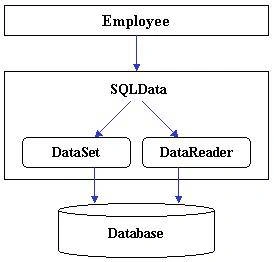
Figure 2 illustrates the main idea behind the SQLData struct: The SQLData struct becomes our access strategy. Only SQLData has to deal with and understand the differences between the DataSet and DataReader. Lets look at some code that illustrates how SQLData hides the complexity. The code below creates an Employee object and loads a read-only employee record. It then asks for the 'FirstName' column.
- publicenum RWMode {
- Invalid = 0,
- Read, // Read Only data
- Write // Writable data
- }
- Employee Emp = new Employee();
- Emp.Load(RWMode.Read, stringEmpID);
- // Read the FirstName
- string FirstName = Emp.FirstName;
Simple enough. Let's look at the Employee class and see what it takes to implement this logic.
- publicclass Employee {
- privatestaticreadonlyint FIRST_NAME = 1;
- publicvoid Load(RWMode Mode, string EmpID) {
- m_Data.OrphanLoad(Mode, "SELECT * FROM Employees WHERE EmployeeID = '" + EmpID + "'", "Employees");
- }
- publicstring FirstName {
- get {
- return m_Data.GetStringField(FIRST_NAME);
- }
- set {
- m_Data.SetStringField(FIRST_NAME, value);
- }
- }
- //======================================================
- // Data Memebers
- //======================================================
- private SQLData m_Data;
- }
Notice that there is very little work for us to do. The 'get' and 'set' property accessors couldnt be easier. We simply ask the SQLData for the data in our FirstName column, which happens to be a string. The SQLData struct knows to use an ADO.NET DataReader because the Employee was created using RWMode.Read.
Notice that the Load method calls SQLData.OrphanLoad. SQLData provides two sets of methods. One set is prefixed with Orphan and lets the SQLData struct know to act as a stand-alone object; another, prefixed with Collection indicates to SQLData that it is to operate as a collection. The SQLData struct allows us to load and access data without worrying about the underlying ADO.NET access mechanism being used.
This is not, however, all SQLData can do for us. SQLData can act as a bookmark -- in this context, a reference to an individual row in a set of data. The term bookmark is not new, as the ADO Recordset has a property named Bookmark. One SQLData struct can act as a bookmark into another SQLData struct. An Employee object housed in a collection uses its local SQLData struct to point to a row in the Employees collection. For instance, an Employees collection object can retrieve all of the employee records from the database, then create an Employee object and instruct it to point to a row of data in the collection. The SQLData struct does all of this on behalf of the Employees collection by looping through the data in the underlying DataSet or DataReader and passing itself as a bookmark to the individual Employee object. Thus, an Employee object uses its SQLData to hold the actual data when it exists as an orphan or uses it as a bookmark into an Employees collection.
An illustration here might prove useful. The Employees collection in Figure 3 contains ten employee records. Each Employee object is using its SQLData struct as a bookmark into the collection. This differs from the previous code sample, in which an individual Employee object was created. In that case, the Employee objects SQLData actually contained the data rather than acting as a bookmark into a collection. The SQLData struct hides all of this from the developer.
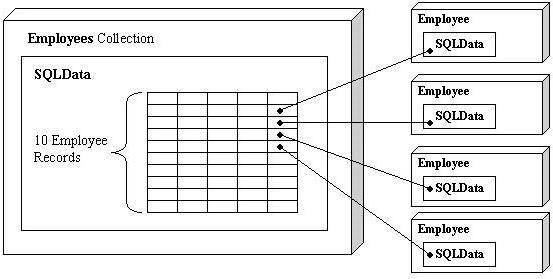
Figure 3 SQLData acting as a bookmark into another SQLData struct
A special case exists in the SQLData struct that allows for a significant performance gain. Figure 3 shows a unique object for each row of data in our collection object. The performance gain can be realized by using the ObjectCreation enum. Lets look at how this is used.
- // How should the collection deal with object creation issues
- publicenum ObjectCreation {
- Single, // Use only a single to represent the entire collection
- Unique // Give every row in the collection its own Object
- }
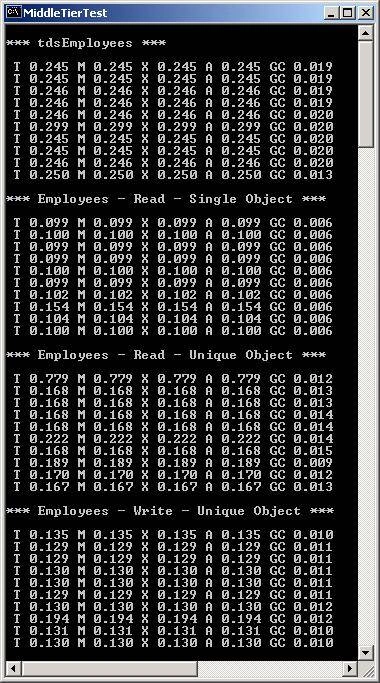
When using ObjectCreation.Single you are telling the SQLData struct that although, for example, there are ten rows of Employee data contained within, the goal is to have them all represented by a single Employee object. If the desire is for a unique object to represent each row of data, the ObjectCreation.Unique value is used. This is easy to do because our Employee class already supports the bookmark mechanism. Instead of creating ten separate Employee objects, the SQLData struct can create just one and set its bookmark to the current row during the foreach iteration logic. The developer has no way of knowing that this is all going on. As I will demonstrate later, using the ObjectCreation type Single hint can sometimes have a dramatic effect on performance. This option is available only with read-only data. The initial prototype supported ObjectCreation.Single for writeable data as well but in the end it didnt make sense. Lets look at a code sample.
- // Create an Employees collection and load all employees
- Employees Emps = new Employees();
- // Request that there be only one Employee object created
- Emps.LoadAll(RWMode.Read, ObjectCreation.Single);
- string str;
- // Loop through and access all of the properties
- foreach(Employee Emp in Emps) {
- str = Emp.EmployeeID;
- str = Emp.FirstName;
- str = Emp.LastName;
- str = Emp.City;
- str = Emp.State;
- str = Emp.Zip;
- }
The code above, although it might loop through a thousand employee records, will create and use only a single Employee object to do so. This is because it uses the ObjectCreation.Single value. Very few resources are created, considering the functionality of this code, and no hacky workarounds are used. All of our business logic is right there in the middle of the mix, ready to act, when the moment arises.
foreach Syntax
There are a few reasons why only the foreach syntax was chosen for the iteration of objects in our collection instead of an indexer or some other mechanism. This syntax forces the developer to declare the each part within the foreach statement itself. For example, the following code will not compile because the Employee object is declared outside the foreach parenthesis:
- // Declare our employee object here, WILL NOT COMPILE !!!
- Employee Emp;
- // Loop through and access all of the properties
- foreach(Emp in Emps) {
- // ...
- }
The developer cannot accidentally hang on to an instance outside of the foreach loop. Its not foolproof, but it goes a long way in avoiding misconceptions, especially when using ObjectCreation.Single, where only one object exists in the collection anyway.
However, this is not the only reason to use the foreach syntax. There is something very interesting here that one could easily gloss over, and its related to the compile error shown above. The foreach syntax is implemented via the IEnumerator interface and objects are returned through this method.
- publicobject Current {
- get { // Your code goes here }
- }
Notice that the return type of the Current property is object yet, as observed in the foreach loop above, no typecasting was done. No typecasting is required for the same reason that trying to declare the each part of the foreach loop outside of the parenthesis generates a compile error. A foreach loop must have the concrete type Employee within the foreach loop parenthesis because the compiler does the required typecast for us based on the concrete type.
This very convenient capability of the foreach syntax becomes key to our SQLData struct concept. The SQLData struct contains all of the data in our system, either in a DataSet or a DataReader. Furthermore, our SQLData struct has no idea what kind of objects it actually contains, so it is forced to work with a collection of type object. If it werent for the foreach syntax, there would either be a lot of ugly typecasting or plenty of needless class derivations simply to return a concrete data type rather than object.
Dont overlook the foreach syntax, it offers a built in typecast -- something which an indexer doesn't.
SQLDataEnumerator
In order to support the foreach syntax, a generic class is needed that inherits from IEnumerator and is capable of iterating over our SQLData struct. The class is called SQLDataEnumerator. This capability means that SQLDataEnumerator can iterate over either a DataSet or a DataReader. Below is a code snippet demonstrating how the Employees collection implements the foreach syntax by using SQLDataEnumerator.
- publicclass Employees: IEnumerable {
- public IEnumerator GetEnumerator() {
- // SQLDataEnumerator implements 'foreach' and it handles all of the issues related to DataSet, SQLDataReader, and even 'Single' or 'Unique' object creation rules.
- returnnew SQLDataEnumerator(this, ref m_Data);
- }
- }
The first step is for the Employees collection to inherit from the IEnumerable interface (see above). This indicates that the Employees collection supports the foreach syntax. The only method in the IEnumerable interface we need to implement is the GetEnumerator method. This is quite easy -- all we have to do is create our SQLDataEnumerator object, being sure to pass it our SQLData struct.
The SQLDataEnumerator constructor is shown below. Notice that the Employees collection passes this as the first parameter. The SQLDataEnumerator expects an ISQLCollection interface as its first parameter. Well talk about that in the next section.
- internalclass SQLDataEnumerator: IEnumerator {
- public SQLDataEnumerator(ISQLCollection ICollSQLObject, ref SQLData MyData) {
- // stuff goes on in here
- }
- }
The SQLDataEnumerator is responsible for implementing the IEnumerator interface (not to be confused with the IEnumerable interface used by the Employees collection above).
- internalclass SQLDataEnumerator: IEnumerator {
- public SQLDataEnumerator(ISQLCollection ICollSQLObject, ref SQLData MyData);
- // These three methods fulfill the IEnumerator contract
- publicvoid Reset();
- publicobject Current; // This is a 'get' property
- publicbool MoveNext();
- }
The programmer almost never uses an IEnumerator directly; the IEnumerator interface is handled by the foreach syntax.
SQLData and Interfaces
With the use of the interface mechanism the SQLData struct obviates the need to know concrete class types. Base classes with virtual methods could have been used in place of interfaces; however, its quite easy to hide interfaces from the consumers of our classes. Inheriting from a class instead of an interface means that all methods in the base class become public. This can be overcome, but why bother? Only the SQLData struct and our internal namespace should know about these interfaces. Since SQLData doesnt want to know concrete class types such as our Employees or Dependents classes, it asks you to implement two interfaces:
- ISQLCollection for the collection classes, i.e., Employees and Dependents
- ISQLObject for the individual classes, i.e., Employee and Dependent
Lets take a look at the interface definitions, and well see how they help us.


Eduardo AlivioPosted Dec 25, 2008, 12:14 AM
I could not locate the source code that is said to be available for viewing online at csharpindex.com/colorCode and the entire Microsoft .NET MiddleTier solution as well. It would be of great pleasure if you can email that samples to [email protected]. I am undergoing a project in University registration system applying the middle tier concept.
Shyam MaggoPosted Jan 25, 2007, 6:19 AM
I am not able to get the Code files for section Building the Middle Tier in the Microsoft .NET Framework It would be great if you can mail me the same code @[email protected]