

Introduction
Bulk copying of data from one data source to another data source is a new feature added to ADO.NET 2.0. Bulk copy classes provides the fastest way to transfer set of data from once source to the other.
Each ADO.NET data provider provides bulk copy classes. For example, in SQL .NET data provider, the bulk copy operation is handled by SqlBulkCopy class, which is described in Figure 1. As you can see from Figure 1, data from a data source can be copied to one of the four types - DataReader, DataSet, DataTable, or XML.
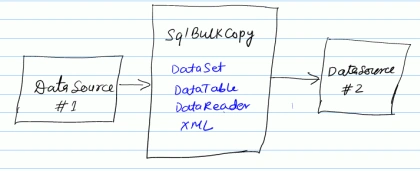
Figure 1. Bulk Copy operation in ADO.NET 2.0
Using bulk copy operation, you can transfer data between two tables on the same SQL Server, between two different SQL Servers, or even two different types of database servers.
Filling Data from the Source
The first step in copying bulk data from a data source to another is to fill data from the source database. This source data can be filled in a DataSet, DataTable, or a DataReader.
// Select data from Products table
cmd = new SqlCommand("SELECT * FROM Products", source);
// Execute reader
SqlDataReader reader = cmd.ExecuteReader();
Creating SqlBulkCopy Object
In ADO.NET 2.0, each data provider has a bulk copy operations class, which provides bulk copy related functionality. For example, SQL data provider has SqlBulkCopy class.
SqlBulkCopy class constructor takes a connection string or SqlConnection object as first parameter, which defines the destination data source. After creating the object, you need to set the DestinationTableName propety to the table, which you want to copy date to.
// Create SqlBulkCopy
SqlBulkCopy bulkData = new SqlBulkCopy(destination);
// Set destination table name
bulkData.DestinationTableName = "BulkDataTable";
Copying Data to the Destination
The SqlBulkCopy class provides WriteToServer method which is used to write data from a DataReader, DataSet, or DataTable to the destination data source.
bulkData.WriteToServer(reader);
lamiaPosted Apr 22, 2012, 5:57 PM
Thanks for the post .I have successfully used this approach with SQL Server. i have a question .what can i use for the same purpose with MYSQL server Thanks in advance
sangram desaiPosted Mar 10, 2012, 2:37 AM
check out this stuff also http://msdotnetbuddy.blogspot.in/2010/07/using-sql-bulk-copy.html
harika kakkireniPosted Aug 11, 2010, 1:03 AM
Thanks for the post, bt i need a small query , hw do i map source to destination in case i have different column names, say Site_Name in source and SiteName in destination
PradeepPosted May 13, 2010, 6:17 AM
I have successfully used this approach in many of my VB .Net applications with SQL Server. But is a similar approach available with Oracle? Specifically, I am reading a CSV file into a datatable, and now I want to use an approach similar to SqlBulkCopy to push the data into an Oracle table. Please advise if you know of any way I could go about it. Many thanks.
Sri KanthPosted Sep 20, 2008, 7:42 AM
Hi, I have seen the Code but I have a Stored Procedure which i want to Use , Actually a Web Page has 24 Rows so to push the data into DataBase I have a DB Call for 24 times, so how can i use stored procedure and how can i handle DataSet/XML data sent by the Frontend Code in the Back End. Thanks in Advance
M BeditedPosted Nov 20, 2007, 2:21 PMEdited Nov 20, 2007, 6:35 PM
Hi. How can I do bulk copy into an Access database?
sofiePosted Aug 27, 2007, 8:40 AM
Hello! I'm relatively new to C#.NET, but I need a functionality to copy data from an excel sheet to a sql database. I read the article, and wrote my code accordingly, but I got the following errors: Error 1 No overload for method 'SqlBulkCopy' takes '1' arguments Error 2 'SqlBulkCopy' does not contain a definition for 'DestinationTableName' Error 3 'SqlBulkCopy' does not contain a definition for 'WriteToServer' Can someone please help me with this? I'm getting a headache out of it :s Below is my code: using System; using System.Data; using System.Configuration; using System.Collections; using System.Web; using System.Web.Security; using System.Web.UI; using System.Web.UI.WebControls; using System.Web.UI.WebControls.WebParts; using System.Web.UI.HtmlControls; using System.Data.OleDb; using System.Data.SqlClient; using System.Data.Common; using System.Data.ProviderBase; using System.Data.Sql; using System.Data.SqlTypes; public partial class SqlBulkCopy : System.Web.UI.Page { protected void Page_Load(object sender, EventArgs e) { } protected void UploadToSqlButton_Click(object sender, EventArgs e) { // Connection string to the excel workbook string excelConnectionString = @"Provider=Microsoft.Jet.OLEDB.4.0; Data Source=testsofie.xls; Extended Properties=""Excel 8.0;HDR=YES"""; // Create a connection to the excel workbook OleDbConnection source = new OleDbConnection(excelConnectionString); // Create source connection string connectionString = ConfigurationManager.ConnectionStrings["ABIH"].ConnectionString; // Create destination connection SqlConnection destination = new SqlConnection(connectionString); // Open source and destination connections source.Open(); destination.Open(); // Select data from source table OleDbCommand command = new OleDbCommand("SELECT * FROM [data$]", source); // Execute reader DbDataReader dataReader = command.ExecuteReader(); // Create SqlBulkCopy SqlBulkCopy bulkData = new SqlBulkCopy(destination); // Set destination table name bulkData.DestinationTableName = "data_Uit_Excel"; // Write Data bulkData.WriteToServer(dataReader); // Close objects bulkData.Close(); destination.Close(); source.Close(); } } I would be very grateful is someone can help me !!! Thank you very much! Sofie