

Introduction
Here we will cover why we need local functions and how they could improve your application performance. You will learn when you should choose Local Function over Lambda expression (Delegates). You will understand how the IL code looks when we execute our code with Lambda expression and local functions.
Scenario 1
Using Lambda Expression
Consider a scenario where you have a list of items with buying and selling price & you want to calculate the percentage of profit of all the items individually.
So, we have a class which represents order details (Flatten object):
- public class OrderDetails
- {
- public int Id { get; set; }
- public string ItemName { get; set; }
- public double PurchasePrice { get; set; }
- public double SellingPrice { get; set; }
- public OrderDetails()
- {
- }
- }
We have a list of items, we will iterate each item and calculate the percentage of profit for each item:
- static void Main(string[] args)
- {
- //#1. Create a list Ordered items details
- List<OrderDetails> lstOrderDetails = new List<OrderDetails>();
- lstOrderDetails.Add(new OrderDetails() { Id = 1, ItemName = "Item 1", PurchasePrice = 100, SellingPrice = 120 });
- lstOrderDetails.Add(new OrderDetails() { Id = 2, ItemName = "Item 2", PurchasePrice = 800, SellingPrice = 1200 });
- lstOrderDetails.Add(new OrderDetails() { Id = 3, ItemName = "Item 3", PurchasePrice = 150, SellingPrice = 150 });
- lstOrderDetails.Add(new OrderDetails() { Id = 4, ItemName = "Item 4", PurchasePrice = 155, SellingPrice = 310 });
- lstOrderDetails.Add(new OrderDetails() { Id = 5, ItemName = "Item 5", PurchasePrice = 500, SellingPrice = 550 });
- //#2. A Lambda to calculate Profit Percentage
- Func<double, double, double> GetPercentageProfit = (purchasePrice, sellPrice) => (((sellPrice - purchasePrice) / purchasePrice) * 100);
- //#3. Loop through each item and print the profit details by calling our delegate
- foreach(var order in lstOrderDetails)
- {
- Console.WriteLine($"Item Name: {order.ItemName}, Profit(%) : {GetPercentageProfit(order.PurchasePrice, order.SellingPrice)} ");
- }
- Console.ReadLine();
- }
In #2 above, we have created a Lambda expression which calculates the percentage of profit and we are calling it in the #3 "foreach" loop.
Now let's see how this Lambda Expression looks in the IL(Intermediate Language) code, and what it does behind the scenes.
To check that, we will use ILDASM.exe, which ships with the .Net framework. You can find it here: "C:\Program Files (x86)\Microsoft SDKs\Windows\v10.0A\bin\NETFX 4.8 Tools" Or you can attach it in your visual studio tools as an extension (I am not covering that, if anyone want to know then please ask in the comments):
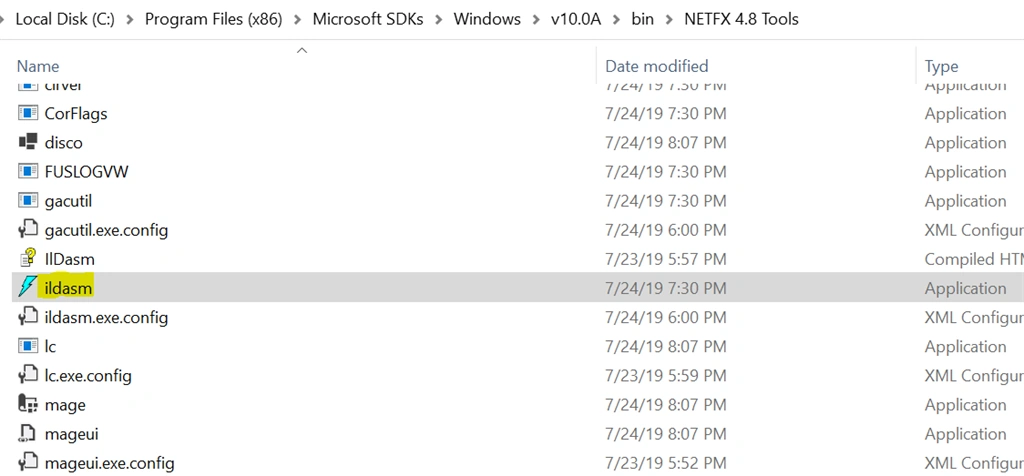
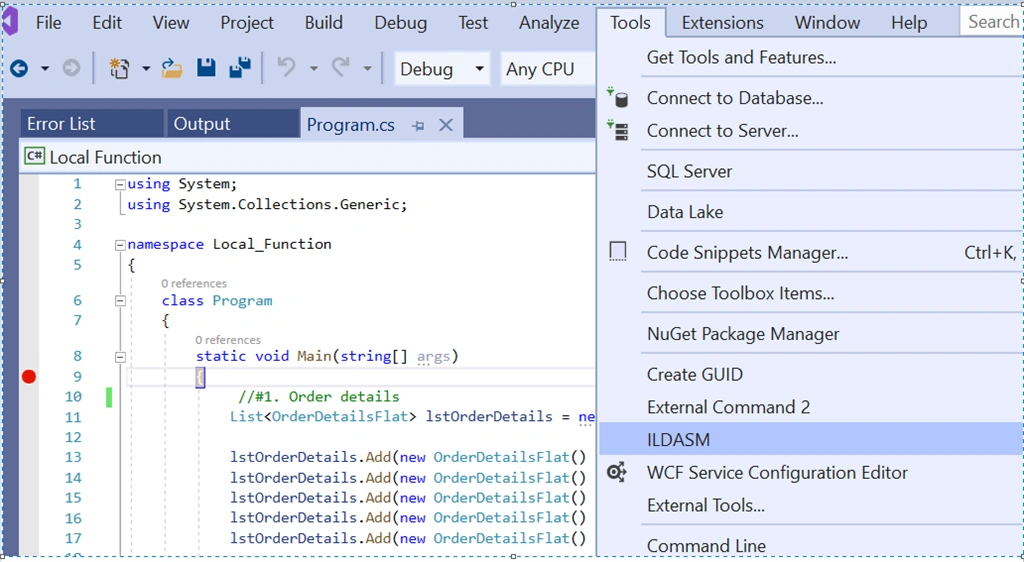
I am running it from my Visual Studio 2019 as I added it as an extension:
Then I am opening the dll file of my project "Local Function.dll" in ILDASM tool:
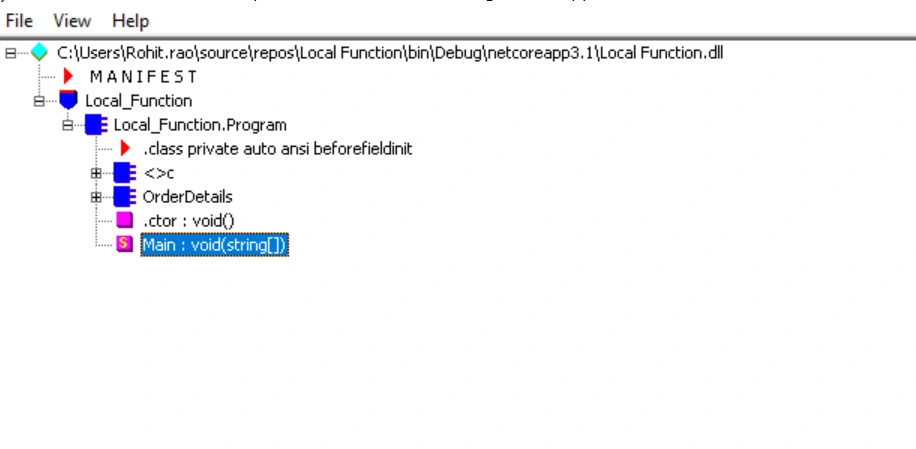
Double click on your "Main : void(string[])" function, it will open the IL code in a new window, see the marked code below:
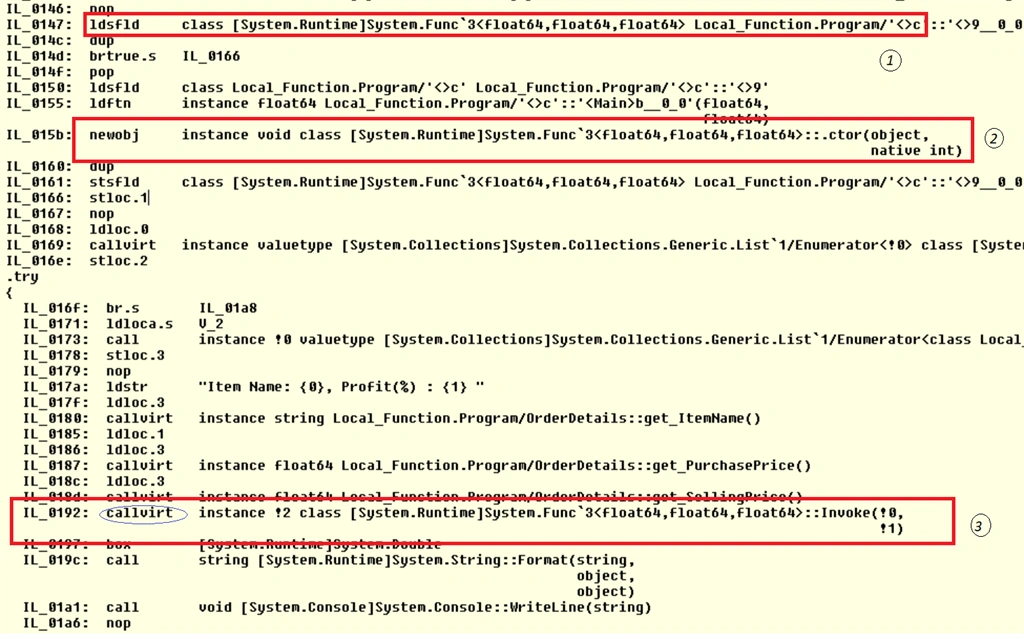
- You can see that our lambda expression is converted into class. Why? Because lambda expressions are converted to delegates.
- As it is a class, we should use it by an instance, which we are getting from "new obj". IT means it will be allocated on Heap.
- To execute/invoke this method, The IL code uses "callvirt" (We will cover callvirt (call virtual method) later with Local Function implementation)
Now, we got to know that Lambda is converted into the delegate and then class, and we need an instance of this class to use it further. The lifecycle of these objects will have to be handled by the Garbage collector.
Using Local Function
Here we replaced Lambda expression with "Local Function":
- static void Main(string[] args)
- {
- //#1. Order details
- List<OrderDetails> lstOrderDetails = new List<OrderDetails>();
- lstOrderDetails.Add(new OrderDetails() { Id = 1, ItemName = "Item 1", PurchasePrice = 100, SellingPrice = 120 });
- lstOrderDetails.Add(new OrderDetails() { Id = 2, ItemName = "Item 2", PurchasePrice = 800, SellingPrice = 1200 });
- lstOrderDetails.Add(new OrderDetails() { Id = 3, ItemName = "Item 3", PurchasePrice = 150, SellingPrice = 150 });
- lstOrderDetails.Add(new OrderDetails() { Id = 4, ItemName = "Item 4", PurchasePrice = 155, SellingPrice = 310 });
- lstOrderDetails.Add(new OrderDetails() { Id = 5, ItemName = "Item 5", PurchasePrice = 500, SellingPrice = 550 });
- //#2. Loop through each item and get the profit details
- foreach (var order in lstOrderDetails)
- {
- Console.WriteLine($"Item Name: {order.ItemName}, Profit(%) : {GetPercentageProfit(order.PurchasePrice, order.SellingPrice)} ");
- }
- //#3. Local function - Inside the function "Main"
- double GetPercentageProfit(double purchasePrice, double sellPrice)
- {
- return (((sellPrice - purchasePrice) / purchasePrice) * 100);
- }
- Console.ReadLine();
- }
So, at #3 above, we have implemented the Local Function, which is embedded inside the Main Function. Let's run the ILDASM.exe again to check how this local function has converted into IL,
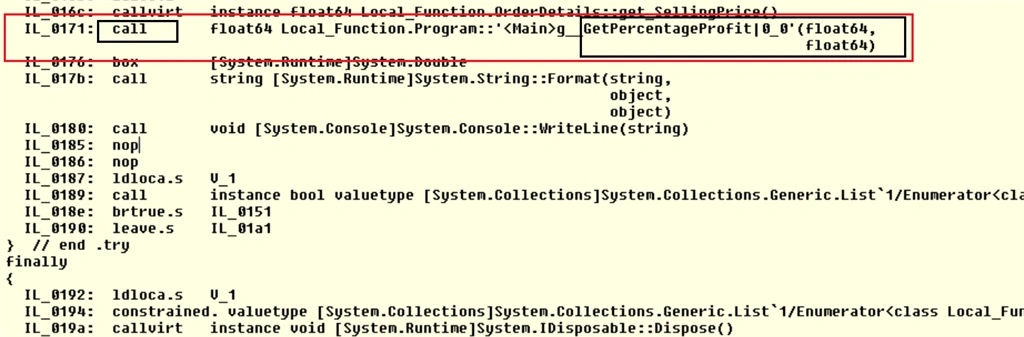
See there is no new class, no new object. Its just a simple method/function call. There is no new object needed to call this method. It would save some memory. The other important difference between the Lambda expression and this Local Function is how the framework is calling this method in IL. Here it is called as "call", which is faster than "callvirt". Why? Because it is stored on Stack not on Heap (Lambda expression instance is on Heap). (Both call and callvirt are IL instructions)
Carlos Muñoz RodriguezPosted Feb 11, 2022, 10:32 PM
What about capturing vs not capturing local variables? Does it affect performance?